
Softphones can replace desk phones for most small and mid-size businesses, but only when three things happen first: the network gets tested under real load, phones get staged and proven before go-live, and number porting runs on dual service instead of a hard cutover. A working softphone setup for business moves through five phases: requirements and inventory, network readiness, provisioning and staging, porting and cutover, and a 30-day optimization review. Skip a phase and the failure shows up on the worst possible day: launch morning.
TL;DR:
- Network testing must confirm sufficient bandwidth, low jitter, and failover options before softphone deployment to prevent call quality issues on launch day.
- Proper account provisioning involves securing admin access with MFA, importing user data via CSV, and installing apps across desktops, mobiles, and browsers with correct configurations.
- Designing comprehensive call flows and staging all devices on isolated VLANs enables thorough testing of inbound, outbound, transfer, and routing functions before going live.
- Maintaining dual service during number porting and establishing a detailed cutover plan with real-time communication helps avoid dropped calls and operational disruptions.
- Security must include encryption protocols like TLS and SRTP, admin account discipline, device hygiene, and limited international calling to protect against system compromise and toll fraud.
Table of Contents
- What Is a Softphone, and Which Businesses Actually Benefit?
- What Network Requirements Do You Need Before Provisioning Softphones?
- How Do You Provision Accounts and Install the Softphone App?
- How Do You Design and Test Call Flows Before Go-Live?
- Number Porting and Cutover: How Do You Avoid Dropped Calls?
- What Security Controls Does a Business Softphone Setup Need?
- How Do You Train Staff and Run a 30-Day Optimization Review?
- What Changes When You Choose an On-Site Install Instead of DIY?
- What I'd Actually Check in Week One
- How BusinessVoip.ca Handles the Hard Parts for You
- Sources
- FAQ
What Is a Softphone, and Which Businesses Actually Benefit?
A softphone is an application that turns a computer, tablet, or smartphone into a full business phone line, using Voice over IP (VoIP) and the Session Initiation Protocol (SIP) to place and receive calls over the internet instead of copper phone lines. Rather than a desk handset tied to one location, the softphone lives on whatever device a person is already carrying. Under the hood, RFC 3261 is the actual signaling standard almost every softphone platform builds on, which is worth knowing before you evaluate any vendor's "proprietary" claims.
For SMBs, the appeal isn't just novelty. It's a specific set of operational upgrades:
- Mobility: Staff can answer the main business line from a laptop at home, a phone in the field, or a browser tab at a client site.
- Lower hardware cost: No desk phone required for every seat, which matters when you're outfitting a 15-person sales team.
- CRM and unified communications integration: Calls can log automatically into platforms like Salesforce or HubSpot, attaching call notes and recordings to the right contact record.
- Easier scaling: Adding a new hire means provisioning an account, not running new cabling to a new desk.
None of that means softphones fit every situation without caveats. They depend entirely on internet connectivity. A power or ISP outage that would leave a traditional analog line dead-in-the-water too, but VoIP adds the layer of router and network dependency on top. There's also the e911 question: softphones on laptops and mobile devices need to transmit a dispatchable location to emergency services, and that location has to be kept current when a device physically moves, which is a real administrative task, not a set-it-and-forget-it checkbox. For businesses with life-safety equipment tied to phone lines, such as certain alarm or elevator systems, those analog dependencies typically stay on dedicated lines rather than migrating to softphone extensions.
What Network Requirements Do You Need Before Provisioning Softphones?
Before a single account gets created, the network has to prove it can carry the call volume you're planning. This is the step most SMBs skip, and it's the single biggest predictor of cutover-day failure.
Start with a full inventory. Export every direct inward dial (DID) number, toll-free number, fax line, and extension currently in use, and map each one to a person, department, or device. Missing inventory items are the most common cause of botched cutovers, according to installation guidance from telecom auditors, because a number nobody remembered to migrate just stops ringing anywhere.
Pro Tip: Don't trust the phone bill alone for your inventory. Pull the actual call detail records for the last billing cycle. Numbers that show zero usage might still be critical, like a fax line for a supplier that only calls twice a year.
Once inventory is locked, do the bandwidth math. A reasonable planning figure is roughly 80 to 100 kbps per concurrent G.711-class call, with headroom built in on top of that baseline, not consumed by it. A 20-person office running multiple simultaneous calls at peak needs roughly several hundred kbps just for voice, before accounting for everything else sharing that connection: file syncing, video calls, point-of-sale traffic. If you're running the more compressed G.729 codec, the per-call number drops, but so does audio fidelity, so don't assume it's a free upgrade.
Run the actual readiness test with this sequence:
- Run a VoIP-specific speed test during business hours when the network is under real load. Off-hours screenshots don't prove anything about your real network.
- Measure jitter and packet loss, not just download speed. Voice calls tolerate very little jitter before quality degrades audibly.
- Confirm upload headroom specifically, since most business internet plans are asymmetric and upload is usually the bottleneck for outbound and simultaneous calls.
- Verify router and switch settings: Quality of Service (QoS) tagging, DSCP markings, and adequate Power over Ethernet (PoE) budget if you're running any PoE-powered desk units alongside softphones.
- Check DHCP options and confirm a dual-WAN or LTE failover path exists if this connection is now your only phone line, not just your only internet line.
A softphone rollout that skips this step is really a bet that your existing internet was already over-provisioned. Sometimes that bet pays off. Often it doesn't, and you find out during your first Monday morning call surge.
How Do You Provision Accounts and Install the Softphone App?
Provisioning is where the project either stays organized or turns into a mess of duplicate extensions and locked-out users. Do it in this order.
Create the company account and lock down admin access first. Before adding a single user, set up multi-factor authentication (MFA) on the admin account and assign roles so not everyone has full administrative rights. This is the account that controls every extension in the company. Treat it accordingly.
Bulk import users and map extensions before assigning phone numbers. Most platforms support a CSV import for names, departments, and extension numbers. Get that structure right before numbers get attached to it, because reshuffling extensions after numbers are live creates confusion for callers and staff alike.
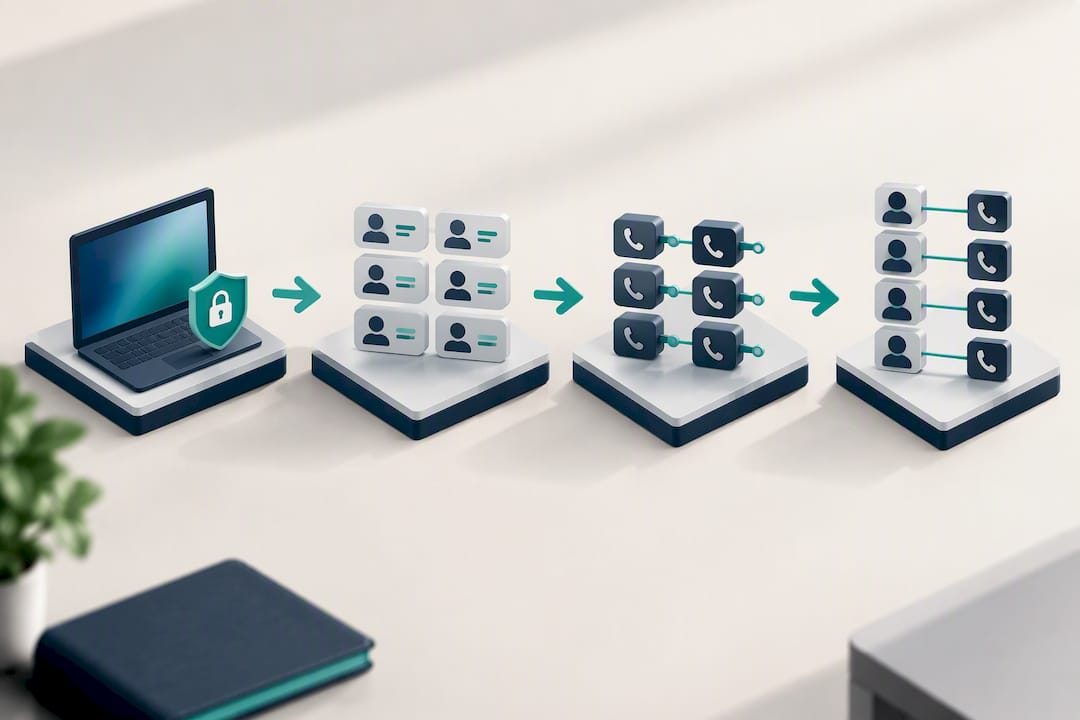
Install the app on each intended platform. Softphone deployments typically span three environments: desktop clients, mobile apps for iOS and Android, and browser-based web clients for people who just need occasional access. Standard setup steps are consistent across most providers: choose the provider, download the app, sign in with the credentials issued, and grant microphone and speaker permissions when the app prompts for them.
A few practical notes that make a real difference in daily use:
- Recommend a dedicated USB or Bluetooth headset for anyone taking more than a handful of calls a day. Laptop microphones pick up keyboard clatter and room echo.
- For remote or hybrid staff, review how remote extensions should be configured so mobile app users don't lose functionality compared to office-based colleagues.
- Zero-touch provisioning through QR codes or cloud-based activation cuts support tickets significantly compared to manually entering SIP credentials on every single device, which matters a lot once you're past 10 or 15 users.
When registration fails, the fix is usually one of four things: incorrect SIP credentials, a transport mismatch (the app is trying UDP when the network requires TCP or TLS), a STUN/ICE negotiation failure behind a restrictive NAT, or a router with SIP ALG enabled and mangling the packets. Check router settings that commonly break VoIP before assuming the problem is the app itself.
How Do You Design and Test Call Flows Before Go-Live?
Call flow design happens on paper before it happens in any admin portal. Sketch out exactly how a call should route during business hours versus after hours: does it hit a receptionist first, an auto-attendant menu, or a ring group that rings three desks simultaneously? Write down every branch, including holiday hours and emergency overrides, because "we'll figure that out later" is how a Saturday call ends up going nowhere.
Once the flow is mapped, stage every physical device and softphone account on an isolated VLAN before it touches production traffic. This keeps configuration mistakes contained. Best-practice installation guidance recommends factory-resetting any handsets being reused, then labeling every device clearly with its extension so troubleshooting during testing doesn't turn into guesswork.
Run the acceptance test in this sequence:
- Test every extension for inbound calls, confirming caller ID displays correctly.
- Test outbound calls from every extension, including any that require a specific outbound caller ID for a department.
- Test blind and warm transfers between extensions and ring groups.
- Confirm voicemail-to-email delivery, including attachment format and delivery speed.
- Verify CRM call logging fires correctly, and confirm call recording (if used) captures both legs of the conversation and stores it where compliance requires.
- Test the after-hours and holiday routing paths specifically, since these get tested the least and fail the most.
Pro Tip: Assign one person to make every single test call from a phone that is NOT on your office Wi-Fi, ideally their personal cell on cellular data. It's the fastest way to catch an inbound routing mistake that only shows up from an outside line.
Sign-off criteria should be explicit and written down: every extension tested, every transfer path confirmed, every after-hours rule verified, and at least one full business day of parallel testing before the flow goes live for real customers.
Number Porting and Cutover: How Do You Avoid Dropped Calls?
Number porting is where most go-live delays actually happen, and it's almost always avoidable with earlier paperwork. Submit your Letters of Authorization (LOAs) along with a recent phone bill from your current carrier as early in the project as possible, since incomplete or mismatched documentation is the most common cause of porting delays. Simple single-line ports can complete in days; ports involving multiple carriers, toll-free numbers, or bundled services can take weeks.
The critical tactic during this window is maintaining dual service. Keep your old lines active, forwarding to the new system or running in parallel, until you've confirmed the inbound call rate on the new system matches historical volume. A silent phone line for even a few hours can mean lost business you'll never know you missed, because the caller just hung up and called the next name on their list.
Build a cutover playbook before the actual day arrives:
- Open a dedicated communication channel (a group chat or shared line) for the cutover team to report issues in real time. Treat this as a war room, not an afterthought.
- Set specific checks for the first morning: confirm inbound calls are landing on the correct extensions, confirm outbound caller ID is displaying the right number, and confirm voicemail is capturing correctly.
- Have a documented rollback plan, meaning you know exactly how to redirect calls back to the old system if something breaks badly enough that operating on the new one isn't viable for a few hours.
After cutover succeeds, don't consider the project finished. Check caller ID display on outbound calls from multiple carriers, since some networks cache old caller ID data for days. Update every public listing, Google Business Profile, website footer, and printed material that references the old number if it's changing at all.
What Security Controls Does a Business Softphone Setup Need?
Security on a softphone deployment isn't optional hardening for later. It needs to be built in from account creation, because a business phone system that gets compromised can be used to place expensive international calls or intercept sensitive conversations.
The baseline protocol requirement is encryption on both signaling and media. Enable TLS for call signaling and SRTP for the actual voice media, and treat this pairing as standard practice rather than an advanced option. Any provider that can't confirm both are available deserves a hard second look. For businesses handling regulated conversations, whether that's financial details or health information, verify what encryption is actually enforced end-to-end rather than just advertised on a features page.
Admin account discipline matters just as much as protocol-level encryption:
- Require multi-factor authentication on every admin account immediately at setup, not as a follow-up task.
- Apply least-privilege roles so most staff can't reconfigure ring groups or reroute the company's main number.
- Keep a second trained admin as a backup, so one person leaving the company doesn't leave you locked out of your own phone system.
- Disable international dialing by default and enable it only for specific extensions that genuinely need it, since unrestricted international calling is a common target for toll fraud.
- Turn on recording consent prompts wherever call recording is active and local law requires notification.
Device hygiene rounds it out: keep the app updated on every platform, use secure provisioning methods like QR-code activation instead of manually typed credentials sitting in a spreadsheet somewhere, and rotate passwords on any shared or generic extensions.
How Do You Train Staff and Run a 30-Day Optimization Review?
A softphone system succeeds or fails based on whether the people using it actually know how to use it, which means documentation matters more than most rollout plans give it credit for.
Build two separate documents. First, an admin runbook covering the tasks that will come up repeatedly: editing call flows, reassigning a number when someone leaves, resetting a device after a hardware swap, and testing e911 location accuracy whenever someone's primary work location changes. Second, a one-page quick-start for frontline staff covering exactly four things: how to transfer a call, how to check voicemail, how to twin calls to a mobile app when away from the desk, and how to pair a headset correctly.
At the 30-day mark, pull specific metrics and review them with named owners assigned to each:
- Missed call rate compared to the prior system's baseline.
- Call abandonment rate on any queues or ring groups.
- Mobile app adoption rate among staff issued the softphone.
- Invoice reconciliation, confirming the new bill matches what was quoted, with no surprise per-minute charges or unexpected line items.
| Review Area | What to Check | Who Owns It |
|---|---|---|
| Missed calls | Compare to prior month's baseline | Office manager |
| Call abandonment | Review queue wait times | IT lead or admin |
| Mobile adoption | Percent of staff using mobile app | IT lead |
| Billing accuracy | Match invoice to quoted pricing | Finance or owner |
Schedule this review on the calendar the same week you go live, not as a vague "we'll check in sometime." A 30-day review that never happens is how small configuration drift turns into a system nobody trusts.
What Changes When You Choose an On-Site Install Instead of DIY?
Everything above assumes an internal team is running requirements gathering, staging, and cutover themselves, which plenty of SMBs do successfully. But a fully on-site, provider-installed system changes several of those steps in ways worth knowing before you decide which route fits your business.
With an on-site install, the design and programming work happens before anyone on your team touches a device. A local team handles cabling, tests PoE drops at each desk, and verifies e911 dispatchable addresses are correct for every physical location, rather than leaving that verification to internal staff juggling it alongside their regular job. Devices arrive labeled and pre-configured to their extension, so the acceptance test becomes a walkthrough confirming what's already working rather than a troubleshooting session.
The tradeoff calculus is fairly simple. Self-provisioning gives you more control and can be faster for a very small, single-location team with straightforward call flows. Provider-assisted on-site install tends to make more sense for multi-site operations, businesses with real analog dependencies (fax lines, alarm systems, older PBX hardware being retired), or any team where a botched cutover would cost more in lost business than the install itself. Phone System Designer services exist specifically for this second category, mapping call flows and hardware needs to the physical space before a single cable gets run.
What I'd Actually Check in Week One
If I were running the first week of a softphone rollout, I'd ignore the temptation to start with the fun part, the app itself, and spend that week on four things: exporting the full number and extension inventory, running network tests during actual business hours with real traffic on the line, naming one specific person as cutover owner, and scheduling a small batch of pilot DIDs to test the whole pipeline before touching the main number.
None of those four steps are exciting. They're also the reason most softphone failures I've seen trace back to skipped homework, not bad software. The inventory catches the fax line nobody remembered. The business-hours test catches the jitter that only shows up when the office Wi-Fi is actually loaded. A named owner means someone's accountable on cutover morning instead of three people assuming someone else has it handled. Pilot DIDs mean your first real mistake happens on a number that doesn't matter, not on your main line during a Monday morning rush.
— James
How BusinessVoip.ca Handles the Hard Parts for You
Every risk covered in this guide, shaky network readiness, staging errors, porting mishaps, security gaps, gets harder to manage the more you're doing it yourself on top of running a business. A local team designs the system, runs the network checks, cables and programs every device, and delivers phones that work on day one, rather than phones you are expected to configure.

This approach tends to matter most for multi-site operations, businesses still carrying analog dependencies like fax lines or older alarm systems, and any team where even a few hours of dead phone lines during a botched cutover would cost real money. This provider has been installing phone systems since 2005, using carrier-grade infrastructure that handles high volumes of business calls daily, with fixed pricing that does not increase annually and a lifetime warranty on rented phones. Number porting coordination and dual-service management, critical steps to avoid cutover failures, are handled by the same local team that did the design work.
If you want a system mapped to your actual space and call flow before anyone touches a cable, start with the Phone System Designer tool. For a direct look at what an on-site Ontario business phone system setup actually includes, that's the place to start the conversation.
Sources
If you're running this project yourself, these resources cover the technical standards and checklists referenced throughout this guide:
- How To Install A Business VoIP Phone System
- FreePBX softphone setup & configuration guide
- Softphone Setup Guide: Turn Your Computer Into a Business Phone
FAQ
How Do I Set Up a Softphone for My Business?
Start with an inventory of every number and extension, then test your network for jitter and packet loss during business hours before provisioning any accounts. From there, follow the five-phase path: requirements, network readiness, provisioning and staging, porting and cutover with dual service, and a 30-day optimization review once the system is live.
What Is the Best Softphone App for Businesses?
There's no single best app across every business, since the right choice depends on your call volume, CRM integration needs, and whether staff need desktop, mobile, or browser access. Look for a platform supporting TLS and SRTP encryption, MFA on admin accounts, and clean CRM logging, and if you'd rather skip the evaluation entirely, a fully installed Ontario business phone system handles that selection and configuration for you.
How Much Do Softphones Typically Cost?
Softphone and business VoIP pricing varies widely by provider, seat count, and whether hardware is included, so most businesses request a quote rather than relying on a published flat rate. Businessvoip.ca's Ontario business phone systems are priced with a fixed-rate structure and no annual increases, with current pricing available directly on the Businessvoip website.
Can You Give Me an Example of a Softphone in Business Use?
A common example: a sales rep installs the company's softphone app on their laptop and phone, then makes and receives calls under the company's main business number from anywhere with internet access, and the call automatically logs into the CRM record for that contact. That single setup replaces what used to require a dedicated desk phone and manual call notes.
Can Softphones Fully Replace Traditional Desk Phones?
For most SMBs, yes, softphones can fully replace desk phones once the network is proven and staff are trained on the app. The main exceptions are life-safety equipment on analog lines and any location where e911 dispatchable address accuracy can't be reliably maintained on a mobile device.