Plan for approximately 80 to 90 kbps per concurrent G.711 call once overhead is included, or approximately 32 kbps for G.729. Before deployment, calculate peak concurrent calls, then test upload speed, latency, jitter, and packet loss to your provider's media servers. Confirm a dedicated voice VLAN, DSCP EF (46) tagging, a managed PoE switch, and a SIP-friendly firewall are in place before anyone provisions a single phone.
TL;DR:
- Latency should stay under 150 milliseconds one-way delay, jitter below 30 milliseconds, and packet loss under 1 percent for optimal call quality.
- Mark RTP packets with DSCP EF and use a dedicated voice VLAN on managed switches to maintain QoS end-to-end; PoE capacity must also accommodate all phones with headroom.
- Upload speeds primarily limit simultaneous calls on asymmetric circuits; keep voice traffic under 75 percent of total WAN capacity for reliable performance.
- Conduct thorough testing during busy hours, verify QoS markings are honored, and ensure hardware and cabling meet the specified requirements before deploying VoIP systems.
Table of Contents
- VoIP Network Requirements: Bandwidth Per Codec and How to Calculate Total Load
- What Latency, Jitter, and Packet Loss Are Acceptable for VoIP?
- How Do QoS, Voice VLANs, and PoE Sizing Work Together?
- How Much WAN Bandwidth Do You Need, and What About Failover?
- Hardware and Cabling Checklist Before You Install VoIP Phones
- How Do You Test and Confirm Network Readiness Before Go-Live?
- An Installer's View on What Actually Breaks VoIP Deployments
- Get a Network That's Actually Ready for VoIP
- Sources
VoIP Network Requirements: Bandwidth Per Codec and How to Calculate Total Load
Every VoIP call carries more than just audio. Each packet gets wrapped in IP, UDP, and RTP headers, roughly 40 bytes worth, and at the standard 20 millisecond packetization interval, that overhead alone adds close to 16 kbps per call. Skip that math and your circuit will feel undersized even though the "codec bitrate" on the spec sheet looked fine.
Here's what each common codec actually costs per call, per direction, overhead included:
- G.711 (toll-quality, no compression): ~80 to 88 kbps
- G.722 (HD voice): ~80 to 100 kbps depending on implementation
- G.729 (compressed): ~24 to 32 kbps
- Opus (adaptive, used by many modern softphones): ~40 to 70 kbps depending on the target bitrate
- iLBC: ~28 to 40 kbps
Statistic to remember: for planning purposes, G.711 lands around 80 to 88 kbps per direction once overhead is factored in, which is why a 10 Mbps circuit sounds generous until you run the numbers against 40 concurrent calls.
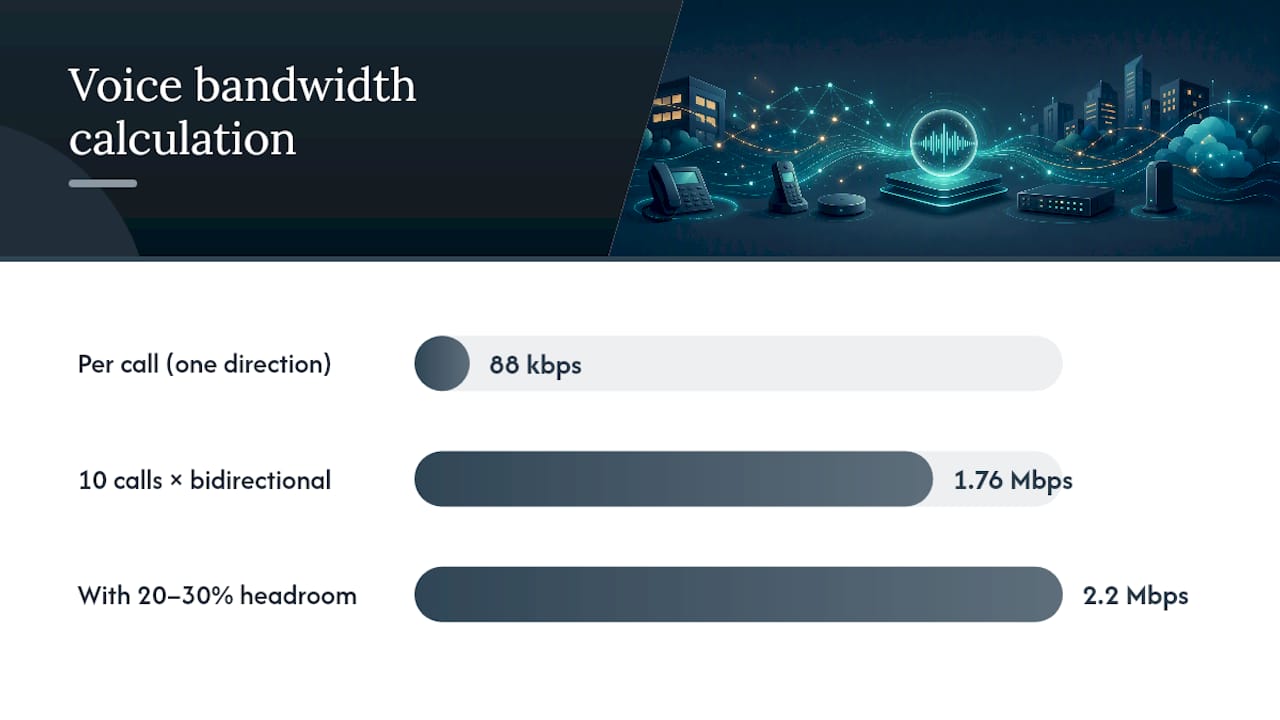
The formula is simple: concurrent calls × per-call bandwidth × 2 (because calls are bidirectional), then add 20 to 30% headroom for signaling, jitter buffering, and other LAN traffic. Ten simultaneous G.711 calls means 10 × 88 kbps × 2 ≈ 1.76 Mbps, and with headroom you're closer to 2.2 Mbps just for voice.
Two optimizations get mentioned often and deserve a caveat. Compressed RTP (cRTP) can shrink that 40-byte header down to 2 to 4 bytes, but it only helps on point-to-point WAN links where both ends support it, not inside your LAN. Voice Activity Detection (VAD) can reduce average bandwidth in high-volume environments but is unreliable in small setups in high-volume environments for sizing circuits when you're running fewer than two dozen simultaneous calls. Don't size a small office's circuit around either one.
What Latency, Jitter, and Packet Loss Are Acceptable for VoIP?
ITU-T G.114 sets the benchmark most VoIP engineers still use: one-way mouth-to-ear delay ideally stays under 150 milliseconds; delays between 150 and 400 ms can be noticeable; above 400 ms is generally unacceptable for network planning. jitter should be kept under 30 ms, and packet loss should be kept under 1%.
Key figures:
- One-way latency: under 150 ms ideal
- Jitter: under 30 ms
- Packet loss: under 1%
Here's the mistake almost everyone makes early on: they run a ping test and read the round-trip number as if it were one-way delay. It isn't. You need to halve that round-trip figure before comparing it against the 150 ms target, or you'll wrongly approve a network that falls apart the moment call volume spikes. On a clean local network, real-world mouth-to-ear delay usually sits between 60 and 120 ms, and most failures trace back to router queuing during busy hours or jitter introduced by Wi-Fi.
Matching symptoms to causes speeds up troubleshooting. Choppy or robotic-sounding audio usually points to packet loss or jitter, not raw latency. Noticeable delay between speakers, the "talking over each other" effect, points to latency itself, often from an oversubscribed WAN link or a distant server. Test during your actual busy hour, aim the test at your provider's real media servers rather than a random ping target, and use VoIP-specific testing tools instead of basic ICMP ping, which doesn't reflect UDP behavior under load.
How Do QoS, Voice VLANs, and PoE Sizing Work Together?
Bandwidth alone doesn't guarantee good calls. Without consistent quality-of-service marking from end to end, even a fat pipe degrades to garbled audio the moment someone starts a large file transfer.
- Mark RTP traffic with DSCP EF (decimal 46) at the phone, and confirm every hop, the switch, the router, and the firewall, trusts and preserves that marking rather than stripping or remarking it.
- Build a dedicated voice VLAN using 802.1Q tagging, and turn on LLDP-MED so phones automatically discover the correct VLAN and QoS settings without manual configuration on each handset.
- Size PoE by total power draw, not port count. Add up the worst-case wattage for every phone you're deploying, compare that sum against your switch's total PoE budget, and leave meaningful headroom rather than running at the ceiling.
- Know your PoE standard. 802.3af tops out around 15.4 watts per port; 802.3at (PoE+) delivers up to 30 watts, which most modern business phones with color screens and extra features actually need.
Pro Tip: Test your QoS setup by generating a saturating traffic load on the same switch port as a live call. If audio holds steady, your markings are being honored end to end. If it degrades, something in the path is stripping DSCP tags, often an unmanaged switch or a firewall with SIP ALG enabled that's mangling the SIP payload.
Watch for three recurring pitfalls: SIP ALG features on consumer-grade routers that rewrite SIP headers incorrectly, unmanaged switches that can't tag VLANs or honor QoS at all, and older switches that quietly strip DSCP markings on the uplink. Detailed walkthroughs on marking RTP with DSCP EF and setting up a voice VLAN cover the configuration steps in more depth.
How Much WAN Bandwidth Do You Need, and What About Failover?
Most business internet connections are asymmetric, meaning upload capacity is a fraction of download. Since VoIP consumes bandwidth in both directions equally, your upload speed is almost always the real ceiling on how many simultaneous calls your circuit can carry, not download.
A practical rule: keep voice traffic under about 75% of total WAN capacity so it never competes directly with everything else on the network. A 10 Mbps symmetric circuit at that threshold gives you about 7.5 Mbps for voice, which supports roughly 40 to 45 concurrent G.711 calls once headroom is factored in, or well over 100 concurrent calls on G.729.
Sizing rules worth keeping on hand:
- Plan for approximately 80 to 90 kbps per concurrent G.711 call, bidirectionally
- Plan for approximately 24 to 32 kbps per concurrent G.729 call, bidirectionally
- Add moderate headroom above your busy-hour peak concurrency, not your total extension count
- Keep voice usage to about 75% of total circuit capacity
For redundancy, a diverse secondary internet connection, ideally from a different physical path or provider, with automatic failover configured lets calls reroute before staff even notice an outage. Failover strategies built around ISP diversity are worth setting up before you go live, not after the first outage.
Hardware and Cabling Checklist Before You Install VoIP Phones
Get these five items confirmed before anyone plugs in a handset:
- Router/firewall: Business-grade, SIP-friendly, with QoS shaping and proper NAT handling. For complex multi-site SIP trunking, a session border controller (SBC) adds a layer of protection and normalization between your network and the carrier.
- Switches: Fully managed, with VLAN tagging, QoS support, and LLDP-MED for automatic phone provisioning.
- PoE budget: Add up worst-case draw across every phone (commonly several watts each, varying by device) and confirm your switch's total PoE budget covers it with room to spare, not just enough for today's headcount.
- Cabling: Cat5e minimum, Cat6 preferred, respecting the 100-meter Ethernet distance limit per run.
- Power continuity: A UPS on your PoE switch keeps phones alive during a short outage, which matters more than most IT managers expect until the first blackout during business hours.
How Do You Test and Confirm Network Readiness Before Go-Live?
Run a structured readiness test before flipping the switch on a full rollout:
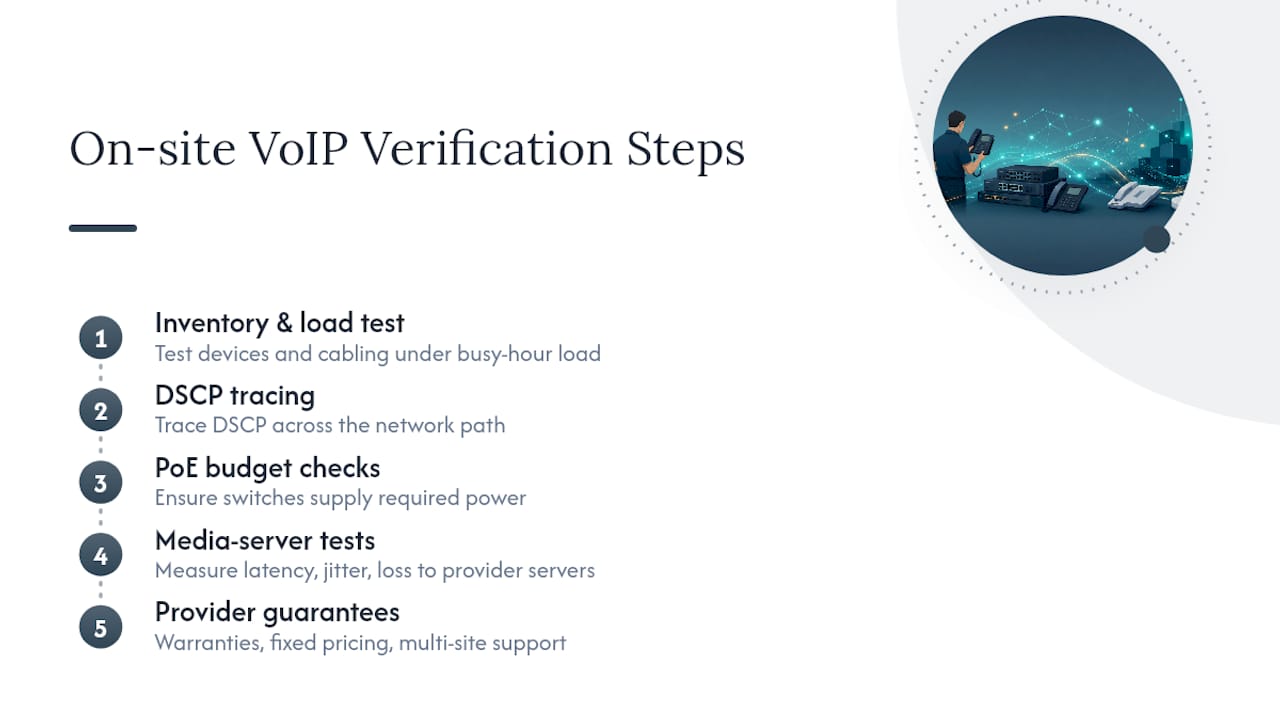
- Simulate peak concurrent calls and measure actual throughput under that load
- Test latency, jitter, and packet loss directly to your provider's media servers, not a generic ping target
- Trace DSCP markings across every hop to confirm nothing strips them
- Boot every PoE device simultaneously and confirm the switch holds its power budget
- Verify SIP registration stays stable over several hours, not just at idle
Go/no-go thresholds stay consistent with ITU-T G.114: one-way latency under 150 ms, jitter under 30 ms, packet loss should be kept under 1%, and QoS markings intact end to end. Document every result, fix what fails, and retest before rolling out to additional sites rather than deploying everywhere at once.
Pro Tip: Businesses that skip staged rollouts and go straight to a full multi-site cutover are the ones most likely to call support on day one. Test one location fully, confirm it holds under busy-hour load for at least a week, then expand.
An Installer's View on What Actually Breaks VoIP Deployments
Most failed rollouts trace back to three things: a consumer-grade router that mangles SIP traffic, a PoE switch sized for today's phone count with zero headroom for growth, and a readiness test run during a quiet afternoon instead of the actual busy hour. None of that shows up until the whole office is on a call at 10 a.m.
Three fixes fix most of it. Wire phones to Ethernet instead of Wi-Fi. Enforce QoS end to end, not just at the phone. Add a cheap secondary uplink with automatic failover. If your team can't confidently trace a DSCP marking across every hop or size a PoE budget with real headroom, that's the moment to bring in a professional installer rather than guessing your way through go-live.
— James
Get a Network That's Actually Ready for VoIP
Reading the requirements is one thing. Verifying that your router, switches, cabling, and WAN circuit actually meet them, under real busy-hour load, is a different job entirely. Phone system providers may design, cable, and install phone systems on-site, including network verification such as DSCP tracing, PoE budget checks, and latency/jitter/loss testing to provider media servers before phones go live.
Some providers offer warranties on rented phones, fixed pricing, and experience addressing issues with phones not working on day one. If you're planning a multi-site or remote-office rollout, Businessvoip's multi-site and remote office solutions are built around the same on-site verification standard. For a full design and installation quote, request a phone system design and skip the guesswork entirely.
Sources
- ITU-T Rec. G.114
- VoIP bandwidth requirements (SIPsymposium guide)
- Latency, jitter, and packet loss: the details (VoIPTest)