
For most small and medium businesses with limited IT staff or remote workers, Hosted PBX is the better starting point. SIP trunking fits businesses that already own on-premises PBX hardware or need maximum concurrent call capacity and tighter local control. That's the short version. The longer version depends on your headcount, your existing gear, and how much your team wants to manage.
Both options route calls over IP rather than traditional copper lines, replacing the old PSTN (Public Switched Telephone Network) connection with internet-based signaling using SIP (Session Initiation Protocol). The difference is where the intelligence lives: in a provider's data center, or in a box on your floor.
Quick profile match:
- Hosted PBX: Best for SMBs with a small to medium number of users, limited in-house IT, remote or hybrid teams, or anyone starting fresh without legacy PBX hardware.
- SIP trunking: Best for businesses that already run an on-premises PBX, have dedicated IT support, and want to reduce per-line costs or maximize concurrent call volume.
Key Takeaways
For most SMBs, hosted PBX delivers faster deployment and lower upfront cost, while SIP trunking suits businesses with existing on-prem PBX hardware and dedicated IT support.
| Point | Details |
|---|---|
| Match model to hardware | No existing PBX means hosted PBX wins on cost and speed; an owned PBX makes SIP trunking worth evaluating. |
| Budget for hidden costs | Porting fees, E911 charges, cabling, and SBC hardware add real dollars to either path. |
| Network readiness first | Confirm bandwidth, QoS, and VLAN configuration before any cutover to avoid call quality failures. |
| Migration takes 3–10 weeks | Hosted PBX cutovers run 3–6 weeks for small offices; SIP trunk activations with hardware changes take 6–10 weeks. |
| Businessvoip on-site option | Businessvoip designs, installs, and supports VoIP systems on-site in Ontario, covering network checks, porting, and lifetime-warranted phones. |
Table of Contents
- What is the difference between SIP trunking and hosted PBX?
- Head-to-head comparison: hosted PBX vs SIP trunking
- What are the real upfront and hardware costs?
- How do monthly costs and pricing models compare?
- How does each model handle growth and remote teams?
- What features and integrations does each model support?
- How do call quality, reliability, and security compare?
- Who is responsible for maintenance and troubleshooting?
- Migration checklist and realistic timelines
- Which option is right for your business?
- Why on-site installation often changes the equation
- Businessvoip can handle the whole transition for you
- Sources
What is the difference between SIP trunking and hosted PBX?
Hosted PBX is a cloud-hosted phone system where the provider runs all the PBX software and infrastructure offsite. You pay a per-user monthly fee, plug in IP phones or a softphone app, and the provider handles everything from call routing to voicemail. No server room required. Call flow looks like this: your phone connects to the internet, hits the provider's data center, and exits to the PSTN from there.
SIP trunking works differently. Your business keeps an on-premises PBX (the hardware or software that manages your internal calls), and SIP trunks replace the old PRI or analog lines that connected that PBX to the outside world. Call flow: your phone hits the on-prem PBX, which passes the call through a SIP trunk to an ITSP (Internet Telephony Service Provider), and out to the PSTN. The PBX logic stays on your site; only the carrier connection moves to IP.
A few terms worth pinning down:
- PBX: Private Branch Exchange, the system that routes calls between extensions and to outside lines.
- SIP: Session Initiation Protocol, the signaling standard that sets up and tears down VoIP calls.
- PSTN: The traditional phone network that carries calls to non-VoIP numbers.
- ITSP: The carrier that provides your SIP trunks.
- SBC: Session Border Controller, a security and interoperability device that sits at the edge of your network and protects SIP traffic.
Pro Tip: If you're not sure whether you have an on-prem PBX, check your server room or telecom closet for a Cisco, Avaya, Mitel, or NEC box with phone lines running to it. If you find one, SIP trunking may let you keep it and cut your carrier costs without replacing anything.
Head-to-head comparison: hosted PBX vs SIP trunking
| Dimension | Hosted PBX | SIP Trunking |
|---|---|---|
| Initial costs | Low: IP phones or rentals only | Higher: on-prem PBX, SBC, possible cabling |
| Ongoing costs | Per-user/month subscription | Per-channel or per-line trunk fees plus PBX licensing |
| Hardware requirements | IP phones or softphones; no server | On-prem PBX, SBC, SIP gateways, PoE switches |
| Control and security | Provider-managed; limited local control | Full local control; customer manages SBC and firewall |
| Scalability and flexibility | Add users in minutes via portal; remote-ready | Add channels with planning; tied to on-prem capacity |
| Call quality and reliability | Depends on internet; provider SLA covers data center | Dedicated trunks; local failover possible; SBC helps |
| Maintenance and IT | Provider handles PBX; customer manages network/phones | Customer or IT partner manages PBX, SBC, upgrades |
| Best for | Remote/hybrid SMBs, fast growth, limited IT | Existing PBX owners, high call volume, IT-staffed teams |
What are the real upfront and hardware costs?
This is where the two models diverge most sharply. Hosted PBX keeps capital spending low. You buy or rent IP phones (typically $80–$250 per handset for a mid-range desk phone), and that's most of it. Some deployments add a local SBC for quality-of-service control, but many small offices skip it entirely.
SIP trunking carries more upfront weight. If you're migrating an existing PBX to SIP trunks, you may already own the PBX itself, which changes the math. But if you're buying new, a business-grade IP PBX for a 10-seat office can run $1,500–$5,000 in hardware alone, before installation. Add an SBC ($500–$3,000 depending on capacity), possible SIP gateways for analog phones or fax lines, PoE switches if your network isn't phone-ready, and cabling if the building hasn't been wired for data at every desk.
On-premises PBX can have lower long-term costs at very large scale, but for most SMBs the upfront CapEx is a real barrier. Hosted PBX trades that capital cost for predictable monthly OpEx, which is why most growing businesses under 75 seats start there.
Example scenarios:
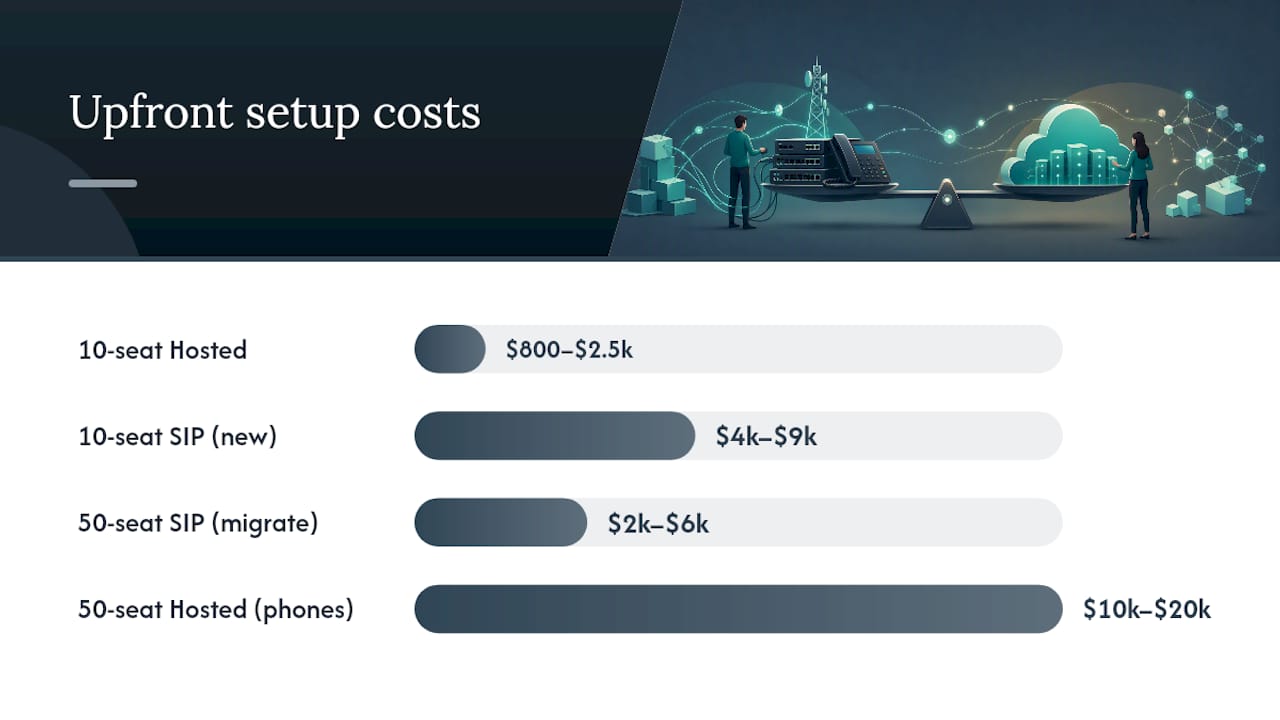
- 10-seat office, no existing PBX: Hosted PBX setup runs roughly $800–$2,500 in phones plus first-month fees. SIP trunking setup with a new PBX and SBC: $4,000–$9,000 before installation labor.
- 50-seat office migrating from PRI lines to SIP: If the PBX is already owned and compatible, SIP trunk activation costs drop to SBC hardware plus porting fees, often $2,000–$6,000 total. Replacing the whole system with Hosted PBX: $10,000–$20,000 in phones, though monthly fees replace the old carrier bill.
Watch for these hidden costs regardless of which path you choose:
- Number porting fees ($15–$50 per number, sometimes more for toll-free)
- Site survey and cabling labor
- E911 registration and compliance fees
- PSTN failover appliances for survivability
- Training time and temporary productivity dip during cutover
How do monthly costs and pricing models compare?
Hosted PBX uses per-user subscription billing; SIP trunking bills on concurrent channels or per-line trunk fees. That structural difference shapes every TCO conversation.
Hosted PBX pricing typically bundles features into tiers. Entry-level plans often cover basic calling, voicemail, and auto-attendant. Higher tiers add call recording, CRM integrations, and advanced analytics. Many U.S. providers price per user per month for a full-featured plan, with discounts available for larger volumes.
SIP trunk pricing works differently. You pay per channel (one concurrent call per channel), not per user. A 10-channel trunk bundle from a U.S. ITSP might run $15–$40 per month for the trunk capacity, plus per-minute charges for outbound calls if you're not on an unlimited plan. The PBX itself may carry separate licensing costs, especially if it's a commercial platform.
Other recurring costs to budget for:
- Support SLA upgrades (24/7 support often costs extra on both models)
- Carrier minute charges on metered SIP trunk plans
- E911 fees (usually $1–$2 per DID per month)
- Phone rental fees if you don't own handsets
- Annual PBX software maintenance contracts for on-prem systems
Worked example for 50 users: A hosted PBX subscription runs several thousand dollars per month for most features. A SIP trunk setup with multiple channels plus PBX licensing and phone amortization might cost less monthly, but excludes substantial upfront hardware costs. At that scale, SIP trunking may break even with hosted PBX after some months, assuming no major hardware failures or upgrades.
How does each model handle growth and remote teams?
Hosted PBX wins on speed and flexibility. Adding a user is a portal click and a phone plug-in. Removing one is the same. For multi-site businesses and remote offices, hosted PBX is particularly strong: every location connects through the same cloud platform, so a receptionist in one office can transfer calls to a colleague working from home without any special configuration.
SIP trunking scales differently. Adding concurrent call capacity means ordering more channels from your ITSP, which usually takes a few days. Adding a new physical location means either extending your on-prem PBX (with SIP gateways or a secondary PBX), or connecting the new site back to your main PBX over a WAN link. Neither is hard with proper IT support, but neither is a portal click either.
Geographic phone numbers (DIDs) are available on both platforms. Hosted PBX providers typically let you provision local numbers in any U.S. area code instantly. SIP trunking providers offer the same, but number assignment is managed through your ITSP rather than a self-service portal.
Pro Tip: *Before committing to either model, run a bandwidth check. Each concurrent VoIP call uses roughly 80–100 Kbps with G.711 codec, or about 30 Kbps with G.729. A 20-channel SIP trunk needs at least 2 Mbps of dedicated, low-latency upload capacity.
What features and integrations does each model support?
Hosted PBX vendors bundle standard PBX features into subscription packages: IVR (interactive voice response), ACD (automatic call distribution), voicemail-to-email, conferencing, call recording, and auto-attendant. You get all of it without touching a server. Most platforms expose REST APIs and pre-built connectors for popular CRMs like Salesforce, HubSpot, and Zoho, plus ticketing systems like Zendesk and ServiceNow. Single sign-on via SAML or OAuth is standard on mid-tier and enterprise plans.
SIP trunking gives you the features your on-prem PBX supports, which varies by platform. A modern IP PBX like a current-generation Cisco or Yealink-based system can match hosted PBX feature for feature. An older Avaya or Mitel box may not support modern API integrations without middleware or an upgrade. CRM integration on an on-prem PBX usually requires a CTI (computer telephony integration) connector, which adds cost and a dependency on your IT team to maintain.
Admin experience differs noticeably. Hosted PBX platforms offer browser-based portals where non-technical staff can manage call routing, add extensions, and pull reports. On-prem PBX administration typically requires familiarity with the platform's own interface, which can be complex enough that most businesses rely on their installer or a managed service partner for anything beyond basic changes.
On handset compatibility: most hosted PBX platforms support a curated list of IP phones and auto-provision them via DHCP and a provisioning server. SIP trunking doesn't dictate phone choice since the PBX handles that, but your PBX vendor's supported handset list still applies.
Feature checklist by model:
- Auto-attendant / IVR: both
- ACD / call queues: both (hosted typically easier to configure)
- Call recording: both (hosted often included; on-prem may need add-on storage)
- Voicemail-to-email: both
- CRM integration via API: hosted PBX has an edge; on-prem requires CTI middleware
- Mobile softphone app: both, though hosted platforms tend to have more polished apps
- Admin portal for non-technical staff: hosted PBX clear advantage
How do call quality, reliability, and security compare?
Call quality on hosted PBX depends on your internet connection. A well-configured network with QoS and a reliable ISP delivers excellent results. The risk is that a single internet outage takes your phones down unless you've architected a failover path, such as a mobile softphone app on LTE or a secondary ISP.
SIP trunking, when the network and SBCs are properly designed, can offer dedicated voice capacity and easier local failover. Your on-prem PBX can keep routing internal calls even if the WAN goes down, and a backup cellular gateway can bridge outbound calls. That local resilience is a real advantage for businesses where phone downtime is expensive.
On security, SIP trunking with a properly configured SBC gives you the most control. The SBC acts as a firewall for SIP traffic, enforcing TLS (Transport Layer Security) for signaling and SRTP (Secure Real-Time Transport Protocol) for media encryption, blocking unauthorized registration attempts, and keeping your call paths off the open internet. Session Border Controllers are a key technical control for SIP trunking security and should be part of any migration plan that routes calls over IP.
Hosted PBX security is the provider's responsibility for the platform itself, but your network edge still matters. Use a business-grade firewall, segment your voice VLAN, and confirm your provider uses TLS/SRTP end-to-end. For regulated industries (healthcare, finance, legal), ask specifically about HIPAA-compliant call recording storage, SOC 2 certification, and data residency.
What to ask any provider about reliability:
- What is the uptime SLA, and does it cover the full call path or just the data center?
- What are the jitter and latency thresholds in the SLA?
- How does failover work if your primary data center goes down?
- Is there a status page with real-time incident reporting?
Provider quality varies significantly. User reviews on platforms like Capterra consistently flag SLA enforcement and support responsiveness as the biggest differentiators among SIP trunking providers, not the base feature set.
Pro Tip: Ask for a 30-day pilot before signing a multi-year contract. Run your actual call volume through the system, test failover manually, and measure MOS (Mean Opinion Score) with a tool like PRTG or VoIP Monitor. A provider confident in their network will agree to a pilot.
Who is responsible for maintenance and troubleshooting?
With hosted PBX, the provider owns the PBX platform: software updates, security patches, hardware refreshes in their data center, and platform-level incident response. Your team is responsible for the local network (router, switches, firewall, QoS configuration), the physical phones, and any local cabling. That split works well for businesses without a dedicated IT person, since the heavy lifting stays with the provider.
SIP trunking flips most of that responsibility back to you. Your IT team or managed service partner handles PBX software updates, SBC firmware, hardware lifecycle planning, backup and restore procedures, and first-line troubleshooting when calls fail. The ITSP handles the trunk capacity and carrier routing, but diagnosing whether a call quality problem lives in your PBX, your SBC, your LAN, or the trunk itself requires someone who knows all four layers.
Responsibility split at a glance:
Hosted PBX:
- Provider: PBX software, data center hardware, platform security, feature updates
- Customer: LAN/WAN, firewall, IP phones, local cabling, user training
SIP trunking / on-prem:
- Provider: trunk capacity, carrier routing, DID management
- Customer: PBX hardware and software, SBC, LAN/WAN, phones, backups, upgrades
For a 10–25 seat business without an IT hire, hosted PBX is the lower-risk path. For a 50-seat business with an IT coordinator or a managed service partner already on retainer, SIP trunking's added responsibility is manageable and the cost savings can justify it.
Migration checklist and realistic timelines
Pre-migration network audit
Before you cut over to either system, confirm your network can handle voice traffic:
- Measure your current internet bandwidth and calculate headroom for peak concurrent calls.
- Verify your router and switches support QoS (DSCP marking for voice traffic).
- Confirm PoE availability on switches if deploying IP desk phones.
- Identify VLAN segmentation needs (voice VLAN separate from data).
- For SIP trunking: confirm SBC placement, firewall rules for SIP/RTP ports, and NAT traversal settings.
- For hosted PBX: confirm your ISP's upload speed and latency to the provider's nearest data center (target under 150ms round-trip).
Number porting and E911
- Collect your current carrier's account numbers and service addresses for all DIDs.
- Submit a Letter of Authorization (LOA) to your new provider.
- Expect porting to take 2–4 weeks for standard U.S. numbers; toll-free numbers can take longer.
- Validate E911 service address for every DID before cutover. This is a legal requirement, not optional.
- Keep your old carrier active until porting confirms complete.
Migration timeline
Cloud-hosted cutovers are generally faster than on-prem SIP trunk projects that require hardware changes.
| Phase | Hosted PBX (10 seats) | Hosted PBX (50 seats) | SIP Trunk Activation (existing PBX) |
|---|---|---|---|
| Site survey and network audit | 1–3 days | 3–5 days | 3–7 days |
| System configuration and provisioning | 2–5 days | 5–10 days | 5 days |
| Pilot (subset of users) | 3–5 days | 5–7 days | 5–10 days |
| Number porting | 2–4 weeks | 2–4 weeks | 2–4 weeks |
| Full cutover | 1 day | 1–2 days | 1–2 days |
| Total elapsed time | 3–6 weeks | 5 weeks | 6–10 weeks |
Post-cutover validation
- Test every extension, DID, and call queue before releasing to staff.
- Confirm voicemail-to-email delivery and call recording storage.
- Validate E911 routing with your local PSAP (Public Safety Answering Point).
- Define rollback triggers: if more than 20% of calls show quality issues in the first 48 hours, have a plan to revert to your old carrier or system.
Pro Tip: Schedule your cutover for a Tuesday or Wednesday morning, not a Monday. You want a full business day to catch problems, and you want your provider's support team at full staffing. Friday cutovers are how people end up with broken phones over the weekend.
Which option is right for your business?
The answer usually comes down to three factors: what hardware you already own, how much IT capacity you have, and how fast you need to scale.
Match your profile:
- Small office, 5–25 users, no existing PBX, remote workers: Hosted PBX. Lower upfront cost, faster deployment, and your team doesn't need to manage a server.
- Mid-size business, 25–75 users, existing on-prem PBX, IT coordinator on staff: SIP trunking to extend the life of your PBX investment, or hosted PBX if the PBX is aging and a refresh makes sense anyway.
- Multi-site operation, high concurrent call volume, dedicated IT team: SIP trunking with a well-designed SBC and QoS architecture, or a hybrid model where hosted PBX handles remote sites and SIP trunks serve the main office.
Three questions to ask any vendor before you sign:
- "What are your bandwidth and QoS requirements, and will you help me verify my network meets them before cutover?" A provider who skips this step is setting you up for call quality complaints.
- "What is your failover plan if your primary data center or my internet connection goes down, and is that covered in the SLA?"
- "Show me the full pricing breakdown: per-user or per-channel fees, E911 charges, porting fees, and any overage rates for concurrent calls."
Actionable next steps:
- Run a bandwidth and QoS audit on your current network.
- Get itemized quotes from at least two providers using the same seat count and channel count assumptions.
- Request a pilot before committing to a full deployment.
- If you're in Ontario or within the Businessvoip service area, request an on-site assessment. A local team that can physically inspect your cabling, switches, and telecom closet catches problems that a remote quote misses entirely.
Why on-site installation often changes the equation
Most of the businesses that call Businessvoip have already tried to evaluate this decision on their own, and they get stuck on the same thing: the technical comparison makes sense on paper, but they're not confident their building's network is actually ready. That's the gap a remote provider can't close for you.
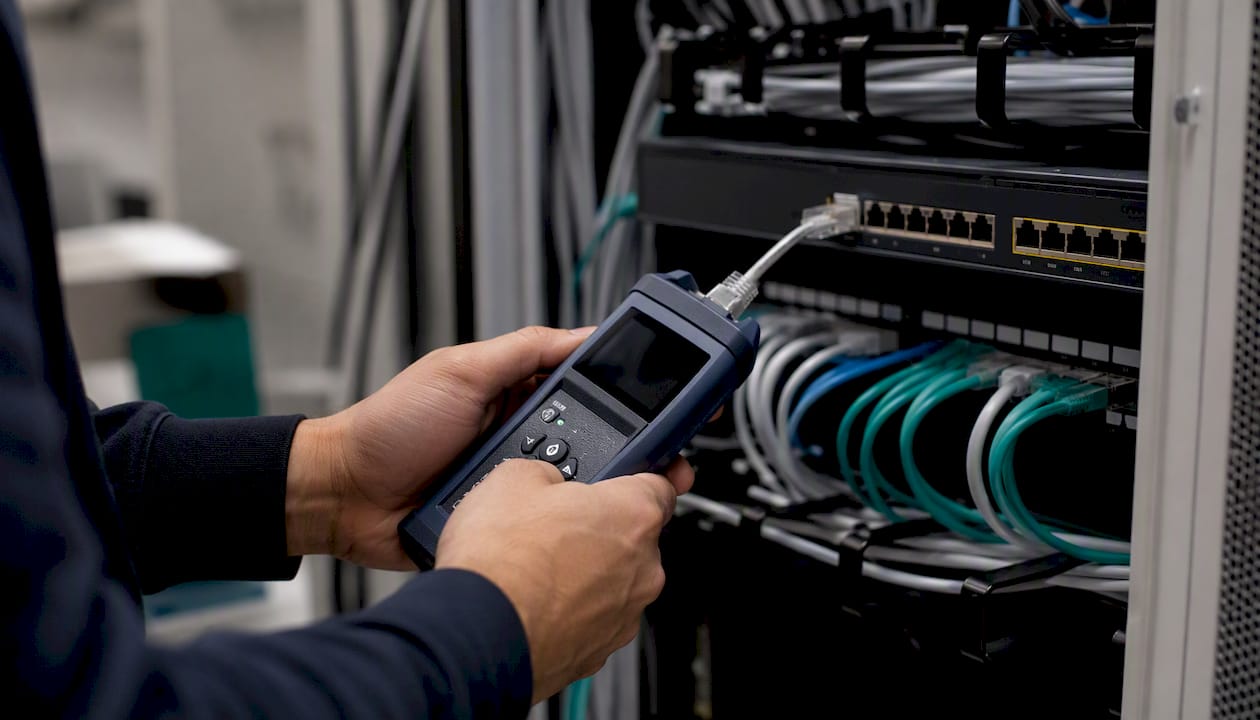
When Businessvoip works with a client, the team visits the site before anything is configured. They check cabling, PoE switch capacity, router QoS settings, and the telecom closet layout. That physical audit catches problems that would otherwise surface as call quality complaints on day three of your new system. It also means the phones work on day one, not after a week of troubleshooting tickets.
For clients who want cloud features but need on-site reliability, a hybrid approach works well: hosted PBX for the platform and remote workers, with on-site installation, cabling, and lifetime-warranted handsets for the main office. That combination isn't something most remote-only providers offer, and it's where the on-site model earns its keep.
Businessvoip can handle the whole transition for you
Getting the comparison right is one thing. Getting the system actually installed and working is another. Businessvoip designs, programs, cables, and installs VoIP phone systems on-site for Ontario businesses, so you're not left configuring phones from a manual after a box shows up at your door.

The service covers everything the comparison above surfaces as a risk: site surveys and network readiness checks, number porting, after-hours and holiday call routing, voicemail-to-email, mobile app setup, and in-person staff training. Rented phones carry a lifetime warranty, and pricing is fixed with no annual increases. For businesses with multiple locations or remote offices, Businessvoip has handled hybrid deployments across Ontario and into remote offices in the U.S. and UK.
If you're ready to move past the comparison and get a written quote for your specific setup, contact Businessvoip for an on-site assessment. That's the concrete next step: a local team reviews your building, your call volume, and your existing gear, then gives you a real number, not a range from a pricing page.
Sources
- Hosted PBX vs SIP Trunking