Run Cat5e at minimum, with Cat6 or Cat6a preferred for anything you're installing today. Keep every horizontal cable run under 100 meters (328 feet), equip phones with PoE-capable 1Gb ports with a calculated power budget, and enforce QoS with a voice VLAN. Require certified test reports, not a handshake, before you accept the job.
TL;DR:
- Cat5e is sufficient for small, basic VoIP setups but offers no long-term or high-bandwidth headroom, especially for larger networks.
- Cat6 is the recommended standard for new installations, supporting 10Gb speeds at shorter distances and providing better noise immunity than Cat5e.
- Every phone requires a dedicated, certified cable run to a patch panel with proper labeling, testing, and no daisy-chaining, to ensure reliable connection and troubleshooting.
- Switches must support PoE standards that match the power requirements of VoIP phones, and uplink bandwidth should be allocated separately to prevent network choke points.
- Proper grounding, bonding, and certified testing are critical to prevent electrical issues, guarantee performance, and meet industry standards for compliance.
Table of Contents
- What Cable Category Does VoIP Actually Need?
- How Should VoIP Cabling Be Physically Installed?
- What PoE and Switch Specs Do VoIP Phones Require?
- What Network Settings Protect Call Quality?
- What Should Installers Test Before You Accept the Job?
- Why Do VoIP Calls Break Even When Cabling Looks Fine?
- What Does an On-Site VoIP Installer Actually Handle?
- What Grounding and Bonding Does VoIP Cabling Need?
- Which Standards Govern VoIP Cabling Compliance?
- Where the Standard Advice on VoIP Cabling Falls Short
- Getting VoIP Cabling Done Right the First Time
- Sources
What Cable Category Does VoIP Actually Need?
Cat5e is the legal minimum for a VoIP deployment, and it will carry a 1Gb connection just fine for a handful of phones on a small network. It's also the ceiling of what it can do. There's no headroom for 10Gb backbone links, no slack for interference in a building with old wiring, and no room to add security cameras or wireless access points on the same switch stack without stretching things thin.
Cat6 is the practical sweet spot for most offices today. It costs marginally more than Cat5e per run but gives you 10Gb capability at shorter distances and far better noise immunity. Cat6a extends that 10Gb performance to the full 100 meter run, which matters if your IDF closet sits at the far end of the building.
- Cat5e: fine for basic phone-only runs in small offices, but offers no future headroom.
- Cat6: the default choice for new installs; supports 10Gb at shorter lengths.
- Cat6a: 10Gb across the full 100 meter run, better for larger floors and mixed voice/data traffic.
- Cat7 and fiber: reserved for backbone runs between the main distribution frame (MDF) and intermediate distribution frames (IDFs), or campus-to-campus links.
Cat5e supports 1Gb speeds, while Cat6a and above are recommended when 10Gb or long-term headroom matters, and fiber is the right call for backbone runs rather than individual phone drops. For plenum ceilings or riser shafts, specify plenum-rated (CMP) or riser-rated (CMR/CL2) jacket, never standard PVC. A fire marshal will fail your install over jacket rating alone, no matter how good the copper inside is.
How Should VoIP Cabling Be Physically Installed?
Every phone gets its own dedicated run back to a patch panel, full stop. No splitters, no daisy-chaining one jack to another, no repurposed splices from an old phone system. Lumen's own installation guidance is blunt about this: regular Cat3/RJ11 telephone wire is not suitable for VoIP, and every jack needs a direct connection to the switch or patch panel.
- Terminate every run at a patch panel inside a dedicated cabinet or IDF, never at a loose splice or a wall-mounted junction box.
- Route cable in conduit or overhead tray, keeping at least 12 inches of separation from electrical conduit to avoid EMI bleed-through.
- Label both ends of every cable with a matching port number, and keep a written port map alongside the patch panel.
- Color-code jacks by function (voice, data, wireless access point) so a technician five years from now doesn't have to guess.
Pro Tip: Buy a $40 label printer before the first cable goes in the wall. Retrofitting labels after a 200-drop install costs more in technician hours than the printer costs ten times over.
What PoE and Switch Specs Do VoIP Phones Require?
Every desk phone needs a 1Gb RJ45 port, and modern IP phones require PoE support under 802.3af, 802.3at, or 802.3bt depending on the phone model, over cabling rated Cat5e or better. The IEEE class matters because it sets the power ceiling: 802.3af delivers up to 15.4 watts, 802.3at (PoE+) pushes to 30 watts, and 802.3bt goes as high as 90 watts for devices that need it, though a basic desk phone rarely draws more than 7 watts.
- Add up the wattage draw for every phone on a switch, then confirm the switch's total PoE budget covers it with margin for simultaneous peak draw.
- Avoid passive PoE injectors and cheap splitters. They skip the negotiation handshake that protects the phone from overcurrent.
- If your switch lacks PoE entirely, a midspan injector works as a stopgap, but it adds another point of failure and another device to power during an outage.
- Plan uplink and stack bandwidth separately from access-port bandwidth. A closet full of 1Gb phones can still choke on a 1Gb uplink to the core.
What Network Settings Protect Call Quality?
Quality of Service configuration that prioritizes voice traffic ahead of standard data is required to prevent audio degradation and dropped calls whenever the network handles anything besides phone traffic. Mark RTP media with DSCP EF (value 46) and SIP signaling with DSCP AF31, then configure priority queuing on every switch hop between the phone and the internet edge, not just the closet switch.
A dedicated voice VLAN keeps broadcast traffic and rogue laptop downloads away from your phones, and it makes QoS policy far easier to apply consistently.
By the numbers: plan for roughly 100 kbps of bandwidth per concurrent G.711 call, with a target latency under 150 ms, jitter under 30 ms, and packet loss under 1 percent.
Before cutover, confirm:
- The router or firewall supports and is configured for QoS, not just capable of it in theory.
- Every switch in the path, not just the edge switch, has priority queuing enabled for the voice VLAN.
- Real call-load testing happens under actual traffic conditions, not just a ping test at 2 a.m. when the office is empty.
Configuring a voice VLAN correctly the first time avoids the retrofit headaches covered in a step-by-step VLAN setup guide, and marking DSCP values consistently is worth its own dedicated QoS checklist.
What Should Installers Test Before You Accept the Job?
The 100 meter (328 foot) horizontal run limit is a hard ceiling for Ethernet and PoE; go past it and you risk signal loss severe enough to break PoE negotiation entirely, not just slow the connection. This is why homerun cabling to a nearby IDF matters more in larger buildings, not less.
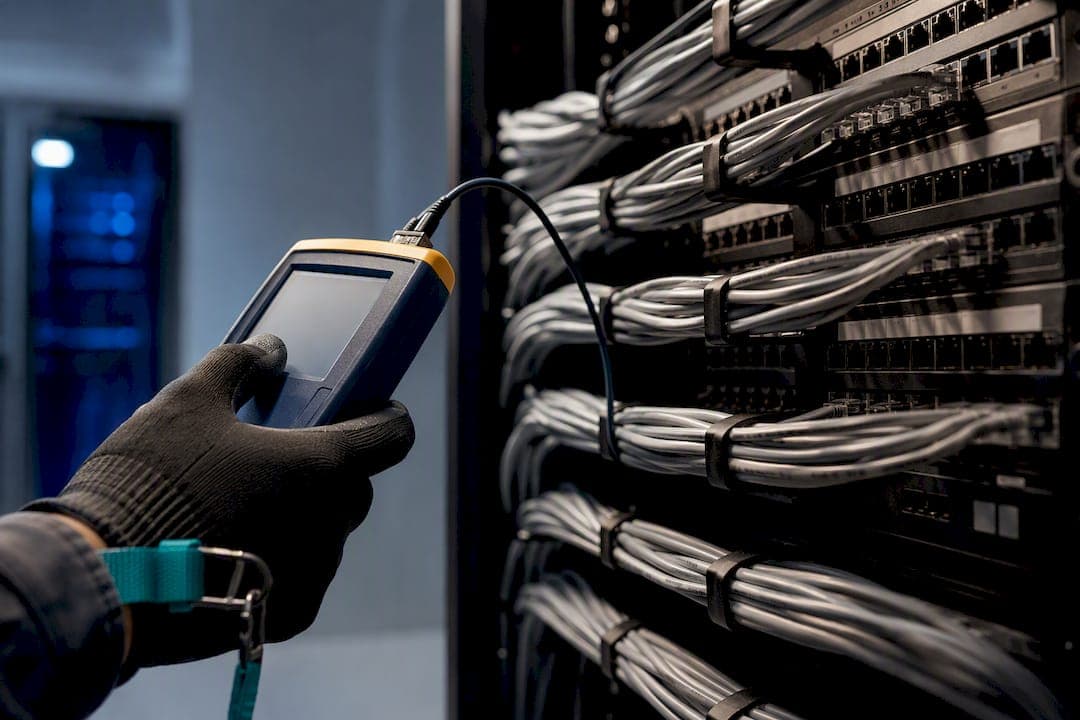
Demand Fluke DSX-level certification testing, or an equivalent, on every single run, checking NEXT (near-end crosstalk), return loss, and length. Enterprise VoIP standards commonly require certification testing and dedicated homerun cabling rather than split runs, and that requirement exists because a marginal cable failure often shows up as garbled audio months later, not an outright dead line on day one.
Acceptance deliverables should include:
- A printed or digital test report for every cable run, with pass/fail results per parameter.
- A port map matching the patch panel labeling scheme.
- As-built drawings showing cable paths, IDF locations, and jack numbers.
- A simulated load test: several concurrent calls plus a file transfer running at the same time, to confirm QoS actually holds under pressure.
Pro Tip: Ask for the test reports before the invoice, not after. Once the walls are closed up and the invoice is paid, you've lost your leverage to get a bad run fixed.
Why Do VoIP Calls Break Even When Cabling Looks Fine?
Jitter and choppy audio usually trace back to missing QoS marking somewhere in the path, not a bad cable. One-way audio is almost always a NAT or firewall traversal issue, not cabling at all. Random call drops on an otherwise stable network often point to a PoE negotiation failure, a marginal cable near its length limit, or a duplex mismatch on a switch port.
Quick triage steps:
- Check port speed and duplex settings; a mismatched port can look fine but silently drop packets.
- Confirm PoE class negotiation completed correctly rather than the phone running on a partial or unstable power budget.
- Run a cable tester on the suspect jack before touching software settings.
- Trace DSCP marking hop by hop. It's common for one switch in the chain to strip tags that every other switch honors.
If the fault follows the phone to a different, known-good port, blame the original cable or jack. If it stays with the port, look upstream toward the switch or the ISP handoff. Persistent trouble after these checks means it's time to bring in a certified installer rather than keep guessing.
What Does an On-Site VoIP Installer Actually Handle?
Field deployment always surfaces details a spec sheet skips: coordinating with the electrician so conduit runs land before drywall closes, keeping labeling consistent across a multi-site rollout, and mapping ports so a technician at a second location can find anything without a phone call to headquarters.
A full installer's deliverable list should include:
- An on-site cabling and network survey before work begins.
- Certified test reports for every run.
- On-site switch and QoS configuration, not remote-only setup.
- Phone programming and staff training before cutover.
Pro Tip: Schedule the cutover window during a real business day with real call volume, not a quiet Sunday. A network that handles ten test calls can still choke on forty simultaneous ones.
A tight handoff checklist for the operations team: confirmed port map, test reports in hand, PoE budget documented, QoS verified under load, and a named contact for post-install issues.
What Grounding and Bonding Does VoIP Cabling Need?
Grounding protects both your equipment and your phone system's uptime, and it's one of the most skipped steps in a rushed install. Every rack, patch panel, and cable pathway needs to bond back to a common ground point, typically through a telecommunications grounding busbar (TGB) connected to the building's main electrical ground.
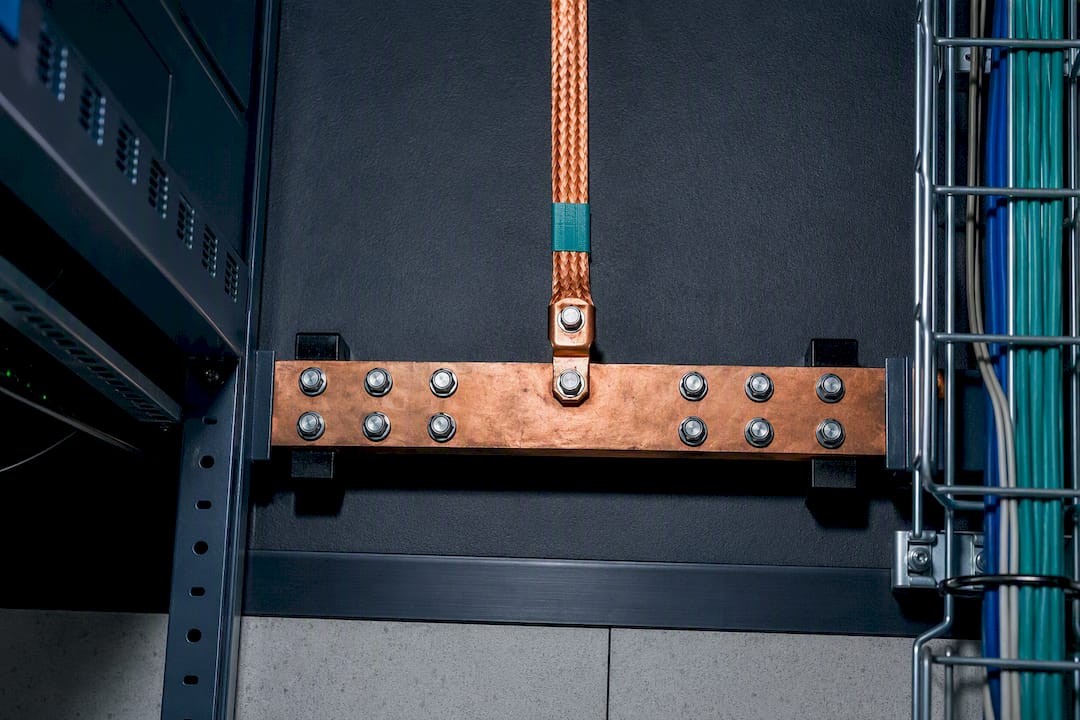
Unbonded equipment racks create ground loops, which show up as electrical hum on analog lines or, in a VoIP context, as intermittent switch resets and PoE instability that looks like a cabling fault but isn't. A lightning strike or power surge with no proper bonding path can take out an entire switch stack and every phone connected to it in one event.
Bonding conductors should run continuously from the rack to the TGB with no splices, and every metallic cable pathway (conduit, tray, ladder rack) needs bonding at both ends if it's exposed to potential fault current. In multi-floor buildings, each IDF closet needs its own bonding connection back to the building's grounding electrode system, not a shared path routed through another closet.
This isn't optional in any facility with a proper telecommunications room, and it's worth a line item on your installer's checklist rather than an assumption that "the electrician handled it." Ask specifically whether the TGB was tested for continuity, because a bonded busbar with a broken connection offers no real protection at all.
Which Standards Govern VoIP Cabling Compliance?
Three standards bodies shape what a compliant VoIP cabling job looks like, and knowing which one covers what helps you push back on a contractor cutting corners.
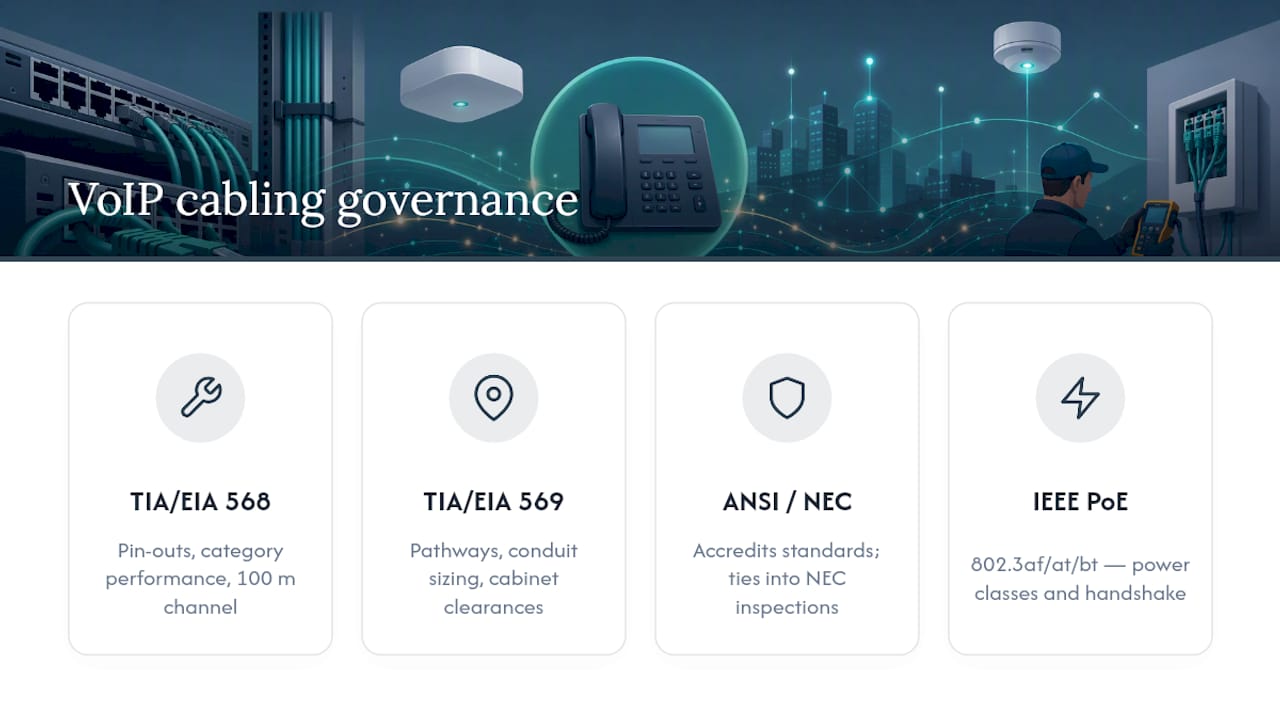
TIA/EIA governs the physical cabling itself. TIA/EIA568 sets the pin-outs, cable category performance requirements, and the 100 meter channel length that every install should follow. TIA/EIA569 covers pathways and spaces, meaning conduit sizing, cabinet placement, and clearance requirements in telecommunications rooms.
ANSI accredits these standards and folds them into the broader National Electrical Code framework that inspectors actually enforce. If your installer talks about "code compliance" for low-voltage cabling, this is usually the framework behind it, alongside local building and fire codes governing jacket ratings in plenum spaces.
IEEE governs the electrical side of PoE specifically: 802.3af, 802.3at, and 802.3bt define the power classes discussed earlier, along with the negotiation handshake between switch and device that keeps a phone from drawing more current than a run can safely deliver.
None of these bodies enforces itself on a private commercial install the way a building inspector enforces electrical code, which is exactly why acceptance testing matters. A cable run that technically meets TIA/EIA568 spec on paper still needs a certified test report proving it performs that way in the field, not just on the box the cable came in.
Where the Standard Advice on VoIP Cabling Falls Short
Most cabling guides treat this like a shopping list: buy Cat6, stay under 100 meters, done. That advice isn't wrong, it's just incomplete in a way that causes real problems six months after cutover. The spec sheet tells you what a compliant install looks like on paper. It says nothing about what happens when the electrician's conduit run and your cable tray cross paths, or when a facilities manager reuses an old phone system's punch-down wiring because it's "already there."
The gap between a standards checklist and a working phone system almost always lives in testing and documentation, not cable choice. A contractor who skips Fluke certification and hands you a "trust me, it works" install is setting you up for a support call in month four, when the actual cause of a crackling line is a marginal NEXT failure nobody ever measured.
If you take one thing from every specification above, make it this: demand the test report before you sign off, and confirm QoS actually holds under a real concurrent call load, not a quiet-network ping test. Everything else, cable category, PoE class, grounding, is table stakes. Verified performance under load is what actually determines whether the phones work on day one or day ninety.
— James
Getting VoIP Cabling Done Right the First Time
Most of what's covered above, category selection, PoE budgeting, QoS configuration, certified testing, is the kind of work businesses either hand to an in-house IT team with time to spare or outsource entirely to avoid the risk of getting it wrong. VoIP providers typically handle the whole job on-site: survey, cabling, patch panel termination, certified testing, switch and QoS configuration, and phone programming, done by a local team rather than shipped in a box with a setup guide.

Pricing structures vary, and phone rentals may come with warranty terms to ensure reliability. If your business runs across multiple sites, including remote offices outside Ontario, the same multi-site and remote office installation approach applies, with consistent port mapping and documentation across every location. DIY cabling works for a business with in-house technical staff and time to spare; a full-service install makes sense when you need it working correctly on day one without managing contractors yourself.
If you want a specific recommendation on cable category, switch specs, and PoE budget for your office layout, get your phone system designed by the team that will also install it.
Sources
- What is Quality of Service (QoS)? — Net2Phone Academy
- VoIP Phone Standards — UNLV (2023)
- VoIP Cables: Types & How to Choose — GetVoIP
- VoIP implementation guide — CloudTalk