
For new permanent in-wall runs, default to Cat6. For short patch cords and dedicated 1 Gbps voice drops, Cat5e is still perfectly acceptable. That's the short version, and the TIA standards back it up.
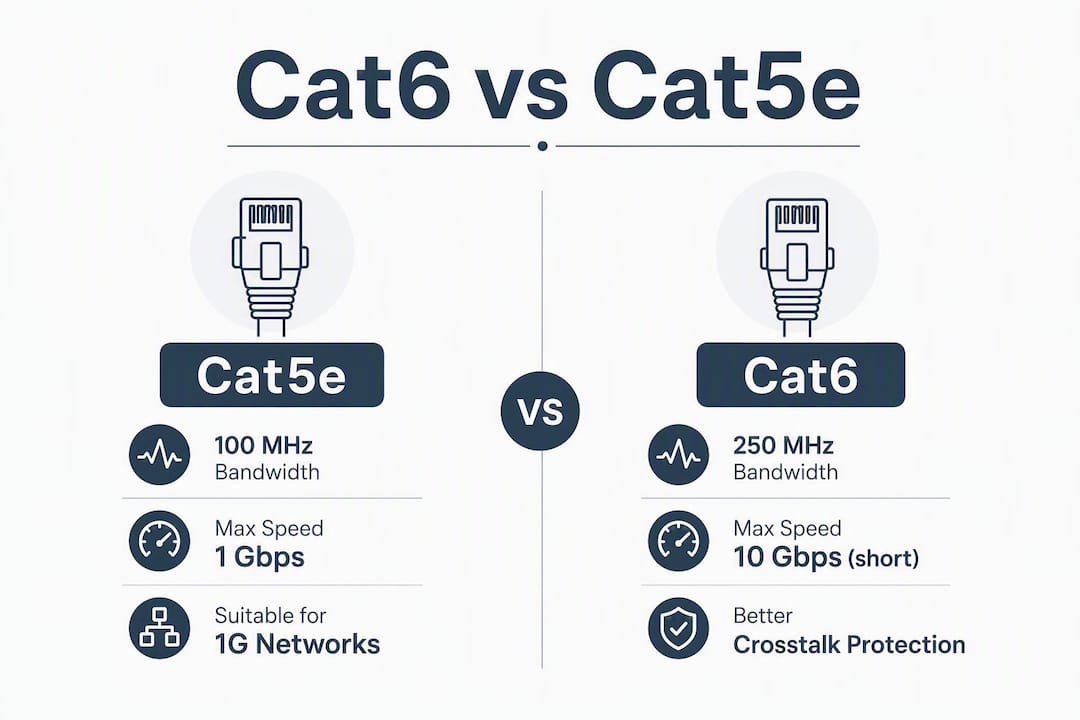
Both cables meet the 1000BASE-T spec to 100 meters, so either will carry gigabit traffic across a full-length channel. The difference shows up when you look ahead:
- Bandwidth headroom: Cat5e tops out at 100 MHz; Cat6 is rated to 250 MHz. That extra headroom is what lets Cat6 support 10GBASE-T, even if only at shorter distances.
- 10 Gbps reach: Cat6 handles 10 Gbps at shorter distances, while Cat5e does not support 10GBASE-T under the standard.
- Cost vs. labor: Cat6 runs about 10–20% more per foot than Cat5e. On any real install, labor and conduit work dwarf that cable price difference, so the upgrade costs far less than it sounds.
Table of Contents
- How do Cat5e and Cat6 compare spec for spec?
- What actually makes Cat6 perform better than Cat5e?
- Which cable fits your actual situation?
- What to specify and check when buying or installing cable
- When should you choose Cat6A or fiber instead?
- Key Takeaways
- The case for Cat6 as the new baseline
How do Cat5e and Cat6 compare spec for spec?
| Spec | Cat5e | Cat6 |
|---|---|---|
| Rated bandwidth | 100 MHz | 250 MHz |
| Max speed (standard) | 1 Gbps (1000BASE-T) | 1 Gbps (1000BASE-T) |
| 10 Gbps support | Not supported | Up to ~55 meters (10GBASE-T); for 100 meters, Cat6A is required |
| Typical conductor AWG | 24 AWG | 23 AWG |
| Central spline | No | Often yes |
| Shielding options | UTP, STP | UTP, STP, FTP |
| Common use cases | Patch cords, 1G voice drops, legacy runs | New in-wall, PoE++, multi-gig, gaming |
| Typical cost premium | Baseline | modestly higher |
| In-wall / plenum rating | CM, CMR, CMP | CM, CMR, CMP |
| Best for | Short/patch/1G-only drops | New permanent in-wall installs |
A few things worth calling out from that table. The shielding options are the same across both categories, so if your environment has electrical interference, either cable can be ordered in a shielded variant. The AWG difference (24 vs. 23) is small on paper but meaningful in practice: the heavier conductor in Cat6 lowers DC resistance, which matters for PoE loads and crosstalk performance. And the cost premium is genuinely modest. On a 20-drop office install, the cable cost difference between Cat5e and Cat6 is often under $50 total. Labor is where the real money goes.
What actually makes Cat6 perform better than Cat5e?
The 250 MHz bandwidth rating is the headline number, but the engineering behind it is what makes Cat6 worth specifying for new installs.
Crosstalk: NEXT, AXT, and the spline
Near-end crosstalk (NEXT) is the interference one wire pair induces on an adjacent pair at the transmitting end. Alien crosstalk (AXT) is the same problem across cables running in the same bundle or tray. Both degrade signal quality, and both get worse as frequency increases.
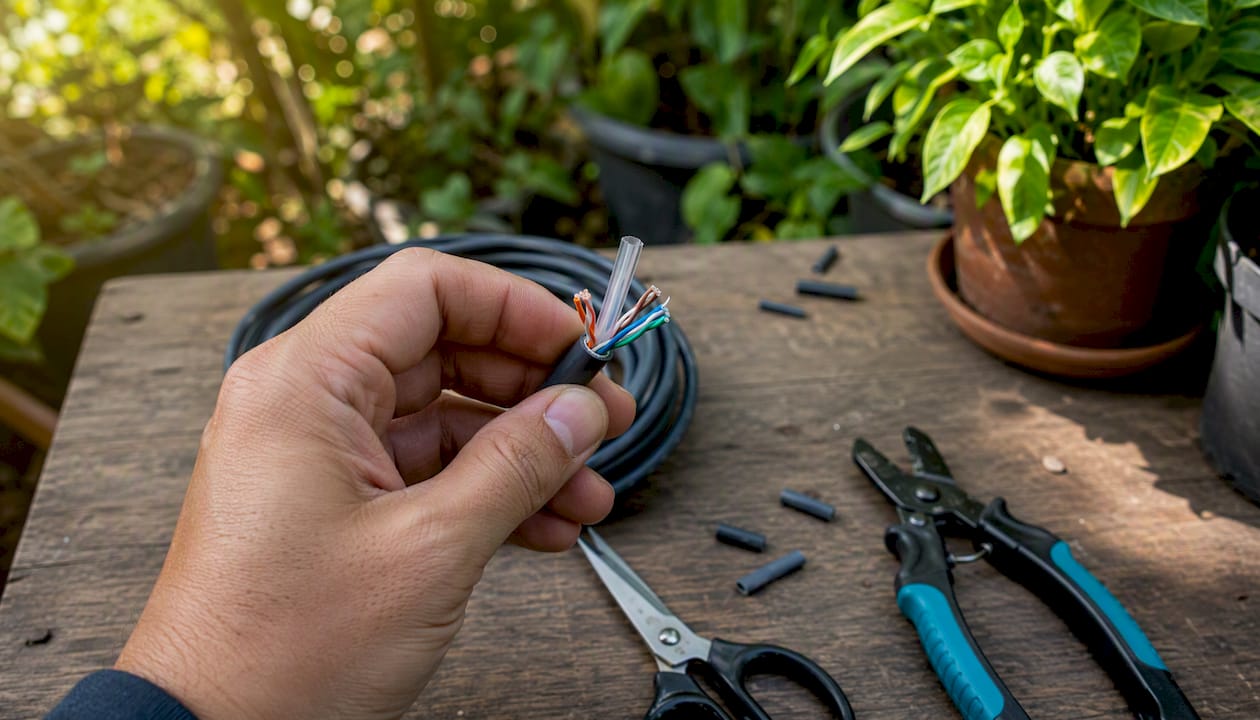
Cat6 addresses this with tighter twist rates per pair and, in most constructions, a central plastic separator called a spline. The spline physically isolates the four pairs from each other inside the jacket, reducing NEXT at higher frequencies. Cat5e has no spline and uses looser twist rates, which is fine at 100 MHz but starts to show noise at the frequencies 10G signaling requires.
The 23 AWG conductor in Cat6 versus the 24 AWG in Cat5e also contributes. Heavier wire has lower DC resistance, which reduces signal attenuation over a run and helps maintain cleaner pair-to-pair isolation.
The 10GBASE-T distance reality
10GBASE-T on Cat6 is rated to support 10 Gbps at limited shorter distances under standard conditions. In dense cable trays with bundled runs, real-world reach can be shorter due to alien crosstalk buildup.
That 55-meter figure assumes a reasonably clean installation. Bundle 24 Cat6 cables in a tight tray and the alien crosstalk between cables compounds, potentially pushing your usable 10G distance down further. Pathway fill, bundle size, and termination quality all affect where the actual ceiling lands. For most home runs and small-office drops, 55 meters is plenty. For server rooms or dense patch environments, it is worth measuring rather than assuming.
PoE and heat
Cat6's lower DC resistance gives it a real thermal advantage under Power over Ethernet loads. PoE++ devices (IEEE 802.3bt, up to 90W) push meaningful current through the cable pairs. In a bundled run, that current generates heat, and heat degrades performance and shortens cable life. The heavier 23 AWG conductor dissipates that heat more effectively than Cat5e's 24 AWG.
For a single PoE camera or access point, the difference is minor. For a dense bundle of PoE++ switches, APs, and IP cameras running through a ceiling plenum, Cat6 is the safer spec.
Pro Tip: After any in-wall termination, run a certification test, not just a continuity check. A basic wire-map tester confirms the pairs are connected; a certification-grade tester (like a Fluke DSX CableAnalyzer) confirms NEXT, FEXT, and insertion loss actually meet the Cat6 spec. For 10G readiness, certification is the only way to know the channel will perform.
Which cable fits your actual situation?
Home network with a 1 Gbps ISP
Recommend: Cat5e OK, Cat6 preferred for new runs.
If your ISP tops out at 1 Gbps and you are patching existing drops, Cat5e handles it without issue. A single gigabit link supports many simultaneous 4K streams, since each 4K stream typically needs 15–25 Mbps. For new in-wall runs during a renovation, spend the extra few dollars per foot on Cat6. You will not re-pull that wall for 15 years.

Gaming and 4K streaming
Recommend: Cat6 for new drops, Cat5e fine for existing patch cords.
Gaming latency is almost never a cable-category problem. A well-terminated Cat5e patch cord to a 1G switch performs identically to Cat6 for gaming purposes. Where Cat6 matters is if you are planning a multi-gig switch upgrade (2.5G or 5G ports are common now on prosumer gear) and want the cable to support it without a re-pull.
Small office with multi-gig aspirations
Recommend: Cat6 for all new in-wall drops.
Industry guidance is consistent here: default to Cat6 for new permanent in-wall cabling. Multi-gig switches (2.5G, 5G) are now mainstream at small-business price points, and Cat6 supports those speeds across the full 100-meter channel. Cat5e does not have a formal multi-gig rating under TIA-568.
For VoIP phone systems, dedicated voice drops to desk phones are a legitimate Cat5e use case. A SIP phone needs a fraction of a gigabit, and if you know that drop will never carry anything else, Cat5e is fine. New drops that might carry both voice and data should be Cat6.
PoE cameras and wireless access points
Recommend: Cat6, especially for PoE++ devices.
The thermal margin advantage of Cat6 is most relevant here. If you are running PoE++ APs or multi-radio access points drawing 60W or more, Cat6 is the right spec. For standard PoE cameras at 15W, either cable works, but Cat6 costs little more and gives you headroom.
Patch cords and short voice drops
Recommend: Cat5e is acceptable.
Short patch cords and known 1G voice drops are exactly where Cat5e still earns its place. A 3-foot patch cord from a wall plate to a laptop is not a future-proofing decision. Buy quality Cat5e patch cords and spend the Cat6 budget on in-wall infrastructure.
One thing to keep in mind: your network runs at the speed of its weakest link. Plugging Cat6 patch cords into Cat5e in-wall runs, or connecting everything to a 100 Mbps switch, gives you Cat5e performance regardless of what is printed on the cable jacket.
What to specify and check when buying or installing cable
Getting the cable category right is only half the job. The jacket rating, termination quality, and post-install testing determine whether the channel actually performs to spec.
Jacket ratings for in-wall and plenum runs
- CM (Communications Multipurpose): Basic rating for residential use, not suitable for in-wall runs in most commercial applications.
- CMR (Communications Multipurpose Riser): Rated for vertical runs between floors; meets fire-spread requirements for riser spaces.
- CMP (Communications Multipurpose Plenum): Required when cable runs through air-handling spaces (above drop ceilings used as return air plenums). CMP jacket materials produce less toxic smoke in a fire. Check your local fire code before specifying.
Always confirm the jacket rating before ordering. Running CMR cable in a plenum space is a code violation in most jurisdictions, and re-pulling is expensive.
Termination quality
Cat6 is less forgiving to terminate than Cat5e. The spline must be managed at the termination point, the pairs need to stay twisted as close to the connector as possible (typically within 0.5 inches for Cat6), and you must use Cat6-rated keystone jacks and patch panels. Using Cat5e punch-down blocks on Cat6 cable degrades the channel to Cat5e performance at best.
For network infrastructure hardware like patch panels, keystone jacks, and cable management, confirm that every component carries a Cat6 rating. The weakest component in the channel sets the ceiling for the whole run.
Testing checklist after termination
- Wire map / pair map: Confirms correct pinout and no crossed pairs.
- Continuity: Confirms end-to-end connectivity on all eight conductors.
- NEXT and FEXT: Near-end and far-end crosstalk measurements; required for Cat6 certification.
- Insertion loss: Confirms signal attenuation stays within spec across the rated frequency range.
- Return loss: Checks impedance consistency along the run.
A basic continuity tester passes the first two items. Certification requires a calibrated field tester that measures NEXT, FEXT, insertion loss, and return loss against the TIA-568 pass/fail mask for the cable category. For any channel you intend to use for 10G, certification is not optional.
Pro Tip: When ordering in-wall cable, confirm these four items on the spec sheet: cable category (Cat6), jacket rating (CMR or CMP per your space), conductor AWG (23 AWG for Cat6), and whether it is solid or stranded conductor. Solid conductor is correct for in-wall runs; stranded is for patch cords.
When should you choose Cat6A or fiber instead?
Cat6 covers most home and small-office scenarios. Two situations push you past it.
You need guaranteed 10 Gbps at the full 100-meter channel length. Cat6A is the specified solution, rated to 500 MHz and supporting 10GBASE-T across the full 100-meter distance. Cat6 cannot reliably guarantee 10G beyond roughly 55 meters, and in dense installations that figure can be shorter. If your switch-to-endpoint runs exceed 55 meters, or if you are designing a data center or backbone, Cat6A is the right call.
You are running backbone or inter-building links. Fiber is the standard for backbone runs, inter-building connections, and any distance beyond 100 meters. Single-mode fiber supports distances measured in kilometers; multimode covers most campus and building backbone scenarios at lower cost. Neither Cat6 nor Cat6A is the right tool for backbone work.
For the comparison in brief: Cat6 at 250 MHz supports 10GBASE-T up to roughly 55 meters; for 10G at 100 meters, Cat6A (500 MHz) is required; fiber handles backbone distances and eliminates copper interference entirely.
One practical note on installation planning: if you are pulling cable during new construction or a major renovation, run conduit. Empty conduit costs very little during rough-in and makes a future upgrade from Cat6 to Cat6A or fiber a one-afternoon job instead of a wall-opening project.
Key Takeaways
Cat6 is the right default for any new permanent in-wall run, with Cat5e remaining acceptable for short patch cords and dedicated 1 Gbps voice drops where no future upgrade is planned.
| Point | Details |
|---|---|
| Default to Cat6 for new in-wall runs | Cat6's 250 MHz rating and 10G headroom future-proof infrastructure that will last 15+ years. |
| Cat5e is still fine for patches and voice drops | Short patch cords and dedicated 1 Gbps SIP phone drops do not need Cat6's extra headroom. |
| Cat6 costs about 10–20% more per foot | Labor dominates total install cost, so the cable upgrade is rarely the budget driver. |
| Certify every channel after termination | A continuity tester is not enough; NEXT/FEXT certification confirms 10G readiness. |
| Choose Cat6A or fiber for 10G beyond 55 meters | Cat6A is specified for guaranteed 10GBASE-T at a channel length up to 100 meters. |
The case for Cat6 as the new baseline
There is a version of this debate that treats Cat5e as a reasonable cost-saving move for new installs. It is not. The cable itself is the cheapest part of any structured cabling job. Labor to pull, terminate, and test a drop runs far more than the cable cost, and in-wall infrastructure routinely outlasts the active equipment it connects by a decade or more.
Choosing Cat5e for a new in-wall run to save a few cents per foot is a decision that locks in a 100 MHz ceiling for the life of that wall. Cat6 at 250 MHz keeps the door open for multi-gig switches, denser PoE deployments, and short-run 10G without touching the walls again.
Where Cat5e genuinely belongs is in patch cords, short voice drops, and retrofit situations where pulling new cable through a finished wall is impractical and the speed requirement is firmly 1 Gbps. That is a real use case, and Cat5e handles it well.
For businesses planning a professionally installed phone system alongside their network cabling, the same logic applies. Businessvoip's on-site installation team specs Cat6 for new in-wall drops as the default, because the cost difference at install time is trivial compared to the cost of re-pulling cable when a multi-gig upgrade arrives three years later. If you are in the Hamilton or Burlington area and want a cabling and VoIP system designed together from the start, Businessvoip's on-site team handles both.

Useful sources and standards
- Telecommunications Industry Association (TIA) — governing body for TIA-568 structured cabling standards, including Cat5e and Cat6 specifications
- Cabling Installation & Maintenance — technical explainer on Cat5e vs. Cat6 differences, conductor specs, and installation guidance
- CrimpShop: Cat5e vs Cat6 vs Cat6A — practical comparison covering 10G distance limits and certification requirements
- CableLeader: Cat5e vs Cat6 technical explainer — PoE thermal margin and patch vs. in-wall guidance
- Smartech Cables: Is Cat5e fast enough? — bandwidth context for 4K streaming and home use cases
- Cables.com: Cat5e vs Cat6 vs Cat5 — overview of cable categories and common application guidance