
Symmetrical internet gives you equal upload and download speeds; asymmetrical does not. For most Canadian small businesses running VoIP phone systems, video conferencing, or cloud backups, symmetrical is the better choice. If your team mainly browses, streams, and downloads, asymmetrical plans cost less and work fine.
- Symmetrical example: equal upload and download speeds, such as 500 Mbps each. Asymmetrical example: download speed much faster than upload, such as 500 Mbps download and a significantly lower upload speed.
- Who needs symmetry: businesses using Zoom, VoIP, Dropbox/OneDrive sync, or large file transfers. Who can save with asymmetry: retail locations with mainly point-of-sale traffic and light browsing.
Key Takeaways
For Canadian businesses, symmetrical internet is the right choice whenever upload-heavy workflows like VoIP, video conferencing, or cloud sync are part of daily operations.
| Point | Details |
|---|---|
| Symmetry vs asymmetry defined | Symmetrical = equal upload/download (e.g., 500/500 Mbps); asymmetrical = download-heavy (e.g., 500/20 Mbps). |
| Upload bottlenecks hurt downloads | Saturated upload pipes delay TCP ACKs, which can reduce download throughput by 20–50%. |
| Speed targets by activity | Plan for ~4 Mbps upload per HD video participant and 100–200 Kbps per concurrent VoIP call. |
| Fiber is the path to symmetry | FTTP/FTTH (Telus PureFibre, Bell Fibe FTTP) delivers true symmetry; cable and DSL rarely do in practice. |
| Businessvoip network checks | Businessvoip runs pre-install network assessments covering upload headroom, QoS, and SIP ALG before any phone system goes live. |
Table of Contents
- What do symmetrical and asymmetrical internet speeds actually mean?
- Why upload speed matters more than most businesses realize
- Pros and cons of symmetrical vs asymmetrical connections
- Which business types should choose symmetrical vs asymmetrical?
- What internet technologies are available in Canada, and which are symmetrical?
- How do you compare ISP plans and test your actual speeds?
- Recommended upload speeds by activity for small businesses
- How upload speed and local network setup affect VoIP call quality
- An honest take on symmetry as a business decision
- Businessvoip can help you get VoIP-ready, whatever your ISP
- Sources
What do symmetrical and asymmetrical internet speeds actually mean?
Symmetrical internet provides equal upload and download speeds — a 1000/1000 Mbps plan delivers 1 Gbps in both directions. Asymmetrical plans give you a much larger downstream pipe than upstream, which is why a cable plan might advertise 500 Mbps download but only 20 Mbps upload.
ISPs list speeds in a download/upload format. That second number is the one most business buyers ignore, and it is the one that causes problems. A plan listed as "1 Gbps" often means 1000/50 Mbps on cable, not 1000/1000. Always read both numbers.
Why the gap exists: cable and DSL networks were engineered for residential consumption. Households download far more than they upload, so providers allocated more radio-frequency spectrum downstream. The result is a structural asymmetry baked into the physical network.
The difference between advertised and sustained speeds compounds this. Advertised speeds are peak figures under ideal conditions. Sustained speeds, which are what your team actually experiences during business hours, can be noticeably lower on shared infrastructure. Business-grade plans with a service-level agreement (SLA) typically guarantee a minimum sustained throughput, which is why they cost more and why they matter.
Why upload speed matters more than most businesses realize
Upload is critical for any two-way service: VoIP calls, video meetings, cloud backups, and remote desktop sessions all depend on a healthy upstream pipe. Download speed gets the headlines; upload speed determines whether your operations actually run.
Activities that consume upload bandwidth:
- VoIP phone calls (including systems like those from Businessvoip): each active call uses upload capacity continuously
- Video conferencing and screen sharing via Zoom, Microsoft Teams, or Google Meet
- Cloud backup and sync through Dropbox, OneDrive, or Google Workspace
- Remote desktop and VPN sessions sending screen data upstream
- Live streaming to YouTube, LinkedIn Live, or a broadcast platform
- Large file transfers to clients, contractors, or remote servers
- NAS and on-premises server access from remote employees
The math is unforgiving. Uploading 1 GB of data at modest upload speeds takes several minutes, with higher speeds significantly reducing transfer time. Those numbers multiply when several staff members are syncing files simultaneously.
There is also a less obvious problem. When your upload pipe is saturated, TCP ACK packets — the small acknowledgment signals your connection sends back to confirm received data — get delayed. The result is that a maxed-out upload can slow your downloads by 20–50%, even when your download capacity is technically wide open. So a backup running in the background during a Zoom call does not just hurt the call. It can make everything feel sluggish.
Symptoms of an upload bottleneck: frozen outgoing video while incoming video looks fine, callers reporting your voice cuts out, cloud sync that never seems to finish, and VPN sessions that lag only when you are sending data.
Pros and cons of symmetrical vs asymmetrical connections
Symmetry improves any workflow that sends data in both directions; asymmetry optimizes cost for teams whose primary activity is consuming content and downloading files.
| Category | Symmetrical | Asymmetrical |
|---|---|---|
| Best for | VoIP, video conferencing, cloud sync, content creation, remote-first teams | General browsing, POS systems, light email, streaming-only offices |
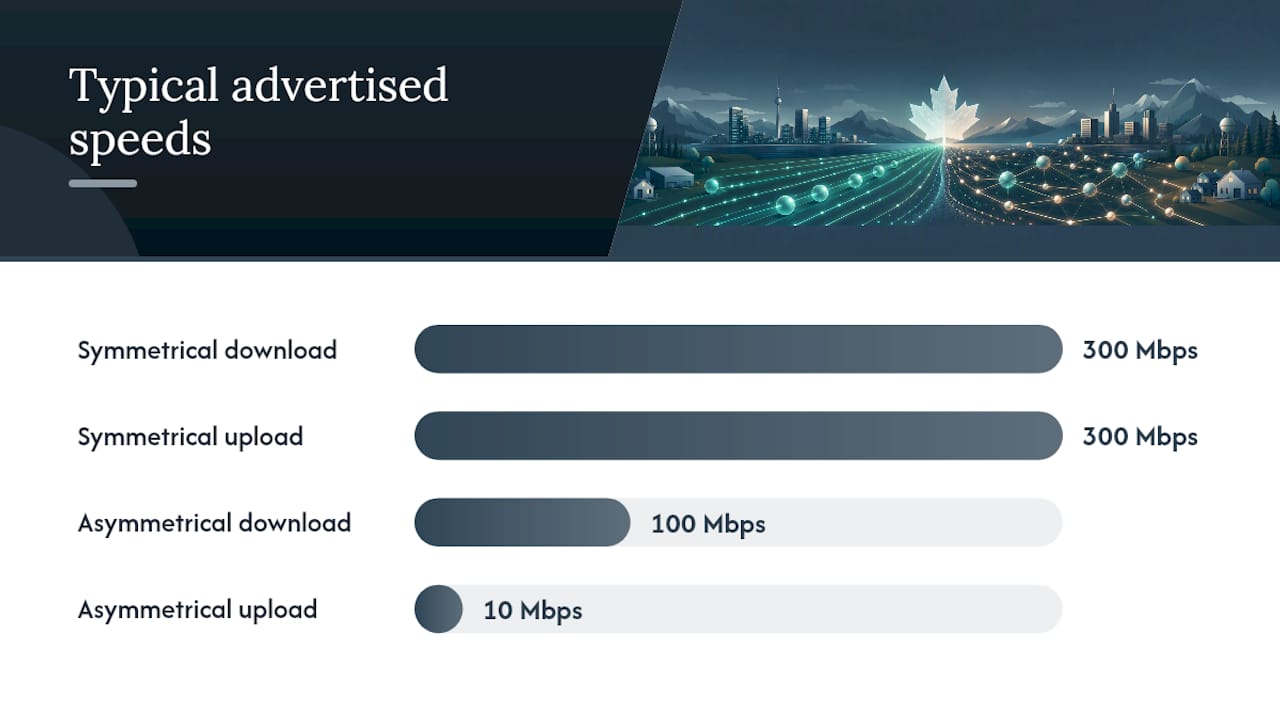
| Typical advertised speeds | 300/300 Mbps (fiber) | 100/10 Mbps (cable/DSL) |
| Underlying technology | Fiber-to-the-premises (FTTP/FTTH) | Cable (DOCSIS), DSL, satellite, most fixed wireless |
| Availability in Canada | Urban and suburban; expanding via Telus PureFibre, Bell Fibe | Widely available in urban/suburban; DSL in rural areas |
| Relative price | Higher monthly cost; often requires business-grade plan | Lower entry cost; consumer plans widely available |
| Impact on VoIP and cloud tasks | Stable call quality, fast sync, no upload bottlenecks | Upload saturation risk with 3+ concurrent calls or heavy backup |
Pro Tip: Calculate your peak concurrent upload load before comparing plans. If three staff members are on Zoom calls simultaneously while a backup runs, you need at least 15–20 Mbps of reliable upload just for the calls. Add the backup and you are pushing 30+ Mbps upstream. A 500/20 Mbps cable plan fails that test; a 300/300 fiber plan handles it with room to spare. The price premium for symmetry often costs less than one hour of lost productivity per week.
Which business types should choose symmetrical vs asymmetrical?
A simple rule: if your team regularly sends data upstream during business hours, symmetry pays for itself quickly.
- Small office with cloud backup and 2–3 simultaneous VoIP calls: choose symmetrical fiber. A 100/100 Mbps plan handles calls and sync without conflict. An asymmetrical 500/20 plan will saturate during backup windows.
- Content studio uploading large video files: symmetry is non-negotiable. Uploading a 10 GB project file at 20 Mbps takes over an hour. At 500 Mbps upload, that is under 3 minutes.
- Remote-first company with frequent screen shares: a 100/100 symmetrical plan can outperform a 500/20 asymmetric plan for multi-person video meetings, because each participant's outgoing stream competes for that narrow upstream.
- Retail location with mainly POS and browsing: asymmetrical works well. Transactions and web browsing are download-heavy; a 100/10 or 150/15 plan is adequate.
- Single-location microbusiness with light cloud use: asymmetrical is fine if you have fewer than two concurrent video calls and your cloud sync runs overnight.
For businesses that cannot access fiber yet, a business-grade asymmetrical plan with a guaranteed upload SLA is a reasonable interim step. Some ISPs offer upload-priority QoS on business tiers, which helps when you cannot get symmetry.
What internet technologies are available in Canada, and which are symmetrical?
Fiber-to-the-premises (FTTP/FTTH) is the technology most capable of delivering true symmetrical speeds. Cable and DSL are structurally asymmetrical, though newer standards are narrowing the gap on paper.
| Technology | Typical download | Typical upload | Symmetry capable? | Urban/rural availability in Canada |
|---|---|---|---|---|
| FTTP/FTTH (fiber) | 300 Mbps | 300 Mbps | Yes | Urban and growing suburban; expanding rapidly |
| Cable (DOCSIS 3.1) | 100 Mbps | 10–50 Mbps | Rarely provisioned symmetrically | Urban and suburban; widely available |
| DSL (VDSL2/ADSL) | 25–100 Mbps | 5–20 Mbps | No | Suburban and rural; declining coverage |
| Satellite (Starlink) | 50 Mbps | 5–20 Mbps | No | Rural and remote; widely available across Canada |
| Fixed wireless | 25–150 Mbps | 5–30 Mbps | Rarely | Rural and semi-rural; varies by provider |
Canadian provider notes:
Telus PureFibre / Telus Business delivers FTTP to much of BC and Alberta, with symmetrical speeds on most business tiers. Telus Business plans include SLA options and dedicated upload capacity. If you are in a Telus fiber footprint, this is one of the strongest symmetrical options available in Canada.
Bell Fibe / Bell Business Fibre uses a mix of FTTP and fiber-to-the-node (FTTN) depending on your address. FTTP addresses get symmetrical-capable speeds; FTTN addresses do not. Always confirm your specific address before assuming Bell Fibe means full fiber.
Rogers/Shaw business plans run on DOCSIS 3.1 cable infrastructure in most markets. DOCSIS 3.1 can technically support higher upstream speeds, but most cable providers still provision limited upload capacity in practice. Rogers business tiers offer higher upload than consumer plans, but they are not symmetrical. Check the upload figure on the specific plan, not just the download headline.
Starlink is genuinely useful for rural Canadian businesses with no fiber alternative. Its asymmetric profile (high download, limited upload) and variable latency make it workable for browsing and light cloud use, but it is not well-suited for sustained VoIP or heavy cloud backup. Treat it as a connectivity lifeline, not a business-grade primary connection.
One caution that applies across all providers: not all fiber plans are symmetrical — some multi-gigabit plans advertise 2 Gbps download with a much lower upload figure buried in the fine print. Always read the upload number explicitly.
To check local fiber availability, visit your municipality's broadband map or the CRTC's broadband availability data. Ask your ISP directly whether your specific address is served by FTTP or a hybrid architecture.
How do you compare ISP plans and test your actual speeds?
Before signing a contract, ask every ISP these questions:
- What are the advertised download and upload speeds on this specific plan?
- Is this a shared (contended) connection or a dedicated circuit?
- What is the contention ratio on business plans?
- Does the plan include an SLA with guaranteed minimum upload and download speeds?
- What are the maintenance windows and mean-time-to-repair commitments?
- What modem or ONT is required, and does it support DOCSIS 3.1 or higher?
- Are upload-specific QoS options available on business tiers?
Once connected, test your real-world performance using Speedtest and Fast. Run tests wired directly to your router, not over Wi-Fi. Test at least three times during peak hours (9 AM–12 PM and 3 PM–5 PM on weekdays) and once during off-peak hours. Compare both upload and download results against your advertised plan.
Running wired tests at peak and off-peak hours and comparing results to advertised speeds is the standard method for validating ISP claims.
Pro Tip: Run a cloud backup or large file upload while on a video call and watch what happens to call quality. If the call degrades noticeably, your upload pipe is too narrow for your workload. That single test tells you more than any speed-test result alone.
When results fall significantly below advertised speeds during business hours, ask your ISP for a business SLA or consider a dedicated circuit.
Recommended upload speeds by activity for small businesses
- VoIP calls: plan for roughly 100 Kbps upload per concurrent call at minimum; 200 Kbps per call for comfortable headroom. Ten simultaneous calls need at least 2 Mbps dedicated upstream.
- HD group video (Zoom/Teams/Meet): approximately 4 Mbps upload per HD participant; a five-person meeting needs 20 Mbps upload just for the video streams.
- HD screen sharing: 1–3 Mbps per active share session, depending on content motion.
- Cloud sync per concurrent user: 2–5 Mbps per active sync session (Dropbox, OneDrive, Google Workspace).
- Large file transfers: size your upload speed to the time window you can tolerate. A 10 GB file at 20 Mbps upload takes roughly 67 minutes; at 100 Mbps, about 13 minutes.
- Live streaming at 1080p60: 6–10 Mbps upload per stream.
A five-person office with three video calls, two cloud sync sessions, and occasional file transfers needs a reliable 25–35 Mbps upstream minimum. A 100/100 Mbps symmetrical fiber plan covers that with room for growth. A 500/20 cable plan does not.
Future-proofing matters here. Businesses that choose slightly more upstream capacity than they currently need avoid a disruptive ISP change 18 months later when they add staff or shift to a cloud-first workflow. For disaster recovery specifically, adequate upload speed determines how quickly you can push backups offsite and restore operations after an incident.
How upload speed and local network setup affect VoIP call quality
Upload capacity and local LAN quality together determine VoIP call stability as much as ISP latency does. A fast fiber connection paired with a poorly configured internal network still produces choppy calls.

WAN upload minimums: plan for 100 Kbps per concurrent call as a floor, 200 Kbps as a comfortable target. For a 10-line office, that means at least 2 Mbps of dedicated upstream reserved for voice traffic.
QoS and VLAN configuration: voice traffic must be prioritized over data traffic at the router level. Without QoS rules, a file upload or video stream will compete with active calls for the same upstream bandwidth. A dedicated voice VLAN keeps call packets separated from general data traffic, which reduces jitter and packet loss.
Router and switch settings: use a business-grade router that supports DSCP marking and traffic shaping. Consumer routers often lack the QoS granularity needed for reliable VoIP. Managed switches allow you to tag voice traffic at the port level.
NAT and SIP ALG: disable SIP ALG on your router. SIP ALG (Application Layer Gateway) was designed to help VoIP traverse NAT, but it frequently corrupts SIP signaling packets and causes one-way audio, dropped calls, and registration failures. Most VoIP providers, including Businessvoip, recommend turning it off.
Wired endpoints: wireless connections introduce variable latency and packet loss that wired connections avoid. Desk phones and VoIP adapters should connect via Ethernet, not Wi-Fi, wherever possible.
From the Businessvoip team: "We run network checks before every on-site install. The most common issue we find isn't the ISP's upload speed — it's SIP ALG left enabled on the router and no QoS rules in place. Fix those two things and most call-quality complaints disappear before we even touch the phones."
Pro Tip: Before your VoIP system goes live, ask your provider to run a pre-installation network assessment. Businessvoip includes this as part of every on-site phone system design — checking WAN upload headroom, QoS configuration, and SIP compatibility so calls work from day one.
For multi-site and remote-office setups, size each site's upload independently based on its concurrent call count. A remote office with two staff members on calls needs the same per-call upload headroom as your main location. Assuming the main site's connection covers remote workers is a common and costly mistake.
An honest take on symmetry as a business decision
Most small businesses underestimate how quickly their upload needs grow. A team of five that runs two video calls and a cloud backup simultaneously is already pushing the limits of a standard cable plan's upstream capacity. Add one more person working remotely, and the plan that seemed adequate six months ago starts producing complaints.
The conventional wisdom is that symmetrical fiber is a premium for power users. The reality is different. For any business that runs VoIP, relies on cloud tools, or has remote staff, symmetry is closer to a baseline requirement than a luxury. A 100/100 Mbps fiber plan often outperforms a 500/20 cable plan in real business conditions, because the bottleneck is almost always upstream.
The other thing most guides miss: the internal network matters as much as the ISP plan. You can pay for a symmetrical fiber connection and still get terrible VoIP quality if SIP ALG is enabled and there are no QoS rules on your router. The ISP plan sets the ceiling; your local network determines whether you reach it.
Businessvoip can help you get VoIP-ready, whatever your ISP
Getting the right internet plan is step one. Getting your network configured to actually use that capacity for reliable VoIP is step two, and that is where most businesses need help.

Businessvoip does not sell internet access. What Businessvoip does is design, cable, program, and install your business phone system on-site, then run a full network check before a single phone goes live. That means verifying your upload headroom, configuring QoS, disabling SIP ALG, and confirming your router and switches can handle the call load. Fixed monthly pricing, no annual increases, and a lifetime warranty on rented phones. Businessvoip has been doing this for Ontario businesses since 2005, and the team serves locations within about 150 km of Ancaster, with province-wide coverage for larger projects. To get a network check and phone system design review, visit Businessvoip and start the conversation.
Sources
- What Is Symmetrical Internet? Benefits, Drawbacks and Providers
- Symmetrical vs. Asymmetrical Internet: Speed Differences