
A cloud based communication platform is an integrated, internet-hosted system that consolidates voice calls, video conferencing, messaging, and team collaboration into one managed solution. The industry term for this category is Unified Communications as a Service, or UCaaS. Ontario small businesses are adopting UCaaS at a fast pace because it replaces fragmented phone systems, email chains, and separate video tools with a single, always-on environment. Top-tier platforms guarantee 99.999% uptime, which translates to less than six minutes of downtime per year. That level of reliability is the baseline expectation for any serious business communication system in 2026.
What are the main features of a cloud based communication platform?
Cloud communications platforms integrate voice, video, messaging, and collaboration into centralized, cloud-hosted solutions built to scale with your business. That means you manage every communication channel from one admin dashboard instead of juggling three or four separate subscriptions.
The core feature set small businesses should expect includes:
- Unified channels: Voice calls, video meetings, team chat, and file sharing all live in one interface. Your staff stops switching between apps mid-conversation.
- AI-driven automation: Call routing, voicemail transcription, and workload balancing run automatically. AI automation capabilities recognized in Gartner's 2025 Magic Quadrant reduce the administrative load on customer service staff significantly.
- Open APIs and integrations: A well-built platform connects to your CRM, billing software, or scheduling tools without custom development work.
- Auto attendant and IVR: Callers reach the right person or department without a receptionist. A properly configured auto attendant system handles after-hours routing, holiday greetings, and call queues automatically.
- Scalable user licenses: You add or remove seats in minutes. No hardware order, no technician visit.
Pro Tip: Before you sign any contract, ask the vendor for their actual uptime logs from the past 12 months. A published SLA and a real track record are two different things.
The practical impact of unified channels is larger than most business owners expect. When your team stops toggling between a desk phone, a video app, and a messaging tool, they recover real time every day. That recovered time compounds across a 10-person team into measurable productivity gains over a quarter.

How do cloud platforms support small business flexibility and scalability?
Cloud infrastructure enables easy scaling of users and features without capital investment in hardware. That single fact changes the economics of business communication for small teams in Ontario.
Here is how flexibility plays out in practice:
- Remote and hybrid work support. Cloud platforms support remote and hybrid teams through virtual collaboration spaces, video conferencing, and shared messaging that work from any device and any location. A staff member working from Guelph connects to the same system as a colleague in your Ancaster office.
- Pay-as-you-go pricing. Cost efficiency in cloud communication comes from software-based deployment and the elimination of traditional hardware investment. You pay for what you use, and you stop paying when you downsize.
- Fast deployment. A cloud system can go live in days, not weeks. There is no PBX cabinet to install, no punch-down blocks to wire, and no waiting for a carrier to provision analog lines.
- Multi-site and remote office support. If your Ontario business has a second location or staff working from the US or UK, a cloud platform treats every endpoint as part of the same phone system. Businessvoip has supported exactly this kind of multi-site setup for Ontario clients since 2005.
- Seasonal scaling. Retailers, campgrounds, and staffing agencies in Ontario often need 20 lines in summer and 8 in winter. Cloud systems accommodate that shift without penalty fees or idle hardware.
The pay-as-you-go model also removes the risk of over-buying. Traditional PBX systems forced businesses to purchase capacity for their projected peak. Cloud platforms let you match your actual headcount every month.
What security and compliance considerations should small businesses evaluate?
Security is the area where cloud communication platforms differ most sharply from each other. The gap between a standard platform and a high-security solution is not a matter of degree. It is a matter of architecture.
The non-negotiable security features for any Ontario business to evaluate:
- End-to-end encryption: Effective security requires end-to-end encryption for messaging, video, and voice flows. Encryption must happen on the client side so that the provider cannot read your calls or messages.
- Zero-trust architecture: Zero-trust means no user or device is trusted by default, even inside your network. Every access request is verified before it is granted.
- Zero-knowledge design: Zero-knowledge encrypted systems encrypt all content inside the browser or app using AES-256-GCM. The server acts as a blind relay with no ability to read message content or metadata.
- Metadata protection: High-security platforms avoid logging interactions and protect metadata. Standard platforms often store metadata even when message content is encrypted. Metadata reveals who called whom, when, and for how long.
- Administrator controls and data governance: Your IT administrator should control data retention policies, user permissions, and export rights without needing to call the vendor.
"End-to-end encryption requires that not even the provider can access data contents or metadata. This necessitates client-side encryption and zero-knowledge designs to protect against leaks. Security-first organizations prioritize decentralized encryption and limited provider knowledge as baseline requirements, not optional add-ons."
Compliance requirements in Ontario vary by industry. Healthcare businesses must align with PHIPA. Financial services firms face OSFI guidance. Any business with European clients or partners may fall under NIS 2 or DORA frameworks. The right platform gives your administrator the controls needed to demonstrate compliance, not just claim it.
Pro Tip: Ask every vendor this question directly: "Can your staff read our call recordings or message content?" The answer tells you everything about their encryption architecture.
How do you choose and implement a cloud communication platform?
Choosing the wrong platform costs more than the subscription fee. It costs the time your team spends working around a system that does not fit your workflow.
Start your evaluation with these criteria:
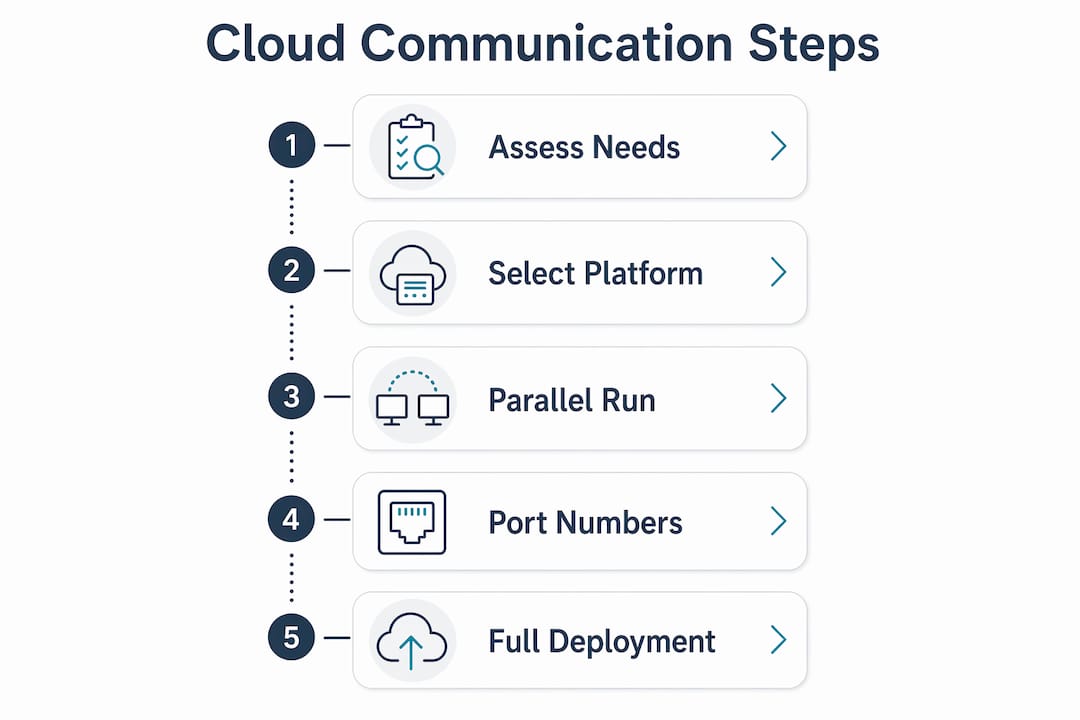
- Communication needs audit: List every channel your business uses today. Voice, video, SMS, team chat, fax. Then list every channel you want to add. The platform must cover both lists.
- Uptime and reliability: Demand a documented uptime SLA. The industry benchmark is 99.999%. Anything below 99.9% introduces meaningful risk for a customer-facing business.
- Integration requirements: Identify the three or four software tools your team uses every day. Confirm the platform connects to them via a native integration or a published API.
- Security posture: Match the platform's encryption and data governance features to your industry's compliance requirements before you sign.
- Vendor support model: Find out whether support is 24/7, whether it is handled locally or offshore, and what the average response time is for critical issues.
Deployment goes smoothest when you run a parallel period. Keep your old system live for two to four weeks while staff learn the new one. Designate one internal champion per department to answer basic questions and collect feedback. Train on the features your team will use in week one, not every feature the platform offers.
Pro Tip: Port your existing phone numbers before you cancel your old service. Number porting can take 5–10 business days, and a gap in service costs you inbound calls you will never recover.
Businessvoip handles the full deployment process for Ontario businesses, including on-site installation, programming, and cabling. That matters because the most common failure point in a cloud phone rollout is not the software. It is the physical setup that nobody tested before go-live.
Key Takeaways
A cloud based communication platform delivers the most value when you match its security architecture, uptime guarantees, and integration capabilities to your specific business needs before you commit.
| Point | Details |
|---|---|
| Uptime is the baseline | Demand a 99.999% uptime SLA and verify it with actual vendor logs before signing. |
| AI automation reduces workload | Features like call routing and transcription free your team from repetitive tasks daily. |
| Security architecture varies widely | Zero-trust and end-to-end encryption are non-negotiable for regulated industries in Ontario. |
| Scalability works both ways | Cloud platforms let you add or remove users monthly, matching your actual headcount. |
| Deployment needs a parallel period | Run your old and new systems together for 2–4 weeks to avoid service gaps during transition. |
What I have learned after years of watching businesses switch to cloud communications
The biggest mistake I see Ontario businesses make is treating a cloud communication platform as a drop-in replacement for their old phone system. It is not. It is a different category of tool, and the businesses that get the most from it are the ones that redesign their workflows around it rather than just replicating what they had before.
The second mistake is underestimating security. Most small business owners assume that because a platform is popular, it is secure. Popularity and security are not the same thing. Standard platforms often store metadata and call logs in ways that expose your business to risk, even when the marketing says "encrypted." The zero-trust and encryption standards that genuinely protect your data require a specific architecture, not just a checkbox in a feature list.
The third thing I have learned is that AI features are worth paying attention to in 2026. Emerging AI integrations will increasingly automate routine tasks, and small teams that adopt them early will operate with the efficiency of teams twice their size. Call routing, transcription, and sentiment analysis are not future features. They are available now, and they compound in value as your call volume grows.
My honest recommendation: evaluate your platform choice the same way you would evaluate a hire. Check references, test the product under real conditions, and make sure the vendor's support model matches your business hours. A cloud system that goes down at 9:00 AM on a Monday with no local support is worse than the analog system it replaced.
— James
How Businessvoip supports Ontario businesses moving to cloud communications
Ontario small businesses that want a cloud phone system without the setup headaches have a direct option. Businessvoip designs, programs, cables, and installs VoIP systems on-site across the province, so every phone works from day one.

Businessvoip has served Ontario businesses since 2005 with fixed pricing, no annual increases, and a lifetime warranty on rented phones. Whether you run a single office in Hamilton or need multi-site phone coverage across Ontario with remote staff in the US or UK, Businessvoip builds the system around your actual setup. You can design your phone system online to get a clear picture of what your business needs before any conversation with a sales rep.
FAQ
What is a cloud based communication platform?
A cloud based communication platform is an internet-hosted system that combines voice, video, messaging, and collaboration tools into one managed solution. The industry term is Unified Communications as a Service, or UCaaS.
How reliable are cloud communication platforms?
Top-tier platforms guarantee 99.999% uptime, which equals less than six minutes of downtime per year. Always request documented uptime logs, not just a published SLA, before committing to a vendor.
Is a cloud phone system secure enough for regulated industries in Ontario?
Security depends entirely on the platform's architecture. Systems with end-to-end encryption and zero-trust design protect both content and metadata, making them suitable for healthcare, financial services, and other regulated sectors.
How quickly can a small business deploy a cloud communication platform?
A cloud system can go live in days because there is no physical PBX hardware to install. Running a parallel period of 2–4 weeks alongside your existing system reduces the risk of service gaps during the transition.
What is the difference between VoIP and a cloud communication platform?
VoIP, or Voice over Internet Protocol, is the technology that carries voice calls over the internet. A cloud communication platform uses VoIP as its foundation but adds video, messaging, collaboration tools, and AI features into one integrated system.