
For Canadian businesses, cloud communications providers deliver voice, video, messaging, and team collaboration entirely over the internet, replacing on-premises PBX hardware with hosted services governed by CRTC regulations and PIPEDA privacy obligations. The right choice for most Ontario organizations is a managed, on-site-installed service where a local team handles design, cabling, programming, and training from day one. Businessvoip has served Ontario businesses since 2005 with exactly that model. To get a site-specific evaluation, contact Businessvoip directly.
Table of Contents
- What do cloud communications providers actually deliver?
- Why cloud communications matter for Canadian businesses
- Managed vs. self-service: which model fits your organization?
- Key features to evaluate for Canadian deployments
- Canada-specific requirements you cannot skip
- Migration timeline and cost factors
- How to choose a cloud communications provider in Canada
- Why Businessvoip is a practical choice for Ontario businesses
- Key Takeaways
- The part most buying guides skip
- What working with Businessvoip looks like
- Useful sources and further reading
What do cloud communications providers actually deliver?
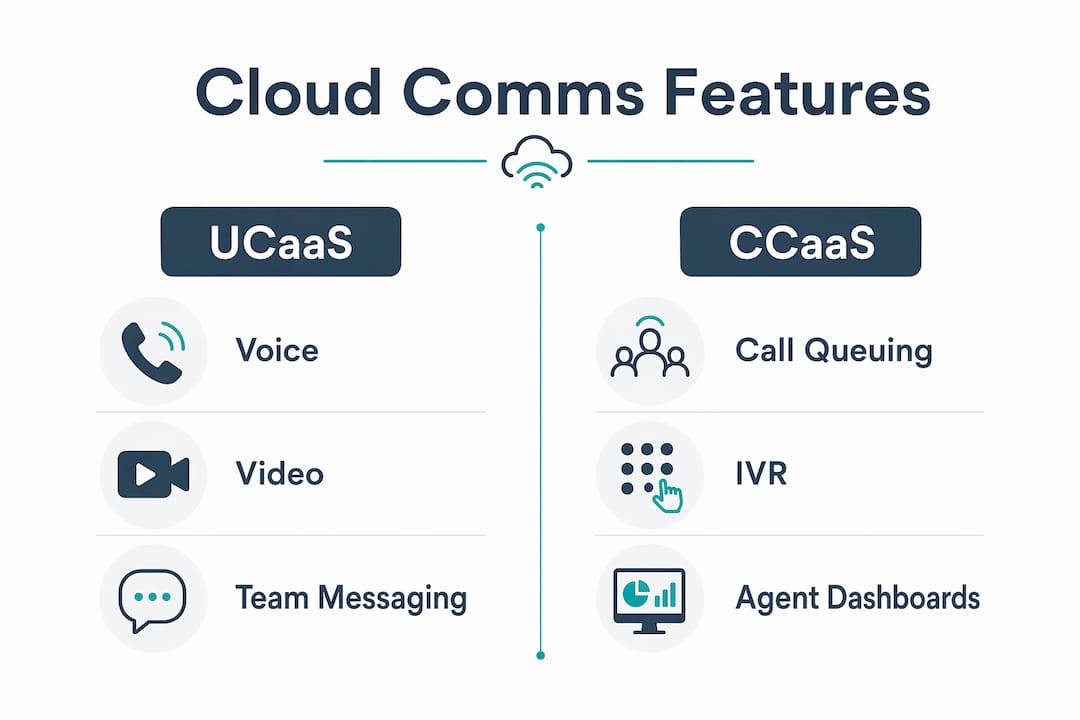
fall into three service models. Knowing which one you need shapes every vendor conversation.UCaaS (Unified Communications as a Service) bundles voice, video, team messaging, and presence into one platform. A law firm with offices in Hamilton and Kitchener uses UCaaS so staff share a single phone directory and can transfer calls between locations without a second thought.
CCaaS (Contact Center as a Service) adds inbound/outbound call queuing, IVR, agent dashboards, and reporting. A property management company fielding maintenance calls across 12 buildings runs CCaaS so every call is logged, routed, and tracked.
CPaaS (Communications Platform as a Service) exposes raw APIs for SMS, voice, and verification. Twilio and Sinch are the best-known examples. A developer team building tenant-notification workflows uses CPaaS to trigger automated texts without touching a phone system.
Typical components bundled across these service models include:
- VoIP calling with direct-inward-dial numbers
- Team chat and presence
- Video conferencing
- Contact center queuing and IVR
- REST APIs and webhook integrations
Why cloud communications matter for Canadian businesses
The operational case is straightforward: cloud voice eliminates the capital cost of PBX hardware, lets you add or remove seats in days rather than weeks, and gives remote employees the same phone experience as office staff. Managed, on-site expertise translates directly into fewer support tickets and faster end-user adoption, because the system is configured correctly before anyone picks up a handset.
For IT managers, the administrative load drops sharply. No firmware patching on physical switches, no trunk-card replacements, no after-hours calls about a dead PBX board. Finance teams get predictable monthly invoices instead of surprise hardware bills.
Top business benefits worth putting in front of a CFO:
- Reliability: carrier-grade uptime with geographic redundancy
- Scalability: add seats or new sites without a truck roll to a data center
- Simpler admin: web portal changes replace vendor service calls
- CRM integration: calls log automatically against customer records
- Remote work: mobile app gives road warriors a full desk-phone experience
Pro Tip: Before you sign any contract, ask the provider to run a QoS (Quality of Service) audit on your existing internet connection. Self-service vendors rarely offer this. A managed provider who tests jitter, packet loss, and latency before installation catches problems that would otherwise surface as choppy calls on day one.
Managed vs. self-service: which model fits your organization?
No single provider is the right answer for every Canadian business. The split comes down to complexity and accountability.
Managed, on-site providers send a technician to your building. They run cable, program every phone, port your numbers, train your staff, and leave with everything working. You call one number if something breaks.
Self-service/cloud-only providers ship hardware to your door and hand you a configuration portal. Setup is faster on paper, but the accountability for making it work sits entirely with your IT team.
Short comparison:
| Managed, on-site | Self-service/cloud-only | |
|---|---|---|
| Accountability | Provider owns the outcome | Customer owns configuration |
| Cabling and install | Included | Customer arranges |
| Staff training | On-site, day of install | Documentation and video |
| Pricing model | Fixed monthly, no surprises | Per-user, often tiered |
| Best for | Multi-site, legacy PBX replacement | Single-site, strong internal IT |
Three questions to pick your model:
- Do you have two or more physical locations that need to share extensions and call routing?
- Are you replacing a legacy PBX with existing cabling that needs to be verified or replaced?
- Does your IT team have bandwidth to own configuration, troubleshooting, and staff training?
If you answered yes to questions 1 or 2, a managed provider almost always reduces risk and total cost. If you answered yes to question 3 and no to the first two, self-service may work fine.
Key features to evaluate for Canadian deployments
Evaluation criteria that reliably predict fit include integration depth, pricing transparency, call quality, and support experience. Map features to the business outcome they produce:
| Feature | Business benefit | When it matters most |
|---|---|---|
| Number porting | Keep existing numbers, no reprinting | Any migration from legacy PBX |
| E911 routing | Accurate emergency dispatch | Required by CRTC for all VoIP providers |
| Call recording | Compliance, training, dispute resolution | Finance, legal, contact center teams |
| Voicemail-to-email | Faster message retrieval | Field teams, executives |
| Mobile app | Full desk-phone features on cell | Remote workers, traveling staff |
| CRM integration | Automatic call logging | Sales and support teams |
Support-level questions matter as much as the feature list. Ask specifically: Is installation on-site or remote? What is the SLA for a full outage versus a degraded-quality issue? Are support hours aligned with your business hours in Eastern Time? Who is the escalation contact if the first-level agent cannot resolve the issue?
For cloud-based phone systems in Ontario, on-site installation and local escalation paths are the two features that separate a smooth rollout from a painful one.

Canada-specific requirements you cannot skip
Canadian VoIP deployments carry regulatory obligations that differ from US deployments, and vendors who primarily serve the US market sometimes gloss over them.
E911: The CRTC requires all VoIP providers to route 911 calls to the correct Public Safety Answering Point and to validate the civic address associated with each line. If an employee moves a phone to a different floor or building, the registered address must be updated. Providers who handle this automatically, rather than leaving it to the customer, reduce your liability exposure.
Number porting: Porting Canadian numbers typically takes 5–10 business days for standard geographic numbers, though complex multi-number or toll-free ports can run longer. Common blockers include mismatched account names between the losing carrier and the gaining carrier, and numbers that are part of a bundled account that must be split first.
PIPEDA: Call recordings, voicemail data, and communications metadata are personal information under Canada's Personal Information Protection and Electronic Documents Act. Ask any provider where that data is stored and whether it crosses the border to US data centers, which subjects it to US federal access laws. Local accountability for data residency is a real differentiator, not a marketing checkbox.
Industry forecasts put cloud/mobile PBX adoption at 96% of North American organizations by the end of 2026, which means most Canadian businesses are either mid-migration or about to start one. Getting the regulatory checklist right before you sign is far cheaper than fixing it after.
Regulatory readiness checklist:
- Confirm E911 civic address validation process with the provider
- Verify data residency (Canadian data centers vs. US-hosted)
- Review PIPEDA data-handling clauses in the service agreement
- Confirm number porting process and expected timeline for your specific numbers
Migration timeline and cost factors
A realistic migration for a medium-sized deployment runs through six phases. Compressing them to save time is where most projects go sideways.
Numbered steps for your RFP timeline:
- Discovery (1–2 weeks): Audit existing numbers, extensions, call flows, and hardware.
- Network readiness (1–2 weeks): QoS testing, firewall rules, VLAN configuration.
- Number porting (2–4 weeks): Submit LOA, confirm account details with losing carrier.
- Pilot (1–2 weeks): Deploy 5–10 phones for a test group; validate call quality and routing.
- Full rollout (1–3 weeks depending on site count): On-site installation, cabling, programming.
- Training and handover (1 week): Staff training, admin portal walkthrough, documentation.
| Cost factor | One-time or recurring | Notes |
|---|---|---|
| Phone hardware (purchase) | One-time | Avoid if renting — shifts risk to provider |
| Phone rental | Recurring | Lifetime warranty with managed providers like Businessvoip |
| Cabling and installation | One-time | Often underestimated on multi-floor sites |
| Number porting fees | One-time | Varies by carrier and number count |
| Monthly service fee | Recurring | Fixed pricing eliminates annual-increase risk |
| Network upgrades | One-time | SD-WAN or QoS configuration if required |
Renting phones rather than purchasing them shifts hardware risk to the provider and, with a lifetime warranty, eliminates the replacement budget line entirely.
How to choose a cloud communications provider in Canada
Ask these questions on every vendor call:
- Do you provide on-site installation and cabling, or is setup self-directed?
- What is your E911 address-validation process, and who is responsible for keeping it current?
- Walk me through your number porting process for Canadian numbers, including typical timelines and what causes delays.
- What redundancy does your infrastructure have, and what is your SLA for a full outage?
- Where is call recording and voicemail data stored? Is it in Canadian data centers?
- What does your pricing look like in year two and year three? Are there annual increases?
Red flags to walk away from:
- No local escalation path — only a ticket system or offshore call center
- Vague answers about number porting ("it usually takes a few weeks")
- No pre-deployment network testing offered
- Pricing that changes annually with no cap
- E911 compliance described as "the customer's responsibility"
Quick yes/no vendor scorecard:
- On-site installation included
- E911 validated and provider-managed
- Canadian data residency confirmed
- Fixed pricing with no annual increases
- Lifetime warranty on rented hardware
- Local support in Eastern Time
For a deeper look at VoIP provider selection criteria specific to Canadian businesses, the checklist above maps directly to the questions that separate a smooth deployment from a costly one.
Why Businessvoip is a practical choice for Ontario businesses
Businessvoip has operated in Ontario since 2005, which means the team has handled legacy PBX replacements, multi-site rollouts, and remote office integrations long enough to know where projects stall. The service model is fully managed: a local technician designs the system, runs cable, programs every phone, ports your numbers, and trains your staff on-site.
Key proof points:
- Carrier-grade infrastructure carrying tens of thousands of business calls daily
- On-site installation with cabling and programming included, not optional
- Lifetime warranty on all rented phones, eliminating hardware replacement costs
- Fixed pricing with no annual increases built into the contract
- Number porting handled end-to-end, including coordination with the losing carrier
- Multi-site experience across Ontario, with remote office integration for US and UK locations
- In business since 2005 with sector experience spanning staffing agencies, property management, and multi-site operations
For a multi-site retail chain or a property management company with buildings across the GTA, the on-site model removes the single biggest risk in any phone system migration: the gap between "the system is configured" and "every phone actually works."
Pro Tip: When requesting a proposal from any managed provider, ask them to include a network readiness report as a deliverable before installation begins. Businessvoip includes this as part of the evaluation process. A provider who skips it is passing that risk to you.
For a managed VoIP installation in Ontario, the evaluation process starts with a site visit and network check, not a generic quote form.
Key Takeaways
Managed, on-site cloud communications providers reduce deployment risk for Ontario businesses by owning installation, E911 compliance, number porting, and ongoing support under a single fixed-price contract.
| Point | Details |
|---|---|
| Model selection drives outcomes | Multi-site or legacy PBX replacements benefit most from a managed, on-site provider. |
| Canada-specific compliance is non-negotiable | E911 routing, PIPEDA data residency, and number porting timelines must be confirmed before signing. |
| Migration has six phases | Discovery through training typically runs 6–14 weeks for a medium-sized deployment. |
| Fixed pricing protects the budget | Annual price increases are a common hidden cost; confirm year-two and year-three rates upfront. |
| Businessvoip for Ontario | Businessvoip provides fully installed, warranted, fixed-price VoIP with on-site support since 2005. |
The part most buying guides skip
The conversation around cloud communications in Canada tends to focus on features and per-seat pricing, as if the hardest part of a phone system migration is picking the right app. It rarely is. The hard part is the gap between "provisioned" and "working" — the moment your staff picks up a phone on day one and either hears a dial tone or doesn't.
Self-service providers have made that gap the customer's problem. The economics work for them: lower support costs, faster sales cycles, and the customer absorbs the configuration risk. For a 10-person office with a technically confident IT manager, that trade-off is reasonable. For a 60-person company replacing a 15-year-old PBX across three locations, it is a significant operational gamble.
The managed model costs more per month in some cases. What it buys is accountability. One team owns the design, the cabling, the porting, the training, and the fix if something goes wrong. That is worth pricing carefully, not dismissing because the per-seat number looks higher on a spreadsheet.
What working with Businessvoip looks like
Ontario businesses that need a phone system that works from day one, not a box of hardware and a setup guide, get a different experience with Businessvoip. The process starts with a free evaluation: a network check, a site assessment, and a detailed proposal that covers every phone, every cable run, and every call flow before any equipment ships.

From there, Businessvoip's local team handles installation, programming, number porting, and staff training on-site. Rented phones carry a lifetime warranty, pricing is fixed with no annual increases, and support is local. For businesses with multiple Ontario locations or remote offices, the same team manages the full deployment.
To start your evaluation, visit businessvoip.ca/design-my-phone-system.html and request a site assessment. The evaluation is free, and the proposal will tell you exactly what to expect before you commit to anything.
Useful sources and further reading
- CRTC — VoIP and 911 obligations: The CRTC's regulatory framework for VoIP providers in Canada, including E911 routing requirements.
- Office of the Privacy Commissioner — PIPEDA overview: Plain-language summary of PIPEDA obligations relevant to communications data and recordings.
- Businessvoip.ca — Canadian VoIP providers guide: Overview of cloud communication services and provider selection criteria for Canadian businesses.
- Businessvoip.ca — Cloud PBX guide for Ontario: Technical primer on cloud PBX migration patterns for IT readers.
- 247Techify — Managed IT services for small business: How managed services reduce IT costs and risk, relevant to the business case for managed communications.