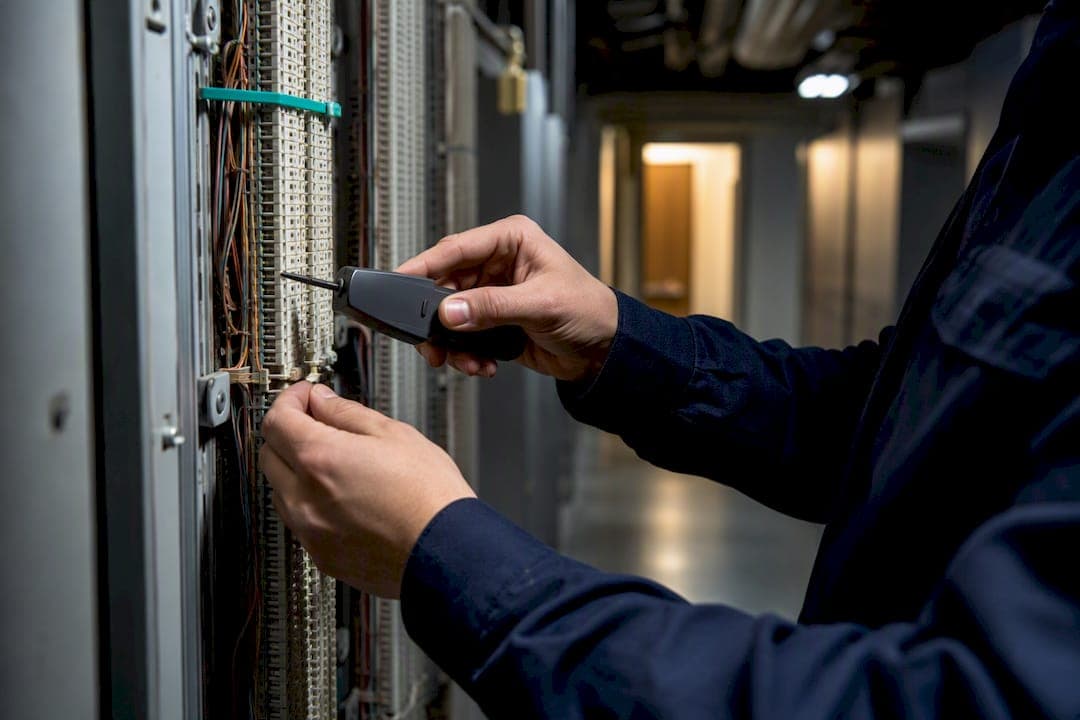
Migrating POTS lines to VoIP across multiple sites is not just feasible for Canadian businesses. It is now the standard path forward as copper infrastructure ages out of carrier networks. A safe migration rests on three non-negotiable safeguards: a complete circuit inventory across every site, a documented parallel run that includes real 911 tests, and direct coordination with your local authority having jurisdiction (AHJ) and monitoring vendor for any life-safety line. Plan for several weeks to a few months depending on site count and circuit complexity, and expect costs to vary sharply between desk-voice lines and alarm or elevator circuits.
TL;DR:
- Canadian multi-site businesses should treat every site's analog lines as already on countdown, regardless of whether formal notices have arrived, to avoid last-minute rushes.
- Inventory efforts must include analyzing carrier bills from at least 24 months and physically verifying lines at each site to prevent overlooked or forgotten circuits.
- Alarm and life-safety circuits require certified emulation devices and AHJ approval, and do not rely on generic adapters or simple VoIP claims by vendors.
- VoIP E911 must be configured with registered dispatchable locations, and thorough testing, including alarm signals and real 911 calls, is essential before cutover.
- On-site, staged installations with comprehensive testing minimize process failures, improve compliance, and are the preferred method for multi-site VoIP migration in Ontario.
Table of Contents
- Why Carrier Retirements in Canada Create Urgency for Multi-Site Operators
- How Do You Inventory Every POTS Line Across Multiple Sites?
- What Are the Best POTS Replacement Options for Each Circuit Type?
- How Does VoIP Affect 911 Service and Life-Safety Compliance?
- What Does a Realistic VoIP Migration Timeline Look Like?
- How Do You Budget the Real Cost of Migration?
- What Technical Steps Should IT Teams Complete Before Cutover?
- What Should You Ask VoIP Vendors Before Signing a Contract?
- What I've Seen Go Wrong in Multi-Site Migrations
- How Businessvoip Handles Multi-Site POTS to VoIP Migrations in Ontario
- Sources
- FAQ
Why Carrier Retirements in Canada Create Urgency for Multi-Site Operators
There is no single national shutoff date for POTS in Canada. That is the detail most business owners get wrong, and it is exactly why so many get caught flat-footed. Unlike a scenario where a regulator sets one deadline for everyone, Canadian carriers file individual discontinuance and withdrawal applications with the Canadian Radio-television and Telecommunications Commission, and each decision applies to a specific service, region, or exchange.
That case-by-case structure means your Barrie branch could face a carrier notice next quarter while your Windsor location keeps copper service for another two years. The CRTC's withdrawal process requires carriers to notify affected customers, but those notice windows are frequently tight, sometimes leaving businesses with only a few months to plan, procure, test, and cut over before service ends.
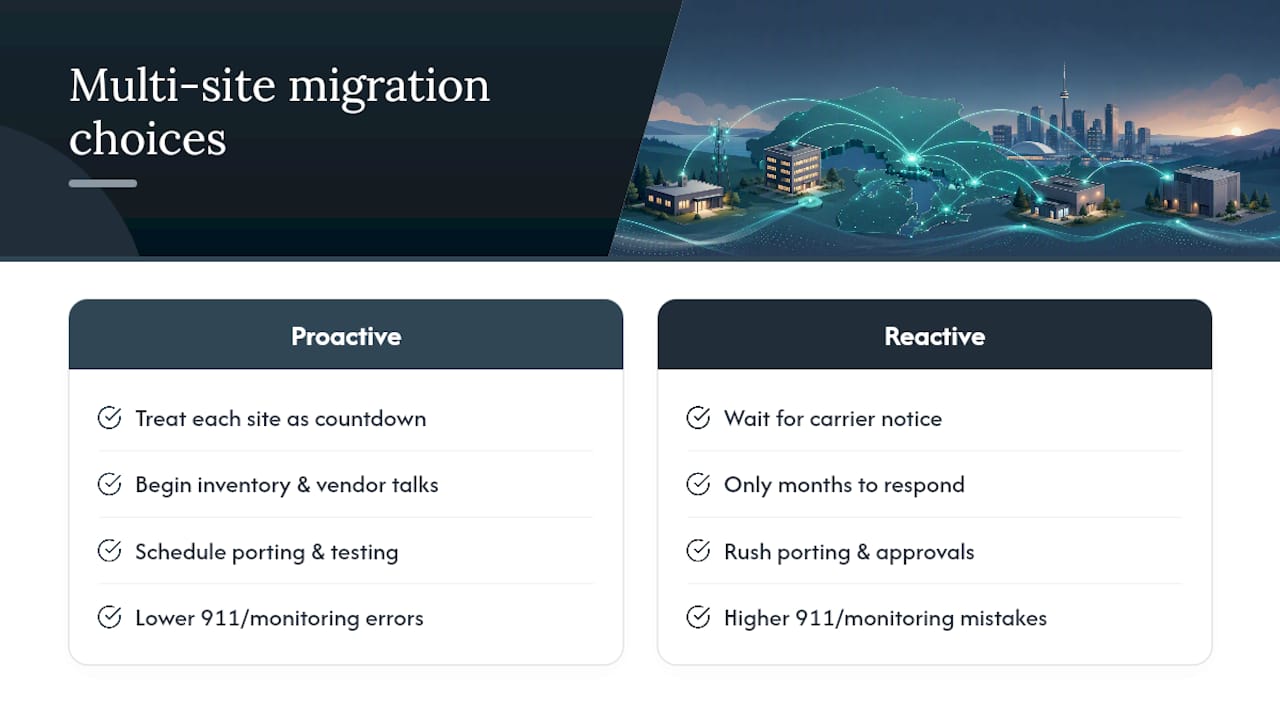
For a single-location business, that compressed timeline is stressful but manageable. For a company running five, ten, or twenty sites, it is a different problem entirely. Multi-site operators often discover that their exposure is uneven: one region's carrier is aggressively retiring copper while another region's plant stays in service years longer. Waiting for a formal notice before starting inventory work is the single costliest mistake a multi-site business can make, because the moment a notice arrives, the clock is already running on porting, testing, and AHJ approvals that take weeks on their own.
The practical response is to treat every site's analog service as a countdown that has already started, whether or not a letter has arrived yet. Businesses that begin inventory and vendor conversations early convert a scramble into a scheduled project. Those that wait usually end up rushing 911 verification and monitoring reprogramming, which is precisely where mistakes with real consequences happen.
How Do You Inventory Every POTS Line Across Multiple Sites?
You cannot replace what you have not found. That sounds obvious, but the number one reason multi-site VoIP migrations run into trouble mid-project is a forgotten analog line that nobody remembered to check until the switchover date. Fax machines, credit card terminals, elevator phones, and alarm panels routinely hide behind years-old billing codes that nobody on the current team recognizes.
Start with your carrier bills going back at least 24 months. Every line item with a phone number attached needs a name and a purpose, even the ones billed under a department code nobody remembers assigning. Cross-reference those bills against a physical site walk at every location, because billing records lag reality, and lines get repurposed, disconnected, or quietly kept "just in case" without ever leaving the invoice.
Build one master spreadsheet across all sites rather than letting each location keep its own list. Useful columns include:
- Site address and internal site ID
- Circuit/phone number and current carrier
- Function (desk voice, fax, alarm panel, elevator phone, credit card terminal, generator telemetry)
- System owner (IT, facilities, security vendor, third party)
- Monitoring or AHJ dependency (yes/no)
- Monthly cost and contract end date
- Migration priority (life-safety, business-critical, low-risk)
Prioritize life-safety and monitored circuits first, since those carry the longest lead times for approval and reprogramming. Desk voice lines, by comparison, can often move in days once numbers are ready to port. The inventory phase feels slow, but it is the phase that prevents every downstream surprise, and skipping it is how businesses end up with an elevator phone that stops working three weeks after the "successful" cutover.
What Are the Best POTS Replacement Options for Each Circuit Type?
Not every analog line needs the same replacement, and treating them as interchangeable is where a lot of migration budgets go sideways. The right approach tiers replacements by what the circuit actually does, since desk voice, life-safety, and fax/modem lines carry very different compliance and technical requirements.
Desk voice lines are the easiest tier. Hosted VoIP and unified communications as a service (UCaaS) platforms, or SIP trunking layered onto an existing PBX, handle standard office calling well. Number porting is routine, and bandwidth requirements are modest, typically under 100kbps per concurrent call. E911 configuration still needs attention here, since VoIP providers must register a dispatchable location per device or extension.
Alarm, elevator, and monitoring circuits are a different animal entirely. These require managed analog emulation devices or certified cellular communicators that carry UL or CSA certification, and they need pre-approval from both the monitoring company and your local AHJ before they can go live. A generic analog telephone adapter (ATA) bought off a shelf will not pass inspection for these applications. Skipping AHJ coordination here is the single most common way multi-site migrations end up with a fire panel that fails its next test.
Fax and modem lines have several viable paths. T.38 fax relay works over SIP trunks for straightforward office faxing. Cloud fax services eliminate the physical line entirely, which dedicated fax providers increasingly position as the simpler long-term option. Dedicated analog gateways remain useful where legacy modems (older credit card terminals, some telemetry devices) need a hard analog handoff.
Pro Tip: Do not assume your alarm vendor's "VoIP-compatible" claim means it is compatible with your specific panel model. Get written confirmation from the monitoring company that they have tested your exact hardware combination before you schedule a cutover date.
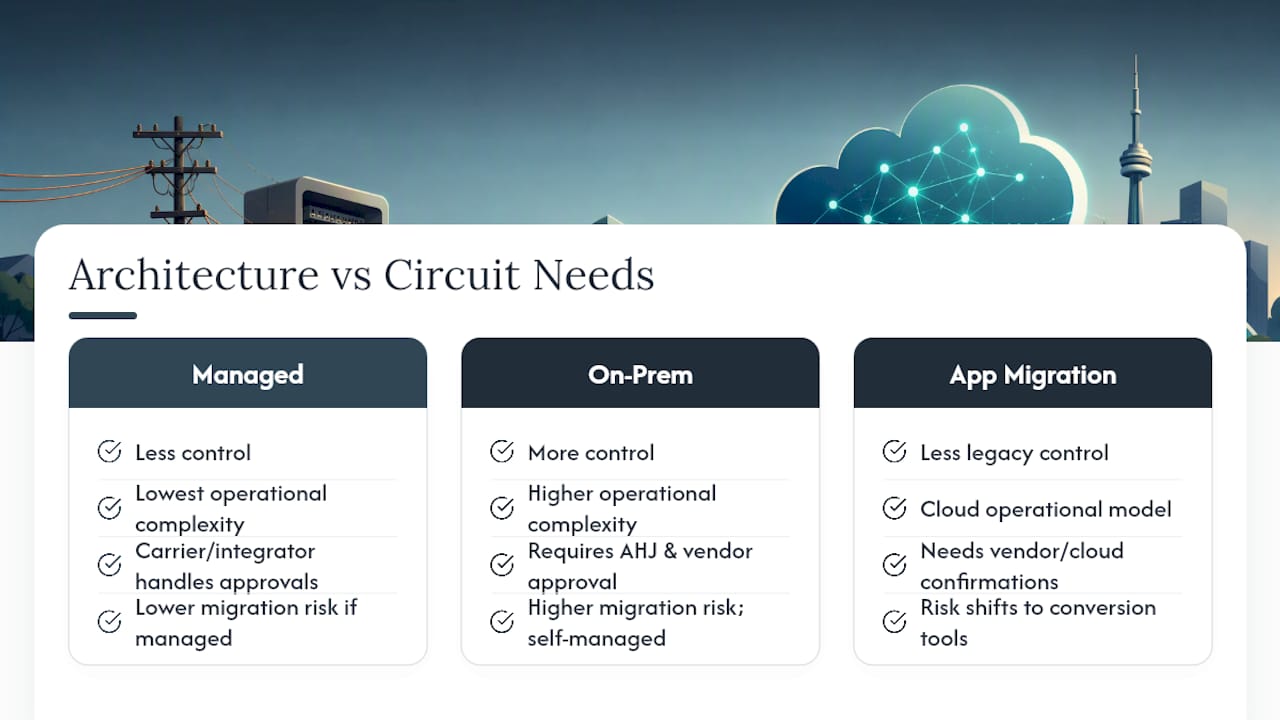
Three architecture patterns tend to cover most multi-site scenarios: fully managed replacement (carrier or integrator handles everything), on-premises gateways (you retain more control, more complexity), and full application migration (moving fax, alarm signaling, and paging into cloud-native tools). Each shifts cost and risk differently, which is worth modeling before committing one site's approach to all of them.
How Does VoIP Affect 911 Service and Life-Safety Compliance?
E911 works differently over VoIP than it does over traditional copper, and that difference carries real regulatory weight. A POTS line has a fixed physical address baked into the network. A VoIP line does not, unless someone configures a dispatchable location for it, which means every extension, every site, and every softphone needs its address registered and verified before go-live, not after.
Your VoIP provider carries responsibility for provisioning that dispatchable location correctly and for maintaining a backup path if the primary internet connection drops. That is not a detail to take on faith. Ask for documentation showing how 911 calls route from each site and what happens if the site's internet connection fails.
The bigger compliance gap shows up with monitored life-safety circuits. A successful test call to 911 does not automatically mean your alarm monitoring company or AHJ considers the line compliant. Documented, real-world testing with retained logs is what inspectors and monitoring vendors actually require, and written vendor attestations often need to sit alongside those logs before the AHJ signs off.
Build time into your project schedule specifically for this coordination. Monitoring companies need to reprogram their receivers to expect signals from a new communicator type, AHJs may require a physical inspection, and none of that happens on the same timeline as a simple desk-phone cutover. Keep every test log, attestation letter, and inspection report in a single project file. If a fire marshal or insurance auditor asks for proof six months later, you want that answer in one folder, not scattered across three vendors' inboxes.
What Does a Realistic VoIP Migration Timeline Look Like?
A phased rollout keeps a multi-site migration from becoming a single high-stakes weekend. The sequence that works consistently follows seven stages:
- Discovery — complete the circuit inventory across every site before designing anything.
- Design — map each circuit to a replacement path (UCaaS, SIP trunk, managed analog emulation, cellular communicator, cloud fax).
- Pilot — run the new system at one representative site, ideally one with both desk voice and at least one life-safety circuit.
- Parallel run — keep the existing analog line active alongside the new system and test both simultaneously.
- Staged porting — port numbers site by site or department by department, never all at once across a multi-site portfolio.
- Verification — run documented test calls, including a real 911 test and alarm panel signal tests, before decommissioning anything.
- Decommission — disconnect copper only after monitoring vendor and AHJ sign-off, with test logs archived.
The parallel-run phase deserves the most attention of the seven. Keeping analog circuits live until the new system passes documented, real-world tests is what separates a controlled migration from a gamble, and that includes 911 verification and life-safety monitoring checks, not just a quick internal call test. Our guide to phone system migration planning walks through building that test matrix site by site.
Number porting adds its own scheduling wrinkle. Porting is generally well supported across Canadian carriers, but lead times stack up fast when you are coordinating multiple carriers across multiple sites, so sequence your porting requests early and stagger them rather than submitting every site's request the same week.
Set rollback triggers before you start, not after something goes wrong. A failed 911 test, an alarm signal that does not register at the monitoring station, or call quality that fails your jitter threshold should each have a predefined "hold the cutover" response. Build a contingency reserve of two to three weeks into your master schedule for exactly this reason.
How Do You Budget the Real Cost of Migration?
A fair cost comparison needs more than an equipment quote. Your five-year total cost of ownership (TCO) model should include hardware, on-site installation labor, monitoring company reprogramming fees, cellular data plans for any communicators, ongoing maintenance, and the parallel billing period where you are paying for both the old and new service simultaneously.
Life-safety circuits deserve their own line in the model, separate from desk voice. Dual connectivity during life-safety cutovers commonly runs for weeks while monitoring companies and inspectors validate the new path, and that overlap cost is easy to underestimate if you are only modeling desk-phone TCO.
A useful worksheet compares cost two ways: per line item (what does each fax line or alarm circuit cost to replace) and per site (what does the whole location cost, including shared network upgrades). A single site with three life-safety circuits and heavy fax use will have a very different five-year TCO than a site with twelve desk phones and nothing else, even if both sites show similar line counts on paper.
What Technical Steps Should IT Teams Complete Before Cutover?
Bandwidth math comes first. Each concurrent VoIP call needs roughly 100kbps of dedicated bandwidth, so a 20-person site running 8 simultaneous calls needs headroom well beyond typical office internet packages, plus margin for jitter and latency targets under 150ms.
Network configuration matters just as much as raw bandwidth:
- Set up a dedicated voice VLAN separate from data traffic.
- Confirm Power over Ethernet (PoE) capacity on switches feeding new desk phones.
- Disable SIP ALG on your router or firewall, since it frequently breaks call setup rather than helping it.
- Configure T.38 fax relay on any SIP trunk carrying fax traffic.
Failover planning closes the gap that copper never had. A secondary ISP connection, a cellular failover device, or an SD-WAN configuration that automatically reroutes traffic keeps calls and alarm signals alive when the primary connection drops. Failover internet strategies matter more for VoIP than most IT teams initially budget for, precisely because a copper outage never took the phone system down with it.
Pro Tip: Run your 911 dispatchable-location test from the actual extension or device that will be in daily use, not from a test phone at the network closet. Address registration errors show up site by site, not network-wide.
Before go-live, run inbound and outbound test calls from every site, a documented 911 test with retained logs, and a live alarm panel signal test confirmed by the monitoring company, not just by your own internal team.
What Should You Ask VoIP Vendors Before Signing a Contract?
Not every VoIP provider is set up to handle a multi-site rollout with life-safety circuits in the mix. Screen vendors against criteria that actually predict success:
- On-site installation capability across all your Ontario locations, not remote-only setup
- Documented AHJ and monitoring-vendor coordination experience
- E911 provisioning process and dispatchable-location handling
- Number-porting track record across multiple carriers
- Warranty terms and service-level agreements in writing
Ask directly for a pilot plan, reference sites they have migrated, and copies of past cutover test logs. A vendor with real multi-site experience will have these ready without hesitation. Read the contract closely for parallel-billing terms, rollback provisions, and who is responsible for any regulatory filings tied to the migration. Vague language in any of those three areas usually means you will be the one holding the paperwork later.
What I've Seen Go Wrong in Multi-Site Migrations
The failures I see repeated most often are not technology failures. They are process failures. A branch manager forgets to mention the fax line the accounting team still uses once a month. An IT lead underestimates how long the monitoring company needs to reprogram its receiver. Nobody schedules the actual 911 test until the week of cutover, by which point there is no time left to fix a failed one.
On-site design and cabling work solves more of this than people expect, because someone is physically walking the building and finding the forgotten lines before they become emergencies. Staged rollouts, site by site rather than all at once, give you room to catch a mistake at location two before it repeats at location twelve. Businesses in Ontario have relied on this approach for local, on-site VoIP installation since 2005, working directly with alarm monitoring companies and building management on cutovers that hold up under inspection. Fixed pricing and a lifetime warranty on rented phones remove two more variables from a project that already has enough of them.
— James
How Businessvoip Handles Multi-Site POTS to VoIP Migrations in Ontario
Businesses running multiple locations across Ontario don't need a box of phones and a setup guide. They need someone who shows up, walks the site, and makes sure the elevator phone still works on cutover day. A local team designs, programs, cables, and installs the entire system on-site at every location, preventing branch managers from troubleshooting SIP configurations on their own.

That on-site model directly addresses the failure points that derail most multi-site migrations: forgotten analog tails, alarm circuits that need monitoring-vendor coordination, and 911 verification that has to happen before copper gets disconnected. Number porting, network checks, and E911 configuration are handled as part of the installation, not left as homework after a box arrives in the mail. Rented phones come with warranty coverage, and pricing is established without annual increases. For businesses running remote offices or multiple branches, the multi-site and remote office service page outlines how the rollout gets staged location by location.
If your organization is staring down a carrier withdrawal notice, or simply wants to get ahead of one, book a migration consultation through Businessvoip's Ontario business phone systems page and get a network and E911 check scheduled before your next site's copper goes away.
Sources
- POTS retirement and the business case to modernize | TechTarget
- CRTC discontinuance/withdrawal decisions (2025-310)
- POTS Line Replacement Guide - PSTN & Life-Safety
FAQ
How Do I Transfer My Phone Number to VoIP in Canada?
Number porting between carriers is standard practice in Canada and typically starts with a porting request submitted to your new VoIP provider, who coordinates with your existing carrier to release the number. Lead times vary by carrier and site count, so multi-site businesses should stagger porting requests rather than submitting every location at once.
What Is the Difference Between POTS and VoIP?
POTS (plain old telephone service) runs voice signals over dedicated copper wire pairs with power supplied by the phone network itself, which is why traditional landlines kept working during a power outage. VoIP carries voice as data over your internet connection, which means it depends on your network staying up, making failover internet planning essential for any VoIP deployment.
Can I Keep My Existing Landline Number When Switching to VoIP?
Yes, existing landline numbers generally transfer over during a VoIP migration through standard number porting. The process runs alongside your parallel-run testing period, so your old number is active on the new system before the analog line gets disconnected.
How Do I Choose a VoIP Provider for a Multi-Site Business in Canada?
Prioritize a provider with proven on-site installation experience, documented AHJ and monitoring-vendor coordination, and a clear E911 provisioning process, rather than just the lowest monthly rate. Businessvoip provides on-site design, cabling, and installation for Ontario businesses with fixed pricing and no annual increases, with current pricing available directly on its website.