
To keep phones live when you relocate, order connectivity and schedule number porting early, preconfigure every device before move day, and stage an overlap between old and new sites so calls never drop. That's the whole strategy in one sentence, and almost every downtime disaster traces back to skipping one of those three moves.
Do these three things this week:
- Notify your VoIP provider and internet service provider of your move date, even if it's still tentative.
- Start a full inventory of every phone, extension, and integration tied to your current system.
- Place orders for any new circuits or structured cabling the new site needs, since these carry the longest lead times.
If you'd rather hand the technical execution to someone else, Businessvoip runs on-site migration surveys for Ontario businesses and handles design, cabling, and programming so phones work the moment you walk in.
Key Takeaways
Protecting uptime during an office relocation depends on ordering connectivity early, documenting the existing system fully, and running a staged cutover with tested fallbacks.
| Point | Details |
|---|---|
| Order connectivity first | New circuits can take 4 to 8 weeks to provision, so order the day the lease is signed. |
| Inventory before teardown | Document every device, DDI, hunt group, and integration to avoid guesswork during reassembly. |
| Test under real load | Run a 30-minute throughput and jitter test during business hours before trusting the new network. |
| Port numbers on a tight window | Submit porting requests so the 3 to 5 business day window lands right at move-in. |
| Assign one project owner | A single decision maker with signing authority prevents conflicting vendor instructions on move day. |
| Consider a managed partner | BusinessVoip.ca designs, cables, and programs systems on-site for Ontario businesses within roughly 150 km of Ancaster, with larger projects available province-wide. |
Table of Contents
- Office Move Phone Planning Timeline: When to Start Each Task
- What to Document Before You Touch a Single Cable
- Getting the New Site's Network Ready for VoIP
- How to Port Your Business Phone Numbers Without Losing Calls
- The Cutover Sequence That Protects Your Most Important Calls
- Who Owns Each Piece of an Office Phone Relocation
- Backup Plans If Your Cutover Slips
- When to Bring in a Managed On-Site Migration Partner
- What Actually Matters Most in an Office Phone Relocation
- Get a Migration Survey Before You Sign a Lease Amendment
- Sources
Office Move Phone Planning Timeline: When to Start Each Task
Start planning the moment your move becomes probable, not once the lease is signed. Industry guidance on office relocation timing confirms that lead time scales with office size and project scope, but nearly every team underestimates how early telecom tasks need to begin.
Here's a realistic sequence:
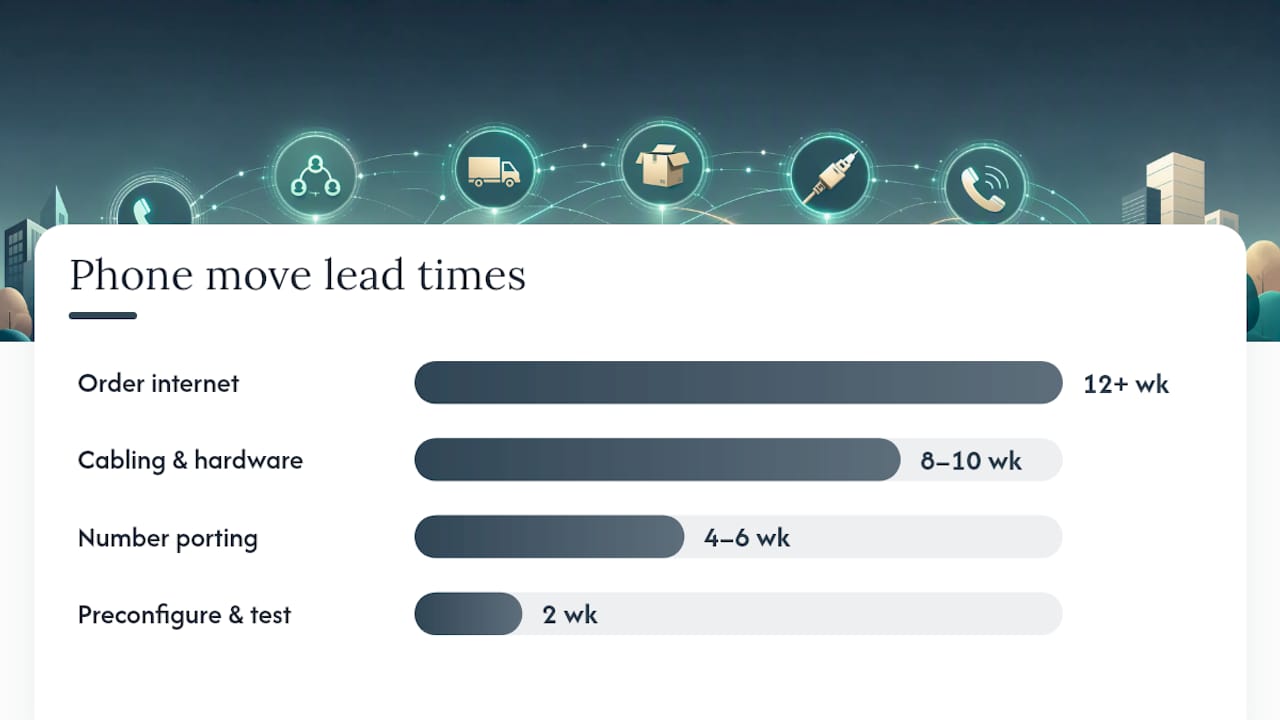
- 12+ weeks out: Order new internet circuits the moment the lease is signed. Fiber and dedicated business circuits regularly take 4 to 8 weeks to provision, longer if the building isn't already lit for telecom.
- 8 to 10 weeks out: Schedule structured cabling and confirm hardware delivery windows with your phone vendor.
- 4 to 6 weeks out: Submit number porting requests so they land close to your actual move date.
- 2 weeks out: Preconfigure and label every handset, then run a full network test at the new site under real traffic conditions.
- Move week: Execute the staged cutover with old and new systems overlapping.
A ten-desk office can often compress this into six weeks. A hundred-person call center with hunt groups and multiple integrations should plan for three to four months, especially if call volume is high enough that even a short outage means real revenue lost.
Pro Tip: Trigger your internet order the day you sign the lease, not the day you get keys. Landlords sometimes delay access for weeks, and providers won't provision a circuit without a confirmed suite number.
What to Document Before You Touch a Single Cable
Missing records are the single most common cause of post-move phone problems, according to relocation guidance from telecom specialists. If you can't reconstruct exactly how the old system was configured, you'll spend move week guessing instead of testing.
Before anyone unplugs anything, document:
- Device model and MAC address for every handset, mapped to its extension.
- Direct inward dial (DDI) numbers and which extension or hunt group they route to.
- Auto-attendant scripts, including exact wording and menu logic.
- Paging zones, fax lines, and any door-phone or intercom integrations.
- Call recording settings and retention rules.
- CRM or helpdesk integrations tied to the phone system (click-to-dial, screen pops, call logging).
Take photos of the punch-down blocks and equipment racks before disconnecting anything, and export a full configuration backup from your phone system's admin portal. If you're running legacy PBX hardware, treat this step with extra care. Legacy systems require experienced technicians who know how to map cards and slots correctly, and they rarely tolerate a rushed teardown.
Pro Tip: Build a labeled packing plan that mirrors your new seating chart, not just a box list. Matching desk assignments before move day means phones get set down in the right spot instead of shuffled around for hours.
Getting the New Site's Network Ready for VoIP
VoIP quality lives or dies on network readiness, and understanding cloud business phone system is where most office move phone planning goes sideways. (Learn more) A phone system is only as good as the internet connection and internal cabling underneath it.
Start with capacity math. Each concurrent VoIP call typically needs somewhere between 85 and 100 kbps of bandwidth depending on the codec, so a 30-person office running 15 simultaneous calls at peak needs meaningfully more headroom than a bare "check email" connection provides. Size your circuit for concurrent call volume, not headcount.
On the physical side:
- Confirm Power over Ethernet (PoE) capacity at the switch level for every desk phone.
- Verify the telecom room has adequate power, a UPS sized for your equipment load, and ventilation, since networking gear generates real heat in a closet.
- Test every cable drop with a certification tester before move day, not after phones are plugged in.
On the configuration side, set up VLANs to separate voice traffic from general data, apply Quality of Service (QoS) tagging so voice packets get priority, and confirm your firewall allows SIP and RTP traffic without aggressive NAT rewriting that breaks call setup.
One overlooked step catches more problems than any other: run a sustained throughput and jitter test, ideally 30 continuous minutes, during business hours at the new site before move day. A quick five-minute test during off-peak times will look fine and still mask the congestion that shows up once forty employees are streaming video calls and uploading files simultaneously.
How to Port Your Business Phone Numbers Without Losing Calls
Number porting typically takes 3 to 5 business days once the request is submitted, and the timing matters more than most people realize. Port too early and you risk losing service at your old location before you're ready to receive calls at the new one. Port too late and you're stuck answering calls on a line nobody's monitoring.

The safest approach: finalize the port to complete on or just before your actual move-in date, with both locations technically capable of receiving calls during the overlap window.
Carriers will typically require:
- A recent bill or account number from your current provider.
- A signed Letter of Authorization (LOA) matching the business name on file exactly.
- Confirmation of the numbers being ported, since even one typo can stall the entire batch.
The most common failure mode is a name mismatch between the LOA and the losing carrier's account records. If your business has changed names, merged, or updated its legal entity since the numbers were first issued, fix that paperwork before submitting the port request. For a deeper look at how number ownership and porting actually works, it's worth understanding what you're entitled to before you sign anything.
If porting slips, don't panic. Temporary call forwarding, a hosted DID as a stopgap, or a short recorded announcement directing callers to a temporary number can all buy you time without losing customers.
The Cutover Sequence That Protects Your Most Important Calls
A staged overlap, where the new site is fully built and tested while the old one keeps running, turns what could be a chaotic all-at-once switch into what telecom specialists describe as a quick routing change rather than a rebuild under pressure.
Here's the sequence that protects revenue-critical lines first:
- Bring the telecom room live at the new site and confirm power, network switches, and internet handoff are stable.
- Test trunks and internet independently before connecting any phones, so you isolate network issues from device issues.
- Route main published numbers to the new site and confirm inbound calls land correctly.
- Cut over priority departments first, like sales and customer support, where a dropped call has the highest cost.
- Migrate remaining desks once priority lines are confirmed stable.
At each stage, test from outside the network, not just internal extension to extension. Confirm inbound and outbound calling, voicemail delivery, call transfers, hunt group routing, auto-attendant menus, paging, and every CRM or helpdesk integration. A successful test list covers every one of these functions individually, because a single working call doesn't mean the whole system is healthy.
Set a rollback point before each stage: if trunk testing fails, don't proceed to routing main numbers. Establish a communication protocol in advance, ideally a shared chat channel where the project owner, telecom vendor, and IT lead can flag a failed test immediately rather than discovering it an hour later from an angry client.
Pro Tip: Keep the old system powered and reachable for at least 48 hours after cutover, even after everything tests green. Edge-case failures often surface only after real, unscripted call traffic hits the new setup.
Who Owns Each Piece of an Office Phone Relocation
Confusion over ownership is what turns a manageable move into a stalled one. Guidance on business phone system relocations consistently points to one fix: name a single project owner with signing authority before the move starts, not during it.
A workable split of responsibilities looks like this:
- Project owner (usually IT lead or office manager): owns the master timeline, coordinates all vendors, and has final say on go/no go decisions.
- Telecom or VoIP vendor: handles porting, trunk configuration, and device programming.
- Internet service provider: delivers and activates the new circuit on schedule.
- Cabling contractor: installs and certifies structured cabling and telecom room wiring.
- Facilities manager: coordinates physical access, power, and building timing with the landlord.
When evaluating an install partner, ask specifically whether they pre-stage and pre-program handsets before delivery, whether packing is labeled to match your new floor plan, and whether they provide written test sign-off before declaring the job done. Give every external vendor a single point of contact on your side. Vendors receiving conflicting instructions from three different employees is a documented cause of relocation delays.
Backup Plans If Your Cutover Slips
Even a well-planned move can hit a delay. Have short-term fallbacks ready before you need them.
- Immediate options: forward main numbers to staff mobiles, activate a hosted auto-attendant with a status message, or have key employees carry a mobile softphone app.
- Parallel options: keep the old service active a few extra days, use a backup internet link (even a cellular hotspot) as a bridge, or move departments in stages instead of all at once.
- Customer communication: a short, honest status line goes further than silence. Something like "We're relocating this week and updating our systems, please leave a voicemail if calls don't connect" prevents frustrated callers from assuming you've gone dark.
Pro Tip: Draft your customer-facing status message a week before the move, not the morning of. You want it ready to publish the moment a delay looks likely, not written under pressure while your phones are down.
Before your old system goes dark for good, export and securely store a final backup of all configuration data, extension lists, and voicemail greetings. If your provider stores call recordings or voicemail-to-email archives, confirm those records transfer or remain accessible; some compliance obligations (particularly in regulated industries like finance or healthcare) require retained call records for a set period even after you've switched systems or providers. Confirm with your provider whether any regulatory retention requirements apply to your industry before decommissioning the old service entirely.
When to Bring in a Managed On-Site Migration Partner
Some of this work is well within reach for a capable internal IT team. Complex moves involving legacy PBX hardware, multiple hunt groups, or tight uptime requirements are a different story, and that's usually where a local, on-site partner earns its cost.
Businessvoip has provided fully installed and supported VoIP phone systems for Ontario businesses since 2005, with a local team that designs, programs, cables, and installs on-site rather than shipping a box of phones and leaving customers to sort out the configuration themselves. The company serves businesses within roughly 150 km of Ancaster directly, with larger projects handled province-wide, including multi-site and remote office deployments.
The difference between a phone system that "arrives" and one that actually works on day one usually comes down to whether someone programmed and tested every extension on-site before your team ever picked up a handset.
Consider a DIY approach if you're running a small, modern hosted VoIP setup with straightforward extensions and no legacy hardware. Consider a managed partner if you have complex call routing, multiple locations, or simply can't afford the risk of guessing your way through cutover.
What Actually Matters Most in an Office Phone Relocation
Most office move checklists treat phone systems like an afterthought bolted onto a furniture and boxes timeline. That's backward. The network and telecom work needs its own project plan with earlier deadlines than the rest of the move, because circuit provisioning and number porting don't care about your moving truck's schedule.
The conventional advice, "call your provider a few weeks before," undersells how much lead time modern connectivity actually requires. An 8-week fiber provisioning delay doesn't shrink because your move date arrived. What gets missed most often isn't the phone hardware. It's the network prep behind it: PoE capacity, telecom room power, and a peak-load test that actually mimics real business traffic instead of a quiet five-minute check.
If you take one thing from this guide, make it this: name a single project owner before you do anything else. Every fallback, every rollback point, and every vendor escalation depends on one person having the authority to make the call when something doesn't test clean. Businesses that skip this step don't usually fail because of bad technology. They fail because three people gave three different instructions to the cabling contractor on move day.
— James
Get a Migration Survey Before You Sign a Lease Amendment
If reading through cutover sequences, VLAN configs, and porting windows made your move feel bigger than expected, that's the accurate picture, not an exaggeration. Businesses that skip the network prep are the ones calling their provider in a panic on move day. BusinessVoip.ca handles the entire process on-site: system design, cabling, programming, staff training, and number porting coordination, backed by a lifetime warranty on rented phones and fixed pricing that doesn't creep up year over year.

Instead of piecing together vendors and hoping the timelines line up, you get one local Ontario team responsible for the whole migration, from the telecom room to the last desk phone. If your business is planning a move and wants a second set of eyes on the network and phone plan before you commit to a lease, request a phone system design consult and get a realistic timeline back before you sign anything.
Sources
- How To Move Your VoIP System to a New Office | Cloudswitched
- How to Relocate Office Phones Without Downtime | iTeleco Blog
- How Far in Advance Should You Plan an Office Move? | Canadian Association of Movers
- Move a Business Phone System in Richmond, VA