
Multi-site VoIP is the right approach for almost any business running more than one office, and for most companies a hosted single-tenant cloud platform or a hub-and-spoke hybrid is the best place to start. Both give you free internal dialing between locations and one admin panel for the whole company. From here, the real work is checking your network, mapping your features, and planning a phased cutover instead of a single risky flag-day switch.
TL;DR:
- Reliable multi-site VoIP requires strong network quality, adequate bandwidth, priority QoS, and redundant internet links at each location.
- A staged migration approach, starting with a pilot site, minimizes risks and ensures call quality issues are addressed early on.
- Centralized control over features, reporting, and billing is essential, with features like local caller ID, hunt groups, and site-specific IVR.
- Proper on-site network verification and cabling checks are critical, as most deployment failures stem from wiring or misconfigured QoS.
- Hybrid or cloud architectures are suitable based on site internet reliability and control needs, with on-site support offering more consistent performance.
Table of Contents
- What Is Multi-Site VoIP, and What Does It Actually Fix?
- What Features Should You Expect From a Multi-Site System?
- Which Architecture Fits Your Business: Cloud, Hub-and-Spoke, or Hybrid?
- How Much Bandwidth and Network Reliability Does Multi-Site VoIP Need?
- What Does a Multi-Site VoIP Migration Actually Look Like?
- How Do You Pick the Right Multi-Site VoIP Provider?
- An Installer's View: Why On-Site Checks Beat Guesswork
- How BusinessVoip.ca Handles Multi-Site Rollouts
- How BusinessVoip.ca Can Help With Your Rollout
- Sources
- FAQ
What Is Multi-Site VoIP, and What Does It Actually Fix?
Multi-site VoIP puts every office on a single phone system instead of a pile of disconnected local lines. Staff share one directory and can dial each other by extension no matter which building they sit in, and calls route to the right site automatically based on rules you set once, centrally.
Before this setup, most growing companies run separate phone contracts per location, each with its own bill, its own voicemail rules, and no way for a receptionist in Guelph to transfer a call to someone in Brantford without dialing a full outside number. Telexico describes multi-site VoIP as a single hosted tenant that solves exactly this: one system, shared extensions, and per-site customization layered on top.
The outcomes decision-makers actually care about:
- Free calling between offices, since internal calls never touch the public network
- One consolidated invoice instead of five separate vendor bills
- Centralized reporting that shows call volume and answer rates by location
- Consistent customer experience no matter which office picks up
If you have two locations and no plans to add a third, a simple local system might still work. Past that, the administrative overhead of separate systems usually outweighs any savings.
What Features Should You Expect From a Multi-Site System?
A capable multi-site setup gives every location its own identity while keeping control centralized. Here's the checklist worth walking through with any vendor:
- Internal extension dialing and a central directory so any employee reaches any other by a short code, regardless of city
- Hunt groups, overflow, and cross-site transfers, so a call to a busy branch rings a backup team at another location instead of going to voicemail
- Central IVR with per-site overrides for hours, holiday schedules, and greetings that differ by location
- Centralized reporting and analytics broken out per site, plus one consolidated bill for finance
- Security basics and call recording with retention policies that can vary by location for compliance reasons
Central reporting tends to be the feature head office notices fastest. According to Telexico's analysis of multi-site deployments, the ability to see missed-call rates and answer times broken down by site is often the single biggest operational win companies report after cutover, ahead of the cost savings.
Voxago's documentation on multi-location operations adds another layer worth planning for: local caller ID and a local-number inventory per site, so a customer calling your Cambridge office still sees a local number even though the call routes through a shared cloud tenant.
Which Architecture Fits Your Business: Cloud, Hub-and-Spoke, or Hybrid?
The architecture decision usually comes down to how much you trust each site's internet connection and how much control head office needs to keep.
- Hosted cloud tenant. Everything lives with the provider. Admin is centralized, scaling to a new office takes days instead of months, but call quality at each site depends entirely on that site's own internet connection.
- Hub-and-spoke or central PBX. One location hosts the core system and other sites connect through it over a private backbone. This lowers per-site bandwidth needs but demands a solid, low-latency link between hub and spokes, or the whole chain suffers.
- Hybrid models. Common for regulated industries or sites with strict latency needs, where one location keeps local survivability while the rest run fully hosted.
- Teams Phone and SIP trunk integration. If your company already runs Microsoft 365, Teams Phone provides a cloud phone system with SIP trunking that layers calling directly into the tools staff already use, though licensing costs per user need a close look before you commit.
None of these is universally "best." A ten-site retail chain with spotty rural internet at two locations will lean hybrid; a professional services firm with strong fiber everywhere can go straight to hosted cloud.
How Much Bandwidth and Network Reliability Does Multi-Site VoIP Need?
Call quality problems almost always trace back to the network, not the phone system itself. Guides covering multi-site deployments consistently point to per-site broadband capacity, quality of service, and redundancy as the gating factors for reliable call quality.
- Estimate bandwidth per user. A standard VoIP call using a common codec generally needs a small measurable amount of dedicated bandwidth per active call in each direction. Multiply by your busiest simultaneous call count per site, then add headroom.
- Configure QoS with DSCP marking. Voice traffic needs priority over email and file transfers, or calls break up the moment someone starts a large download.
- Set latency and jitter targets. Aim for round-trip latency and jitter low enough to ensure consistently clean audio.
- Add redundant WAN links. A second internet connection, even a basic cellular failover, prevents one office from going silent when the primary line drops.
- Confirm E911 location data is registered correctly for every site, since emergency dispatch depends on it.
- Run a call-quality smoke test before go-live: place calls during peak network hours and check for choppy audio or dropped packets.
Pro Tip: Ask your network team to run a packet capture during a peak-hour test call and check the DSCP tags on the voice packets. If they show up as best-effort instead of priority-marked, your QoS configuration isn't actually working, even if someone told you it was set up. Our QoS and DSCP marking guide walks through exactly how to verify this.
What Does a Multi-Site VoIP Migration Actually Look Like?
Migrating five offices onto one system in a single weekend is how rollouts go wrong. A staged approach spreads the risk.
- Inventory everything first. Document existing phone systems, every phone number per site, and each location's network setup.
- Map the design. Decide which numbers stay local, how caller ID appears per site, and how IVR and business hours differ by location.
- Pick a pilot site. Choose one manageable office to go live first and work out the kinks before touching the rest. Vendor guidance on multi-location rollouts consistently recommends this pilot-first approach over a single company-wide cutover.
- Provision devices. Decide between zero-touch provisioning for simple sites and onsite cabling and VLAN checks for anything more complex.
- Port numbers and run acceptance tests. Confirm inbound and outbound calling, voicemail delivery, and E911 registration work correctly at each site before declaring it done.
How Do You Pick the Right Multi-Site VoIP Provider?
The evaluation gets easier once you know which questions actually separate a serious provider from one that will hand you a box of phones and disappear.
Must-have criteria worth screening for:
- Documented experience rolling out systems across multiple locations, not just single offices
- Clear SLA terms and defined support hours, including who handles emergencies
- On-site engineering as an option, not just remote support over the phone
- Warranty terms on any phones you rent or lease
Questions worth asking directly in an RFP or vendor call: How long does provisioning take per new site? Do you run a network check before installation, or after problems show up? How is E911 handled when a remote worker connects from home?
On budget, ask whether pricing is per-user or per-site, and whether phones are rented or purchased outright, since that changes your long-term costs significantly.
Red flags to walk away from: no mention of a network assessment, no phased migration plan offered, and vague or evasive answers about E911 location handling.
An Installer's View: Why On-Site Checks Beat Guesswork
Most rollout failures I've seen described in the field come down to the same three things: a VLAN wired wrong at one branch, QoS that was configured on paper but never verified on the wire, and number porting that missed a line nobody remembered to document. These problems rarely show up until go-live day.
Zero-touch provisioning works fine for a straightforward single-site add. Multi-site rollouts with mixed network conditions benefit from someone physically checking cabling and switch configuration first. A staged rollout with real acceptance testing at each site catches these issues while they're still cheap to fix.
— James
How BusinessVoip.ca Handles Multi-Site Rollouts
Every checklist item above (network verification, phased cutover, per-site configuration) is exactly what shows up on real deployments. Businessvoip for Ontario businesses, rather than shipping equipment and leaving the wiring and configuration to your own staff.
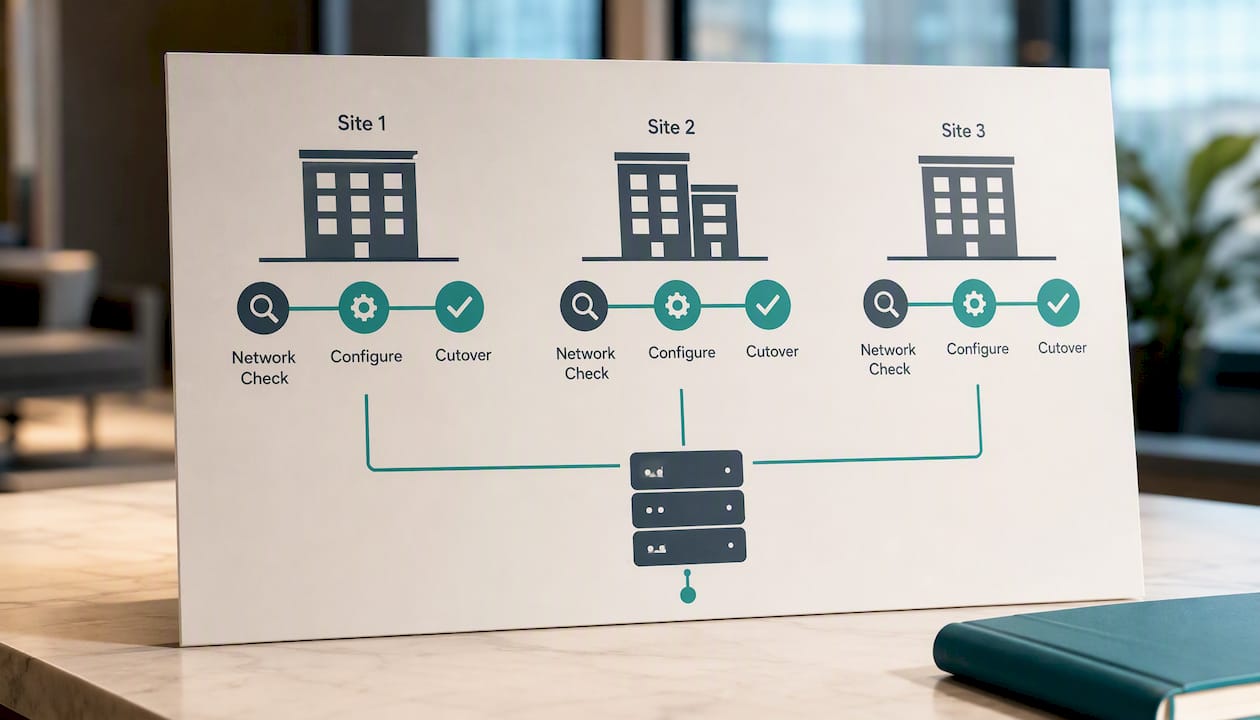
That matters directly for multi-site work: on-site system design means someone checks each location's network before phones ever go live, not after call quality complaints start coming in. Fixed pricing avoids the annual increases common with hosted plans, and rented phones come with warranty coverage, reducing unexpected budget costs for handset failures.
How BusinessVoip.ca Can Help With Your Rollout
Skipping the network check is the single most common reason multi-site rollouts run into trouble after go-live, more often than any feature gap or pricing dispute. A managed, on-site approach catches wiring and configuration problems before staff ever pick up a handset, instead of after the complaints start.
Businessvoip designs, cables, and installs multi-site systems in person across Ontario, including projects in multiple locations province-wide and remote offices for some clients. That includes:
- Full system design and per-site number and IVR mapping
- On-site cabling, VLAN checks, and phone installation
- Staff training and post-cutover acceptance testing
- Fixed pricing with no annual increases, and a lifetime warranty on rented phones
If you're planning a rollout across two or more offices, start with a phone system design assessment so someone reviews your network before you commit to an architecture. Businesses in Burlington, Kitchener, Cambridge, Guelph, and Brantford can also check local Ontario coverage and pricing directly.
Sources
For technical depth beyond this guide, Microsoft's own documentation covers Teams Phone System architecture in detail. Businessvoip's general VoIP guide and multi-site and remote office overview cover operational specifics for Ontario deployments.
FAQ
Is VoIP Legal in Canada?
Yes. VoIP is fully legal for business and residential use in Canada, and it's the standard technology behind most modern business phone systems, including Businessvoip's installations.
What Is the Best VoIP Setup for a Company With Multiple Offices?
There's no single "best" app, since multi-site needs vary by network quality and compliance requirements, but a hosted cloud tenant or hybrid architecture with centralized admin and per-site customization covers most businesses well. A fully installed, on-site supported system tends to outperform a self-managed one for companies without dedicated IT staff at every location.
What Is a Disadvantage of Using VoIP?
Call quality depends entirely on your internet connection, so a site with weak bandwidth, poor QoS configuration, or an unreliable WAN link can experience choppy audio or dropped calls, which is why network readiness checks matter before cutover.
Can I Just Plug a VoIP Phone Into My Router?
You can plug a phone directly into a router for a very basic setup, but multi-site deployments need proper VLAN configuration and QoS marking to keep voice traffic prioritized. Skipping this step is one of the most common causes of call quality complaints after installation.
How Long Does a Multi-Site VoIP Migration Take?
Timelines vary by site count and network readiness, but a phased rollout starting with a pilot site typically takes a few weeks per phase rather than a single weekend cutover, which reduces the risk of company-wide downtime.