
Yes, you can fax over VoIP, and the fix depends on what your carrier and endpoints support. Use T.38 relay when the entire path supports it. If not, configure G.711 passthrough with strict settings. If both keep failing, switch to cloud fax.
- T.38 relay demodulates the fax at the gateway and sends it as resilient data packets, tolerating the packet loss that kills a fax call. Best option when your carrier and SBC both support it end to end.
- G.711 passthrough carries the fax as raw audio with no compression. It can work, but only on a nearly perfect network with zero jitter tolerance.
- Cloud fax / fax-to-email skips the VoIP path entirely and routes documents as encrypted files. The most reliable choice when either method above keeps failing.
Quick stat: fax modems tolerate almost no data loss. Even a fraction of a percent of packet loss can corrupt fax tones enough to drop the call. Your first move: confirm with your carrier whether T.38 is supported on your trunk, then test both modes before committing to hardware changes.
Key Takeaways
Reliable fax over VoIP depends on matching the transport method (T.38, G.711 passthrough, or cloud fax) to what your carrier, ATA, and network can actually support.
| Point | Details |
|---|---|
| T.38 is the default choice | It packetizes fax data with redundancy, making it resilient to packet loss that breaks passthrough methods. |
| Passthrough needs strict settings | Pin the codec, disable echo cancellation and VAD, and use a wired connection with near-zero packet loss. |
| Watch the thresholds | Packet loss above a very low threshold or jitter above a small number of milliseconds is a common cause of failed fax transmissions. |
| Cloud fax sidesteps the problem | Routing documents as encrypted email or API attachments avoids VoIP transport issues entirely. |
| Businessvoip handles the setup | Its on-site team audits trunks, configures ATAs and SBCs, and pilots T.38 or cloud-fax migrations for Ontario businesses. |
Table of Contents
- Why Fax Over VoIP Breaks and How T.38 Fixes It
- Three Ways to Actually Send Fax Over IP
- Configuration Checklist for T.38 and G.711 Passthrough
- Diagnosing a Failed Fax: What to Check First
- Should You Keep Analog Fax or Migrate to Cloud Fax?
- How Businessvoip Tests and Deploys Reliable Fax Over IP
- Why the Standard Fax Troubleshooting Advice Falls Short
- Get Your Fax Configuration Tested and Fixed On-Site
- Frequently Asked Questions
- Sources
Why Fax Over VoIP Breaks and How T.38 Fixes It
Traditional fax machines were built for the analog phone network, using the ITU-T T.30 protocol, which assumes a fixed-bandwidth, always-on circuit with predictable timing. VoIP doesn't offer that. Voice and fax data get chopped into packets, compressed, and reassembled, and that process introduces jitter, out-of-order delivery, and occasional lost packets. A voice call shrugs this off because human ears fill in the gaps. A fax modem cannot. Its tones are precise frequency-based signals, and even brief distortion turns a page into garbage or drops the call outright.
G.711 passthrough tries to route around this by carrying the fax as uncompressed audio, essentially telling the network "don't touch this, just pass it through." That works, but only if every hop along the way cooperates: no transcoding to a lossy codec like G.729, no aggressive jitter buffering, no echo cancellation stripping out the modem tones. On a clean, low-latency path it's usable. On anything less, it usually isn't.
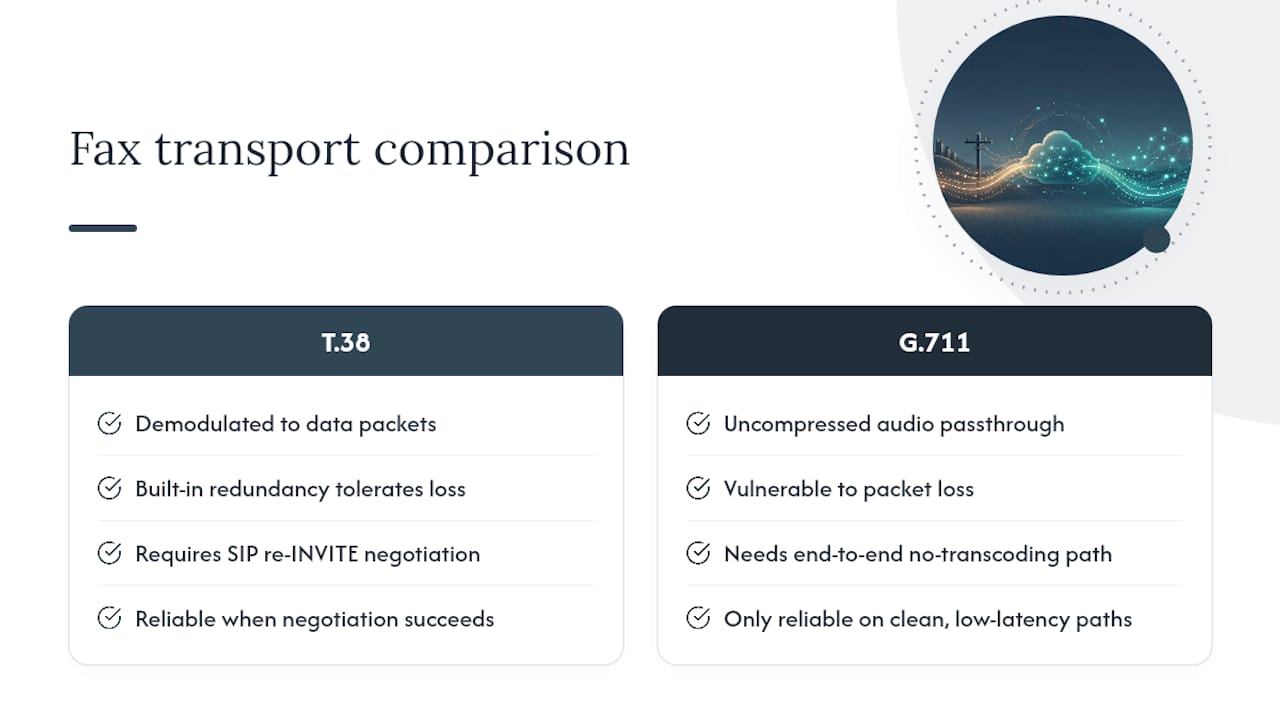
T.38 takes a different approach entirely. Instead of treating fax as audio, it demodulates the signal at the gateway, converts it into structured data packets with built-in redundancy, and remodulates it back into fax tones at the receiving end. That redundancy is what makes it resilient to packet loss in a way G.711 never can be.
The catch is negotiation. Switching a call to T.38 mid-stream requires a SIP re-INVITE, and if a firewall, SIP ALG, or misconfigured SBC blocks or mangles that re-INVITE, the call falls back to G.711 or fails altogether. This single point of failure explains most "T.38 doesn't work" complaints.
Three Ways to Actually Send Fax Over IP
-
T.38 via ATA or SBC. This should be your default. Confirm with your carrier that T.38 is supported on your trunk, and confirm your ATA or SBC also supports it. Then place a live test fax and watch for the SIP re-INVITE in your call logs. If it negotiates cleanly, you're set. This method performs well even on links with moderate jitter or occasional loss, since redundancy in the T.38 stream absorbs the damage.
-
G.711 passthrough with strict settings. When a carrier or endpoint doesn't support T.38, passthrough is the fallback. It only holds up if you pin the codec to G.711 (PCMU or PCMA), disable echo cancellation and voice activity detection, and run the ATA on a wired connection with near-zero packet loss. Many field deployments configure devices to attempt T.38 first and fall back to G.711 automatically, which covers mixed-endpoint environments without manual intervention on every call.
-
Cloud fax or fax-to-email. This bypasses the VoIP transport problem entirely. Documents move as encrypted files over your data connection instead of as audio over a voice trunk, and providers deliver faxes as email attachments or through an API or web portal. For regulated industries, this also brings an audit trail and centralized archiving that a physical fax machine never offered. If your team already handles voicemail through email workflows, cloud fax fits into the same mental model.
Configuration Checklist for T.38 and G.711 Passthrough
Run through this before you blame the network for a failed fax, or consider managed telephony solutions for professional setup assistance like Call Time.
Carrier side:
- Confirm T.38 support on your specific trunk, not just "VoIP support" in general.
- Ask whether the carrier permits SIP re-INVITE for mid-call codec switching.
- Request a dedicated test number and a testing window with support staff on standby.
ATA or PBX side:
- Set the fax mode explicitly to T.38, with G.711 passthrough as fallback only.
- Pin the codec to PCMU or PCMA. Never let it negotiate down to G.729 or another compressed codec.
- Disable echo cancellation and voice activity detection on any port used for fax.
- Set a fixed (not adaptive) jitter buffer.
- Lower the fax machine's baud rate to 14.4 kbps and disable Super G3, which most IP paths can't support reliably.
Network side:
- Hardwire the ATA. Never run fax over Wi-Fi.
- Enable QoS and prioritize the fax/voice VLAN.
- Run packet loss, jitter, and latency tests during actual business hours, not just at 2 a.m. when the network is idle.
Pro Tip: Test T.38 and G.711 passthrough back to back using the same document and the same time of day. If T.38 succeeds and passthrough fails, you have your answer, and you can stop tweaking the passthrough settings entirely.
Diagnosing a Failed Fax: What to Check First
- Pull the SIP trace. Look for whether the re-INVITE to T.38 even appears. If it's missing, blocked, or your SBC strips the SDP attributes for image/t38, the call never had a chance to switch modes.
- Check for mid-call transcoding. If your carrier or SBC transcodes the audio leg, any fax tones riding on G.711 get mangled instantly.
- Measure the network in real numbers. Packet loss above roughly 0.1% and jitter above 20 ms are common breaking points for fax, well below what a voice call would even notice. Tools like a basic SIP packet capture (Wireshark) or your carrier's built-in QoS dashboard will show both.
- Try field fixes. Force the fax machine down to 14.4 kbps, isolate the ATA on its own network segment, and if the deadline is urgent, send the document through cloud fax while you troubleshoot the underlying path.
Fragility check: fax modems have essentially no error correction for lost audio, which is why even sub-1% packet loss rates that voice calls tolerate without complaint can break a fax transmission outright.
Should You Keep Analog Fax or Migrate to Cloud Fax?
Keep an analog line or a managed POTS replacement if you run high fax volumes on legacy hardware or face a strict regulatory mandate tied to a physical line. Migrate to cloud fax when you need audit trails, encryption, and centralized archiving without maintaining fax machines at every site. Either way, weigh setup cost against the maintenance burden of keeping old hardware alive on a network it was never designed for.
How Businessvoip Tests and Deploys Reliable Fax Over IP
Getting T.38 to negotiate correctly across a carrier trunk, an SBC, and an ATA takes hands-on configuration work, not guesswork from a manual. Businessvoip has been designing and installing on-site business phone systems since 2005, running on carrier-grade infrastructure that carries tens of thousands of business calls daily across Ontario.
- On-site audit of your current trunk, ATA, and network path to identify where fax negotiation is failing.
- T.38 pilot testing with real test numbers before rolling changes out company-wide.
- Managed POTS replacement or cloud-fax migration planning for teams ready to leave legacy hardware behind.
Pro Tip: If you manage multiple sites with different carriers, ask about session border controller configurations that handle per-leg negotiation. It's often the missing piece when T.38 works at one office but not another.
A phone system that hasn't been tested for fax negotiation is a phone system with a blind spot nobody notices until a contract or invoice fails to arrive.
Why the Standard Fax Troubleshooting Advice Falls Short
Most guidance on fax over VoIP stops at "enable T.38" and calls it solved. That advice ignores the part that actually determines success: whether your SBC and carrier correctly pass the SIP re-INVITE that switches the call into T.38 mode in the first place. I've seen the negotiation fail silently more often than the fax itself fails after negotiation succeeds.
The bigger blind spot is treating fax as a codec problem instead of a network problem. Teams tweak baud rates and toggle Super G3 for weeks when the real issue is 0.3% packet loss on an under-provisioned link. Fix the network first, then tune the fax settings.
My honest read: if you're troubleshooting fax failures more than once a quarter, stop patching and either commit fully to a properly tested T.38 configuration or move the workload to cloud fax. Split-the-difference setups, where nobody fully tests T.38 and nobody fully commits to cloud fax, waste more IT hours than either clean option ever would.
Get Your Fax Configuration Tested and Fixed On-Site
Reading about T.38 negotiation is one thing. Getting your specific carrier, SBC, and ATA to actually cooperate is another, and that's the gap Businessvoip closes for Ontario businesses. Instead of shipping you a box of equipment and a settings PDF, Businessvoip's local team comes on-site, tests your trunk for T.38 support, configures the ATA or SBC settings directly, and confirms the fix with real test faxes before calling the job done.

This matters most for businesses juggling fax alongside a full phone system rollout, tech companies and ISPs, multi-site operations, or any office where a failed fax means a missed contract. If that sounds like your situation, start with a phone system design consultation or look at how Businessvoip supports tech companies and ISPs with the same on-site, carrier-grade approach it's used since 2005. Fixed pricing means no surprise increases once the fax problem is solved for good.
Frequently Asked Questions
Is it possible to fax over VoIP reliably? Yes. T.38 relay is the most reliable method when your carrier and endpoints support it. G.711 passthrough with strict settings and cloud fax are dependable fallback options.
What's the difference between T.38 and G.711 passthrough for fax? T.38 converts fax into resilient data packets with redundancy, tolerating network imperfections. G.711 passthrough sends fax as raw uncompressed audio, which only survives on a nearly flawless connection.
How do I send a fax to email over VoIP? Cloud fax services route incoming faxes as email attachments or through an API, bypassing the VoIP transport layer that causes most fax failures.
What packet loss level causes fax failures? Packet loss above roughly 0.1%, or jitter above 20 ms, is enough to disrupt most fax transmissions, well below the threshold that affects a normal voice call.
Should I switch to cloud fax instead of fixing my VoIP fax setup? If T.38 and G.711 passthrough both fail consistently after proper configuration, cloud fax is a more dependable long-term solution, especially for regulated industries needing audit trails.
Sources
- Fax Over IP: Why Faxing Over VoIP Is Unreliable
- Fax over IP: T.38 vs G.711, What Survives VoIP | SIPNEX
- Using a fax machine with VoIP | Lumen
- Paxyl Fax | Secure Cloud Faxing