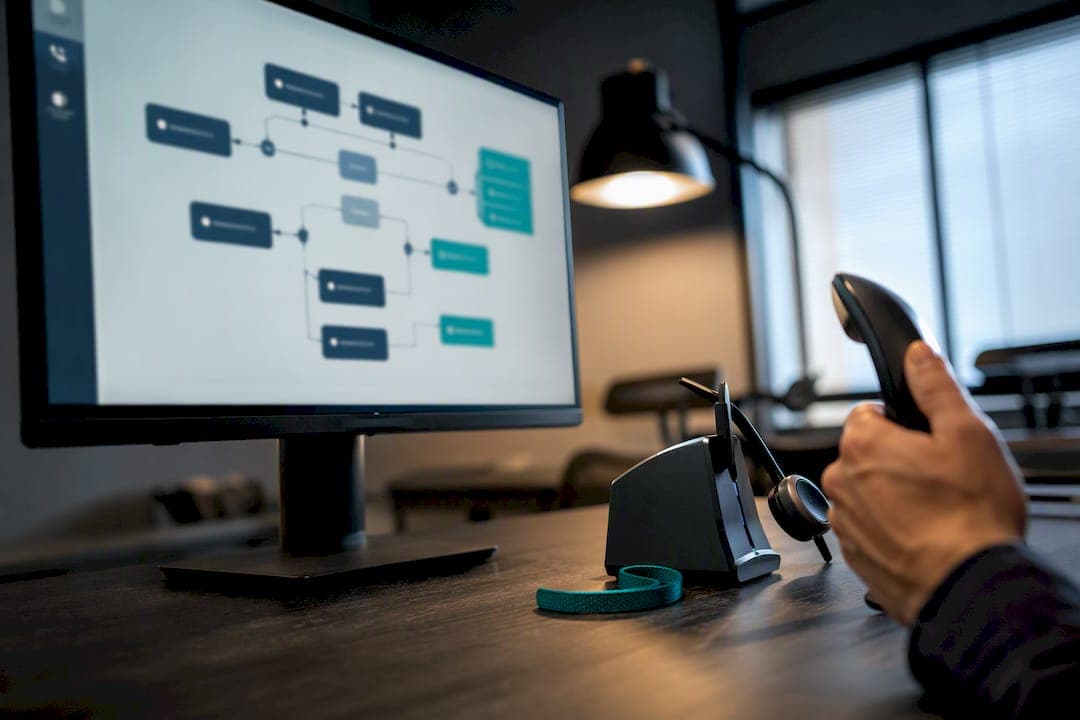
Call flow design is the process of mapping caller intents to defined routing outcomes, then building the menus, rules, and fallbacks that get each caller there without a dead end. Start by identifying your top three to five reasons people call, build short menus around them, and give every single path an explicit fallback. Businesses that skip the fallback step are the ones whose callers end up stuck in silence or looping back to the same menu.
TL;DR:
- Building effective call flows requires prioritizing fallback options for every menu node to prevent callers from experiencing dead ends or loops.
- Keeping the initial menu to three to five options, with clear prompts and fast-paced delivery, significantly reduces caller abandonment and navigational errors.
- Designing thorough overflow, timeout, and escalation rules for queues and auto attendants ensures robust handling during high call volume or system outages.
- External testing from outside lines and real-world scenarios is critical to identify misroutes and technical issues before going live.
- On-site installation and local support help translate detailed diagrams into reliable, functioning phone systems, especially for multi-site and after-hours routing needs.
Table of Contents
- What Is Call Flow Design and What Makes Up the Caller Journey?
- Core Components and Design Tradeoffs That Shape Every Flow
- How to Design a Call Flow: A Step-by-Step Method
- IVR and Menu Design: What Actually Reduces Abandonment
- Planning Fallbacks, Queue Overflow, and Edge Cases
- Testing, Rollout, and Ongoing Monitoring
- Why On-Site Installation and Local Support Cut Launch Risk
- Common Pitfalls and How to Troubleshoot Them
- Call Flow Diagram Examples for Different Business Types
- How Call Flow Design Affects Customer Experience and Business Metrics
- Regulatory and Compliance Considerations in Call Flow Design
- The Real Lesson in Call Flow Design
- How Businessvoip Turns a Call Flow Plan Into a Working Phone System
- Where to Learn More
- Sources
- FAQ
What Is Call Flow Design and What Makes Up the Caller Journey?
Every call moves through the same basic stages: the ring, the greeting, identification (who is calling and why), routing, and resolution. Call flow design is the discipline of deciding exactly what happens at each of those stages instead of leaving it to whatever the phone system defaults to out of the box.
The building blocks you're arranging are limited in number, even if the combinations get complex:
- Greeting — the first thing a caller hears, often branded and time-aware
- IVR or menu — the decision point where callers self-select a path
- Data lookup — pulling caller ID or account info to skip redundant questions
- Queue — a holding pattern with music, position updates, or callback offers
- Transfer — handing the call to a person, department, or external number
- Voicemail or callback — the safety net when no live option is available
A simple example: greeting plays, caller presses 1 for sales, call drops into the sales queue, next available agent picks up. That's a three-step flow, and it's often all a small business needs for its busiest line.
Core Components and Design Tradeoffs That Shape Every Flow
The technical decisions inside a call flow come down to how you route, what you connect to, and how much you ask a caller to do before reaching a human.
Routing logic typically falls into four categories:
- Time-based routing — different paths during business hours, after hours, and holidays
- Skills-based routing — sending billing questions to billing-trained agents, not the general queue
- Value-based routing — flagging known high-value accounts for priority handling
- Geographic routing — directing calls to the nearest branch or regional team
Integrations matter as much as the routing rules themselves. A flow that pulls from your CRM before the call connects lets an agent see the account history instead of asking the caller to repeat it, which shortens handle time and cuts repeat questioning. Ticketing and scheduling integrations do similar work for support and appointment-based businesses.
The real tension is menu depth versus containment. More menu options can resolve more issues without a human, but every extra layer raises the odds a caller hangs up or mashes zero out of frustration.
Bury it one layer down or drop it.
How to Design a Call Flow: A Step-by-Step Method
A reliable call flow follows the same sequence regardless of industry or phone platform. Skipping steps is where most launch-day problems start.
- Map caller intents and rank them by volume. Pull call logs or ask front-desk staff what people actually call about. Your top three to five intents should drive the first menu; everything else is a secondary tier or a catch-all.
- Define the outcome for each intent. Decide whether an intent ends in self-service (hours, address), a queue and live transfer, or a callback request. Write this down before touching any software.
- Draft the diagram before you build anything. Sketch decision trees on paper or in a whiteboard tool. This is where you catch dead ends before they become production bugs.
- Document routing rules and fallbacks for every single node. For each branch, write the "if X then Y, else Z" logic. Genesys Cloud's flow-design approach treats menus, tasks, and transfers as reusable, testable building blocks. That habit, of validating each piece before it goes live, catches undefined states early.
- Write scripts for every prompt, keeping wording consistent across the flow.
- Build it in the platform, then test and monitor before calling it done.
IVR and Menu Design: What Actually Reduces Abandonment
Limit the first-level menu to three to five options, and lead with whatever gets called most often. A caller who hears their reason for calling as option one hangs up far less often than one who hears it as option four.
Say the option before the number, not after. "For billing, press 1" processes faster in a caller's head than "Press 1 for billing," because the intent registers before the digit does. This lines up with Nielsen Norman Group's menu usability research, which found that clear labeling and limited choice sets consistently reduce navigation errors, whether the menu is on a screen or in a caller's ear.
Keep the whole prompt under 10 to 20 seconds. Longer than that and people either zone out or start pressing digits blind.
A few non-negotiables:
- Always give an escape route to a live person, especially for urgent or complex issues, since a fully automated menu with no human option drives up abandonment for anything that isn't routine
- Build a separate after-hours menu; don't just let the daytime flow run on autopilot at 2 a.m.
- Test the actual pacing of your recorded prompts, not just the script on paper
- Offer language selection early if your caller base needs it
Pro Tip: Record your own greeting, then have someone unfamiliar with the business call in cold. If they hesitate on any option, rewrite it.
Planning Fallbacks, Queue Overflow, and Edge Cases
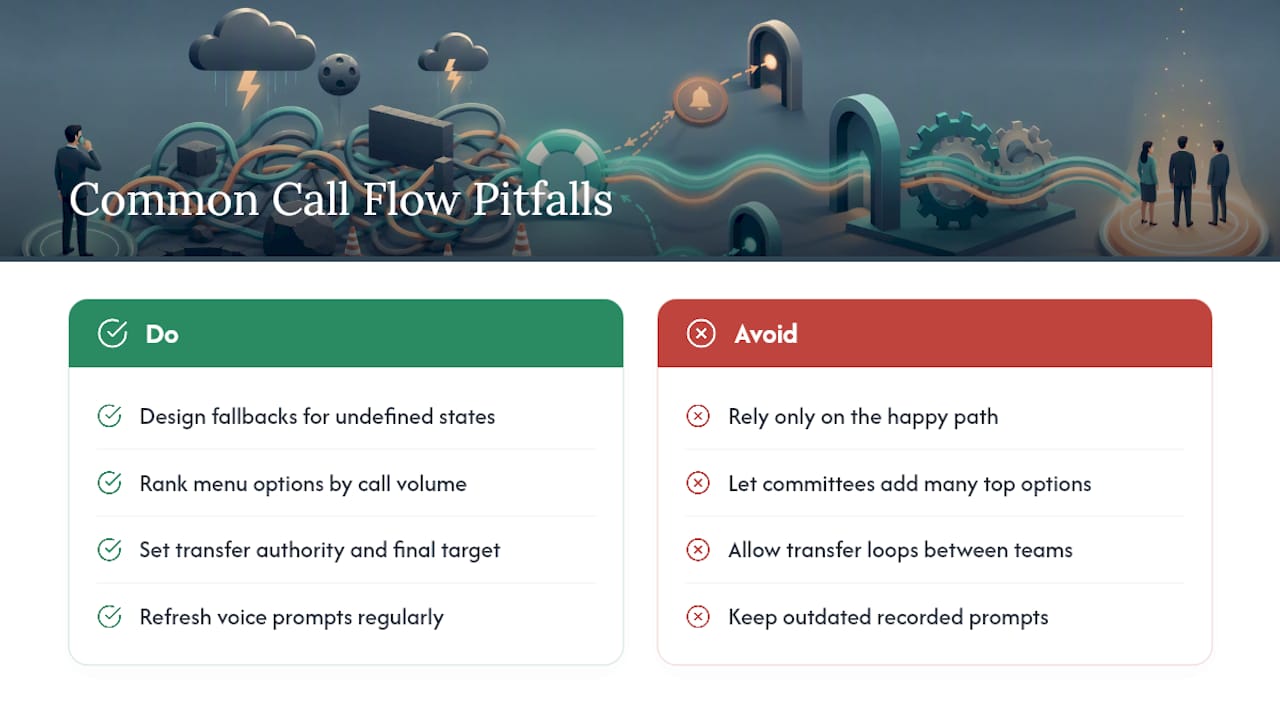
The flows that fail in production are almost always the ones where someone designed the happy path and stopped there. Every queue needs an explicit overflow rule and a timeout destination, not an assumption that calls will always get answered before anyone waits too long.
Document this for every queue and auto attendant in your system:
- Overflow destination — where calls go when the queue is full, named explicitly, not left blank
- Timeout redirect — where an unanswered call goes after a set number of rings
- Callback and wait-time messaging — an estimated wait plus a callback offer meaningfully cuts abandonment during busy periods
- Escalation authority — who can transfer a call further, and to whom, so you avoid transfer loops
- Outage and holiday behavior — a defined path for when the primary system is down or the office is closed
Microsoft's guidance on Teams auto attendants and call queues is built almost entirely around this idea: name every destination and every membership explicitly, because undefined states are where callers get stranded.
Testing, Rollout, and Ongoing Monitoring
Test every path from an outside line, not just an internal extension, since internal test calls skip network hops that reveal real problems. Simulate an invalid key press and simulate silence. Both scenarios expose timeout gaps that a clean test call never will.
- Sandbox test first, checking every branch including the ones you expect nobody to use.
- Run a pilot with one team or one line before flipping the switch company-wide.
- Launch fully, with logging and alerting turned on from day one so problems surface fast.
- Review on a set cadence and adjust based on what the metrics actually show.
Track abandonment rate, containment rate (the share resolved without a human), misroute rate, average handle time, and per-intent call volume. A flow with rising misroutes usually means your menu labels don't match how callers actually describe their problem, not that the technology is broken. A documented six-step methodology, mapping intents, defining outcomes, diagramming, setting rules, scripting, then testing and monitoring, gives you a repeatable checklist instead of reinventing the process every time you add a line.
Why On-Site Installation and Local Support Cut Launch Risk
A call flow diagram is only as good as the system that runs it, and that's where a lot of businesses lose the thread between design and execution. A phone system shipped in a box with a login and a PDF leaves the wiring, the extension mapping, and the actual testing to whoever's available in the office that week.
Businesses that need multi-site consistency or complex after-hours logic generally do better hiring a local integrator than configuring everything in-house from scratch. A local integrator can handle on-site design, programming, cabling, and installation work, with fixed pricing and warranties on rented phones, so the flow you diagram is the flow that's actually live when the first call comes in.
Common Pitfalls and How to Troubleshoot Them
The single most common mistake is designing only the happy path. A menu that handles "caller presses 1, gets an agent" flawlessly but has no answer for "caller presses nothing" or "queue is full at 9 a.m. Monday" will fail exactly when call volume matters most. Treat every undefined state as a bug, not an edge case.
A close second: menus written by committee, where every department wants its own top-level option. This produces a seven-option menu that serves internal politics instead of caller needs. Fix it by ranking intents by actual volume and letting data override department preference.
Transfer loops are a quieter problem. They happen when Agent A transfers to Department B, which transfers back to A because nobody defined escalation authority. The fix is a written rule: who can transfer where, and what the final destination is when nobody can resolve the issue.
Stale voice prompts cause friction too. A greeting recorded three years ago that still references a manager who left or a promotion that ended makes the business sound neglected, even when the routing logic underneath is sound.
Finally, watch for menus that were tested only from an internal extension. Internal calls often skip carrier routing steps that external calls hit, so a flow that works perfectly in testing can misroute the moment a real customer dials in from outside. Run every test from an outside line, and run it more than once, at different times of day, before trusting the flow with real traffic.
Call Flow Diagram Examples for Different Business Types
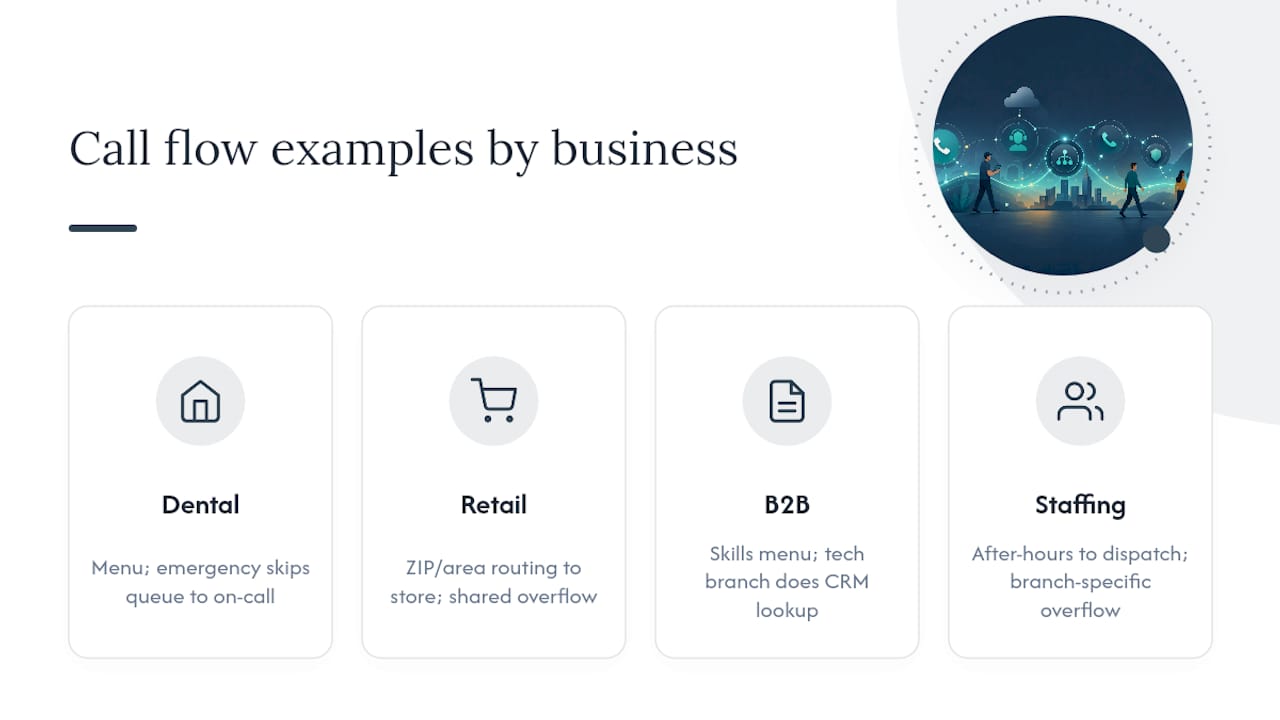
A dental office typically needs a short flow: greeting, then options for "schedule an appointment," "billing question," or "emergency," with the emergency option skipping the queue entirely and routing straight to an on-call line. Simplicity works here because call volume per intent is low and urgency varies sharply between options.
A multi-location retail chain needs geographic routing layered on top of intent routing. The flow identifies the caller's area code or asks for a ZIP code, then routes into a location-specific queue, with a shared overflow queue for when a specific store's line is swamped.
A B2B software support line usually benefits from skills-based branching: a menu that separates "billing" from "technical issue" from "sales," where the technical branch does a CRM lookup on the caller's phone number before ever ringing an agent, so the support rep opens the call already seeing the account's plan and history.
A staffing agency or multi-site operation often needs a hybrid: after-hours calls route to an emergency dispatch line, business-hours calls split by client account versus job seeker, and each branch has its own overflow destination rather than sharing one generic voicemail box. Businesses juggling several offices tend to find remote and multi-site call routing unworkable without this kind of branch-specific fallback planning, because a single shared overflow queue collapses the moment two locations get busy at once.
How Call Flow Design Affects Customer Experience and Business Metrics
A caller who reaches the right person on the first attempt rates the interaction well regardless of hold time. A caller bounced between two departments rates it poorly even if total wait time was shorter. Call flow design is the mechanism that decides which experience most callers get.
The metrics move in predictable directions. Containment rate rises when self-service options actually match what people call about, not what the business wishes they called about. Misroute rate falls when menu wording mirrors caller language instead of internal department names. Average handle time drops when data lookups hand agents context before they ask a single question, since agents stop spending the first ninety seconds of every call re-gathering information the system already has.
Abandonment rate is the metric most sensitive to design quality. It climbs sharply when hold times go unexplained and callers have no visibility into their place in line, and it drops when a flow offers an estimated wait or a callback option instead of dead air. None of this requires exotic technology. It requires deciding, in advance, what each caller hears at each decision point and never leaving that decision to whatever the platform ships with by default.
Poor flow design also shows up in staffing costs indirectly. When misroutes are common, agents spend time transferring calls that shouldn't have reached them, which inflates handle time across the whole team, not just the misrouted call itself.
Regulatory and Compliance Considerations in Call Flow Design
Call recording disclosure is the most common compliance touchpoint in flow design. If any part of your flow records calls for quality or training purposes, the greeting needs to disclose that before the recording starts, and the specific consent requirement depends on where your callers are located, since rules vary by jurisdiction. Build the disclosure into the greeting script itself rather than relying on staff to mention it verbally.
Accessibility is a second consideration that gets overlooked at the design stage. A flow that depends entirely on touch-tone input with no voice-recognition alternative, and no option to reach a human quickly, can create real barriers for callers with disabilities. Keeping a fast, obvious escape to a live agent addresses both the usability problem and much of the accessibility concern at once.
Industries with additional obligations, healthcare, financial services, legal, often have specific rules about what information a menu can request before verifying caller identity, and what data can be logged alongside a call recording. If your business falls into one of these categories, involve legal counsel or compliance staff in the flow design phase itself, not as a review step after the system is already built. Retrofitting compliance into a live phone system is far more disruptive than designing it in from the start.
The Real Lesson in Call Flow Design
Most guidance on this topic obsesses over the happy path: the perfect menu, the ideal script, the shortest route to an agent. That's the easy 80% of the work.
Conventional advice also treats call flow design as a purely digital exercise, something you finish inside a flow builder and forget. That's backwards for any business running physical phones on a real network. A flawless diagram means nothing if the cabling, the extension mapping, or the carrier setup underneath it is wrong. I'd argue the design phase and the installation phase should never be separated the way most software-first advice implies.
If you take one thing from this guide, prioritize the fallback for every single node before you touch scripting or branding. A caller who hits a dead end once will remember it longer than one who waited an extra thirty seconds in a well-managed queue. Design the failure states first. The happy path takes care of itself.
— James
How Businessvoip Turns a Call Flow Plan Into a Working Phone System
A diagram is only useful once it's wired into a real system, and that's the gap between a good plan and a phone that actually works on launch day. Some providers close that gap for businesses by handling the on-site design, programming, cabling, and installation in person, so the flow you mapped, including every fallback and after-hours rule, is live and tested before your team ever picks up a handset.

That hands-on model matters most for businesses with multiple locations, remote offices, or after-hours routing that a generic setup guide can't anticipate. Businessvoip has been building these systems since 2005, with fixed pricing that doesn't creep up annually and a lifetime warranty on rented phones. If your team needs help translating a call flow diagram into rules, scripts, and cabling that hold up on day one, start with a phone system design review and get a plan built around your actual call volume, not a generic template.
Where to Learn More
For deeper reference, Microsoft's auto attendant and call queue design guidance and Nielsen Norman Group's menu usability research cover the underlying design patterns this guide builds on.
Sources
- Design call flows - Microsoft Teams (auto attendants and call queues)
- Basic flow design steps - Genesys Cloud Resource Center
- Menu design — Nielsen Norman Group
- How To Design An Effective Call Flow: Step-by-Step Blueprint
FAQ
What Are the Six Steps of the Call Flow Design Process?
The core sequence is mapping caller intents, defining outcomes for each, drafting a diagram, writing routing rules and fallbacks, scripting prompts, then testing and monitoring the live flow, a structure documented in step-by-step call flow blueprints.
What Does Call Flow Mean in a Business Phone System?
A call flow is the defined path a call takes from the moment it rings in through greeting, menu selection, routing, and resolution, whether that resolution is a live transfer, self-service, or voicemail.
Can You Give an Example of a Simple Call Flow?
A basic example: the greeting plays, the caller presses 1 for sales, the call enters the sales queue, and the next available agent answers, with a voicemail fallback if no agent picks up within a set time.
What Is a "Flow Call" and How Is It Different From a Regular Call?
"Flow call" is usually shorthand for a call that moves through a designed routing flow, menus, rules, and fallbacks, rather than ringing straight to one phone line with no logic behind it.
Who Should Design a Business's Call Flow?
Whoever owns the customer experience, an office manager, IT lead, or business owner, should map the intents and outcomes, while a local integrator typically handles the technical build, cabling, and installation.