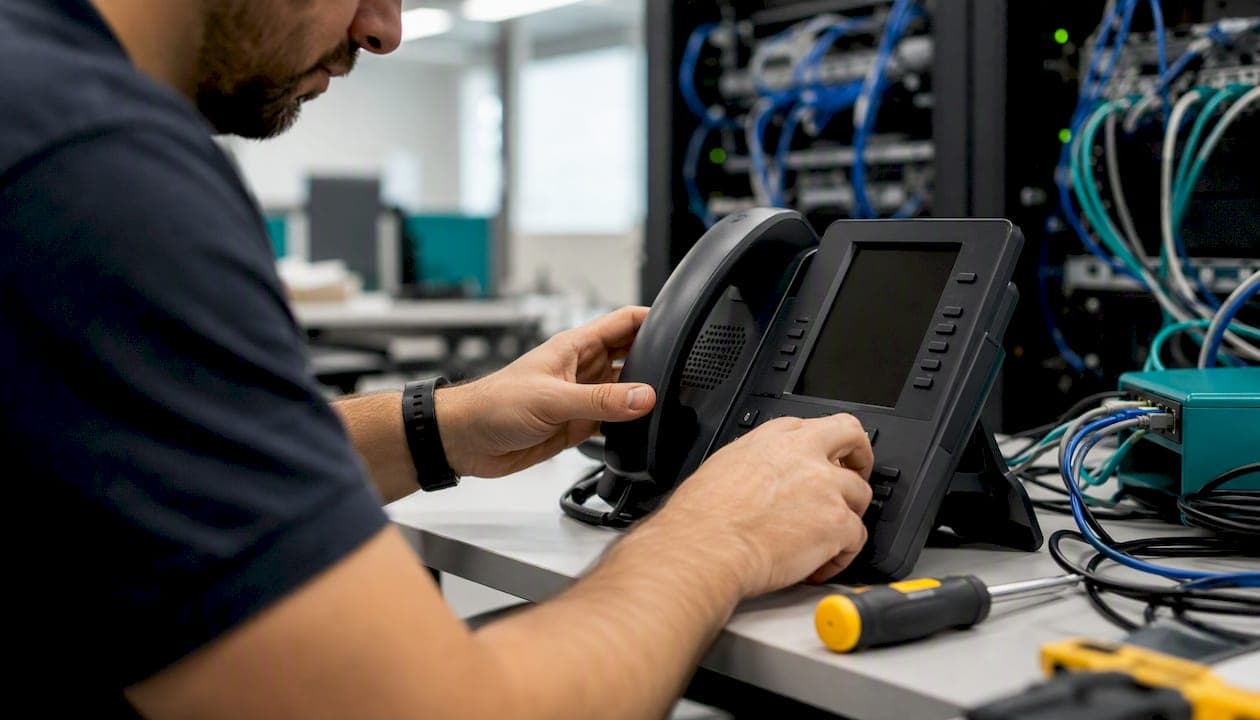
To block spam calls for your business, the fastest path combines three things: enable your carrier's or VoIP provider's built-in spam filter, add a basic auto-attendant or press-1 screening step, and give staff a two-sentence verification script. That layered approach handles the vast majority of robocalls and spoofed numbers without blocking real customers.
Here is your same-day action checklist:
- Enable carrier spam filtering on every business line (takes minutes in most admin portals)
- Turn on your VoIP provider's spam score threshold or call-blocking policy
- Add a simple auto-attendant or press-1 IVR to your main inbound number
- Whitelist your top 20 vendors, clients, and partners by number
- Give every customer-facing staff member a one-line verification script for unexpected payment or account requests
Pro Tip: Forward your main business line to an auto-attendant rather than ringing staff directly. Robodialers almost never press 1, so that single change stops the majority of bot calls before a human ever picks up.
The FCC and FTC both recommend combining carrier tools with call-blocking apps and skepticism for unexpected calls. No single measure is enough on its own.
Key Takeaways
Layered protection combining carrier filtering, VoIP provider controls, an auto-attendant, and a staff verification script gives small and medium businesses the most reliable defense against spam and robocalls.
| Point | Details |
|---|---|
| Start with carrier filtering | Enable your carrier's spam filter and anonymous call rejection first — it costs nothing and activates in minutes. |
| Add an auto-attendant | A press-1 prompt stops most robodialers before they reach staff, making it the highest-leverage single change. |
| STIR/SHAKEN has limits | Caller ID authentication reduces risk but does not stop verified numbers from being used maliciously — always layer controls. |
| Train staff on one script | "I'll call you back at the number we have on file" ends most social engineering attempts without alienating real callers. |
| Businessvoip | Businessvoip installs fully configured VoIP systems in Ontario with built-in spam controls, auto-attendant setup, and staff training included. |
Table of Contents
- How does modern call blocking actually work?
- Step-by-step setup for your business phone type
- What tools should you actually consider?
- What does this cost, and how long does setup take?
- Staff procedures, verification scripts, and whitelist policies
- How to report spam calls and what protections apply
- Troubleshooting missed calls and false positives
- Why layered provider filtering is the most reliable business solution
- A practitioner's perspective on what actually moves the needle
- Businessvoip installs spam-ready phone systems for Ontario businesses
- Sources
How does modern call blocking actually work?
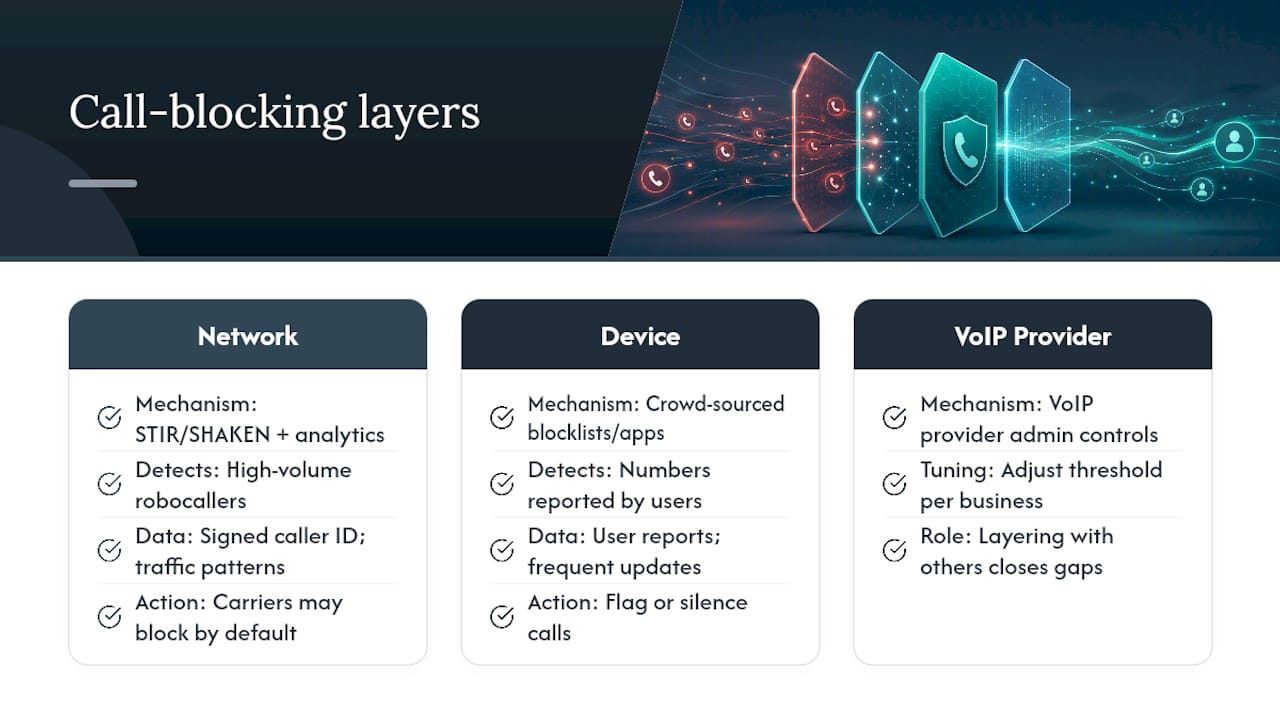
Two layers protect your lines: the network and the device. Understanding both helps you pick the right combination without over-blocking legitimate calls.
STIR/SHAKEN is the industry framework the FCC requires carriers to implement for caller ID authentication. When a call travels across the network, originating carriers digitally sign the caller ID, and terminating carriers verify that signature. A call that passes gets an "A" attestation; one that can't be verified gets a lower score, which your carrier may label "Potential Spam" or "Scam Likely." The catch: STIR/SHAKEN confirms that a number is who it claims to be, but a verified number can still belong to a scammer. Authentication reduces risk; it does not eliminate it.
Beyond STIR/SHAKEN, carriers run their own analytics engines that score calls based on traffic patterns, complaint databases, and call behavior. A number that dials thousands of businesses in an hour gets flagged automatically. The FCC allows carriers to block robocalls by default using these analytics, and most major carriers now do exactly that.
Device-level tools work differently. Call-blocking apps on mobile phones rely on crowd-sourced databases: users report a number, it gets added to a shared blocklist, and future calls from that number get flagged or silenced. These apps update frequently and work well for individual mobile lines, but they don't integrate natively with multi-line business systems or hunt groups. Android's fake call detection feature adds a newer layer, using a device-level handshake to flag deepfake impersonation attempts when both parties use compatible Google apps.
The practical takeaway: network filtering catches high-volume robocallers; device apps catch numbers that have been crowd-reported; and your own VoIP provider's admin controls let you tune the threshold for your specific business. Layering all three is what closes the gaps.
Step-by-step setup for your business phone type
VoIP or hosted PBX
- Log into your admin portal and locate the spam filter or call-blocking policy section.
- Set the spam score threshold to "medium" or "high" to auto-block the most obvious robocalls.
- Enable anonymous call rejection to drop calls with no caller ID.
- Configure your hunt group defaults so unverified calls go to an auto-attendant queue, not directly to a staff extension.
- Add a CNAME or line-level spam filter if your provider supports per-line controls.
Carrier documentation, such as Verizon One Talk's spam management tools, shows that business-grade portals let you set auto-block for high-risk calls, label potential spam, and maintain a desk-phone blocklist at the admin level.
Pro Tip: After enabling spam filtering, check your call logs daily for the first two weeks. Legitimate vendors sometimes get caught in aggressive filters, and catching that early prevents a missed lead from becoming a lost client.
On-premise PBX with SIP trunking
- Route all inbound SIP traffic through a screening trunk before it hits your extensions.
- Set up an auto-attendant as the first point of contact on every inbound DID.
- Use selective acceptance rules: accept calls from known area codes during business hours; send everything else to a recorded message with a callback option.
- Block calls from specific number ranges directly in your SIP trunk configuration.
Mobile business lines
- Enable your carrier's spam-blocking app (most major US carriers offer one at no extra cost).
- Turn on caller ID labeling so flagged calls display "Spam Risk" before you answer.
- Use the silent-block option to send suspected spam directly to voicemail without ringing.
- Add your key contacts to your phone's whitelist so they always ring through.
Traditional analog landline
- Ask your carrier about star-code blocking options (many carriers support codes like *60 to block specific numbers).
- Consider an inline call-blocking device that plugs between your wall jack and phone; these maintain their own blocklists and can screen calls before they ring.
- The most effective upgrade: forward the landline to a VoIP number with a full auto-attendant. That gives you all the controls above without replacing your existing hardware.
What tools should you actually consider?
The right tool depends on your phone setup, your call volume, and how much management overhead you can absorb.
Carrier-level spam filters are the starting point for every business. They operate at the network before a call ever reaches your system, cost little or nothing to activate, and require almost no ongoing management. The tradeoff is that you have limited control over the threshold.
VoIP provider spam filtering gives you admin-portal control: set thresholds, manage blocklists and whitelists, and apply different rules to different hunt groups or departments. This is where most SMBs get the best return. A well-configured hosted VoIP system with integrated spam controls handles the bulk of unwanted calls without touching your staff's workflow.
Call-blocking apps (mobile-focused, crowd-sourced databases) work well for solo lines or small teams using cell phones as their primary business number. They update frequently but don't scale to multi-line office systems without a provider integration.
Auto-attendants and IVR screeners are arguably the highest-leverage tool for any business that gets more than a handful of spam calls per day. Bots almost never navigate a menu. A press-1 prompt alone eliminates most robocall traffic. Pair it with a CRM integration and legitimate callers get routed to the right person while their call data logs automatically.
Inline call-blocking hardware suits analog landlines where a full VoIP migration isn't yet on the table. These devices maintain local blocklists and can be updated manually or via a subscription database. One-time cost, no monthly fee, but also no remote management.
When evaluating any provider or service, watch for these red flags: no admin portal for whitelist/blacklist management, no appeal process for falsely blocked calls, and no transparency about how the spam score is calculated. A provider that can't tell you why a call was blocked will cost you customers.
For CRM integration, the goal is simple: every call that gets through, whether answered or missed, should log in your CRM with the caller ID, timestamp, and disposition. That data helps you spot patterns (the same spoofed prefix calling repeatedly) and recover leads that might have been misrouted.
What does this cost, and how long does setup take?
Carrier and VoIP built-in filters are typically included in your existing plan or available as a free add-on. Activation takes minutes in most admin portals. Some carriers charge a small monthly fee per line for advanced labeling features.
Third-party call-blocking apps and AI screeners generally run on monthly subscriptions. Business-tier plans with admin controls and multi-line support cost more than consumer apps. Most offer a free trial period, which is worth using before committing.
Inline hardware for analog lines is a one-time purchase. Installation takes under an hour. Subscription-based database updates, if offered, add a small recurring cost.
Timeline to expect:
- Same day: Enable carrier spam filter, turn on anonymous call rejection, activate mobile spam-blocking app
- Within 1 week: Configure VoIP spam thresholds, set up auto-attendant, whitelist key contacts, train staff on verification script
- Within 2–6 weeks: Integrate call data with CRM, tune spam thresholds based on two weeks of log review, set up reporting workflow for repeated offenders
Staff procedures, verification scripts, and whitelist policies
Technology handles the volume. Staff handle the edge cases, and that's where businesses lose money to scams.
The most common attack is simple: a caller claims to be from your bank, your carrier, or a vendor and asks for account credentials, a wire transfer, or a payment over the phone. The call looks legitimate because the number has been spoofed to match a real institution.
Give every customer-facing staff member this script for unexpected requests:
"I'm not able to verify account information or process payments over an inbound call. I'll need to call you back at the number we have on file. Can I get your name and the best time to reach you?"
That one sentence ends the scam attempt without being rude to a legitimate caller.
Policy checklist for your team:
- Maintain a shared whitelist of approved vendor and client numbers in your phone system admin portal
- Log any suspicious call with the number, time, and what was requested
- Escalate repeated calls from the same number or prefix to your phone system admin for blocking
- Never read back account numbers, passwords, or payment details to an inbound caller
Pro Tip: Run a five-minute role-play during your next team meeting: one person plays the scammer, one plays the staff member. Teams that practice the script once handle real attempts far more calmly than those who only read it.
Training doesn't need to be formal. A monthly five-minute refresher at the start of a team meeting, plus a shared log where staff can flag suspicious numbers, covers most businesses adequately.
How to report spam calls and what protections apply
Reporting matters even when you can't stop a specific caller immediately. The data feeds enforcement actions and carrier analytics that block illegal callers at scale.
To report to the Do Not Call Registry:
- Go to Donotcall and register your business number if you haven't already.
- Use the same site to report unwanted calls: include the date, time, and the number that appeared on your caller ID.
The National Do Not Call Registry reduces calls from law-abiding telemarketers, but it does not stop scammers. Overseas operations and outright fraudsters ignore it. Registration still takes about 30 days to propagate fully, and it's still worth doing.
To report fraud or financial loss:
- Go to Reportfraud and file a detailed report.
- Include: the number that called, the date and time, what was requested, whether any money or information was transferred, and any audio or voicemail you saved.
The FTC uses these reports for enforcement and shares the data with carriers and law enforcement partners. A single report may not stop one caller, but patterns across thousands of reports do.
To report to the FCC:
File at fcc.gov/consumers/guides/filing-informal-complaint. Include the same call details. The FCC's consumer guide on robocalls explains what information is most useful.
On false blocks and carrier appeals: if your own outbound calls are being labeled "Spam Likely" or blocked, most carriers have a number reputation portal where you can submit your business information and request a label correction. Keep a log of affected calls (timestamps, recipient numbers, carrier involved) to support the appeal.
Troubleshooting missed calls and false positives
False positives are the real operational risk of aggressive spam filtering. A blocked customer call is a lost lead.
Diagnostic sequence:
- Pull your call logs for the past 7 days and look for calls that went to voicemail with no ring, or calls that show "blocked" in the disposition field.
- Check whether the affected numbers are flagged in your carrier's spam database (most admin portals show a spam score or label).
- Review your VoIP provider's block policy: is the threshold set too aggressively? Is anonymous call rejection catching calls from legitimate vendors who don't transmit caller ID?
- Check your whitelist: are key clients and vendors on it?
Common problems and fixes:
- Voicemail-only blocks: usually caused by silent-block settings. Adjust so flagged calls ring once before going to voicemail, giving staff a chance to answer.
- Hunt-group dropped calls: check whether your auto-attendant timeout is too short. Callers who don't press 1 fast enough get dropped. Extend the timeout to 8–10 seconds.
- Legitimate vendor blocked: add the number to your whitelist immediately and submit a carrier appeal if the number carries a "Scam Likely" label.
To reduce false positives without weakening protection:
- Use a whitelist for all known contacts rather than relying solely on spam scores
- Set your spam threshold to "medium" rather than "high" if you're in a high-inbound-volume business
- Review call logs weekly for the first month after any configuration change
Why layered provider filtering is the most reliable business solution
The FCC's guidance on STIR/SHAKEN and the FTC's call-blocking recommendations both point to the same conclusion: no single tool is sufficient. STIR/SHAKEN authenticates caller ID but doesn't stop a verified number from being used maliciously. Carrier analytics catch high-volume robocallers but miss targeted scam calls. Device apps catch crowd-reported numbers but don't scale to multi-line systems.
The businesses that see the biggest reduction in spam call volume are those that combine network-level filtering with a properly configured IVR and a staff policy. Each layer catches what the others miss. Provider-integrated solutions, particularly hosted VoIP platforms with admin-level controls, give SMBs the most tunable protection without requiring an IT team to manage it.
For businesses evaluating their VoIP provider options, spam filtering capability should be a primary evaluation criterion alongside call quality and pricing.
A practitioner's perspective on what actually moves the needle
Most businesses I see come to the spam call problem backwards. They install a call-blocking app on a couple of phones, notice it doesn't help much, and conclude that blocking doesn't work. What they've actually done is apply a consumer-grade fix to a business-grade problem.
The auto-attendant is the single highest-leverage change for most SMBs. Not because it's technically sophisticated, but because it changes the economics for the attacker. A robocaller dialing thousands of numbers per hour can't afford to navigate a menu. That one configuration change, properly set up, cuts bot traffic by a substantial margin before any other tool is even needed.
The second thing businesses underestimate is the staff script. The technology stops the volume. The script stops the targeted social engineering attempts that get through anyway. A staff member who knows to say "I'll call you back at the number we have on file" is more valuable than any app.
Businessvoip has been designing and installing business phone systems in Ontario since 2005, and the pattern holds across sectors: the businesses with the least spam exposure are the ones where the phone system was configured intentionally, not assembled piecemeal. A properly designed phone system with built-in spam controls, a configured auto-attendant, and staff who know the verification protocol handles the problem before it becomes a daily interruption.
Businessvoip installs spam-ready phone systems for Ontario businesses
Spam call filtering is only as good as the system it runs on. If your business is still on a patchwork of phones with no admin portal, no auto-attendant, and no centralized call policy, you're managing the problem manually every day.

Businessvoip designs, programs, cables, and installs complete VoIP business phone systems on-site across Ontario, within about 150 km of Ancaster and province-wide for larger projects. Every system ships with carrier-grade spam filtering, a configured auto-attendant, whitelist/blacklist controls, and staff training included. Fixed pricing means no annual increases, and rented phones carry a lifetime warranty. Whether you're in Burlington, Hamilton, or running multi-site operations across the province, the system is ready to go from day one. Contact Businessvoip to get a quote and have your spam-filtering configuration designed for your specific lines.
Sources
- Caller ID Spoofing | Federal Communications Commission
- How To Block Unwanted Calls | Consumer Advice
- Donotcall
- Reportfraud