
A phone extension is a short internal number, typically 3–5 digits, assigned to direct calls within a business phone system to specific employees, teams, or departments. Unlike a full telephone number, an extension works inside a Private Branch Exchange (PBX) or cloud VoIP platform, routing calls without requiring a separate phone line for every person. Ontario businesses of all sizes rely on telephone extensions to manage call flow, reduce costs, and give callers a direct path to the right person. Businessvoip designs, programs, and installs these systems on-site for businesses across Ontario, so every extension works from day one.
What is a phone extension and how does it work?
A phone extension routes calls internally via PBX or cloud VoIP systems, eliminating the need for a separate phone line for every employee. This means a 20-person office can operate on a single main number while giving each staff member a unique internal number. Common formats include ext. 205, x205, #205, or simply 205 dialed after the main line connects.
Extensions live inside the phone system's routing logic. When a caller dials the main number, the auto-attendant answers and prompts them to enter an extension or select a department. The system then transfers the call internally. For businesses with departments like sales, support, and billing, this structure keeps call traffic organized and reduces the chance of calls landing in the wrong place.

Extensions simplify business communication by avoiding the cost and complexity of assigning unique public phone numbers to every employee. A cloud VoIP platform handles the routing digitally, which means extensions can follow employees to remote offices, home offices, or mobile devices. For Ontario businesses managing staff across multiple locations, this flexibility is a practical advantage.
How do you dial a phone extension from different devices?
Dialing a telephone extension depends on the device you are using. The method differs between smartphones and traditional landlines, and knowing the right approach saves time on every call.
Dialing manually
The most straightforward method works on any device. Dial the main number, wait for the auto-attendant to answer, listen for the prompt, and then enter the extension digits on your keypad. This works reliably on landlines, desk phones, and mobile phones. The drawback is that you must stay on the line through the full automated menu before entering the extension.
Dialing extensions on an iPhone
- Open the Phone app and go to the keypad.
- Dial the main number.
- To add a pause, press and hold the asterisk (*) key until a comma (, ) appears. This inserts a 2-second automatic pause before the extension dials.
- Type the extension digits after the comma. The full entry looks like: (416) 555-0100,205.
- To add a wait instead, press and hold the pound (#) key until a semicolon (;) appears. The phone will pause and show a "Dial" button, letting you trigger the extension manually.
- Save the full string in your contacts for one-tap dialing on future calls.
Dialing extensions on Android
- Open the Phone app and enter the main number.
- Tap the three-dot menu or "More" option.
- Select "Add 2-sec pause" to insert a comma, or "Add wait" to insert a semicolon.
- Type the extension digits after the pause or wait character.
- Save the contact with the full string included.
Saving numbers with pause or wait characters enables one-tap dialing without manually entering the extension on every call. This is especially useful for staff who call the same extensions dozens of times per week.
Dialing on a landline or desk phone
Traditional landlines do not support pause or wait characters in stored contacts the same way smartphones do. Dial the main number, wait for the prompt, and enter the extension manually. Some modern desk phones on VoIP systems allow you to program speed-dial buttons with extension numbers, which achieves a similar result.
Pro Tip: When saving a contact with an extension on your smartphone, add two commas instead of one if the auto-attendant takes longer than two seconds to prompt you. The double pause gives the system extra time before the extension digits fire.
How should businesses set up office phone extensions?
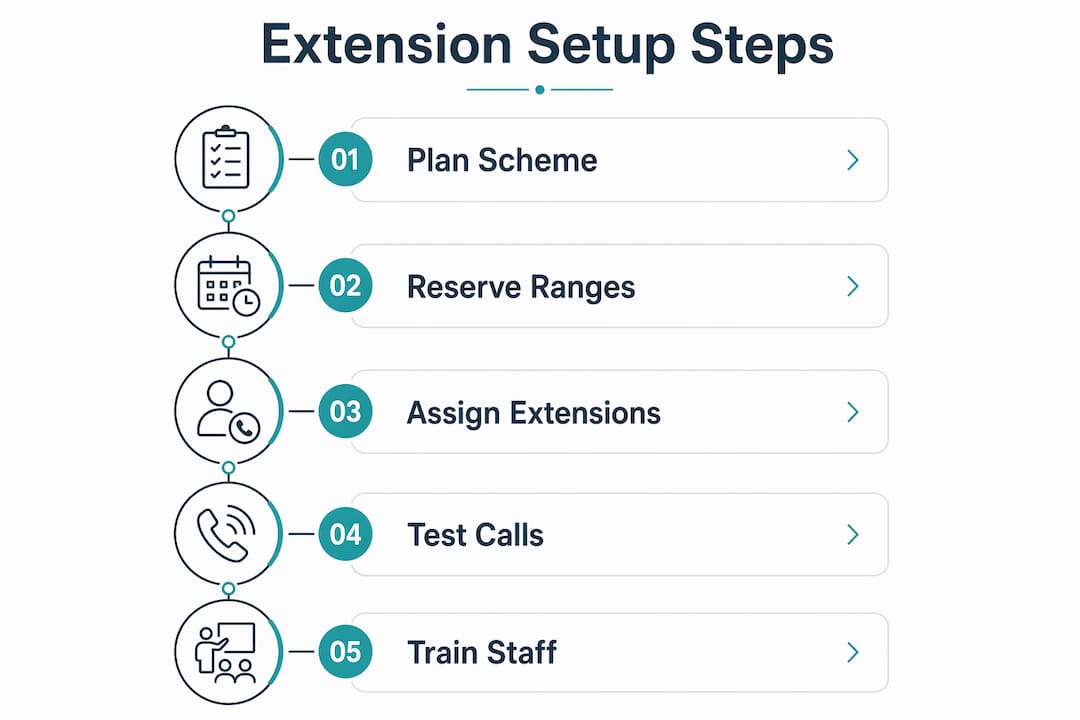
A well-planned extension scheme is the difference between a phone system that scales and one that creates confusion as your team grows. The planning stage matters as much as the technology itself.
- Assign extensions by department or function. Logical extension ranges improve call routing and scalability. A common structure uses 100–199 for executives, 200–299 for sales, 300–399 for support, and 400–499 for operations. This makes the directory intuitive for both staff and callers.
- Choose the right extension length. Three-digit extensions work for teams under 100 people. Four-digit extensions suit larger organizations and leave room to grow without renumbering everyone.
- Set up an auto-attendant. An auto-attendant greets callers, presents menu options, and routes calls to the correct extension or department group. This removes the need for a dedicated receptionist to handle every incoming call.
- Use Direct Inward Dialing (DID) for key roles. DID assigns a unique public phone number to a specific person or role, bypassing the main menu entirely. Pair DID with extensions so that high-volume contacts like sales leads or executives get direct access.
- Integrate with a cloud VoIP platform. Cloud-based systems let you add, remove, or reassign extensions without rewiring anything. For businesses with multi-site or remote offices, this means a staff member in Mississauga and one in Hamilton can share the same extension directory.
- Document your extension directory. Publish an internal phone extension directory and update it whenever staff changes occur. A stale directory is one of the most common sources of misdirected calls.
Pro Tip: Reserve a block of extensions for future hires before you launch the system. Filling gaps in a live extension scheme is far more disruptive than planning ahead.
What are common problems when dialing extensions?
Timing is the most frequent source of failed extension dials. Automatic pauses that are too short for the system's prompt cause the extension digits to fire before the auto-attendant is ready to receive them. The call connects to the main line but the extension never registers.
- Pause too short. Add a second comma to double the delay. On iPhone, this means the stored number looks like: (416) 555-0100,,205.
- Pause too long. If the system times out waiting for input, it may route the call to a default destination or voicemail. Trim the number of commas or switch to a wait character so you control the timing manually.
- Auto-attendant menu variations. Some systems play a greeting before the prompt, others go straight to the tone. If the timing is inconsistent, use a wait (semicolon) instead of a pause. Using wait instead of pause is especially important for multi-site businesses where auto-attendant timing varies by location.
- Extension not recognized. Confirm the extension is still active in the system. Staff turnover and system changes can leave old extensions pointing nowhere.
- Voicemail extension setup errors. If callers reach the wrong voicemail, check that the voicemail extension is mapped correctly in the PBX settings. Each extension should have its own voicemail box configured separately.
The fix for most timing problems is switching from pause to wait. Wait gives you manual control over when the extension digits send, which removes the guesswork entirely.
Extensions vs. direct lines: which does your business need?
Direct Inward Dialing (DID) gives external callers a unique public number that connects directly to one person or role, bypassing the main menu. An internal phone extension, by contrast, is only dialable from within the system or by callers who already know the main number and extension.
| Feature | Phone extension | Direct line (DID) |
|---|---|---|
| Requires main number | Yes | No |
| Dialable from outside | Only with main number | Yes, directly |
| Cost per user | Low | Higher |
| Best for | Internal routing, departments | Executives, sales, key contacts |
| Caller experience | Menu-driven | Immediate connection |
Most Ontario businesses benefit from a combination. Extensions handle the bulk of internal routing and keep costs low. DID numbers go to roles that receive frequent external calls, such as account managers or a main sales contact. This hybrid approach gives callers the most direct path without paying for a unique public number for every employee.
Call forwarding extensions add another layer of flexibility. You can forward an extension to a mobile number, a voicemail box, or another extension when someone is unavailable. This keeps callers from hitting a dead end and reduces missed calls.
Key Takeaways
A well-structured extension scheme, combined with the right dialing techniques, is the foundation of efficient business phone communication.
| Point | Details |
|---|---|
| Extensions are 3–5 digit internal numbers | They route calls within PBX or VoIP systems without requiring separate phone lines. |
| Use pause or wait characters on smartphones | Comma inserts a 2-second auto-delay; semicolon requires manual confirmation before dialing. |
| Assign extensions by department range | Logical numbering (100s for executives, 200s for sales) improves routing and scalability. |
| Combine extensions with DID for key roles | DID lets external callers bypass the menu for high-priority contacts like sales or executives. |
| Timing mismatches cause most dial failures | Add extra pauses or switch to wait characters when auto-attendant prompts are inconsistent. |
What I've learned from watching businesses get extensions wrong
Most businesses treat extension planning as an afterthought. They set up a phone system, assign numbers as people join, and end up with a directory that makes no logical sense by year three. Extension 101 is accounting, 102 is the owner, 103 is a former employee, and 110 is the warehouse. Nobody can remember who is where, and new staff spend their first week asking colleagues for numbers.
The businesses that get it right plan the scheme before anyone picks up a phone. They block out ranges by function, reserve space for growth, and publish the directory on day one. That discipline pays off every time the team expands or a department moves.
The other mistake I see constantly is ignoring the smartphone dialing experience. Your clients and partners are calling from mobile phones. If they have to manually dial your main number, sit through a 30-second greeting, and then punch in an extension every single time, they will stop calling. Saving the full string with pause characters in their contacts takes 10 seconds and removes that friction permanently. Businesses that coach their key contacts to save numbers this way report far fewer "I couldn't get through" complaints.
The wait character is underused. Most people default to pause because it is simpler, but if you are managing extensions across multiple sites with different auto-attendant configurations, wait is the only reliable option. It puts the caller in control of the timing rather than guessing how long the system needs.
— James
Phone extension setup for Ontario businesses
Ontario businesses that want a phone system that actually works from day one, without configuring it themselves, have a direct path forward with Businessvoip.

Businessvoip's local Ontario team designs, programs, cables, and installs VoIP phone systems on-site, including full extension configuration, auto-attendant setup, and voicemail extension mapping. Fixed pricing means no annual increases, and rented phones carry a lifetime warranty. Whether you are setting up extensions for a single office or need a unified directory across multiple locations, Businessvoip handles the full build. Use the phone system designer to map out your extension scheme and get a quote tailored to your team size and structure.
FAQ
What is a phone extension?
A phone extension is a short internal number, typically 3–5 digits, that routes calls to a specific employee, team, or department within a business phone system. It operates inside a PBX or cloud VoIP platform rather than as a separate public phone line.
How do I dial an extension on my iPhone?
Dial the main number, then hold the asterisk (*) key to insert a comma (pause character), and type the extension digits. Save the full string in your contacts for one-tap dialing on future calls.
What is the difference between pause and wait when dialing an extension?
A pause (comma) automatically waits 2 seconds before sending the extension digits, while a wait (semicolon) pauses and displays a "Dial" button so you manually trigger the extension. Use wait when auto-attendant timing is inconsistent.
What is Direct Inward Dialing (DID)?
Direct Inward Dialing assigns a unique public phone number to a specific person or role, letting external callers reach them directly without going through the main number or extension menu.
How should I organize extensions for a growing business?
Assign extension ranges by department, such as 100–199 for executives and 200–299 for sales, and reserve blocks for future hires. This structure keeps the directory logical and avoids disruptive renumbering as your team grows.