
Route every out-of-hours call to a single, tested fallback that captures caller intent and triggers a callback within 60 minutes. That one rule, properly configured, is the difference between a missed lead and a recovered one. 88% of customers expect a response within 60 minutes (as of 2024), so your callback SLA should align with this demand.
The quick setup (10–30 minutes):
- Set your business hours in your phone system's admin portal
- Point the fallback number to a voicemail-to-email inbox, an answering service, or your on-call line
- Record a clear after-hours message that tells callers when to expect a callback
- Make one test call from a mobile phone to confirm the routing fires correctly
Verdict: For most SMBs, a voicemail-to-email fallback is the low-effort starting point. Full coverage, meaning a live answering service or on-call routing, is worth the extra cost if you handle emergencies or high-value leads after 5 PM.
Table of Contents
- How after-hours call routing works
- What types of after-hours routing should you use?
- Step-by-step setup checklist you can follow today
- Where should you route after-hours calls?
- What does after-hours routing actually cost?
- Troubleshooting common after-hours routing problems
- Why after-hours routing matters: the ROI case
- Security and privacy during after-hours calls
- Key Takeaways
- The detail most businesses get wrong
- Businessvoip builds and installs your after-hours routing
How after-hours call routing works
Time-based call routing automatically directs incoming calls to a destination, such as an agent, team queue, IVR menu, or voicemail, based on a schedule you define. It is not the same as manually forwarding your desk phone before you leave. The system checks the clock against your configured business hours and fires the correct rule without anyone touching a button.
The core components of any after-hours routing setup are:
- Business hours calendar: defines when "open" and "closed" rules apply, including holidays
- Virtual numbers or DIDs: the phone numbers calls arrive on before routing logic runs
- Routing rules: the conditions (time, day, caller ID) that determine where a call goes
- IVR or auto-attendant: an optional menu that lets callers self-select a path
- Escalation and fallback: what happens when the primary destination doesn't answer
A simple call flow looks like this: caller dials your number → system checks the time → if outside business hours, the after-hours rule fires → call routes to voicemail, answering service, or on-call staff → if no answer, escalation rule sends an alert or routes to a secondary fallback.
Time zone mismatches and overlapping schedules are among the most common sources of misrouted calls, especially for businesses with remote staff or clients in multiple regions. Automated schedule rules remove the human error that creeps in during shift handoffs. If your team spans EST and PST, your routing rules need to account for both, or callers in one region will hit your after-hours message during what is, for them, a normal business hour.

What types of after-hours routing should you use?
Not every business needs the same solution. The right routing type depends on your call volume, urgency level, and budget.
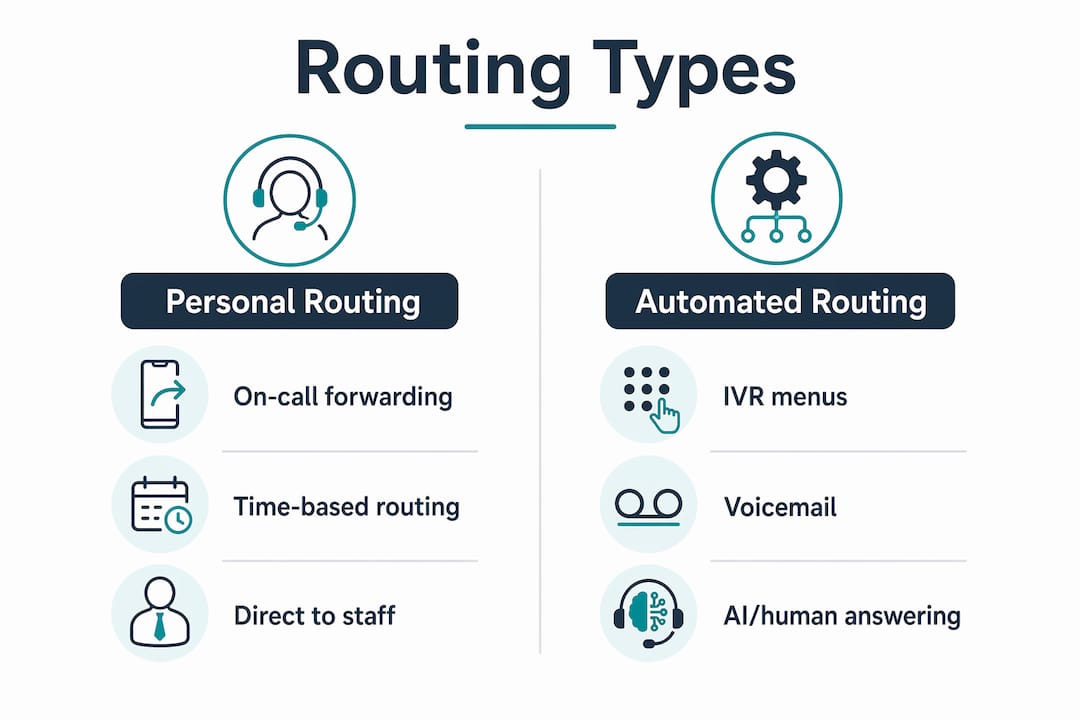
Time-based routing to on-call staff sends calls directly to a designated person's mobile after hours. Fast and personal, but it burns out staff quickly if volume is high.
IVR or after-hours menu gives callers a short self-service menu: press 1 for emergencies, press 2 to leave a message. Keep the menu to three options maximum. Long menus dramatically increase abandonment at night, when callers are already frustrated.
Overflow or alternate numbers redirect calls to a secondary line, a partner office, or a different team when your main line is unavailable. Useful for reception overflow routing during peak periods or holidays.
Voicemail or voicemail-to-email is the lowest-cost option. The caller leaves a message; your team gets an email with the audio file attached. No staffing required, but response time depends entirely on how often someone checks that inbox.
Full answering services (human or AI-assisted) handle the call live. They can capture caller details, book appointments, and escalate emergencies so callers never hit a dead end. The cost is higher, but lead capture quality is significantly better than voicemail alone.
Hybrid AI plus human models are worth a close look for small teams. An AI receptionist handles routine calls and hands complex ones to a human backup, covering appointment scheduling and lead qualification without requiring a full-time overnight staff member.
| Routing Type | Best For | Cost Level |
|---|---|---|
| On-call forwarding | Emergencies, trades, urgent services | Low |
| IVR menu | Multi-department businesses | Low–Medium |
| Voicemail-to-email | Low-urgency lead capture | Very Low |
| Answering service (human) | High-value leads, 24/7 coverage | Medium–High |
| Hybrid AI + human | Small teams needing coverage without full staffing | Medium |
Pro Tip: For emergency-response businesses like plumbers or HVAC contractors, always put the emergency escalation path as option 1 on your IVR. Callers in distress will not wait through a long menu.
Step-by-step setup checklist you can follow today
Work through these steps in order. Most VoIP platforms let you complete steps 1–6 in a single admin session.
- Define your business hours. Set exact open and closed windows for each day of the week, including any split shifts. Add a separate holiday schedule.
- Identify your routing targets. Decide where after-hours calls go: on-call mobile, voicemail inbox, answering service, or IVR menu.
- Configure time zones. Set the time zone for each location or number. If you have multi-site or remote offices, each site needs its own schedule.
- Record your after-hours message. Keep it under 20 seconds. State your business name, confirm you're closed, give your hours, and tell callers exactly when they'll hear back.
- Enable voicemail-to-email. Point the voicemail inbox to a monitored email address, not a shared inbox that nobody checks.
- Set escalation rules. If the primary destination doesn't answer within a set number of rings, the call should route to a secondary fallback, not drop.
- Integrate with your calendar or CRM if your platform supports it, so missed calls log automatically and trigger follow-up tasks.
- Test from multiple numbers. Call your main line from a mobile phone during your configured after-hours window. Then test from a number in a different time zone using a time zone planner to confirm the schedule fires correctly.
- Simulate agent unavailability. Turn off the primary destination and confirm the escalation rule catches the call.
- Confirm voicemail notifications. Check that the email with the audio file arrives within two minutes of the test call.
- Document the rollback path. Write down the steps to revert to your previous routing rules. Keep that document somewhere your whole team can find it.
Pro Tip: Assign one person as the routing owner. They are the only one who changes schedules, updates the after-hours message, and runs the quarterly test call. Shared ownership means nobody owns it.

Where should you route after-hours calls?
Choosing the right destination is as important as setting the schedule. Here is how the main options stack up for SMBs.
On-call staff work well for trades, property managers, and any business where a real human needs to triage the call. The risk is burnout and inconsistency if the on-call rotation isn't managed carefully. On-call routing solutions can send voicemail alerts with escalation if the first person doesn't pick up, which removes the single-point-of-failure problem.
Team queues distribute calls across a group rather than ringing one person. Better for coverage, but someone still has to be staffed.
IVR menus work best when callers have genuinely different needs, such as a medical clinic where a patient calling about a prescription refill should not reach the same path as someone reporting a serious symptom.
Voicemail is fine for low-urgency businesses. The KPI to watch is callback completion rate: what percentage of voicemails actually get returned within your stated SLA window?
Answering services are the right call when lead value is high enough to justify the cost. A missed $5,000 contract because a caller hit voicemail at 6 PM is a worse outcome than the monthly answering service fee.
Suggested KPIs to track after launch:
- Missed-call rate (target: below 5% during covered hours)
- Response SLA compliance (percentage of callbacks completed within 60 minutes)
- Callback completion rate (percentage of voicemails that receive a return call)
- Abandonment rate on IVR menus (high abandonment signals a menu that's too long or confusing)
88% of customers expect a response within 60 minutes (as of 2024), which means your SLA target should be built around that window, not your team's convenience.
What does after-hours routing actually cost?
Cost depends on three variables: how you handle the call (voicemail vs. live agent), how complex your routing is, and whether you need on-site installation or a cloud-only setup.
Cost drivers to understand before you buy:
- Subscription vs. per-minute pricing from your VoIP or answering service provider
- Whether you need a human answering service or an AI-assisted one
- IVR complexity (a single fallback message costs almost nothing to configure; a multi-level menu with CRM integration costs more)
- Network readiness and on-site cabling if you're running physical phones
- Number of locations and time zones to manage
Rough pricing shapes for small teams:
- Basic voicemail-to-email forwarding: typically included in most VoIP subscriptions at no extra charge
- AI-assisted answering services: generally priced per interaction or as a monthly flat rate for a set number of calls
- 24/7 human answering services: monthly fees that scale with call volume and complexity
Implementation timeline:
- Cloud-only voicemail or simple forwarding: same day to 48 hours
- IVR configuration with multiple routing paths: 2–5 business days
- Full on-site VoIP installation with after-hours programming, cabling, and testing: 1–3 weeks depending on site complexity
Questions to ask any vendor before signing:
- Does the platform support multiple time zones and holiday schedules natively?
- Can I update routing rules myself, or do I need to call support?
- What happens to a call if the primary and secondary destinations both fail?
- Is voicemail-to-email included, or is it an add-on?
Troubleshooting common after-hours routing problems
Most routing failures trace back to one of four causes: wrong time zone, missing fallback, call loop, or a forwarding code the carrier doesn't recognize.
Common problems and direct fixes:
- Calls routing to after-hours during business hours: Check the time zone setting on the routing rule. The platform's clock and your local time zone must match exactly.
- Forwarding not working: Confirm the forwarding code is supported by your carrier. Some carriers require specific activation codes; others block forwarding by default on certain line types.
- Call loops: A call loop happens when destination A forwards to destination B, which forwards back to A. Map your routing chain on paper before configuring it, and make sure every path terminates at a voicemail or a live answer.
- Voicemail not arriving by email: Check the email address in the voicemail-to-email settings, confirm it isn't landing in spam, and verify the file size limit on the receiving inbox.
- IVR not playing the correct message: Re-upload the audio file and confirm the file format matches what the platform requires (typically MP3 or WAV at a specific bitrate).
Debug checklist:
- Confirm business hours settings match the intended schedule
- Check routing rule order (rules are often evaluated top-to-bottom; a catch-all rule placed too high will intercept calls before the correct rule fires)
- Test with caller IDs from different regions and carriers
- Check CRM or webhook logs to confirm calls are being logged
- Verify no overlapping schedules exist for the same number
Test after-hours routing from multiple carrier networks and mobile numbers in other time zones, since carrier-specific call forwarding and caller ID behavior can differ and cause misroutes that only show up in real-world testing.
When to escalate to vendor support: if the routing rule is configured correctly and the problem persists across multiple test calls from different carriers, the issue is likely at the carrier or SIP trunk level, not in your platform settings.
Why after-hours routing matters: the ROI case
88% of customers expect a response within 60 minutes of reaching out (as of 2024). For an SMB, every unanswered after-hours call is a potential lead that called a competitor next.
The ROI argument is straightforward. Fewer missed calls means more leads captured. Faster triage of urgent problems means fewer escalations that become expensive crises. A caller who reaches a clear, professional after-hours message and gets a callback within the hour has a fundamentally different brand experience than one who hits dead silence or an overflowing voicemail box.
For businesses that handle emergencies, such as plumbers, HVAC contractors, or property managers, after-hours call handling is not a nice-to-have. A single recovered emergency call can cover months of answering service fees.
Track your missed-call rate and response SLA compliance for 30 days after launch. Those two numbers will tell you whether your current setup is working or whether you need to move up to a live answering service.
Businessvoip provides on-site VoIP design and installation with voicemail-to-email, mobile app support, and after-hours routing configuration included, backed by carrier-grade infrastructure and local Ontario support.
Security and privacy during after-hours calls
After-hours calls carry the same privacy obligations as calls during business hours, and in some ways more risk, since fewer people are monitoring the system.
Key considerations:
- Call recording compliance: if your system records calls, callers must be notified. This applies after hours too. Check your state's one-party or two-party consent laws before enabling recording on after-hours lines.
- Voicemail access controls: voicemail inboxes that receive sensitive caller information should require a PIN or be accessible only through authenticated email accounts. A shared voicemail with no PIN is an open door.
- Answering service data handling: if a third-party answering service captures caller details, confirm their data handling practices. Ask specifically where call recordings and transcripts are stored and who has access.
- IVR data inputs: if your after-hours IVR collects account numbers, dates of birth, or other sensitive inputs via keypad, those inputs need to be encrypted in transit and at rest.
- Network security for VoIP: SIP-based phone systems are a target for toll fraud, where attackers exploit open SIP ports to make unauthorized calls. After hours, when nobody is watching the system, is when this most often goes undetected. Confirm your provider uses SIP authentication, rate limiting, and anomaly alerts.
A quick audit: review who has admin access to your routing rules and voicemail settings. After-hours configurations are often set up once and forgotten, which means stale admin credentials from former employees can linger for years.
Key Takeaways
After-hours call routing works when you configure a single, tested fallback that captures caller intent and triggers a callback within your stated SLA window.
| Point | Details |
|---|---|
| Start with one fallback | A voicemail-to-email rule configured and tested today beats a complex IVR built next quarter. |
| Time zones break routing | Set the time zone on every routing rule explicitly; mismatches are the top cause of calls hitting after-hours during open hours. |
| 60-minute SLA is the benchmark | 88% of customers expect a response within 60 minutes (as of 2024), so build your callback SLA around that window. |
| Track three KPIs | Monitor missed-call rate, response SLA compliance, and callback completion rate for 30 days post-launch. |
| Businessvoip handles the setup | Businessvoip designs, programs, and installs VoIP systems on-site in Ontario, including after-hours routing, voicemail-to-email, and mobile app configuration. |
The detail most businesses get wrong
The checklist in this article covers the mechanics. What it can't fully convey is how often the IVR holiday schedule is the thing that breaks everything.
Most teams configure after-hours routing once, test it on a Tuesday afternoon, and never touch it again. Then a statutory holiday arrives, the holiday schedule was never added, and every caller on Christmas Eve gets routed to a live agent who isn't there, or worse, a ringing phone that nobody answers.
The fix is simple but easy to skip: build a recurring calendar reminder to review and update your holiday schedule at least 60 days before any major holiday period. When you hand the routing setup off to an internal admin or a vendor, make that review cycle part of the written handoff document, not a verbal instruction.
One more thing worth saying plainly: the fastest path to fewer missed leads is not the most sophisticated routing architecture. It's a single well-tested fallback that actually works, owned by one person who keeps it current.
Businessvoip builds and installs your after-hours routing
If you'd rather have your after-hours routing designed, programmed, and tested by a local team than configure it yourself, that's exactly what Businessvoip does. For Ontario businesses, Businessvoip's on-site team handles the full setup: system design, cabling, phone installation, after-hours and holiday routing, voicemail-to-email, and mobile app configuration, all at a fixed monthly price with no annual increases.

Rented phones come with a lifetime warranty, and the same local team that installs the system supports it afterward. Whether you run a single office or need consistent routing across multiple locations, Businessvoip has handled that configuration since 2005. Trades businesses, property managers, and construction and contracting companies that depend on after-hours emergency callbacks are a particular fit. To get a system designed for your business, start with a phone system design consultation.