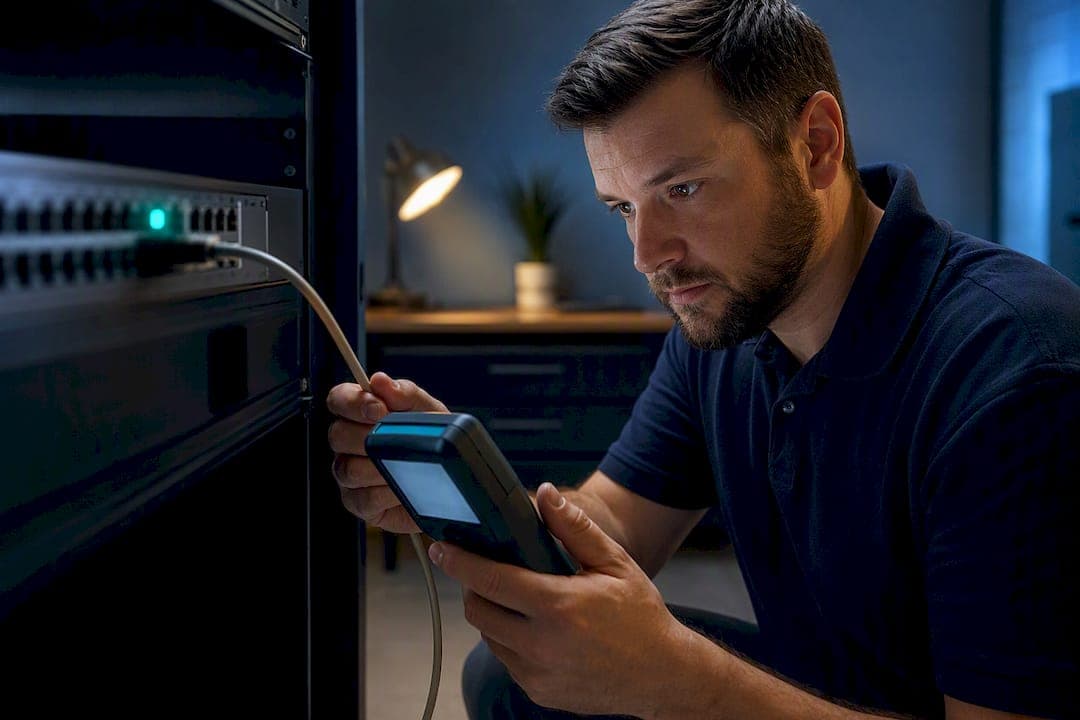
Mark RTP traffic DSCP EF (46) and SIP signaling CS3 (24) or AF31 (26), then push those markings through untouched: 802.1p CoS 5 on the voice VLAN, trust dscp enabled on every access switch port, and a WAN priority queue with bandwidth reserved for your actual concurrent call load. Confirm with a packet capture at the WAN interface. Everything below explains why, and how to build it out properly.
TL;DR:
- Trust and verify DSCP markings at multiple network points to ensure they survive through switches, routers, and VPNs, preventing silent downgrades.
- WAN queuing strategies should be chosen based on network size, with SQM recommended for small offices and LLQ for multi-class enterprise setups, always sizing shapers properly.
- Proper source marking on phones, PBX, or gateways, combined with end-to-end validation through packet captures, is essential for effective VoIP QoS.
- Packet loss concealment helps mitigate occasional drops but cannot compensate for persistent congestion or misconfigured QoS, making accurate sizing and trustworthiness paramount.
Table of Contents
- Quick VoIP QoS Setup Settings: DSCP, 802.1p, and Bandwidth Math
- How Do You Keep Voice VLANs From Losing Their DSCP Tags?
- LLQ, Strict Priority, or SQM: Which WAN Queueing Strategy Fits?
- How Do You Mark VoIP Packets Correctly at the Source?
- Verifying VoIP QoS Is Actually Working
- Sample QoS Configuration Snippets for Common Platforms
- On-Site Validation Checklist Before You Call It Done
- Why Packet Loss Concealment Still Matters Even With Perfect QoS
- Making QoS Consistent Across the Entire Call Path
- What Changes When VoIP Runs Over Wi-Fi?
- Does MPLS Still Make Sense for VoIP QoS?
- The One Mistake That Undermines Most QoS Setups
- Sources
Quick VoIP QoS Setup Settings: DSCP, 802.1p, and Bandwidth Math
Before touching a single config line, get the numbers right. Guessing at bandwidth reservations is the single most common reason a technically correct QoS setup still produces choppy calls.
Start with marking. RTP (the actual audio) gets DSCP EF marking, the standard expedited forwarding class for latency-sensitive media, which Cisco's own QoS guidance defines as the standard expedited forwarding class for latency-sensitive media, backed by the per-hop behavior defined in RFC 3246. SIP signaling doesn't carry audio, so it doesn't need EF. Mark it CS3 (24) or AF31 (26) instead. Both are widely used defaults, per SIPSymposium's configuration guide.
Bandwidth comes next, and this is where a lot of setups quietly fail:
- G.711 codec calls use substantial bandwidth including overhead.
- G.729 codec compresses bandwidth usage significantly compared to G.711.
- It is advisable to add some headroom on top of your calculated total bandwidth reservation, per that same SIPSymposium guidance.
Sample math: 10 concurrent G.711 calls = 870 kbps raw. Add 20% headroom and you're reserving roughly 1.04 Mbps for voice on your WAN queue, not 870 kbps flat.
Map DSCP EF to 802.1p CoS 5 on your voice VLAN so Layer 2 switches and Layer 3 routers agree on priority as traffic crosses trunk links. One rule overrides everything else here: confirm you have enough raw bandwidth for your call volume before you configure any queue. QoS prioritizes traffic during congestion. It does not create bandwidth that doesn't exist.
How Do You Keep Voice VLANs From Losing Their DSCP Tags?
Most "QoS isn't working" tickets aren't queueing problems. They're switches quietly stripping or overwriting DSCP because nobody told them to trust it. On many managed switches, access ports default to untrusted for DSCP, which means the switch rewrites markings unless you explicitly configure otherwise.
Set up the voice VLAN first:
- Create a dedicated voice VLAN separate from your data VLAN, and configure it on the switch and on each phone's provisioning template.
- Enable LLDP-MED or CDP on switch ports connected to phones, so handsets auto-discover the correct voice VLAN ID without manual entry on every device.
- On each access port, explicitly set
trust dscp(or the equivalent QoS trust boundary command for your platform) so incoming markings survive instead of getting rewritten to best-effort. - Enable PoE on those same ports if your phones don't have separate power, and turn on
spanning-tree portfastso phones don't sit in a blocking state during boot. - At Layer 3 boundaries, confirm your DSCP-to-CoS mapping table matches on both sides of any inter-VLAN routing hop. A mismatch here silently downgrades voice traffic the moment it crosses from VLAN to VLAN.
Testing whether a switch strips DSCP is straightforward: capture packets at the phone's port and again at the router's WAN interface, then compare the DSCP byte in both captures. If EF (which shows up as tos 0xb8 in most packet analyzers) is present at the phone but gone by the time it reaches the WAN, something in between is untrusted or misconfigured, according to Cisco's Nexus QoS configuration documentation. Our own voice VLAN setup walkthrough covers the switch-side commands in more depth.
Pro Tip: Capture at three points, phone, access switch, and router WAN interface, not just one. The hop where DSCP disappears tells you exactly which device needs a trust command, instead of you guessing across an entire network closet.
LLQ, Strict Priority, or SQM: Which WAN Queueing Strategy Fits?
Your LAN can carry gigabit traffic without breaking a sweat. Your WAN link almost certainly can't. That mismatch is why the WAN circuit, not the office switch stack, is where voice quality actually gets decided, and it's why QoS has to be applied on the LAN side of the WAN interface. Configuring priority after traffic has already crossed the bottleneck accomplishes nothing, a point Cisco's VoIP QoS documentation makes explicitly.
Two broad approaches handle this:
- LLQ (Low Latency Queuing / strict priority): voice gets a guaranteed minimum bandwidth and jumps the queue ahead of everything else, up to a defined ceiling.
- SQM (Smart Queue Management, using fq_codel or CAKE): a single adaptive queue that manages latency and bufferbloat automatically, without manual per-class bandwidth carving.
LLQ is the enterprise answer when you're running multiple traffic classes (voice, video conferencing, bulk data) and need guaranteed, auditable bandwidth allocations on a business-grade router or firewall. SQM is often the better fit for smaller offices with a single WAN circuit and no dedicated network engineer, because it needs almost no tuning and directly addresses bufferbloat, which a good chunk of "QoS failures" turn out to actually be.
One tradeoff worth understanding before you pick either: policing drops packets that exceed a rate limit outright, while shaping buffers and delays them instead. For voice, that distinction matters in the other direction than you might expect: excessive buffering under shaping introduces the exact jitter you're trying to eliminate, so voice-priority queues typically want tight buffers and small ceilings, not generous ones.
Sizing the shaper is where a lot of otherwise-correct configs quietly underperform. Set your shaper rate to approximately a high percentage of your measured effective upload speed, not the nominal ISP contract speed, so your router remains the actual bottleneck instead of a switch further upstream sitting on an unmanaged buffer. Reserve voice bandwidth as concurrent calls multiplied by estimated per-call bandwidth plus appropriate headroom.
If you're running strict priority queues, police the voice class itself with a defined ceiling. Cisco recommends this explicitly: an uncapped priority queue can starve data traffic entirely during an unusual burst, which turns a voice quality fix into a full network outage for everyone else on the link.
Pro Tip: If your office runs one WAN circuit and fewer than 20 concurrent calls, try SQM before you build a manual LLQ policy. It solves the majority of small-site jitter complaints with a fraction of the configuration risk.
How Do You Mark VoIP Packets Correctly at the Source?
Marking has to happen somewhere before the packet reaches your WAN queue, and where you do it depends on your stack.
- Phone provisioning templates: most desk phones let you set DSCP values directly in the provisioning file or DHCP option, typically under a QoS or "Diffserv" setting. Confirm the template pushes EF (46) for RTP and CS3 or AF31 for SIP before mass-deploying it across a fleet.
- Asterisk / PBX settings: in
sip.confor the relevant channel driver config, settos_audio=efandtos_sip=cs3(or your platform's equivalent syntax) so the PBX marks outbound packets correctly at the source rather than relying entirely on downstream remarking. - Linux iptables marking: for a Linux-based gateway or session border controller, mangle-table rules can mark traffic by port range, for example targeting your RTP port range (often 10000 to 20000) and your SIP signaling port (typically 5060), setting the DSCP field on each accordingly.
- Validation with tcpdump: run a capture during an active call and inspect the ToS/DSCP byte on the packets leaving that interface. If it isn't showing EF or CS3 as expected, the marking rule isn't matching the traffic you think it is.
- Edge remarking: if endpoints can't mark reliably (older analog gateways, some SIP trunks), remark at your edge router or firewall instead. Just confirm nothing further upstream is already remarking the same traffic, since conflicting remarking rules at two different hops is a common source of markings that "work sometimes."
Verifying VoIP QoS Is Actually Working
A configuration that looks correct on paper isn't the same as one that's protecting call quality under real load. Verification closes that gap, and it needs concrete numbers, not a subjective "the call sounded fine."
The targets to test against: one-way latency under 150 ms, jitter under 30 to 40 ms, and packet loss under 1%, consistent with ITU G.114 recommendations for high-quality voice and the practical thresholds where audio degradation becomes audible. Translate those into a Mean Opinion Score, and you're looking for a MOS in the 4.0+ range for calls users would rate as good to excellent. Our MOS score guide breaks down how that scale maps to real complaint patterns.
Run verification in this order:
- Capture packets at the phone, the access switch, and the router's WAN interface during a live call, checking the DSCP byte at each hop. A tool like ntopng can flag per-flow classification automatically instead of you eyeballing raw captures.
- On Cisco gear, run
show policy-map interfaceto confirm the priority class is actually matching voice traffic and not sitting at zero packets. On Linux,tc qdisc showand its stats output tell the same story. - Load-test the link: saturate upload and download with a bulk transfer while a call is active, then compare jitter, loss, and MOS against the idle baseline. A queue that performs fine at idle and collapses under load has a sizing problem, not a marking problem.
- If loss or jitter spikes only under load, look at shaper sizing first, then queue depth, before you assume the marking itself is broken.
Sample QoS Configuration Snippets for Common Platforms
These are starting points, not drop-in production configs. Adjust interface names, bandwidth figures, and ACL ranges to match your environment.
Cisco IOS (MQC/LLQ):
class-map match-any VOICE
 match dscp ef
policy-map WAN-QOS
 class VOICE
  priority percent 20
interface GigabitEthernet0/1
 service-policy output WAN-QOS
The priority command under MQC creates a strict-priority queue for anything matching DSCP EF, guaranteeing bandwidth without letting voice consume the entire link.
FortiGate: create a traffic shaper with a guaranteed and maximum bandwidth, then build a shaping policy matching ToS/DSCP value 0xB8 (EF/46) so the firewall applies that shaper specifically to voice-tagged flows, configurable through the GUI's Traffic Shaping Policy page or the equivalent CLI shaper object.
EdgeRouter / UniFi: enable strict priority queueing on the WAN interface and assign voice traffic to the highest-priority queue by matching DSCP or the voice VLAN's source subnet; UniFi's Smart Queue feature largely automates this but still needs its bandwidth field set to your measured upload and download speeds, not your ISP's advertised numbers.
Linux (tc + iptables):
iptables -t mangle -A POSTROUTING -p udp --dport 10000:20000 -j DSCP --set-dscp-class ef
tc qdisc add dev eth0 root handle 1: prio bands 3
| Platform | Voice match method | Priority mechanism |
|---|---|---|
| Cisco IOS | DSCP EF match in class-map | LLQ priority command |
| FortiGate | ToS 0xB8 in shaping policy | Guaranteed/max traffic shaper |
| EdgeRouter/UniFi | DSCP or VLAN match | Strict priority queue / Smart Queue |
| Linux | iptables DSCP mangle rule | tc priority qdisc |
On-Site Validation Checklist Before You Call It Done
A config file that looks right in a text editor isn't the same as a phone system that performs right on a Monday morning call surge. Before signing off, walk through:
- A full network audit confirming switch models, port counts, and PoE budget support the voice VLAN plan.
- DSCP survival checks at phone, switch, and WAN hops, not just one capture point.
- WAN shaper verification under actual load, not idle conditions.
- A failover test, confirming call continuity if the primary WAN circuit drops (our failover internet guide covers configuration options).
Some providers install and program these systems on-site rather than shipping a box of phones and a PDF, and may offer carrier-grade infrastructure and warranties on rented handsets. When an internal team hits a switch that won't hold trust settings or a WAN circuit that can't be sized cleanly, that's the point to bring in an on-site integrator rather than iterating remotely for another week. Our on-site QoS checklist walks through the same audit steps field techs use during a live deployment.
Why Packet Loss Concealment Still Matters Even With Perfect QoS
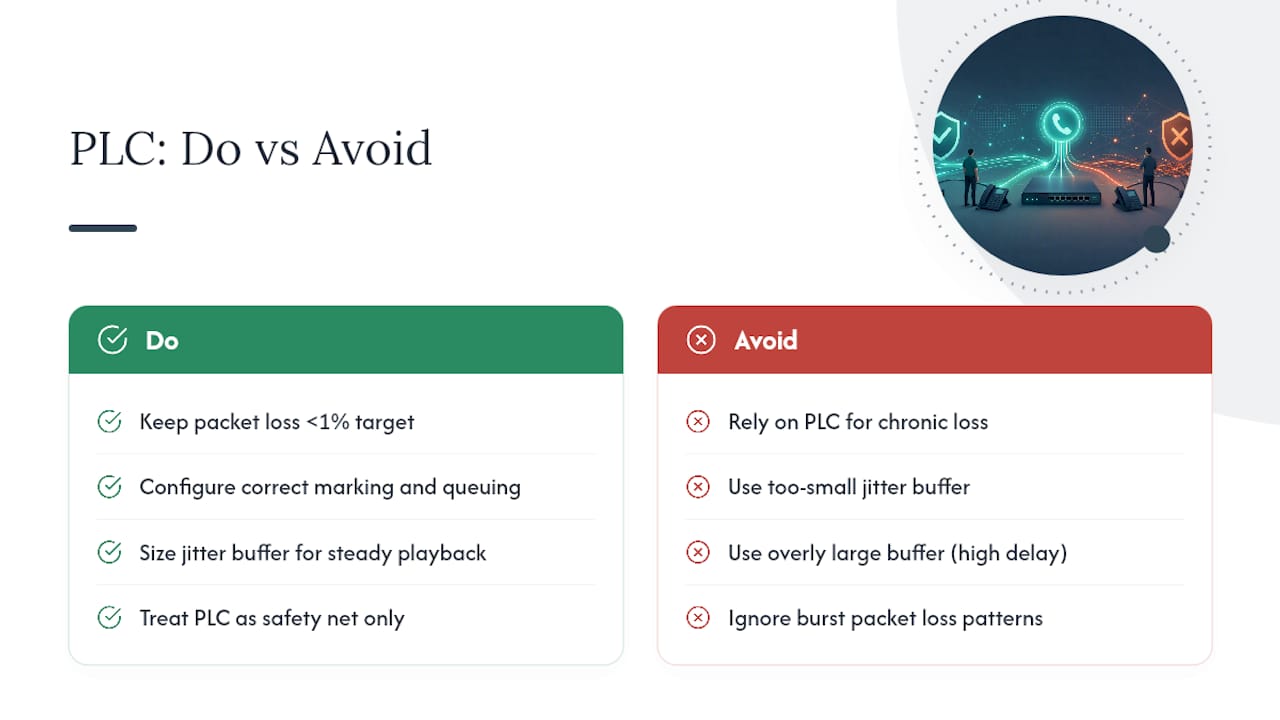
Even a flawlessly configured QoS setup won't eliminate every dropped packet. Wireless interference, a brief WAN blip, a router buffer flush under momentary congestion, these happen regardless of how well you've marked and queued traffic. That's where packet loss concealment (PLC) comes in as the last line of defense.
Most modern codecs, including G.711 and Opus, include built-in PLC algorithms that interpolate missing audio using the samples immediately before and after the gap. A single lost 20 ms packet becomes nearly imperceptible because the codec reconstructs a plausible waveform rather than leaving dead air or a click. Miss several packets in a row, though, and concealment runs out of usable context, which is exactly why the sub 1% packet loss target matters so much: PLC handles occasional, isolated loss well but degrades fast once loss becomes burst.
This is also why jitter buffers and PLC work together rather than separately. A jitter buffer reorders and smooths out packets that arrive late or out of sequence, feeding the codec a steadier stream so PLC only has to compensate for genuine loss, not timing chaos that looks like loss. Size that buffer too small and you get audible clicks from real drops. Size it too large and you introduce delay that undermines the very latency targets your QoS policy is protecting.
Treat PLC as a safety net, not a substitute for correct marking and queueing. A network that leans on codec-level concealment to mask a chronically congested link will still sound noticeably worse than one where QoS keeps loss rare enough that concealment barely has to work.
Making QoS Consistent Across the Entire Call Path
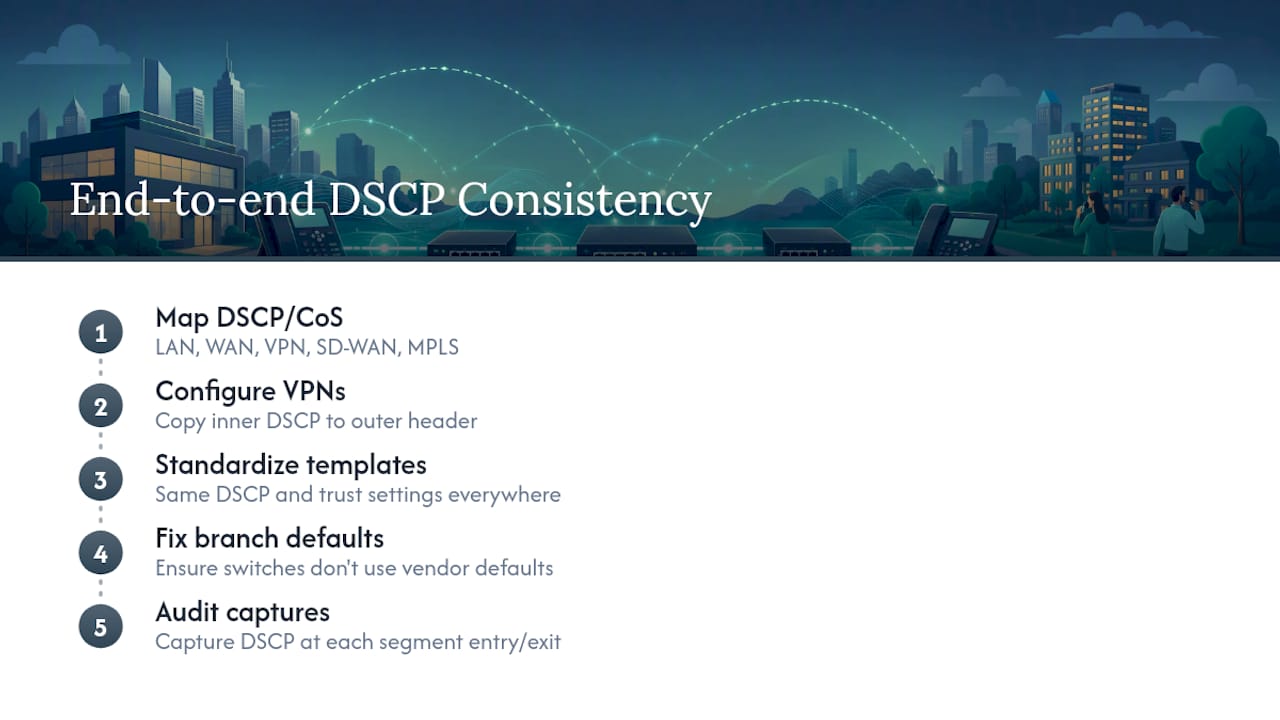
A DSCP marking is only useful if it survives every hop between the phone and the far end of the call. Voice quality problems often trace back to one segment in an otherwise solid setup: the marking gets applied correctly at the phone, honored on the LAN switch, respected by the WAN router, and then dropped or ignored by an ISP, a firewall, or a remote office's own network that nobody audited.
End-to-end consistency means mapping DSCP and CoS values the same way across every segment: LAN switches, WAN routers, VPN tunnels between offices, and any SD-WAN or MPLS underlay in between. A VPN tunnel in particular is a common blind spot, since encapsulation can bury the original DSCP byte unless the tunnel is explicitly configured to copy it to the outer header.
For multi-site organizations, this gets more complicated fast. Each site's local network team (or vendor) may configure QoS slightly differently, and a policy that works perfectly at headquarters can fall apart at a branch office where the switch defaults weren't changed. The fix isn't more documentation. It's a standardized configuration template applied identically at every site, with the same DSCP values, the same trust settings, and the same verification steps run at each location before go-live. Our multi-site and remote office guidance covers the VLAN side of that standardization in more detail.
Audit end-to-end consistency the same way you audit a single site: capture DSCP at the entry and exit of every segment in the path, not just at the office where the phones sit.
What Changes When VoIP Runs Over Wi-Fi?
Wired QoS techniques don't map directly onto wireless, and that mismatch trips up a lot of otherwise solid setups. Wi-Fi uses WMM (Wi-Fi Multimedia), which is the 802.11 equivalent of 802.1p priority tagging, mapping traffic into four access categories, with voice getting the highest.
The catch is that WMM prioritization only works if your access points are actually mapping DSCP to the correct WMM access category, and a lot of consumer-grade and even some business access points don't do this reliably out of the box. Confirm your AP vendor's documentation on DSCP-to-WMM mapping rather than assuming it happens automatically just because "the AP supports QoS."
Beyond marking, wireless introduces problems wired QoS never has to deal with: contention from other devices on the same channel, distance-related signal degradation, and roaming delay as a phone moves between access points mid-call. A softphone on a laptop roaming across APs during a call can experience a brief audio gap during the handoff, regardless of how well DSCP is configured, because that gap is a Layer 2 association issue, not a queueing issue.
For any office running softphones or Wi-Fi handsets as a primary calling method, band steering to 5GHz or 6GHz, adequate AP density to avoid roaming dead zones, and a dedicated SSID for voice traffic all matter more than the QoS marking itself. Wired handsets remain the more predictable choice for any desk that takes calls all day, precisely because they sidestep this entire category of problem.
Does MPLS Still Make Sense for VoIP QoS?
MPLS earns its reputation for voice because it lets a provider guarantee bandwidth and latency class by class across their entire backbone, not just at your edge router. Where a standard internet circuit can only promise best-effort delivery once traffic leaves your building, an MPLS provider typically commits to a service level agreement covering latency, jitter, and packet loss across the full path between your sites.
That matters most for multi-site organizations trunking voice between offices, where the WAN isn't a single bottleneck you control but several hops through a carrier's network you don't. DSCP-to-MPLS EXP bit mapping lets your internal EF marking carry through the provider's core, provided the DSCP-to-EXP mapping is configured correctly on both ends, another spot where end-to-end consistency checks matter.
The tradeoff is cost and flexibility. MPLS circuits run considerably more than commodity internet, and providers are increasingly steering customers toward SD-WAN over broadband and LTE with reliable priority behavior of its own. For a single-site business with one clean internet circuit, MPLS is usually overkill. For a company running voice across five branch offices where a single congested hop can degrade every call routed through it, MPLS remains one of the more reliable ways to buy consistent behavior instead of engineering it piecemeal at every location.
The One Mistake That Undermines Most QoS Setups
The research here points to one pattern more than any other: teams get the marking right and still get complaints, because they never verify the marking survives the whole path. It's the gap between a config that's technically correct and one that's actually protecting calls.
Conventional advice leans hard on the marking step, DSCP EF here, CS3 there, and treats verification as an afterthought. That's backwards. A switch silently untrusting DSCP, a shaper sized against the ISP's advertised speed instead of the measured one, a VPN tunnel eating the outer header, any of these quietly undoes correct marking, and none of them show up unless someone captures packets at more than one hop.
If you only do one thing after reading this, make it verification under load, not idle conditions. Most jitter complaints trace back to bufferbloat or undersized shapers, not bad marking logic. Fix the bandwidth math and the trust settings first. The queueing strategy you pick, LLQ or SQM, matters far less than most vendor documentation implies once those two fundamentals are actually in place.
— James
Ready for a phone system where QoS isn't something your team has to reverse engineer after the fact? Businessvoip designs, cables, and programs the network on-site, with carrier-grade infrastructure and a lifetime warranty on every rented phone. If you're running a multi-site operation with remote offices, our multi-site and remote office solutions are built specifically for the VLAN and QoS consistency challenges that come with it.
Sources
- Quality of Service for Voice over IP — Cisco
- VoIP QoS Configuration — SIPSymposium
- ntopng — traffic analysis