If your network carries VoIP calls, guest Wi-Fi, IP cameras, or you expect to add more than 10 devices in the next two years, choose a managed or smart switch. If you only need a few extra ports in a single-purpose setup with no segmentation or monitoring requirements, an unmanaged switch is fine.
The three-way split works like this:
- Unmanaged: plug in and forget. No VLANs, no QoS, no SNMP. Right for small, static setups under 10 devices with no real-time traffic.
- Smart/web-managed: a practical middle ground for most SMBs. Supports VLANs, basic QoS, and a web UI without requiring CLI skills.
- Fully managed: enterprise-grade control with CLI, SNMP, port mirroring, 802.1X, and link aggregation. Necessary for multi-site networks, compliance environments, or any deployment where visibility and segmentation are non-negotiable.
The technical triggers that push you toward managed hardware are three: VLANs (traffic segmentation), QoS (quality of service priority for voice packets), and SNMP (remote monitoring). If you need any one of those, an unmanaged switch cannot help you. Businessvoip designs and installs on-site VoIP systems with VLAN and QoS configuration built in, so the switch decision gets made before a single cable is run.
Table of Contents
- What an unmanaged switch actually does (and where it stops)
- What a managed switch gives you that unmanaged hardware cannot
- Smart/web-managed switches: the right fit for most small businesses
- Side-by-side: unmanaged vs. smart vs. fully managed
- How to choose the right switch: a practical checklist
- Deployment effort and troubleshooting: what the real difference looks like
- Which switch fits your actual setup?
- Key Takeaways
- The mistake most offices make before calling an installer
- Businessvoip handles the switch decision as part of the install
- Sources and further reading
What an unmanaged switch actually does (and where it stops)
An unmanaged switch is a Layer 2 device with no configuration interface. Every port behaves identically. Traffic floods across all ports in the same broadcast domain, and there is no way to separate devices, prioritize traffic, or see what is happening on any port.

Unmanaged switches are the right choice for small, stable deployments where segmentation, monitoring, or QoS are not required. A dedicated camera subnet with no other traffic on it, a small conference room with three PCs and a printer, or a temporary job-site setup are all reasonable fits.
What an unmanaged switch cannot do:
- Tag or pass VLAN traffic
- Prioritize VoIP packets over bulk file transfers
- Report port statistics or respond to SNMP polling
- Mirror traffic to a monitoring device
- Restrict which devices can connect
Pros: Zero configuration time, lowest hardware cost, no firmware management.
Cons: No segmentation, no visibility, no QoS. Any real-time traffic shares bandwidth equally with everything else on the segment.
Pro Tip: If you are buying an unmanaged switch for a camera cluster, make sure that segment is physically isolated from your main LAN. Once you add a VoIP phone or a guest access point to the same switch, you have already outgrown it.
What a managed switch gives you that unmanaged hardware cannot
A managed switch is a configurable Layer 2 (or Layer 3) device with one or more management interfaces: a serial console, a web GUI, an SNMP agent, or a full CLI accessed over SSH. Cisco describes managed switches as providing remote monitoring, SNMP support, and port mirroring that make troubleshooting faster and more precise.
Core features you get with a fully managed switch:
- VLANs: separate voice, data, guest, and IoT traffic on the same physical cable plant
- QoS / DSCP: tag and prioritize voice packets so a file download cannot degrade a call
- SNMP: poll port statistics, receive alerts, and feed data into a network monitoring platform
- Port mirroring: copy traffic from one port to another for packet capture and diagnosis
- 802.1X: authenticate devices before they get network access
- Spanning Tree Protocol (STP): prevent broadcast loops in multi-switch topologies
- Link aggregation (LACP): bond multiple uplinks for bandwidth and redundancy
- Per-port PoE control: set power budgets and priorities per device
Management methods range from a full CLI (highest capability, steepest learning curve) to a cloud-managed dashboard (easiest remote access, subscription cost) to a local web GUI (middle ground). The method you choose affects both the skill level required and the ongoing operational cost.
Buying managed hardware and leaving it configured with factory defaults effectively yields unmanaged behavior. Configuration is half the value of the hardware. A switch with VLANs and QoS disabled is just an expensive unmanaged switch.
The trade-off is real: managed switches cost more upfront and require someone to configure and maintain them. For networks carrying VoIP or mixed device types, that investment pays back quickly in call quality and reduced troubleshooting time.
Smart/web-managed switches: the right fit for most small businesses
Smart switches sit between unmanaged and fully managed devices, offering limited VLANs (typically 4–8), basic QoS, and a web UI instead of a CLI. You get the segmentation and voice prioritization that a growing office needs without hiring someone who knows Cisco IOS.
Where smart-managed switches fit well:
- A 10–25 person office running a cloud VoIP system that needs voice and data VLANs separated
- A retail location with a guest Wi-Fi network that must stay off the POS segment
- An early-stage IoT or camera deployment where basic port grouping is enough
- Any site where the IT contact is a generalist, not a network engineer
The operational benefit is real. Web-managed switches typically take 20–30 minutes to configure basic VLANs and QoS, compared to hours of CLI work on a fully managed device. The price premium over unmanaged hardware is often modest.
When to pick smart now vs. fully managed later:
- Choose smart-managed if your VLAN count stays under 8 and you have no compliance requirement (PCI, HIPAA).
- Choose fully managed if you expect to add more than two switches, need SNMP-based monitoring, or work with an MSP that manages your infrastructure remotely.
- Budget for the upgrade path: smart switches from major vendors often cannot be promoted to full management later, so plan the ceiling before you buy.
Pro Tip: If you are deploying a VoIP phone system for a small business and your installer is not asking about VLAN tagging and QoS on day one, that is a gap worth closing before the phones go in.
Side-by-side: unmanaged vs. smart vs. fully managed
| Feature / Criteria | Unmanaged | Smart / Web-Managed | Fully Managed |
|---|---|---|---|
| VLANs | None | Limited (4–8 typical) | Full (no practical limit; varies by model, but typically supports many VLANs) |
| QoS / DSCP | None | Basic (port-based or limited DSCP) | Full DSCP, per-queue shaping |
| ACLs / Access control | None | Limited | Full ACL support |
| SNMP / Remote monitoring | None | Read-only SNMP on some models | Full SNMP v1/v2c/v3 |
| Port mirroring | No | Some models | Yes |
| 802.1X authentication | No | Rarely | Yes |
| Per-port PoE control | No | Some models | Yes |
| Spanning Tree / Loop protection | Basic (passive) | Yes | Yes, with RSTP/MSTP |
| VoIP / real-time traffic | Poor (no prioritization) | Good (basic QoS) | Excellent (full QoS + DSCP) |
| Scalability | Single-segment only | Small multi-switch | Multi-site, multi-VLAN |
| Admin skill required | None | Low (web UI) | Medium to high (CLI + SNMP) |
| Hardware cost (SMB range) | Lowest | Moderate | Higher |
| Management time | None | Low | Medium to high |
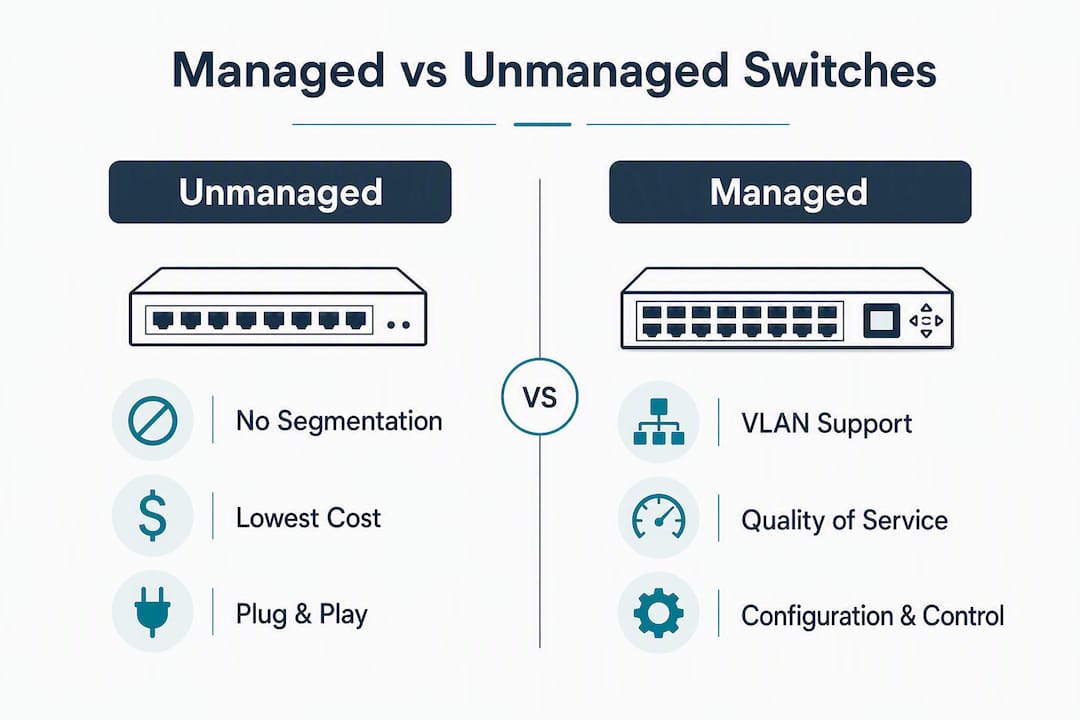
The two gaps that matter most in practice are QoS and VLANs. Without QoS, a single large file transfer can cause audible jitter on every VoIP call on the same segment. Without VLANs, guest devices share a broadcast domain with your phones and servers. Both problems are invisible on an unmanaged switch because there is no monitoring to show you they exist.
The cost difference between unmanaged and smart-managed switches at SMB scale is often modest in absolute terms and may be cheaper than the replacement labor and downtime that comes from outgrowing an unmanaged deployment.
How to choose the right switch: a practical checklist
Work through these in order. The first trigger that fires tells you which category you need.
- Inventory your devices. Count phones, APs, cameras, POS terminals, and servers. More than 10 devices of mixed types is a signal for at least smart-managed.
- List your real-time traffic. Any VoIP, video conferencing, or live streaming on the LAN means you need QoS. That rules out unmanaged.
- Identify segmentation requirements. Guest Wi-Fi, IoT, or POS on the same physical infrastructure requires VLANs. Unmanaged switches cannot tag VLANs.
- Check PoE needs. If you are powering phones or APs from the switch, per-port PoE control becomes important at scale. Unmanaged PoE distributes power without priority.
- Forecast 3-year growth. Adding a second switch, a remote office, or IoT devices within three years means managed hardware now saves replacement costs later.
- Assess your skill or support resources. No in-house IT and no MSP? Smart-managed is your ceiling unless you bring in an installer.
Questions to ask your vendor or installer:
- Can this switch tag VLANs end-to-end across all uplinks?
- How does it handle DSCP markings for VoIP traffic under congestion?
- What remote monitoring or alerting is available out of the box?
- Can firmware be updated remotely, or does someone need to be on-site?
Red flags to watch for:
- An installer who proposes unmanaged switches for a VoIP deployment
- Managed hardware quoted with no mention of VLAN or QoS configuration
- Mixing unmanaged switches into a managed VLAN topology, which breaks VLAN tagging downstream and creates monitoring blind spots
Pro Tip: If you are buying managed hardware, schedule VLAN and QoS configuration as part of the installation, not as a follow-up task. Networks that go live with defaults rarely get reconfigured until something breaks.
Deployment effort and troubleshooting: what the real difference looks like
Installation time for an unmanaged switch is measured in minutes. Plug in, done. A smart-managed switch adds 20–45 minutes for VLAN and QoS setup via the web UI. A fully managed switch with SNMP, ACLs, spanning tree, and 802.1X can take several hours per device, plus ongoing monitoring and firmware cycles.

The troubleshooting gap is where managed hardware earns its cost. On an unmanaged switch, diagnosing a call-quality problem means guessing: you cannot see port utilization, error counts, or whether a broadcast storm is occurring. On a managed switch, SNMP polling surfaces port errors in real time, port mirroring lets you capture the actual traffic, and remote logging shows you exactly when a link flapped.
Managed switches provide visibility and control that make troubleshooting faster. On unmanaged gear, diagnosis is slower and more manual by design.
Common operational questions answered:
- Can a managed switch behave as unmanaged? Yes. Leave all ports in the default VLAN with no QoS configured and it behaves like an unmanaged device. This is a common and expensive mistake.
- Do unmanaged switches need an IP address? No. They forward traffic at Layer 2 with no IP stack. You cannot reach them remotely for any reason.
- Can you mix managed and unmanaged switches? Technically yes, but mixing unmanaged into a managed VLAN topology strips VLAN tags downstream. If managed is your standard, every switch in the path should be manageable.
- What is cloud-managed switching? A cloud-managed switch uses a vendor's hosted dashboard for configuration and monitoring. Lower on-site skill requirement, but adds a subscription cost and a dependency on internet connectivity for management access.
Which switch fits your actual setup?
Small office, no VoIP (under 10 devices, cloud apps only): An unmanaged switch covers basic port expansion. No segmentation needed, no real-time traffic to prioritize.
10–25 person office with a VoIP phone system and guest Wi-Fi: Smart-managed is the right call. You need voice and data VLANs separated, basic QoS for call quality, and guest isolation. For most SMBs, managed switches become necessary when VoIP, guest Wi-Fi, or IoT devices are in the mix.
Retail with POS terminals: PCI scope requires POS traffic to be isolated from everything else. That means VLANs, which means at minimum smart-managed. Fully managed is safer if you have more than one switch in the store.
CCTV or IP camera deployment: An unmanaged PoE switch works if the camera segment is physically isolated. The moment cameras share infrastructure with other traffic, or you need per-port PoE budgeting to protect APs and phones during peak draw, move to managed PoE hardware.
Multi-site or multi-floor office: Fully managed, without exception. You need SNMP monitoring across all switches, consistent VLAN tagging across uplinks, and the ability to troubleshoot remotely. Unmanaged hardware in this topology creates blind spots that are genuinely hard to diagnose.
Temporary or construction-site setup: Unmanaged is fine for a short-term deployment with no VoIP and no sensitive data. Just plan to replace it when the permanent network goes in.
Mixing warning: Adding an unmanaged switch downstream of a managed VLAN topology is one of the most common rollout mistakes. The unmanaged device strips VLAN tags, so devices behind it land in the wrong segment. If you are building a managed network, every switch in the path needs to be manageable.
Key Takeaways
Managed switches are the right default for any network carrying VoIP, guest Wi-Fi, or mixed device types, and smart/web-managed switches cover most SMB needs without requiring CLI expertise.
| Point | Details |
|---|---|
| Unmanaged = no segmentation | Use only for small, static, single-purpose networks with no real-time traffic. |
| Smart-managed covers most SMBs | Provides VLANs and basic QoS via web UI, without enterprise complexity or cost. |
| VoIP requires QoS | Unmanaged switches cannot prioritize voice packets; call quality suffers under any congestion. |
| Mixing types breaks VLANs | An unmanaged switch downstream of a managed topology strips VLAN tags and creates blind spots. |
| Businessvoip installs with VLAN and QoS configured | On-site design and installation means the switch decision and configuration happen before day one. |
The mistake most offices make before calling an installer
The pattern comes up repeatedly: a business buys managed hardware because someone told them it was the right choice, then the installer (or the office manager) leaves every port in the default VLAN with QoS disabled. The switch is managed in name only. Calls drop during the morning rush, nobody can explain why, and the troubleshooting starts from scratch because nobody configured SNMP either.
The other version is the reverse: an unmanaged switch gets dropped into a managed topology because it was cheaper and "just for the back office." VLAN tags disappear downstream, devices end up on the wrong segment, and the security policy that was supposed to isolate guest traffic quietly stops working.
Both mistakes share the same root cause: the switch decision and the configuration decision get treated as separate events. They are not. The hardware choice only matters if the configuration follows it.
For VoIP specifically, device-level QoS and DSCP handling on managed switches protects call quality during congestion. That protection does not exist by default. It has to be programmed. Scheduling VLAN and QoS configuration as part of the installation, not as a follow-up, is the single most practical thing you can do to protect call quality from day one.
Businessvoip handles the switch decision as part of the install
Getting the right switch is only half the problem. The other half is making sure it is configured correctly before your phones go live.
Businessvoip's Ontario team designs, cables, and installs VoIP phone systems on-site, with VLAN tagging and QoS programming built into the installation, not added later. The network check happens before any hardware is ordered, so you are not buying a managed switch and leaving it on defaults.

Every installation includes system design, cabling, VLAN and QoS configuration, number porting, staff training, and a lifetime warranty on rented phones. For multi-site offices and remote locations that need consistent switching across floors or buildings, the same on-site approach applies. If you want a phone system that works from the moment it is installed, design your system with Businessvoip and get the network right the first time.
Sources and further reading
Technical references:
- What is a managed switch? — Cisco: authoritative definitions of managed switch features including SNMP, VLANs, and QoS
- Managed vs Unmanaged vs Smart Switch — FS.com: detailed breakdown of all three switch categories with feature comparisons
- Managed vs Unmanaged Switch difference — ServerFault: community-sourced technical explanation of management interfaces and use cases
- PoE managed switch vs unmanaged — Planet Technology USA: per-port PoE budgeting and power priority for camera and AP deployments
- Managed switches for small business — Sequentur: practical SMB triggers and cost trade-offs for managed vs unmanaged decisions
- Managed vs Unmanaged Switches — 5G Store: use-case guidance for when unmanaged hardware remains appropriate
Related Businessvoip guides:
- VoIP Phone Service for Business: 2026 Guide: how VoIP performance requirements interact with network switching decisions
- Layer 2 vs Layer 3 Switch: Choose by Use Case: when you need Layer 3 routing features beyond standard managed switching
- Best VoIP Phone System for Small Business in Ontario: business-grade phone requirements that drive managed switch selection