
Warm (attended) transfers, where you consult the receiving party before connecting the caller, and cold (blind) transfers, where you connect the caller immediately with no heads-up, are the two core call transfer types. Voicemail transfers and conference transfers round out the list. Use warm transfers for complex issues, VIP accounts, or anything with escalation risk. Use cold transfers for simple routing or high call volume, where speed matters more than context.
TL;DR:
- Warm transfers are best for complex issues, high-value calls, or escalation risks because they include context passing, which improves first-call resolution.
- Cold transfers are suitable for simple routing or high-volume situations, but they can lead to callers reaching unprepared agents with no context.
- Implementing ring-back and fallback to queues can prevent callers from disappearing into dead ends if transfers fail or are unanswered.
- Enabling default warm transfers and ring-back on all paths reduces repeat contacts and improves overall transfer success rates.
- Proper configuration of SIP protocols and staff training on transfer etiquette significantly enhance transfer reliability and caller experience.
Table of Contents
- What Call Transfer Actually Means
- Warm, Cold, Conference, and Voicemail: How Each One Actually Works
- How to Transfer a Call: Step-By-Step Across Devices
- Transfer Etiquette and When to Use Each Type
- Technical Notes for Admins: SIP, Feature Codes, and Fallback Settings
- What a Properly Installed VoIP System Gets Right on Transfers
- One Change Worth Making This Week
- Sources
What Call Transfer Actually Means
A call transfer moves an active call from one person to another without the caller having to hang up and redial. Three roles are always in play: the transferor (the person moving the call), the transferee (the caller being moved), and the transfer target (whoever picks up next). Vendors and phone systems label the same handful of concepts differently, which is where a lot of confusion starts.
The main categories worth knowing:
- Attended/warm transfer: the transferor talks to the target first, then connects the caller.
- Blind/cold transfer: the transferor sends the call straight through with no consult.
- Tepid or queue transfer: a middle option that drops the caller into a queue or hunt group rather than one specific person.
- Voicemail transfer: the call is routed directly into someone's voicemail box, often used when a warm handoff isn't possible.
- Conference/three-way transfer: the transferor stays on the line with both parties instead of dropping off.
Some vendors call blind transfer "unsupervised" and attended transfer "supervised." Others use "consult transfer" for what most people mean by warm transfer. The mechanics behind these types of call forwarding and transfer are consistent across providers even when the labels shift.
Warm, Cold, Conference, and Voicemail: How Each One Actually Works
Warm/attended transfer works in three steps: put the caller on hold, call the target and explain the situation, then either merge the call or hand it off. The upside is real: the receiving agent already has context, which cuts repeat questions and tends to raise first-call resolution. The difference between warm and cold voice transfers shows warm handoffs using a whisper or screen-pop to pass details, which shortens setup time for whoever picks up next. The cost is time. A warm transfer typically adds 10 to 30 seconds before the caller reconnects. Use it for billing disputes, technical escalations, or any caller who's already frustrated once.
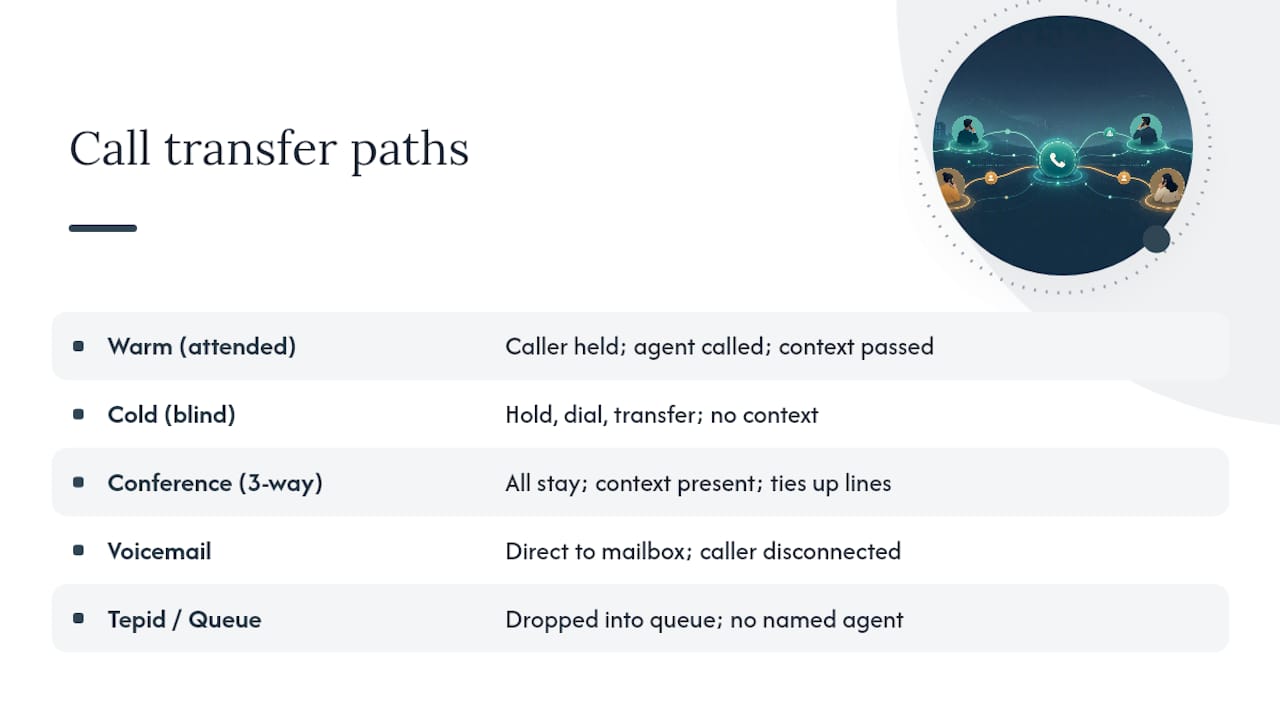
Cold/blind transfer skips the consult entirely. Hold, dial, transfer, done. It's fast, and it's the right call for high-volume front desks or simple routing, like sending every "sales" request to the same extension. The risk is obvious once you've experienced it: the caller lands on someone who has no idea why they're calling, or worse, the line rings out to a voicemail transfer that leads nowhere.
Conference/three-way transfer keeps everyone on the line at once instead of the transferor stepping away. It's useful when a manager needs to stay involved, or when handing off a technical issue benefits from having both the original agent and the specialist present. The trade-off against a standard warm transfer is time and line capacity. Three people tied up on one call costs more than a quick handoff.
Voicemail and tepid/queue transfers cover the gaps. A voicemail transfer sends the caller directly to a mailbox, appropriate after hours or when the target is confirmed unavailable. A tepid transfer drops the caller into a queue or ring group rather than a named person, common in support lines where "next available agent" beats a specific extension.
Pro Tip: Reserve warm transfers for anything involving money, a complaint, or a repeat caller. For routine routing, a well-configured cold transfer with ring-back protection does the job without tying up two agents.
How to Transfer a Call: Step-By-Step Across Devices
The core workflow rarely changes: put the caller on hold, dial the target, decide whether to consult, then complete or cancel the transfer.
- Desk phone/SIP handset: press Transfer, dial the extension, press Transfer again for blind, or wait for pickup and announce for warm.
- VoIP softphone: click Transfer in the call window, choose "consult" or "blind," then select the contact or extension.
- Mobile app: tap the transfer icon during an active call, pick a contact, and choose warm or direct transfer depending on the app's options.
- Microsoft Teams: select "Consult then transfer" to speak with the recipient first, or transfer directly. Teams also lets you include a call topic or generate transfer context so the receiving person isn't starting cold.
Before you transfer anything, run a quick checklist: confirm the target is actually available, capture the caller's name and a one-line summary of the issue, and know what the fallback is if nobody picks up.
Fallback handling is where most small setups fall apart. Configuring ring-back so unanswered transfers return to the originator prevents callers from landing in a dead-end voicemail. Good systems also support route-to-queue as a backup, so a missed transfer doesn't just vanish.
Transfer Etiquette and When to Use Each Type
Set a simple rule of thumb for your team: warm transfers for anything complex, high-value, or emotionally charged; cold transfers for routine routing and call surges where speed wins.
A warm transfer script can be short: "I have [caller name] on the line about [issue]. Can you take this?" For voicemail transfers, one line covers it: "I'm going to connect you to [name]'s voicemail since they're unavailable, is that okay?"
- Cap hold time during a warm transfer consult at under 30 seconds when possible.
- Limit transfers to two hops. A caller bounced three times is a caller who hangs up.
- Watch transfer failure rate, first-call resolution, and average handle time as your core metrics.
Pro Tip: If your transfer failure rate is climbing, check your ring-back settings before you blame the agents. A missing fallback rule causes more dropped transfers than bad scripting ever does.
Technical Notes for Admins: SIP, Feature Codes, and Fallback Settings
The protocol behind most modern transfers is SIP, defined in RFC 5589, which uses REFER and Replaces to handle blind, consultative, and attended transfers at the dialog level. Understanding this matters if you're troubleshooting why a transfer drops instead of connecting cleanly.
On Asterisk-based systems, feature codes distinguish blind from attended transfers, with settings like atxferthreeway for three-way bridging and atxfercomplete to finalize an attended handoff.
What to check on any cloud system:
- Consult transfer enabled, not just blind
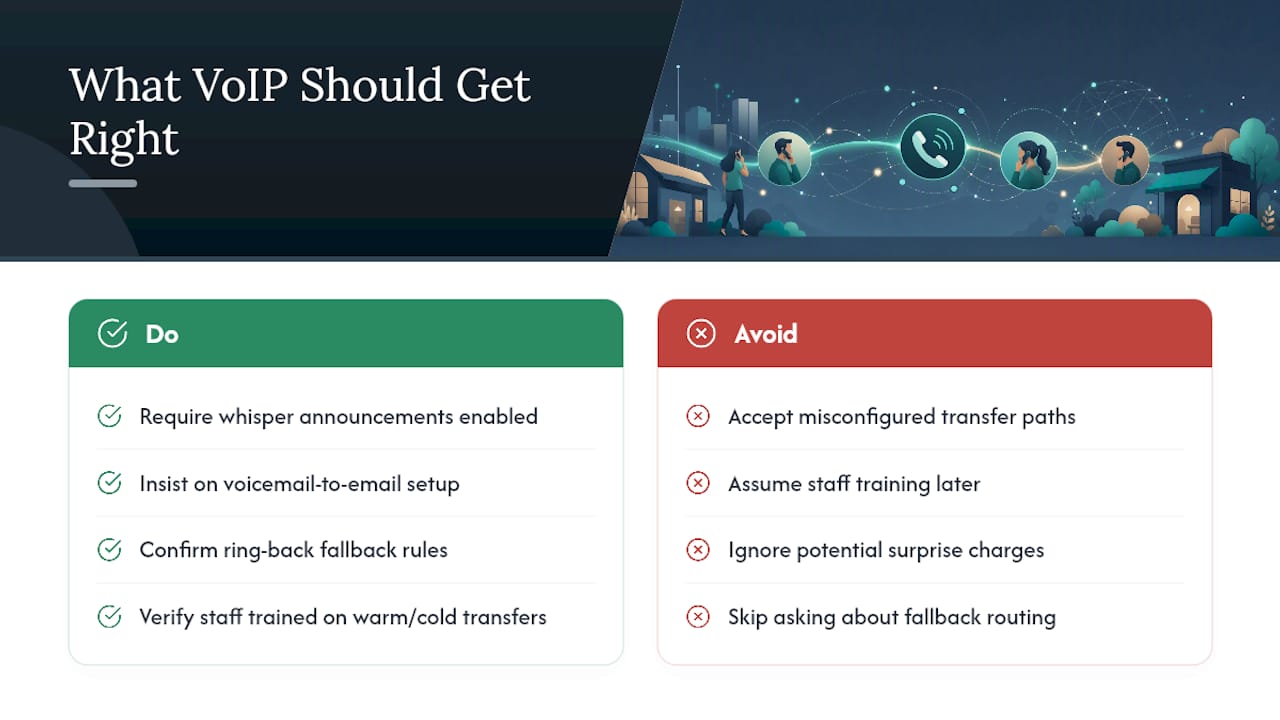
- Whisper or screen-pop context passed to the receiving agent
- Ring-back or return-to-sender configured for unanswered transfers
What a Properly Installed VoIP System Gets Right on Transfers
A managed on-site VoIP deployment handles this configuration before day one, not after a complaint. That means whisper announcements, voicemail-to-email, and ring-back fallback rules are already active, with staff trained on the difference between warm and cold before the first call comes in. Fixed pricing and a warranty on rented phones also mean a misconfigured transfer path doesn't turn into a surprise line item. When vetting any provider, ask directly how fallback routing is configured and who trains your staff on it, a question worth raising with Businessvoip's phone system design team.
One Change Worth Making This Week
If you fix one thing, make warm transfers the default for anything involving a complaint, a return caller, or an unresolved issue. It costs 20 extra seconds and saves the customer from repeating themselves, which is usually what triggers the second complaint. The single highest-leverage move is enabling ring-back on every transfer path you have, so a missed handoff returns to a human instead of disappearing into silence. Add one line to your team's script this week: "Let me check if they're available before I connect you." That's the whole fix.
— James
Sources
Start with RFC 5589 for SIP transfer behavior, Asterisk's feature-code docs for configuration, and Microsoft's Teams transfer guide for platform steps. For queue-based fallback routing, QueueFlow's queue management system shows how structured queue transfers work in practice.
- Asterisk: Feature code call transfers
- Transfer a call in Microsoft Teams | Microsoft Support
- Cold Transfer vs Warm Transfer in AI Voice Agents (2026)