A DID number is a public phone number assigned to your phone system so inbound calls route directly to a specific extension, queue, or application, no receptionist required. It follows the E.164 international format, and the magic happens through DNIS and SIP signaling, which tell your system exactly which number was dialed. A single DID includes three things:
- The number itself (a standard E.164-formatted phone number)
- A routing target (an extension, hunt group, queue, or IVR menu)
- Capabilities (voice, SMS, or CNAM caller ID display, depending on the type)
Key Takeaways
A DID number works because it pairs an E.164-formatted public number with DNIS signaling, letting any phone system route inbound calls precisely without a human operator in the loop.
| Point | Details |
|---|---|
| DID requires DNIS | A number that forwards calls without signaling dialed digits isn't true DID routing. |
| Match type to purpose | Use mobile ranges for SMS, geographic for local presence, toll-free for called-party-pays support. |
| Channels matter more than DID count | Size trunk capacity for simultaneous calls, not the number of DIDs you own. |
| Verify DNIS during setup | Capture SIP INVITE headers or run carrier test calls before going live. |
| Choose on-site installation for complex rollouts | Businessvoip designs, cables, and installs systems on-site for Ontario multi-site and QoS-sensitive projects. |
Table of Contents
- How Did Numbers Explained Through Call Flow Actually Work
- A Brief History Of Did Numbers And Why The Term Gets Misused
- Types Of Did Numbers And When To Use Each One
- Business Use Cases That Make Did Numbers Worth Setting Up
- How To Get And Provision Did Numbers Step By Step
- What Did Numbers Actually Cost And How Capacity Is Priced
- Did Number Vs Extension Vs Virtual Number: What's The Difference
- A Checklist For Choosing A Did Provider You Can Trust
- Your Post-Provisioning Setup And Test Checklist
- When On-Site Installed VoIP Beats Cloud-Only Did Provisioning
- Keeping Your Did Numbers Secure From Fraud And Robocalls
- Regulatory Rules That Apply To Did Numbers
- Why Understanding This Stuff Actually Matters
- Ready To Move From Explanation To Installation
- Frequently Asked Questions
- Sources
How Did Numbers Explained Through Call Flow Actually Work
Picture a customer dialing +1-800-555-0142. The carrier's network looks up who owns that number and forwards the call, usually across a SIP trunk or PRI, toward your provider's switch. At that point the system sends a SIP INVITE that carries the dialed digits, known as DNIS, so your PBX or cloud platform knows precisely which number the caller reached. Your system then checks its routing rules and sends the call to the right extension, ring group, or queue.
Here's the part most people miss: you don't need one trunk channel per number. A single SIP trunk can carry traffic for hundreds of DIDs, because channels represent simultaneous calls, not owned numbers. Many DIDs might share a smaller number of channels comfortably, since it's rare for all numbers to ring simultaneously.
Pro Tip: During provisioning, ask your carrier to run a test call and show you the SIP INVITE headers. If the DNIS digits aren't showing up correctly, your routing rules will silently fail later.
A Brief History Of Did Numbers And Why The Term Gets Misused
Direct inward dialing started in the PBX era of the 1960s, when phone companies gave businesses trunk lines that could ring straight to a desk phone instead of through a switchboard operator. ISDN and PRI circuits carried that concept through the 1990s. Then SIP and VoIP arrived, and the physical trunk became a software concept: a virtual number delivered over the internet.
The confusion today comes from conflating three separate things: the number, the transport, and the routing logic.
- Old PBX DID: number tied to a physical copper trunk
- Modern SIP DID: number is virtual, carried over any internet connection
- Common misconception: a "virtual number" and a true DID aren't automatically the same. Without DNIS signaling, a number that just forwards calls isn't really doing DID routing at all.
Types Of Did Numbers And When To Use Each One
The number type you pick determines what it can do and what it costs, before any routing rules ever come into play. Geographic and mobile ranges behave very differently, and picking the wrong one is a common, expensive mistake.
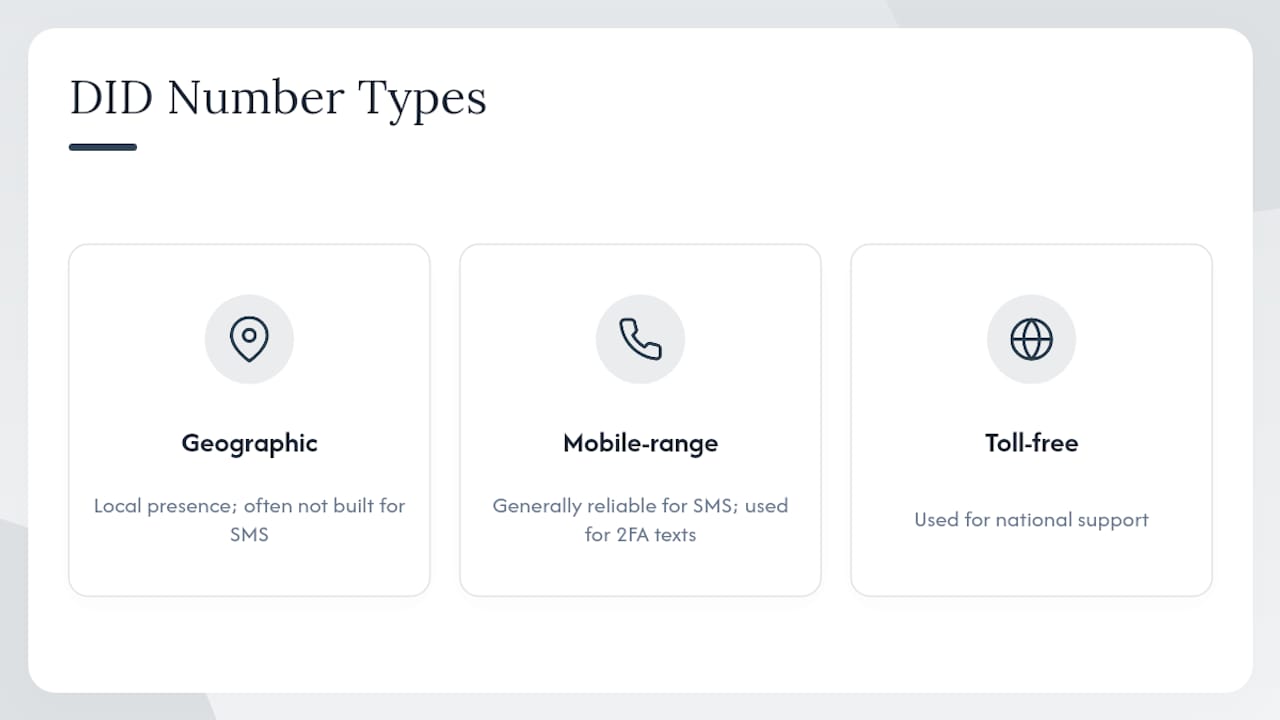
The SMS caveat trips up a lot of buyers: mobile-range numbers are generally reliable for SMS, while landline-style geographic numbers often aren't built for it at all. A typical setup mixes types deliberately, using a local number for community trust, a toll-free line for national support, and a mobile-range DID purely for two-factor authentication texts.
Business Use Cases That Make Did Numbers Worth Setting Up
DIDs cut friction because callers reach the right person or queue on the first try, which is exactly what drives first-contact resolution up in call centers and small offices alike.
- Direct-to-agent lines: a sales rep's personal DID rings their desk phone and mobile app simultaneously.
- Department queues: a support number lands in an IVR menu that routes by keypress.
- Campaign tracking: a unique DID per ad channel tells marketing which source drove the call.
- Fax and automation: dedicated DIDs still feed fax-to-email servers and automated call flows for after-hours routing.
How To Get And Provision Did Numbers Step By Step
You get DID numbers from a carrier, a reseller, or directly through your cloud PBX provider, then map each one to a destination inside your system.
- Pick the number type based on the use case (local presence, toll-free, or SMS-capable mobile range).
- Check availability and capability with the provider, especially SMS and CNAM support if you need them.
- Order and verify provisioning, confirming the number shows up correctly on the carrier's dashboard.
- Map DNIS routing rules so each number points to the correct extension, queue, or IVR branch.
- Test with real inbound calls before rolling the number out to customers.
Porting an existing number usually means submitting a letter of authorization and a recent bill copy, then waiting through a service window where the number can briefly lose service if timing isn't managed carefully. Consult a phone extension systems guide for more detail on mapping numbers once they land.
Pro Tip: Run a carrier test call and capture the SIP INVITE during provisioning. It's the fastest way to confirm DNIS digits and Caller ID are behaving before you go live.
What Did Numbers Actually Cost And How Capacity Is Priced
Pricing breaks into three pieces: a per-number rental fee, per-minute usage charges, and the cost of however many simultaneous channels you need.
- Number type and country shift the base rental price significantly.
- SMS capability on mobile-range numbers usually costs more than a plain voice-only geographic number.
- Toll-free verification fees apply because the called party pays for airtime.
- Concurrent channel needs, not DID count, drive your real trunk costs.
Small quantities of geographic numbers often run around a nominal monthly fee per number, while toll-free and mobile ranges cost noticeably more. The capacity model matters more than people expect: 200 DIDs sharing 40 channels means your business can handle 40 simultaneous inbound calls, regardless of how many numbers are technically active. For a deeper breakdown of billing structures, see this VoIP pricing guide.
Did Number Vs Extension Vs Virtual Number: What's The Difference
Every DID is a phone number, but the term specifically emphasizes inbound routing from the outside world. An extension is internal shorthand with no life outside your building. A "virtual number" just describes the absence of a physical copper line, which could mean a true DID or something far less capable.
- DID: externally dialable, carrier-provisioned, appears in outside directories.
- Extension: internal-only, dialed by coworkers, invisible to outside callers.
- Virtual number: a description of delivery method, not a guarantee of DID-style routing.
A Checklist For Choosing A Did Provider You Can Trust
The single best test: can the provider reliably deliver DNIS and SIP headers to your platform? If they can't demonstrate that clearly, nothing else on the list matters.
- Number types available across geographic, toll-free, and mobile ranges.
- SMS and CNAM support if your business depends on text messaging or caller ID branding.
- Porting track record and how they handle the service window during transfers.
- Reporting and analytics for call volume and channel usage.
- SLA and support model, especially who answers when something breaks at 2 a.m.
- Per-channel pricing clarity instead of vague bundled fees.
- Fraud mitigation tools, including toll fraud alerts and call pattern monitoring.
Ask providers directly about emergency calling compliance, lawful intercept obligations, and whether they'll show you a sample SIP INVITE before you sign anything. Red flags include opaque pricing sheets, refusal to demonstrate DNIS delivery, and no verifiable way to test reachability before cutover.
Your Post-Provisioning Setup And Test Checklist
Once numbers are live, run this sequence before handing anything to staff:
- Inventory every number and its intended purpose.
- Assign DNIS routing rules for each one.
- Map numbers to extensions or queues inside your PBX.
- Test calls from multiple carriers and networks, not just your own desk phone.
- Monitor call metrics for the first two weeks after go-live.
Test SMS-capable numbers separately, and schedule ported number tests during off-hours to catch problems before customers notice. Capture SIP INVITE logs during testing so you have a record if DNIS digits ever misroute later.
When On-Site Installed VoIP Beats Cloud-Only Did Provisioning
Cloud-only DID provisioning works well for single-location setups with solid internet. It starts to strain once you're running multiple sites, need guaranteed uptime, or depend on local PSTN failover if the internet drops.
- Multi-site rollouts benefit from on-prem gateways that keep phones working during an outage.
- Locations with unreliable internet need local hardware handling call quality, not a cloud dashboard alone.
- Complex training and cabling needs favor a team that shows up and wires the system correctly the first time.
BusinessVoip.ca designs, programs, cables, and installs systems on-site rather than shipping a box and walking away, backing rented phones with a lifetime warranty. That matters most in scenarios where a remote reseller simply can't diagnose a wiring problem over the phone.
Pro Tip: When mapping DIDs across multiple sites, build a network QoS test and a porting window into your project timeline from day one, not as an afterthought.
Keeping Your Did Numbers Secure From Fraud And Robocalls
DID numbers are a favorite target for toll fraud, where attackers hijack your trunk to place expensive international calls on your dime. The fix starts with basic hygiene: disable international calling on trunks that don't need it, and set concurrent call limits so a compromised account can't flood your system overnight.
Robocalls and spoofed caller ID are the other persistent headache. Many carriers now support STIR/SHAKEN call authentication, which cryptographically verifies that a caller ID hasn't been forged in transit. Ask your provider whether they participate in this framework, since it directly affects whether your outbound calls get flagged as "Spam Likely" on customer phones.
A few practical habits go a long way:
- Set call restrictions on trunks based on time of day and geography, since most legitimate business calls follow predictable patterns.
- Monitor for unusual call volume spikes, especially overnight or to unfamiliar country codes.
- Require strong SIP credentials on every trunk, since weak or default passwords are the most common entry point for hijacked systems.
- Review CNAM and Caller ID settings periodically, since outdated caller ID data can make legitimate calls look suspicious to spam filters.
None of this is exotic. It's closer to changing the locks on a building than deploying some elaborate security system, but skipping it is how businesses end up with a five-figure fraud bill from a weekend nobody was watching the phones.
Regulatory Rules That Apply To Did Numbers
Emergency calling compliance is the rule that catches the most businesses off guard. When a DID number is assigned to a remote worker or a new office location, the system needs an accurate registered address so 911 dispatch sends help to the right building instead of company headquarters three provinces away. This becomes a real issue with mobile-forward setups where employees roam between sites using the same number.
Lawful intercept obligations exist in most jurisdictions, requiring carriers to support authorized law enforcement access under proper legal process. As an end customer, you typically won't interact with this directly, but it's worth knowing your carrier is equipped to comply, since it affects which providers can legally operate in your market.
Number portability rules also carry compliance weight. Carriers are generally required to release a number to a new provider within a defined service window once proper documentation is submitted, and dragging their feet on this can trigger regulatory complaints in some regions.
If you're running a multi-site operation, the practical takeaway is simple: keep your emergency address information current every time a DID gets reassigned to a new physical location, and confirm with your provider how they handle both 911 routing and lawful intercept before you sign a contract. It's a five-minute conversation that saves a serious headache later.
Why Understanding This Stuff Actually Matters
Most people treat DID numbers like plumbing, invisible until something breaks. That's backwards. The businesses that get the most value out of their phone system are the ones that treat number type, routing, and capacity as decisions worth making on purpose rather than defaults to accept.
Start with an inventory of what you already have, decide which number types actually match your use cases, and run through the setup checklist before you assume anything works. For hands-on projects, especially multi-site or QoS-sensitive builds, Businessvoip has done this design work before.
Ready To Move From Explanation To Installation
Reading about DID routing is one thing. Having someone show up, run the cabling, and program every extension correctly on day one is another. Businessvoip is the alternative to a self-managed cloud setup for Ontario businesses that don't want to troubleshoot SIP headers themselves, since the local team designs, programs, and installs the system on-site instead of shipping a box and leaving you to figure it out.

That matters most for multi-site operations, where DID mapping across locations gets complicated fast. Businessvoip's multi-site and remote office solutions are built specifically for that kind of rollout, backed by fixed pricing with no annual increases and a lifetime warranty on rented phones. The typical engagement runs through four steps: design, install, test, and train, so your staff isn't guessing at extensions on launch day.
If you want a system custom-built around your DID and routing needs rather than a generic cloud template, start with the phone system designer tool and get a plan built around your actual call flow.
Frequently Asked Questions
What does DID stand for in phone systems? DID stands for Direct Inward Dialing, a system that lets external callers reach a specific extension or department directly without going through a receptionist or main switchboard.
Is a DID number the same as a virtual number? Not necessarily. A virtual number simply means there's no dedicated physical line, but true DID behavior requires DNIS signaling so the receiving system knows which number was dialed and can route accordingly.
How many DID numbers can share one SIP trunk? There's no fixed limit, since trunk channels represent simultaneous calls rather than owned numbers. A business might run 200 DIDs across just 40 channels if it rarely needs more than 40 calls active at once.
Do I need a different number type for SMS features like 2FA? Usually yes. Mobile-range DIDs are generally the reliable choice for SMS, while geographic landline-style numbers often aren't built to send or receive text messages.
What happens during number porting? You submit documentation, typically a letter of authorization and a recent bill, to your new provider, who coordinates the transfer with your old carrier. There's usually a brief service window where timing matters, so plan porting during low-traffic periods.
Sources
- E.164
- DID Number Types Explained: Geographic, National, Mobile, Toll-Free & iNum | DIDHub Blog
- What is a DID number? Direct Inward Dialing Explained | didlogic