
Use native device or system storage for call recordings you only need to reference for a few days, and move anything tied to disputes, training, or regulatory obligations into external cloud storage or a managed on-site system with a documented retention schedule. Baseline requirements either way: encryption at rest and in transit, and a written retention policy rather than whatever the vendor defaults to. If you only need quick playback, native storage is fine. If a regulator, insurer, or lawyer could ever ask for that file, set up BYOS or a managed provider now.
TL;DR:
- Native storage may be convenient for quick playback but often has limited retention periods and can fill up quickly once call volume increases.
- External storage options like cloud buckets provide more control over retention duration and encryption but require additional setup and ongoing management.
- A layered approach with hot, warm, and cold storage tiers suits most organizations, based on retrieval needs, legal requirements, and budget constraints.
- Encrypted data at rest and in transit, role-based access control, multi-factor authentication, and audit logs are essential security measures for stored recordings.
- Implementing a proper recording pipeline with encryption, metadata tagging, automated lifecycle management, and redundancy improves compliance and retrieval reliability.
Table of Contents
- Native Storage vs. Cloud Buckets vs. BYOS: Picking the Right Tier
- How Do You Find Recordings on Your Phone or Desktop?
- Building a Retention Schedule That Actually Holds Up
- What Security Controls Should Protect Stored Recordings?
- How the Recording Pipeline Should Actually Flow
- When a Managed On-Site System Beats DIY Cloud Storage
- A Phone System Built With Storage and Compliance in Mind
- Sources
Native Storage vs. Cloud Buckets vs. BYOS: Picking the Right Tier
Native or system storage is the path of least resistance. Your phone or softphone drops the file locally or in an app-managed folder, and you can grab it in seconds. The catch: most platforms apply vendor-set expiration windows, and storage quotas fill up faster than teams expect once call volume climbs. Some cloud contact center platforms, for instance, don't hold onto recordings in temporary storage at all. Google's Cloud Contact Center AI (CCAI) Platform queues files for upload to external storage or a CRM and deletes the temporary copies after seven days, which means native storage was never meant to be permanent in the first place.
External storage, whether that's a bring-your-own-storage (BYOS) bucket on AWS, Azure, or Google Cloud, gives you the opposite tradeoff: more setup work, but full control over encryption, access, and how long a file lives. CCAI Platform's own external storage documentation recommends using Cloud Storage buckets or SFTP and flags object versioning as a fix when bucket retention policies block overwrites.
Most organizations end up layering three tiers:
- Hot storage for recordings under 30 days old that staff pull for coaching or quality review
- Warm storage for files still likely to get requested (mid-term disputes, active cases)
- Cold or archive storage for anything past its active-use window but still inside a legal or regulatory retention period
Pick based on four factors: how fast you need to retrieve a file, how long you're legally required to keep it, what compliance framework applies, and what your storage budget can absorb.
How Do You Find Recordings on Your Phone or Desktop?
Recordings don't always sit where you expect, especially after an OS update reshuffles folder structures. Here's how to track them down:
- On Android, check
Internal Storage/CallorInternal Storage/Recordingsfirst. OEMs vary widely. Samsung often uses a "Call" subfolder inside the phone app's own storage; other brands nest it underMusicor a carrier-branded folder. A system update can silently relocate this path, so if a recording vanishes, search the file manager by date instead of guessing the folder name. - On iPhone, native call recording isn't built in the way it is on Android, so most iOS recordings live inside whatever call-recording or VoIP app made them, accessible through that app's own history or recents list.
- On desktop or VoIP portals, log into the admin console and look for a "call history" or "recordings" tab, where files are typically downloadable as MP3 or WAV.
- If a file is missing, check whether your platform auto-deletes after a fixed window (seven days is common on some cloud platforms) before it ever reaches permanent storage.
Building a Retention Schedule That Actually Holds Up
Storage limitation, the principle that you shouldn't keep personal data longer than necessary, is not just a privacy nicety. It's the reason a single "keep everything forever" policy fails every audit. Different recordings serve different purposes, and each purpose should carry its own retention clock rather than one blanket rule for the whole call log.
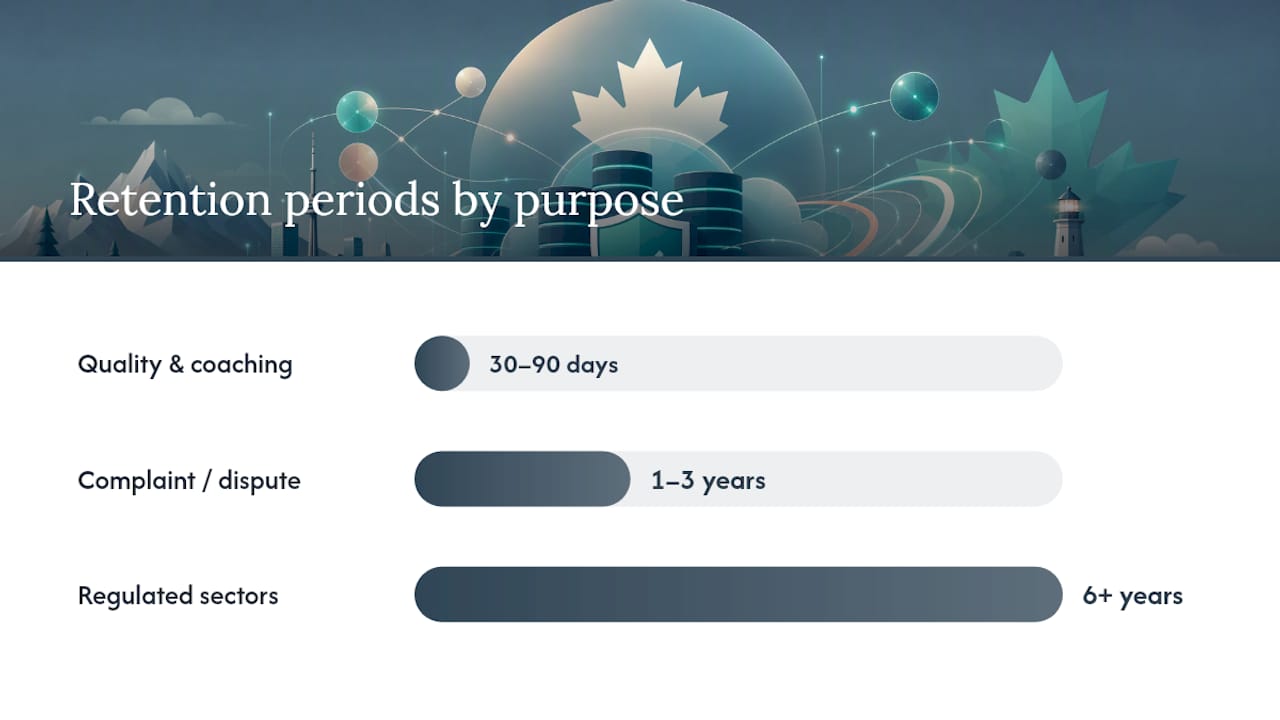
A workable structure, purely illustrative and not a compliance guarantee, might look like this:
- Quality assurance and coaching calls: 30 to 90 days
- Calls tied to a customer complaint or billing dispute: mid-term, often 1 to 3 years
- Calls in regulated sectors like finance or healthcare: multi-year, sometimes 6 years or more depending on the framework
For each category, document three things: the event that starts the clock (call date, dispute filing, contract end), the retention period, and the legal or business justification for that period. Retention guidance from voice AI compliance specialists recommends mapping every recording's purpose to a specific retention clock rather than relying on a single default.
Pro Tip: Don't trust vendor defaults to match your legal obligations. One retention-policy guide points out that Microsoft Teams recordings can auto-expire in 120 days by default, which is nowhere near long enough for regulated industries that need years of records on file.
Implementation checklist: automate deletion once a retention clock expires, build in a legal hold override that pauses deletion the moment litigation or an investigation is anticipated, and generate deletion evidence (a timestamped log or certificate) every time a file is purged. If you're storing recordings from Canadian callers, review Canada's call recording consent rules alongside your retention schedule, since consent obligations and storage duration are separate but related requirements.
What Security Controls Should Protect Stored Recordings?
Encryption is non-negotiable at both ends of the pipeline: AES-256 for data at rest, and TLS 1.3 or SRTP for data moving between the call platform and storage. In higher-risk environments, keep encryption keys separate from the encrypted data itself, ideally in a hardware security module (HSM), so a storage breach alone doesn't expose readable audio.
Access control matters just as much as encryption. A few non-negotiables:
- Role-based access control (RBAC) so only staff with a business reason can play back or download a recording
- Multi-factor authentication (MFA) on every account with storage access
- Segregation of duties, so the person who can delete a recording isn't the same person approving that deletion
- Full audit logs covering every playback, download, and deletion event
Zendesk's approach is a useful reference point: recordings are encrypted at rest and can be stored regionally in the US, EEA, or Australia, with retention settings you can adjust rather than a fixed default. When a legal hold hits, lifecycle deletion needs to stop immediately for the affected recordings, and that suspension needs its own audit trail. Deletion evidence should also cascade across every derived artifact, not just the original audio file, since transcripts, backups, and analytics exports can all outlive the source recording if nobody tracks them.
Pro Tip: If overwriting archived files is impractical, cryptographic erasure works as a deletion method: destroy the encryption key and the recording becomes unrecoverable, while the key-destruction event itself serves as your auditable proof of deletion.
For a deeper look at how transcription vendors handle data security patterns around stored voice data, this transcription and data security overview is worth a read, and this breakdown of cloud security fundamentals covers encryption and key management from a broader IT angle.
How the Recording Pipeline Should Actually Flow
A recording that goes straight from "call ends" to "sits in a folder forever" skips several steps that matter for compliance and retrieval. A tighter pipeline looks like this:
- Capture and buffer: the call is encrypted live (SRTP) and held in temporary storage during the conversation.
- Post-call processing: the raw file is transcoded to a standard format (commonly MP3 or WAV) and, if needed, split when it exceeds size limits.
- Metadata attachment: caller ID, timestamp, agent, and call purpose get tagged to the file so it's searchable later, not just stored blind.
- Upload and index: the file moves to its designated storage tier and gets indexed in whatever system tracks retrieval.
- Lifecycle automation: rules automatically shift files from hot to warm to cold storage, and trigger deletion (with a certificate) once the retention clock runs out.
This staged approach mirrors what compliant storage pipelines typically include: live encryption, buffering, processing, metadata, and automated lifecycle transitions. Large files sometimes need splitting, and uploads should retry automatically if a connection drops, since a failed upload with no retry logic is how recordings quietly disappear. Build in geographic redundancy (a second copy in a different region), periodic integrity checks, and scheduled restore tests, and design retrieval SLAs into your tiering decisions. Archived recordings pulled for an audit should have a guaranteed retrieval window, often within 24 hours, rather than an open-ended wait.
When a Managed On-Site System Beats DIY Cloud Storage
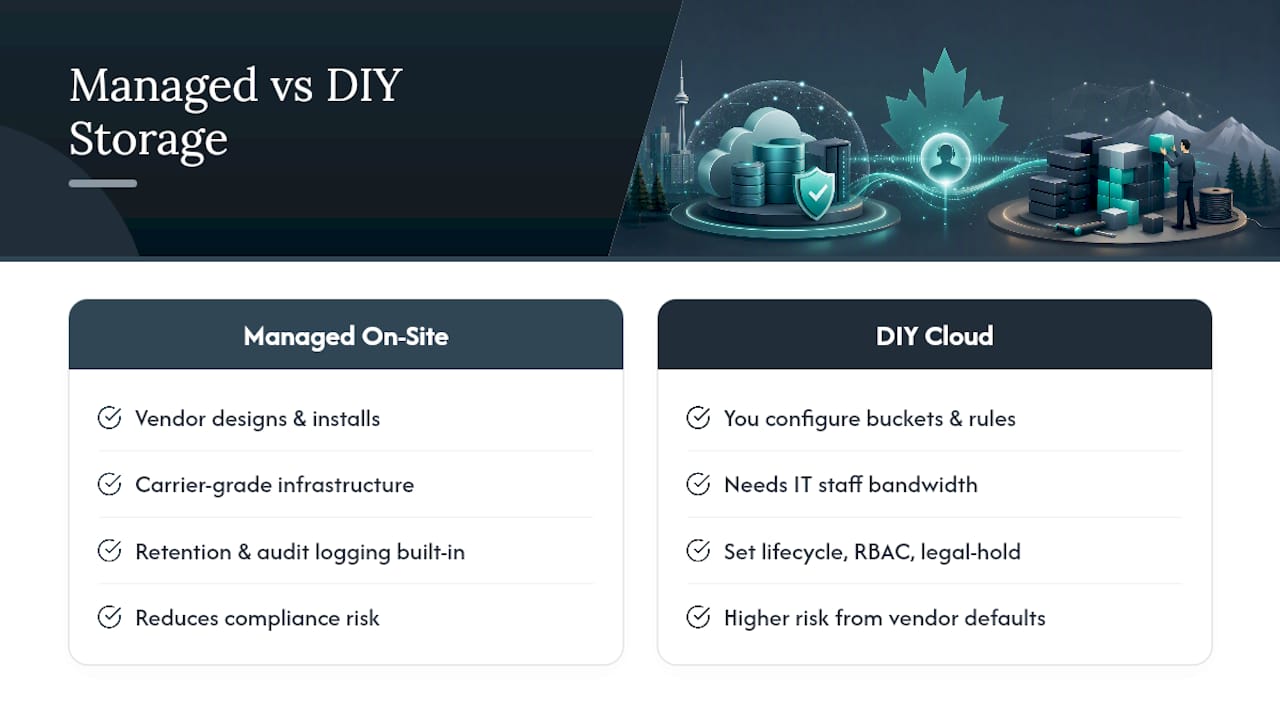
Here's where I'll push back on the assumption baked into most of this advice: that every business should be assembling its own storage pipeline. Configuring buckets, lifecycle rules, RBAC, and legal-hold overrides is entirely doable if you have IT staff with the bandwidth. Most small and mid-sized businesses don't, and that gap is exactly where recordings quietly fall through vendor defaults nobody reviewed.
A managed, on-site VoIP deployment sidesteps that problem by design. Businessvoip designs, programs, cables, and installs phone systems on-site for Ontario businesses, running on carrier-grade infrastructure that handles tens of thousands of business calls daily, with the retention and access rules built in from day one rather than configured after a compliance scare. That matters most for businesses with real regulatory exposure: financial services, healthcare-adjacent operations, multi-site companies, or any business fielding recorded calls from remote offices in the US and UK. If your compliance profile is simple, DIY cloud storage might suffice. If it isn't, a system where retention, encryption, and audit logging are handled as part of the phone system design itself removes a whole category of risk that a spreadsheet-and-bucket-policy approach tends to miss.
— James
A Phone System Built With Storage and Compliance in Mind
Most of the advice above assumes you're stitching together storage buckets, retention scripts, and access controls yourself. Businessvoip skips that assembly work entirely: its Ontario team designs, cables, and installs your phone system on-site, with call recording, retention behavior, and access controls configured as part of the build rather than left for you to figure out after the fact.

That matters most if you're a growing operation with real compliance exposure, tech companies, ISPs, multi-site businesses, or any operation juggling remote offices outside Ontario, where a misconfigured storage default can turn into a real liability. Fixed pricing means no surprise increases down the road, and every rented phone carries a lifetime warranty, so you're not troubleshooting hardware on top of managing recordings. If you're ready to see what a properly designed system looks like for your call volume and retention needs, start with a custom phone system design built around how your business actually operates, or check out Businessvoip's work with tech companies and ISPs for a closer look at what a fully installed, audit-ready setup includes.
This article is general information, not a substitute for advice from a qualified lawyer. Consult a qualified legal professional about your own circumstances before acting on anything here.
Sources
- Call recording data management — CCAI Platform
- Zendesk call recording FAQ
- Voice AI call recording retention: a storage guide
- How to build a voice recording retention policy — UMEVO