Yes, WiFi desk phones are a viable enterprise endpoint — provided you choose models with built-in dual-band Wi-Fi (802.11ac/ax), 802.1X authentication, and centralized provisioning via TR-069 or auto-provisioning. The catch is that your wireless infrastructure has to be ready for voice before a single phone ships.
Here is the quick shortlist by role:
- Reception and executive desks: A built-in Wi-Fi deskset like the Yealink SIP-T57W or Snom D892M gives you a large screen, expansion keys, and EHS headset support without running new cable.
- Hot-desking and hybrid sites: The Snom D787 or Yealink T54W + DD10K dongle covers offices where some desks need DECT reach and others just need Wi-Fi.
- Roaming frontline staff (retail, warehouse, healthcare): A cordless Wi-Fi handset like the Grandstream WP826 with Wi-Fi 6, SRTP, and a 3,000mAh battery handles all-day mobility that a deskset cannot.
When your deployment involves VLAN segmentation, QoS tuning, or 802.1X rollout, on-site services from a provider like Businessvoip reduce the risk of a failed launch.
Key Takeaways
Business-grade WiFi desk phones are a reliable enterprise endpoint only when the underlying wireless network is designed for voice, with dedicated VLANs, QoS, and 802.1X authentication in place before deployment.
| Point | Details |
|---|---|
| Wi-Fi readiness comes first | Voice over Wi-Fi requires a dedicated VLAN, DSCP QoS, and AP density tuned for voice before phones ship. |
| Match form factor to role | Desksets for reception and executives; cordless Wi-Fi handsets (WP826) for roaming staff; hybrid dongles for DECT sites. |
| Require these specs in every RFP | 802.11ac/ax, 802.1X, TLS, SRTP, TR-069 auto-provisioning, PoE. Prefer models with a 3-year or longer warranty for reduced long-term risk, but 1-year remains standard on most makes. |
| Budget for operating costs | Firmware maintenance, battery replacement at 2–3 years, and network reconfiguration are recurring costs, not one-time. |
| Businessvoip for managed installs | Businessvoip designs, programs, and installs VoIP systems on-site in Ontario, including network checks and lifetime warranty on rented phones. |
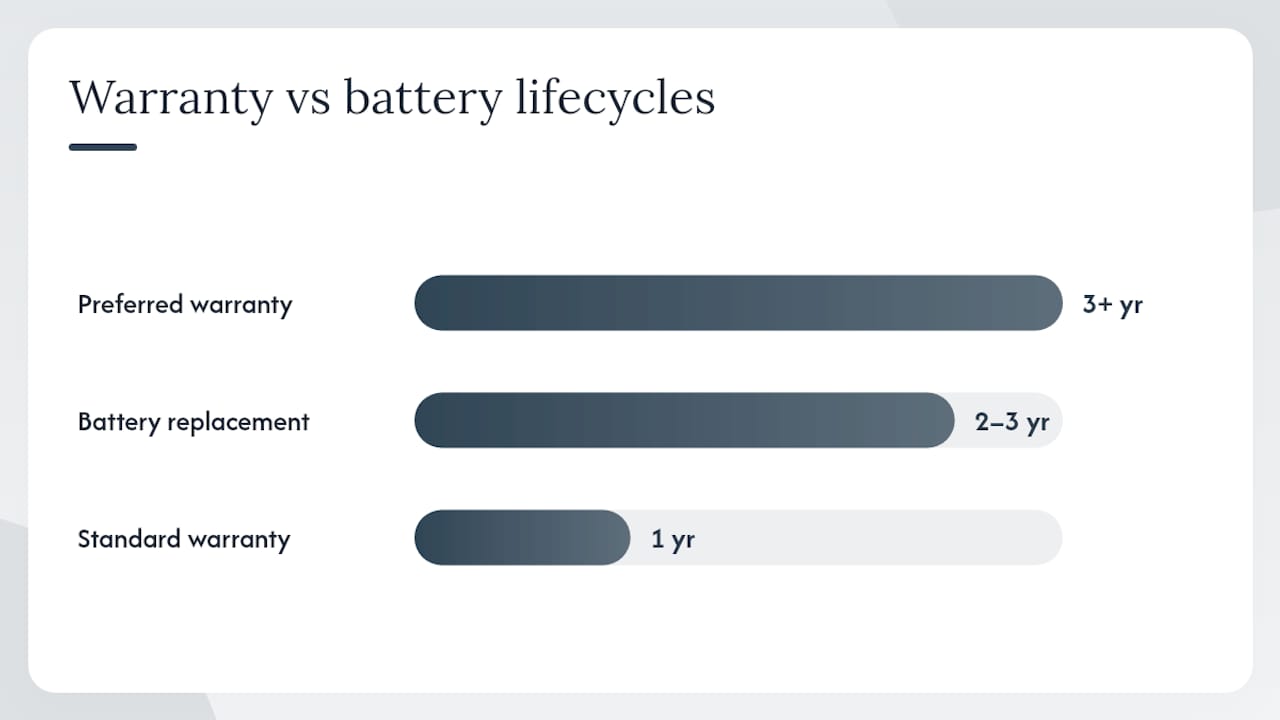
Table of Contents
- Which WiFi desk phone fits your office role?
- What do those spec columns actually mean for VoIP?
- Wi-Fi vs. DECT: which one actually fits your environment?
- How do you pick the right model for your site?
- Which model should you actually buy?
- The case for getting the network right before the phones arrive
- Businessvoip: fully installed VoIP for Ontario businesses
- Useful sources
Which WiFi desk phone fits your office role?
| Model | Best For | Wi-Fi Form | Wi-Fi Standard & Roaming | SIP Lines | Power | Headset / BT | Security | Provisioning | Price Band & Warranty |
|---|---|---|---|---|---|---|---|---|---|
| Businessvoip | Ontario businesses needing fully installed, managed VoIP | Vendor-selected hardware, on-site installed | Matched to site survey | Configured per site | PoE or DC, per install | Configured per site | 802.1X, TLS, SRTP | Full auto-provisioning, lifetime support | Monthly rental; lifetime warranty on rented phones |
| Yealink SIP-T57W | Executives, receptionists, hot-desking managers | Built-in dual-band Wi-Fi | 802.11ac, 5GHz; 802.11k/r/v | Up to 25 | PoE or DC | EHS, USB, Bluetooth | 802.1X, TLS, SRTP, WPA2/3 | TR-069, auto-provision | $$$ / 1-year mfr. |
| Yealink T54W + DD10K | Mixed DECT/Wi-Fi sites, retail, warehouse reception | Deskset + DECT dongle (hybrid) | 802.11ac via dongle; DECT | Up to 25 | PoE or DC | EHS, USB | 802.1X, TLS, SRTP | TR-069, auto-provision | $$ / 1-year mfr. |
| Snom D787 | Hot-desking, historic buildings, temp offices | Built-in Wi-Fi | 802.11n/ac, 5GHz | 12 SIP lines | PoE or DC | EHS, USB | 802.1X, TLS, SRTP, WPA2 | Web provisioning, TR-069 | $$ / 3-year warranty |
| Snom D892M | Reception, executive suites, cordless + deskset | Built-in Wi-Fi + integrated DECT | 802.11ac, 5GHz; DECT | Up to 12 | PoE or DC | EHS, Bluetooth | 802.1X, TLS, SRTP, WPA2/3 | TR-069, auto-provision | $$$ / 1-year mfr. |
| Snom D810W | Entry-level office users, shared workspaces | Built-in Wi-Fi | 802.11n/ac, 5GHz | Up to 12 | PoE or DC | EHS, USB | 802.1X, TLS, SRTP, WPA2 | TR-069, auto-provision | $ / 1-year mfr. |
| Grandstream WP826 | Roaming frontline staff, retail, logistics, healthcare | Cordless Wi-Fi handset | 802.11ax (Wi-Fi 6), 5GHz; 802.11k/r/v | Up to 10 | Battery (3,000mAh, ~12h talk) | Bluetooth | 802.1X, TLS, SRTP, WPA3 | TR-069, auto-provision | $$ / 1-year mfr. |
A few notes on the table above:
- Warranty standout: — The Snom D787 ships with a 3-year warranty, which is longer than most competitors in its price tier.
What do those spec columns actually mean for VoIP?
Wi-Fi standard and roaming support
802.11ac (Wi-Fi 5) handles most office deployments cleanly. 802.11ax (Wi-Fi 6) adds OFDMA and better performance in dense environments, which is why the Grandstream WP826's Wi-Fi 6 support matters in a busy warehouse or clinic floor. The roaming protocols — 802.11k (neighbor reports), 802.11r (fast BSS transition), and 802.11v (BSS transition management) — are what prevent a 3-second audio gap when a cordless handset walks between access points. Without them, roaming handsets stutter.
Security features
802.1X is port-based network access control: the phone authenticates to the network before it gets an IP address, which stops unauthorized devices from joining your voice VLAN. TLS encrypts the SIP signaling layer; SRTP encrypts the audio stream. WPA3 is the current Wi-Fi association standard and replaces WPA2's weaker TKIP-based handshake. For any deployment touching HIPAA, PCI-DSS, or SOC 2 scope, all four of these should be non-negotiable requirements.
Provisioning and manageability
TR-069 lets a provisioning server push configuration, firmware, and dial plans to phones automatically. Auto-provisioning via a hosted redirect server (Yealink's RPS, Snom's SRAPS) means a new phone boots, contacts the provisioning server, and configures itself with no IT hands-on. For a 50-phone rollout, that difference between manual configuration and auto-provisioning is roughly two days of labor.
Wi-Fi vs. DECT: which one actually fits your environment?
This is where most procurement decisions go sideways. The assumption that Wi-Fi is cheaper because the infrastructure already exists is frequently wrong in practice. Voice over Wi-Fi (VoWiFi) almost always requires redesigning or augmenting the existing network: separate SSIDs, VLAN segmentation, QoS policies, and often additional AP density. DECT runs on its own dedicated frequency (1.9 GHz in North America) and does not compete with data traffic at all.
That said, DECT and Wi-Fi endpoints have comparable device lifespans — typically 3–5 years — so the hardware investment is similar. The real differentiator is what your network looks like today and whether your staff need data apps on the handset.
Wi-Fi advantages:
- Supports data-centric apps (CRM lookup, messaging, directory) that DECT cannot run
- Single infrastructure for voice and data reduces hardware footprint
- 802.11ax supports higher device density in modern offices
DECT advantages:
- Dedicated spectrum means no contention with data traffic, which translates to more consistent call quality
- Simpler deployment when voice-only mobility is the goal
- Battery life tends to run longer on DECT handsets than Wi-Fi equivalents
Use-case grid:
| Environment | Recommended Approach |
|---|---|
| Open-plan office, mostly desk workers | Built-in Wi-Fi desksets (Yealink T57W, Snom D787) |
| Warehouse or logistics floor | Cordless Wi-Fi 6 handset (Grandstream WP826) or DECT |
| Healthcare (HIPAA, high density) | DECT or Wi-Fi 6 with dedicated voice SSID and WPA3 |
| Retail with existing DECT base | Hybrid deskset + DECT dongle (Yealink T54W + DD10K) |
| Historic building, no cable runs | Built-in Wi-Fi deskset (Snom D787, D810W) |
| Executive suite needing cordless reach | Snom D892M (integrated DECT + Wi-Fi + Bluetooth) |
Pro Tip: Before committing to VoWiFi across a site, run a voice-specific Wi-Fi assessment. A data-only site survey misses the AP placement and channel width decisions that determine whether calls drop at the far end of a floor.
How do you pick the right model for your site?
Work through this in order. Skipping steps is how you end up with 40 phones that work fine in the conference room and drop calls in the warehouse.
- Define user personas. List every role that needs a phone: reception, executive, hot-desk worker, roaming staff. Each persona drives a different form factor.
- Map personas to form factors. Reception and executives get desksets with expansion keys. Hot-deskers need Wi-Fi desksets with fast login (hot-desking provisioning). Roaming staff need cordless handsets with roaming support and long battery life.
- Specify required codecs and SIP accounts. G.722 for HD audio; — for low-bandwidth links. Confirm how many simultaneous SIP registrations each phone needs (shared lines, BLF keys).
- Confirm power and headset requirements. PoE available at every desk? Headset-heavy users need EHS support. Cordless users need battery capacity matched to their shift length.
- Lock in provisioning and security requirements. TR-069 or auto-provisioning is mandatory for any rollout above 10 phones. 802.1X is mandatory for any network with a compliance requirement.
- Check warranty and support terms. A 1-year warranty on a phone you expect to run for 4 years is a gap. The Snom D787's 3-year warranty and Businessvoip's lifetime warranty on rentals are the two models that close it.
Vendor questions worth asking before you sign:
- Does the phone support 802.1X with certificate-based authentication, or only username/password?
- What is the firmware update cadence, and how are critical security patches delivered?
- What is the roaming performance specification (handover time in milliseconds)?
- What is the SLA for warranty replacement — advance replacement or return-and-wait?
Red flags: A vendor who cannot answer the roaming handover question, or who says "just use WPA2-Personal" for an enterprise deployment, is not ready for your environment.
Sample RFP line item: "Built-in dual-band Wi-Fi 802.11ac/ax, 802.1X EAP-TLS, TR-069 auto-provisioning, PoE 802.3af, G.722 codec support, minimum 3-year warranty."
Which model should you actually buy?
- Reception desk: — Yealink SIP-T57W or Snom D892M. Both support EHS headsets, PoE, and expansion modules. The D892M adds integrated DECT for a cordless handset at the same desk.
- Hot-desking / open plan: — Snom D787. The 3-year warranty, built-in Wi-Fi, and web provisioning make it the lowest-friction option for desks that turn over frequently.
- Frontline / roaming staff: — Grandstream WP826. Wi-Fi 6, 12-hour talk time, and WPA3 cover the full shift in high-density environments.
When the deployment involves AP tuning, VLAN setup, or 802.1X rollout across multiple sites, involve professional services early. Businessvoip handles multi-site VoIP installations across Ontario, including network checks and on-site configuration, which changes the risk profile for complex rollouts.
The case for getting the network right before the phones arrive
Most of the Wi-Fi desk phone conversations I see focus on the hardware: which model has the best display, which supports the most SIP lines. That is the wrong starting point. The hardware decision is almost secondary to the network decision. A premium Yealink T57W on a poorly configured Wi-Fi network will sound worse than a budget phone on a properly segmented voice VLAN.
The models in this article are all genuinely capable. The Grandstream WP826's Wi-Fi 6 and WPA3 support is real enterprise-grade hardware. The Snom D892M's combination of integrated DECT, Wi-Fi, and Bluetooth is genuinely useful for reception environments. But none of that matters if the AP placement is wrong or the QoS policy is missing.
The other thing that gets underestimated is the value of on-site installation services for larger rollouts. When a vendor designs the network and configures the phones together, the failure modes that come from siloed IT and telecom teams disappear. That is the argument for a managed deployment, not just a hardware purchase.
Businessvoip: fully installed VoIP for Ontario businesses
Picking the right hardware is only half the problem. The other half is getting it working on day one, without a week of troubleshooting VLAN configs and provisioning errors.

Businessvoip designs, programs, cables, and installs VoIP phone systems on-site for Ontario businesses, within about 150 km of Ancaster and province-wide for larger projects. The team handles network checks, 802.1X setup, auto-provisioning, number porting, and staff training as part of the installation. Rented phones carry a lifetime warranty, so there is no per-unit replacement budget to track. Fixed monthly pricing means no annual increases. For IT teams managing multi-site rollouts or technical environments, Businessvoip's on-site managed installation removes the deployment risk that comes with self-provisioned hardware. Get a quote or request a system design consultation at businessvoip.ca.
Useful sources
- Demystifying the IP-DECT versus VoWiFi debate - NEC Australia
- Voice over Wi-Fi or DECT? Weighing up the Choices | Spectralink
- DECT vs Wi‑Fi: Which Is Best? - UC Today
- Cordless Wi-Fi IP Phone
- T54W+DD10K - DECT Desk Phone | Yealink
- Snom D892M | Premium SIP/VoIP Desk Phone with DECT, Wi‑Fi and Bluetooth
- Snom D787 IP Desk Phone – WiFi-Enabled SIP Phone with 4.3" Color Display & 24 Programmable Keys (00004621)