Prioritize RTP with DSCP EF 46 at the gateway, turn on Smart Queues if your WAN is under roughly 300 Mbps, and put every phone on a dedicated voice VLAN with LLDP-MED. Do those three things before touching anything else. Disable SIP ALG if calls register but audio drops out, and remark DSCP at the switch egress if your gateway can't trust incoming markings from the carrier.
TL;DR:
- Prioritizing RTP with DSCP EF 46 is essential, and setting up Smart Queues with download and upload speeds at 80 to 95 percent of actual line rate improves call quality.
- Placing phones on a dedicated voice VLAN with LLDP-MED automates VLAN assignment and ensures DSCP EF matches the switch egress priority, reducing setup errors.
- Disabling SIP ALG is necessary because it corrupts SIP headers, often causing one-way audio or registration issues, and inbound forwarding should be restricted to provider-defined IPs.
- Establishing a staged deployment with wired testing first, verifying QoS configurations, and measuring actual WAN link rates avoids common pitfalls that cause choppy calls or misdiagnosed issues.
Table of Contents
- What Is UniFi VoIP QoS and Why Does It Matter?
- Five Immediate Actions to Take in the UniFi Console
- How Do You Create a QoS Policy for VoIP in UniFi?
- Should You Enable Smart Queues for VoIP?
- Configuring Voice VLANs and DSCP on UniFi Switches
- Should You Disable SIP ALG on UniFi?
- How Much Bandwidth Does Each VoIP Call Actually Need?
- How Do You Verify VoIP QoS Is Actually Working?
- Field Notes on Deploying VoIP QoS Without Downtime
- What SMB IT Teams Get Wrong About VoIP QoS
- Get Your UniFi VoIP Network Set Up Right the First Time
- Where to Go for the Technical Details
- Sources
- FAQ
What Is UniFi VoIP QoS and Why Does It Matter?
Quality of Service on a UniFi network means telling the router and switches which packets get first access to bandwidth and queue priority when the network is busy. For voice traffic, that means Real-time Transport Protocol (RTP) packets carrying the actual audio need to jump ahead of a file sync or a video call competing for the same upload pipe.
Ubiquiti's own documentation on UniFi QoS and traffic shaping frames this correctly: prioritize the traffic, don't just throttle everything else. Voice packets are small, constant, and time-sensitive. A single dropped or delayed packet causes a click or a gap; a burst of jitter causes the robotic warble every remote worker has heard on a bad call. Data traffic doesn't care about 150 milliseconds of delay. Voice absolutely does. That asymmetry is the entire reason "unifi voip qos" as a search term exists, and it's the entire reason generic bandwidth caps don't solve the problem.
Five Immediate Actions to Take in the UniFi Console
Before diving into policy tables and DSCP tags, run through this sequence. It takes under an hour on a site with UniFi Network hardware already deployed.
- Confirm your real WAN speed. Run a wired speed test off-peak, not over Wi-Fi, and note both upload and download.
- Create a QoS policy prioritizing DSCP EF 46. This is the RTP marking every major VoIP provider uses.
- Enable Voice VLAN and LLDP-MED on phone ports or the port profile assigned to them.
- Disable SIP ALG and confirm outbound SIP/RTP reaches your provider without a firewall block.
- Place a test call and pull a packet capture to confirm DSCP tags survive the trip and check the Mean Opinion Score (MOS).
Pro Tip: Do the speed test and the QoS policy on the same visit. Smart Queues sized against stale WAN numbers from a year ago is one of the most common reasons "we already set up QoS" sites still have choppy calls.
How Do You Create a QoS Policy for VoIP in UniFi?
UniFi Network 9.4 moved QoS into the Policy Table under Settings, replacing the older traffic rules interface from 9.3 and earlier. You'll pick one of three objectives: Prioritize, Limit, or Prioritize and Limit. For voice, Prioritize is almost always the right call, since you want RTP to jump the queue, not get capped.
To scope a policy correctly:
- Match traffic by DSCP value (EF/46) if your phones or PBX already tag RTP correctly.
- Alternatively, scope by source, matching the voice VLAN subnet or a defined IP group containing your phone handsets and PBX.
- Set the action to Prioritize, and leave Limit blank unless you're deliberately capping a noisy secondary service.
A minimal working rule looks like: "Prioritize DSCP 46 traffic from VLAN 20 (Voice) to any destination." If your phones or SIP trunk provider doesn't reliably tag DSCP, remark it at the UniFi gateway instead of trusting whatever arrives.
Gateway-level QoS matters most for internet-bound and inter-VLAN traffic, since that's where contention with guest Wi-Fi or cloud backups actually happens. Switch-only QoS won't help a saturated WAN link.
Pro Tip: If you run hosted VoIP, ask your provider which DSCP value they expect on egress. Some hosted PBX platforms remark everything to 46 automatically; others expect you to do it.
Should You Enable Smart Queues for VoIP?
Smart Queues, UniFi's implementation of fq_codel, exist to fight bufferbloat, the delay that builds up when a router's outbound buffer fills faster than it can drain. On a congested upload link, bufferbloat is often the real cause of choppy audio, not raw bandwidth shortage. Community-documented shaper configurations consistently show Smart Queues clearing up audio problems that DSCP prioritization alone couldn't fix, because the bottleneck was queue depth, not priority order.
Setting them up correctly means:
- Measuring real line rate with a wired, off-peak speed test, never the number on your ISP contract.
- Entering Download and Upload values at roughly 80 to 95 percent of that measured rate, not the advertised plan speed.
- Treating Smart Queues as sufficient on most lower-bandwidth links; faster links usually need a dedicated shaper class instead.
The two most common mistakes: swapping the upload and download fields, and assuming Smart Queues reserves bandwidth for voice the way a shaper class does. It doesn't reserve anything. It just keeps the queue short so priority actually means something.
Configuring Voice VLANs and DSCP on UniFi Switches
Getting phones onto a dedicated voice VLAN automatically, rather than manually assigning IPs on every desk, comes down to LLDP-MED. UniFi switch documentation confirms that enabling LLDP-MED globally and in the port profile lets compliant phones announce themselves and get placed on the voice VLAN without manual tagging.
A few decisions matter here:
- If a phone daisy-chains a PC through its second Ethernet port, the port profile needs the voice VLAN tagged and the data VLAN native/untagged, so the PC stays on the regular network.
- Enable port-level QoS in the profile and match DSCP EF 46 to the correct queue, so switch egress behavior matches what the gateway already prioritizes.
- Use egress rate limiting per port only when you need to cap an individual device, such as a shared conference room unit pulling bandwidth from a video feed. It's not a substitute for shaping at the WAN edge.
Pro Tip: Not every handset supports LLDP-MED cleanly. Keep a fallback plan, either a DHCP option string or manual VLAN tagging, for the handful of older phones that won't auto-negotiate.
Should You Disable SIP ALG on UniFi?
Yes, in almost every case. SIP Application Layer Gateway is a NAT helper meant to rewrite SIP headers so calls traverse routers correctly, but in practice it does the opposite, corrupting headers the phone and provider already agree on. Viirtue's configuration guide and the underlying SIP protocol specification both point to the same root issue: ALG rewriting breaks the very NAT traversal it's supposed to fix.
Ports and forwarding rules depend on your setup:
- Allow outbound SIP and RTP freely; almost no hosted deployment needs inbound forwards.
- For an on-premises PBX accepting inbound SIP trunks, restrict forwards to your provider's published IP ranges, never open to the internet.
- Verify RTP NAT pinholes stay open for the duration of a call, not just during registration.
- Hosted phone systems rarely need any inbound forwarding at all. Confirm with your provider before opening anything.
How Much Bandwidth Does Each VoIP Call Actually Need?
Budget roughly 80 to 90 kbps per call for standard G.711 audio, according to SipStack's configuration guidance, which also cites the common rule of reserving 1.04 Mbps for 10 concurrent G.711 calls once overhead is included.
Sizing headroom for your own site:
- Count realistic concurrent calls at peak, not total extensions. A 20-person office rarely exceeds 6 to 8 simultaneous calls.
- Multiply by 90 kbps per call, then add roughly 10 percent for signaling and RTP header overhead.
- Compare that number against measured upload speed, not the plan's advertised rate.
For a larger number of concurrent calls, budget upload capacity proportionally to ensure clean, prioritized voice traffic. Undersized WAN links show up as choppy audio during business hours and clean audio at 7 AM. One important trade-off complicates the math: enabling QoS rules on some UniFi gateways disables hardware offloading, which can measurably cut peak throughput. Size your gateway hardware with that ceiling in mind, not just its unshaped benchmark numbers. A closer look at this math, including MOS targets and QoS classification, is worth reading before you finalize a purchase.
How Do You Verify VoIP QoS Is Actually Working?
Run a synthetic SIP test call and check the Mean Opinion Score. Anything above 4.0 indicates good quality; below 3.5 usually means a real problem, not a minor annoyance.
- Take a packet capture during a live call and confirm DSCP EF 46 survives from phone to gateway to WAN, since NAT and SIP ALG both have a history of stripping or rewriting it.
- Run a wired, off-peak speed test alongside Smart Queue monitoring to catch WAN saturation before it becomes a help desk ticket.
- Measure jitter and packet loss directly, not just MOS. A MOS score can look acceptable while jitter spikes intermittently.
Match the symptom to the likely cause before opening a ticket with your carrier: choppy audio under load usually means bufferbloat; one-way audio almost always means a NAT or ALG problem; registration failures point straight at SIP ALG or a blocked port on the firewall.
Pro Tip: Keep a baseline packet capture from a known-good day. Comparing a "bad call" capture against it cuts troubleshooting time by more than half, because you're spotting the difference instead of guessing at normal.
Field Notes on Deploying VoIP QoS Without Downtime
QoS settings fix congestion and prioritization problems. They do not fix bad cabling, insufficient Power over Ethernet (PoE) budgets, or a WAN link that was undersized before you touched a single setting. That distinction gets lost constantly.
Always verify call quality on wired phones first. If audio is clean on a wired handset but breaks up on Wi-Fi, the problem is the wireless environment, not your QoS policy. When rolling changes across multiple sites, stage VLANs one location at a time and confirm PoE budgets on the switch before mass-deploying new port profiles. A switch that's short on PoE headroom will drop phones intermittently in a way that looks exactly like a network QoS issue but has nothing to do with DSCP or Smart Queues. For teams managing a rollout across several offices at once, a staged VLAN setup guide is worth having open during the work. Teams without spare bandwidth for a multi-week rollout often shorten the timeline and avoid the common missteps by having the cutover managed on-site instead of handled remotely.
What SMB IT Teams Get Wrong About VoIP QoS
Most VoIP quality complaints get blamed on "the internet" when the real cause is a queue depth problem sitting one hop from the phone. That's the gap the vendor documentation doesn't emphasize enough: DSCP prioritization only matters once bufferbloat is under control, and plenty of networks skip Smart Queues entirely because the setting sounds optional rather than foundational.
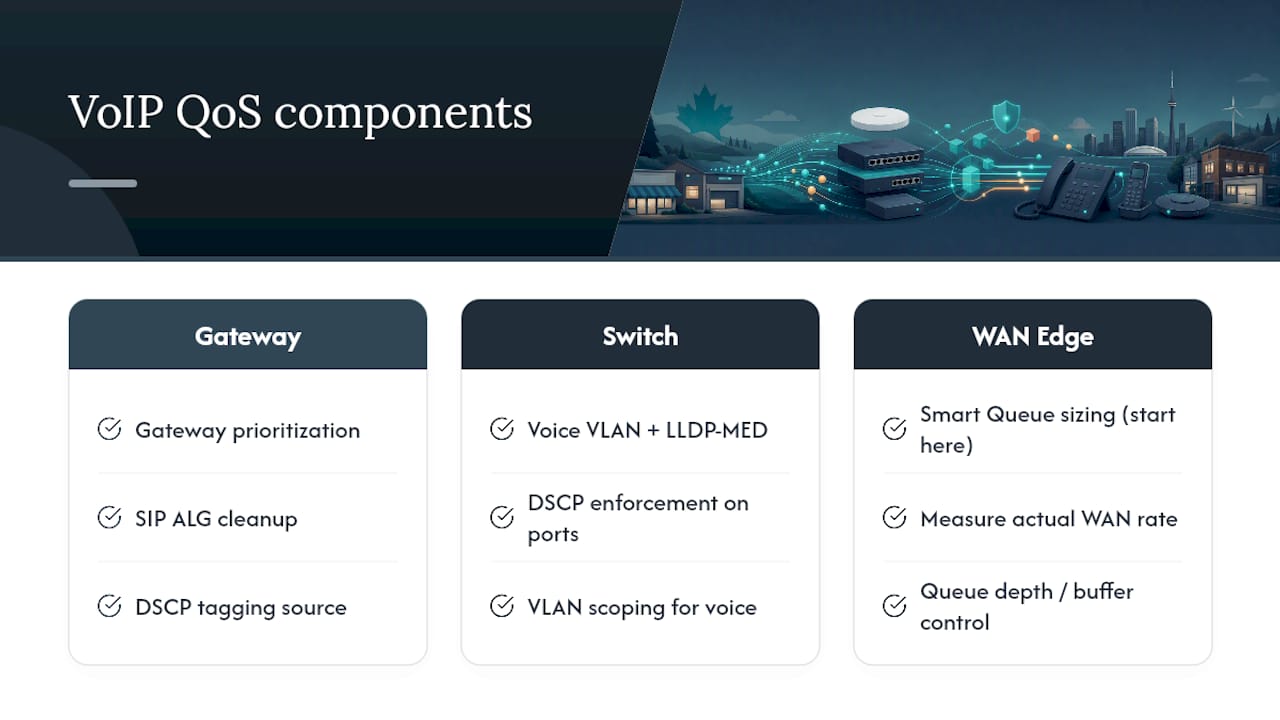
The conventional advice treats QoS as a single toggle. It isn't. It's three separate systems, gateway prioritization, switch-level VLAN and DSCP enforcement, and WAN-edge queue management, that only work together. Skip the voice VLAN and LLDP-MED step, and your DSCP tagging is inconsistent from the start. Skip Smart Queue sizing, and prioritization has nothing to prioritize against because the queue is already backed up.
If there's one place to start, it's measuring your actual WAN line rate honestly and setting Smart Queues against that real number, not the ISP's marketing figure. Everything downstream, DSCP policies, VLAN scoping, SIP ALG cleanup, works better once the queue itself isn't the bottleneck. Field experience backs the vendor guidance here more than it contradicts it. The gap isn't in what UniFi's documentation says to do. It's in how few deployments actually verify the numbers before calling the job finished.
— James
Get Your UniFi VoIP Network Set Up Right the First Time
Reading through DSCP tags, Smart Queue math, and VLAN staging is one thing. Doing it correctly across a multi-site office, on a deadline, with staff who need working phones Monday morning, is another. A local team can design, program, cable, and install your entire phone system on-site, so every phone works from day one instead of after multiple rounds of remote troubleshooting.

This approach makes the most sense for multi-site rollouts, offices without dedicated IT staff to stage VLANs incrementally, or any site with cabling and PoE budget questions that a settings menu can't answer. Some providers back installs with fixed pricing to avoid surprise increases, and some offer warranties on rented phones. If your team manages several branch locations, the multi-site and remote office setup page covers what a coordinated rollout looks like in practice. To get a project scoped, visit Businessvoip and request a design consultation for your office.
Where to Go for the Technical Details
For exact UI paths and current feature behavior, Ubiquiti's own QoS and traffic shaping guide and switch settings documentation stay current with each firmware release. For SIP and NAT behavior at the protocol level, RFC 3261 explains why ALG rewriting causes problems. For bandwidth math specific to VoIP, the per-call bandwidth requirements breakdown walks through sizing in more detail than a single article can cover.
Sources
- UniFi QoS and Traffic Shaping – Ubiquiti Help Center
- Enabling QoS for VoIP on UniFi Gateways and Routers | SipStack knowledge base
- USG, VoIP and QoS, how to setup? | Ubiquiti Community
FAQ
What DSCP value should VoIP traffic use on UniFi?
Use DSCP EF (46) for RTP audio traffic; it's the value virtually every VoIP provider and PBX platform expects, and UniFi's Policy Table can prioritize or remark traffic matching it directly.
Do Smart Queues replace the need for a QoS policy?
No. Smart Queues fight bufferbloat by keeping the send queue short, while a QoS policy decides which traffic gets priority inside that queue. Most VoIP deployments need both.
Does enabling QoS slow down my UniFi network?
It can. Enabling formal QoS rules on some UniFi gateways disables hardware offloading, which may reduce peak throughput on high-rate links, so size gateway hardware with that ceiling in mind.
Why does SIP ALG cause one-way audio?
SIP ALG rewrites SIP headers in a way that often conflicts with how the phone and provider already negotiated NAT traversal, corrupting the addresses RTP packets need to find their way back.
How much bandwidth do 10 VoIP calls need?
Budget roughly 80 to 90 kbps per call for standard G.711 audio, including overhead, and size upload capacity accordingly for your number of concurrent calls.
Does Businessvoip handle UniFi network configuration during installation?
Some providers design, program, and install the full phone system on-site, including network and VLAN configuration, so QoS and voice VLAN setup are handled as part of the installation rather than left to office staff.