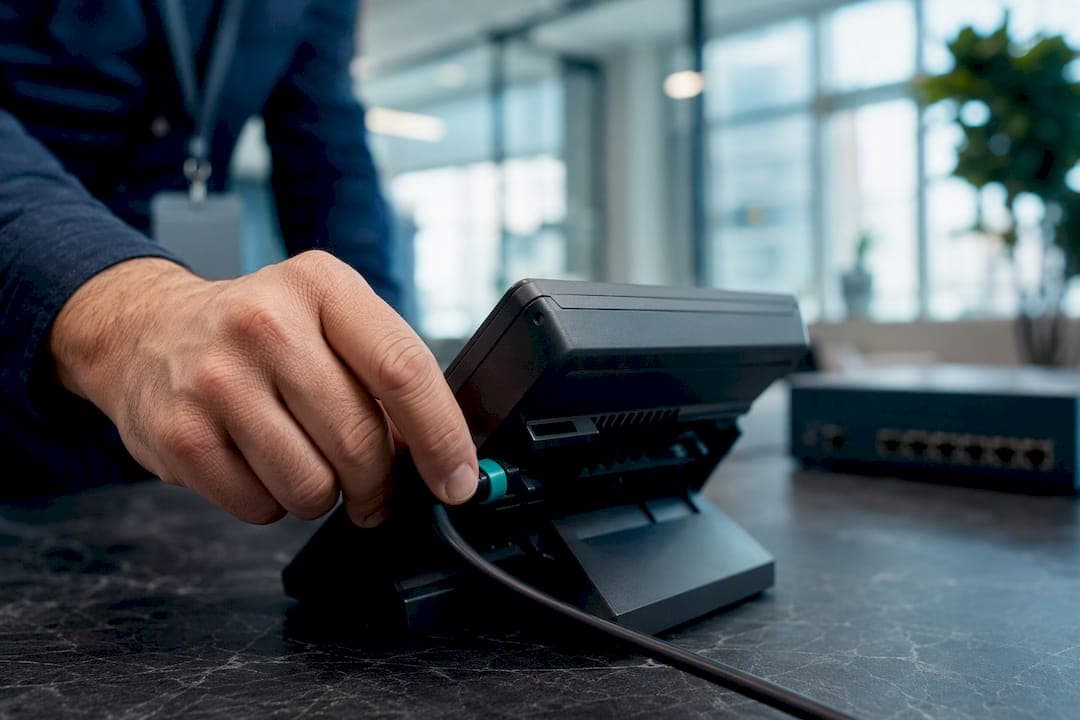
Remote handset provisioning is the automated process of configuring VoIP phones and SIP handsets over a network, using TFTP, HTTP, or HTTPS to push settings and firmware without anyone touching the device in person. The reliable way to run it: preprovision every handset in the vendor system before it ships, then roll out through a staged pilot rather than a mass push. That single sequence, tag the device, stage a small batch, watch for failures, then scale, prevents almost every "brick on arrival" call your help desk will ever get.
TL;DR:
- Preprovisioning and staging bulk handsets before deployment significantly reduces first-boot failures and help desk calls.
- Ensuring DNS, firewall, template, and authentication are correctly configured handles the majority of initial provisioning issues.
- Support varies greatly by firmware version and device type, with SIP phones, DECT systems, and Android handsets having specific provisioning methods.
- Complex environments with NAT, multi-site setups, or regulatory requirements often benefit from managed on-site installation over remote zero-touch provisioning.
- Securing provisioning servers with HTTPS, IP whitelists, and encrypted credentials is critical to prevent security vulnerabilities and credential leaks.
Table of Contents
- Which Handsets and Base Stations Actually Support Remote Provisioning
- Network and Server Prerequisites You Can't Skip
- Choosing a Provisioning Method: RPS, DHCP, SIP PnP, or Direct URL
- A Preprovisioning and Zero-Touch Deployment Checklist
- Troubleshooting the Failures You'll See Most Often
- Locking Down Provisioning Endpoints and Configuration Files
- Running Provisioning at Fleet Scale
- Why Some Organizations Skip Remote Provisioning for Managed Installs
- Trade-offs Between Zero-Touch Provisioning and Managed Installation
- Skip the Provisioning Guesswork With a Managed Install
- Vendor Documentation Worth Bookmarking
- Sources
- FAQ
Which Handsets and Base Stations Actually Support Remote Provisioning
Before you build a rollout plan, confirm the hardware can do what you're asking. Support varies more by firmware version than by brand name, so check both.
- SIP desk phones (Cisco, Yealink, Poly, Grandstream) generally support TFTP/HTTP/HTTPS provisioning out of the box, though older firmware may lack HTTPS or certificate validation.
- DECT systems (base station plus cordless handsets) use a two-tier model: one profile for the base, separate XML files for each handset addressed by placeholders like
%IPEIor%IPUI, per Grandstream's provisioning documentation. - Teams-certified Android handsets typically route through a cloud MDM layer instead of classic TFTP provisioning, closer to mobile device management enrollment than traditional SIP provisioning.
Before ordering hardware, pull the firmware changelog and confirm the redirection order your vendor uses (many check a cloud RPS service before ever looking at DHCP). Build your inventory sheet with vendor, model, MAC address, and IPEI/IPUI for DECT gear. That sheet is the backbone of everything that follows.
Network and Server Prerequisites You Can't Skip
Most first-boot failures trace back to one of four gaps: DNS, firewall rules, mismatched templates, or missing authentication. Fix these before a single phone leaves the shelf.
- Use an FQDN, not a static IP, for your provisioning server. If you ever migrate hosting or change carriers, an IP-bound config means reflashing every handset manually. An FQDN lets you repoint DNS and every phone finds the new server on its next check-in.
- Open the right firewall ports in both directions. Handsets need outbound access to your provisioning server (TFTP/UDP 69, HTTP/80, HTTPS/443) and to your SIP registrar, and NAT devices need to keep those sessions alive long enough for a full config download, not just a ping.
- Stage templates and firmware images ahead of the rollout. Mismatched template-to-device mapping is the single most common cause of a phone that "provisions successfully" but registers with the wrong extension or codec set.
- Set authentication for first-time contact. Vendor systems like Yeastar's RPS/FQDN method rely on an RPS PIN tied to the account; other platforms use client certificates. Either way, don't leave the first handshake wide open on a public URL.
Get these four items locked down and most of your "day one" support tickets disappear before they start.
Choosing a Provisioning Method: RPS, DHCP, SIP PnP, or Direct URL
There's no single correct method. The right choice depends on where the device sits when it first powers on.
- RPS/FQDN redirection works well for remote and home offices, since the handset calls out to a vendor-hosted redirect service over the internet rather than depending on local network config. The catch: some vendors lock a MAC address to whichever account first claimed it, so a phone bought secondhand or reassigned between tenants may reject your provisioning attempt until that lock is released.
- DHCP options 66/43 are fast and simple for on-premises deployments, since the phone picks up the provisioning server address the moment it joins the LAN. They fail the second a handset leaves that network, which makes them a poor fit for remote workers or multi-site fleets.
- SIP PnP (plug and play) broadcasts a multicast request on the local subnet and works nicely for same-site rollouts, but most modern handsets check vendor-cloud redirection first. If a device seems to ignore your PnP server, check the redirection order in firmware settings before assuming the network is broken.
- Direct resync URL is the blunt instrument: point a phone's config menu (or a one-off provisioning command) straight at a hosted config file. It's the fastest way to push an emergency fix to a single device, but it doesn't scale past a handful of phones.
On protocol choice, TFTP is fast and lightweight but sends everything, including credentials, in the clear. HTTP is easier to work with behind corporate proxies but carries the same exposure risk. HTTPS costs a little more setup (certificates, cipher configuration) and is the only one of the three that protects SIP credentials in transit, a detail Cisco's provisioning guide treats as a baseline requirement, not an option.
Pro Tip: Check your vendor's redirection order before troubleshooting a "stuck" phone. If the device checks a cloud RPS service before your local DHCP or PnP server, no amount of network debugging on your end will fix it. Release or update the RPS entry first.
A Preprovisioning and Zero-Touch Deployment Checklist
Run this sequence for every batch of new handsets, whether it's five phones for a satellite office or five hundred for a multi-site rollout.
- Tag each device in the vendor provisioning system by MAC address before it ships. This is the step that prevents the "brick on arrival" scenario entirely, since preprovisioning ahead of shipment cuts first-boot failures dramatically compared to configuring after delivery.
- Upload the correct template and firmware image, then test on a bench unit identical to what's shipping, not just a similar model.
- Ship with plain-language instructions. For DECT handsets, note battery and charger seating explicitly. If an RPS PIN is required, spell out exactly where to enter it on the handset screen.
- Monitor the first-boot sequence in order: redirect contact, profile download, firmware update (if triggered), then SIP registration. A phone that stalls between download and registration usually points to a template mismatch, not a network problem.
- Run a pilot before a full rollout. Ship five to ten units first, watch registration success over 24 to 48 hours, and set a rollback trigger (say, more than 10% failing to register cleanly) before green-lighting the rest of the batch.
Pro Tip: Keep a "known good" test handset on your bench at all times, provisioned against your production server. When a field unit fails, provision the test unit against the same template first. If it works, the problem is the phone or its local network, not your server.
Troubleshooting the Failures You'll See Most Often
Most provisioning failures fall into a short list of repeat offenders, and the fix is almost always faster than sending someone on-site.
- DNS or FQDN resolution failure. If the phone can't resolve your provisioning FQDN, check the site's DNS settings before touching the server.
- Firewall or NAT blocking the session. A trace on the firewall showing outbound requests leaving but no response returning usually means a stateful firewall is dropping the reply, not that the server is down.
- MAC address locked to a previous vendor account. A phone that was provisioned elsewhere may need a factory reset plus coordination with the prior owner's vendor account to release the lock, since some platforms won't let a second account claim an already-registered MAC.
- Firmware jump too large. Pushing a phone from a firmware version several major releases behind straight to current can cause a failed update mid-flash. Cisco's own guidance recommends staging intermediate firmware versions for older fleets rather than jumping straight to the newest release.
A useful benchmark: most provisioning failures resolve inside the first 15 minutes of a phone's life, at the redirect or download stage, not later. If a device successfully downloads its config and firmware but fails to register, the problem has shifted from provisioning to SIP credentials or PBX-side account status, and your troubleshooting should shift with it.
When escalating to vendor support, pull the phone's provisioning log from its web UI (most show a timestamped history of redirect attempts, download status, and registration attempts) rather than describing symptoms secondhand.
Locking Down Provisioning Endpoints and Configuration Files
A provisioning server is a high-value target: it holds every SIP credential your organization uses. Treat it that way.
- Use HTTPS with client certificates for first-time provisioning wherever the handset supports it. Cisco's provisioning documentation highlights per-device encrypted profiles and SSL as the standard for secure first contact, not an advanced option.
- Restrict server access with IP allow-lists and short-lived tokens or PINs, and rotate RPS PINs and shared secrets on a schedule rather than leaving them static for years.
- Never store plaintext SIP credentials in a config file sitting on a public-facing server. Use parameter substitution tied to your provisioning system and pull actual secrets from a vault at generation time, not from a flat file anyone with server access can read.
- Test firmware integrity before mass deployment. A corrupted or mismatched firmware image pushed to a hundred phones at once is a much worse afternoon than catching it on one bench unit first.
Pro Tip: If your provisioning server ever gets flagged in a security audit, the first question to ask is whether SIP passwords are visible in plaintext config files. That single gap is the most common finding in VoIP security reviews, and it's usually the easiest one to fix. For a broader rundown of the basics worth locking down, see these VoIP security controls.
Running Provisioning at Fleet Scale
A rollout that works for 20 phones can fall apart at 200 without the right operational scaffolding underneath it.
- Keep a live inventory mapping MAC and IPEI/IPUI addresses to specific users and sites, synced with whatever ticketing or CMDB system your IT team already uses. A provisioning system with no link back to "who has this phone" turns every hardware swap into a manual lookup.
- Build a staging lab that mirrors production, same firmware baseline, same template structure, so you validate changes before they touch a live fleet instead of after.
- Track registration rate, time-to-register, and firmware success rate as standing metrics, with alert thresholds set low enough to catch a bad batch before your help desk phone starts ringing.
- Treat every template or firmware change as a change-controlled event, with a communicated pilot window and a documented rollback path, the same discipline you'd apply to a server patch.
Why Some Organizations Skip Remote Provisioning for Managed Installs
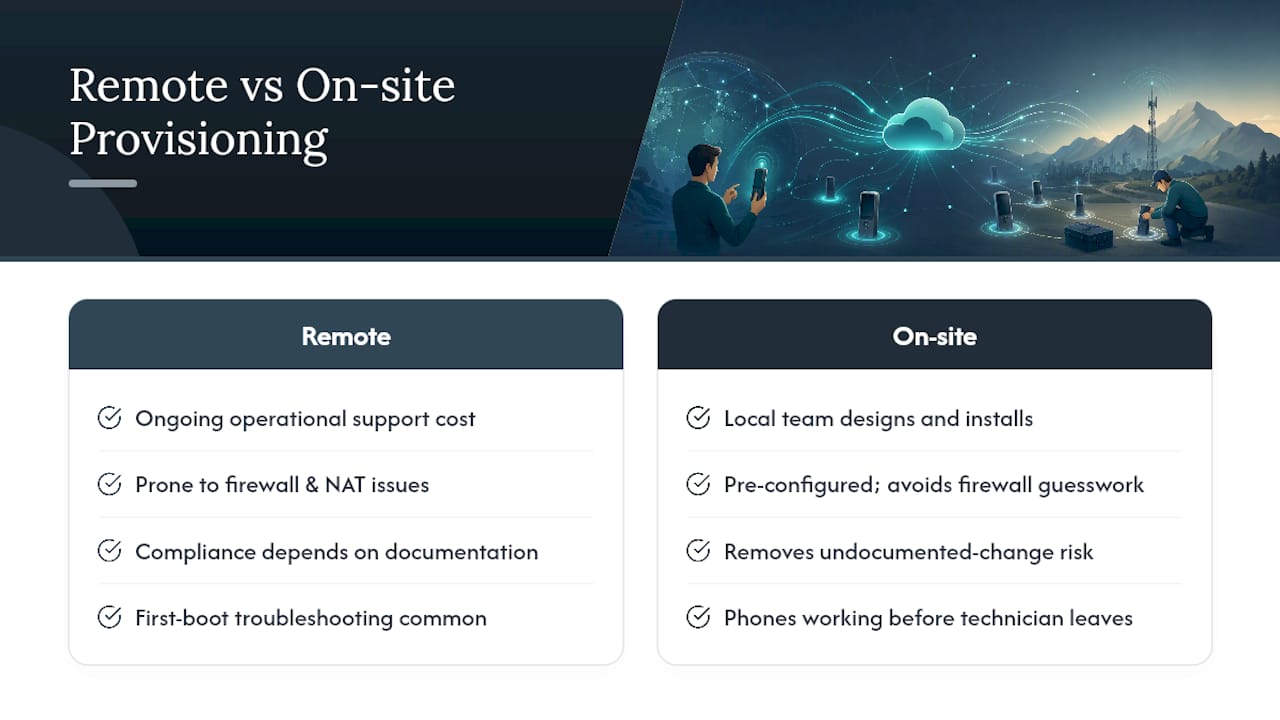
Remote provisioning handles a lot on its own, but it isn't free of operational cost, especially across multi-site networks with inconsistent firewall configurations or regulated environments where every device change needs documentation. That's the gap Businessvoip's model is built around: a local Ontario team designs, programs, cables, and installs the entire phone system on-site, so there's no first-boot troubleshooting cycle at all, because every phone is already working before the technician leaves.
For organizations juggling complex NAT setups, multi-site synchronization, or compliance requirements where an undocumented config change is a real problem, that on-site model removes the guesswork entirely. Rented phones carry a lifetime warranty, which matters more than it sounds like once you've dealt with a fleet of aging handsets failing provisioning one by one as firmware support winds down.
Trade-offs Between Zero-Touch Provisioning and Managed Installation
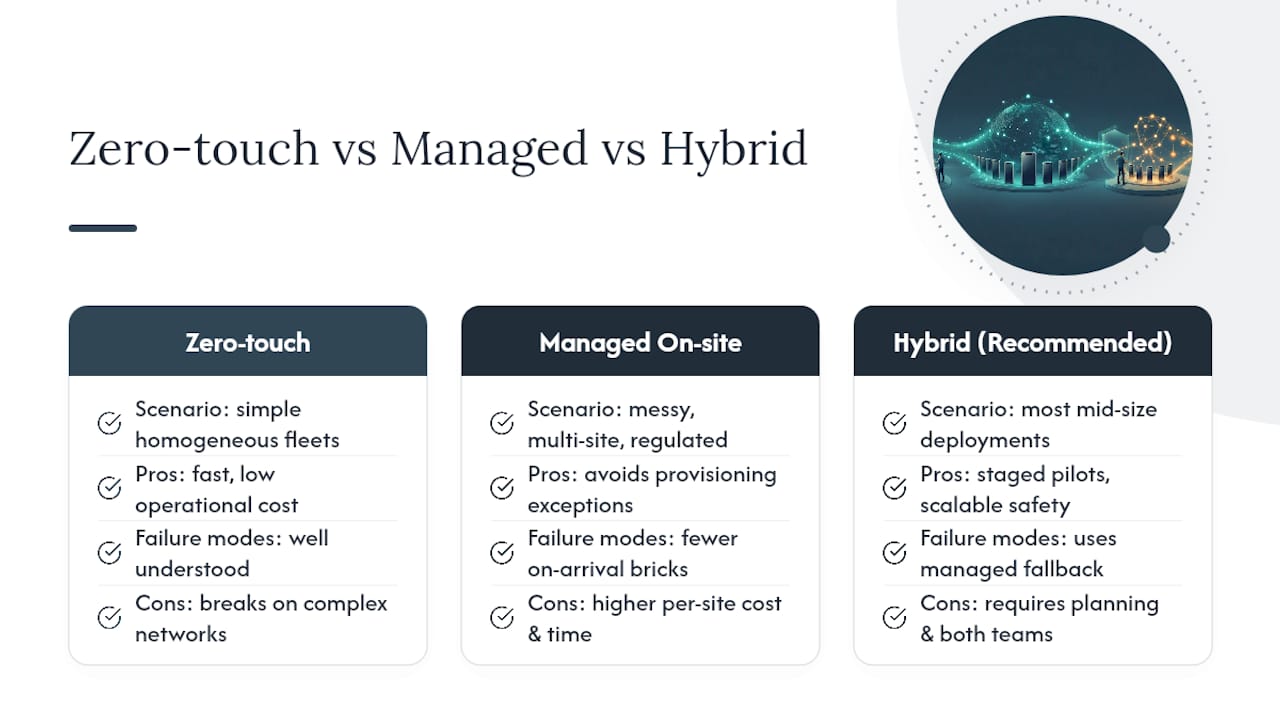
Zero-touch remote provisioning earns its keep on simple, homogeneous fleets, one vendor, one firmware baseline, predictable network conditions. It's fast, cheap to run at scale, and the failure modes are well understood.
Complex environments flip that math. Multi-site NAT quirks, mixed vendor hardware, or regulated call routing rules turn every provisioning exception into an hour of admin time that a managed on-site install would have avoided outright. My honest read: preprovision and pilot for anything simple, and keep a managed install option on the table for the messy edge cases rather than forcing zero-touch to handle every scenario. Most mid-size deployments do best with both, staged pilots for standard rollouts, a managed fallback when the network or compliance picture gets complicated.
— James
Skip the Provisioning Guesswork With a Managed Install
There is an alternative to DIY remote provisioning for businesses that prefer not to manage MAC address lockouts, firmware staging, and firewall rules themselves. A local team handles the design, templating, on-site programming, cabling, and network checks directly, so every phone registers correctly before anyone on your staff has to touch a config file. Rented phones carry a warranty, and pricing is fixed to avoid surprise increases.

This approach fits best for multi-site rollouts, regulated operations with strict documentation needs, and any environment where NAT or firewall complexity has already caused provisioning headaches. It also covers remote office and multi-site deployments that need consistent configuration across locations without a central IT team chasing down every failed handset. If your current fleet is fighting you more than it's serving you, get a quote through the Businessvoip landing page and have a local team take the provisioning problem off your desk entirely.
Vendor Documentation Worth Bookmarking
For exact syntax and device-specific config, keep Cisco's provisioning guide, Grandstream's DECT handset documentation, and Yeastar's DHCP provisioning guide close at hand, especially their resync URL syntax and RPS notes sections.
Sources
- Cisco provisioning guide
- Yeastar auto-provisioning (DHCP method)
- Grandstream DP handset provisioning guide
- ManageEngine cloud MDM overview
FAQ
Why Does My Phone Say "Provisioning"?
Your phone is contacting a provisioning server to download its configuration file and check for firmware updates, a normal part of first boot or a scheduled resync. If it stays on that screen for more than a few minutes, check whether the device can resolve the provisioning server's FQDN and whether a firewall is blocking the connection.
What Is Remote Provisioning?
Remote provisioning is the process of configuring a device's settings, credentials, and firmware over a network instead of manually on-site, typically using TFTP, HTTP, or HTTPS. For VoIP handsets specifically, this means the phone fetches its config and registers to your PBX without anyone plugging it into a laptop first.
What Does It Mean When My Phone Is Provisioning?
The device has connected to a provisioning or redirect server and is actively downloading its settings, which may include SIP credentials, dial plan information, and a firmware update if one is queued. This process typically follows the sequence described by Yeastar's provisioning documentation: boot, contact server, validate, apply config, register.
What Is Mobile Phone Provisioning?
Mobile phone provisioning generally refers to enrolling smartphones or tablets into a mobile device management (MDM) platform for policy enforcement and app distribution, a different process from SIP handset provisioning even though both use over-the-air delivery. Platforms supporting Apple Business Manager or Android Zero-Touch enrollment handle mobile provisioning, while VoIP desk phones and DECT handsets use TFTP/HTTP-based config delivery instead.
How Much Does Managed VoIP Provisioning Cost?
Pricing for a fully installed, fixed-price VoIP system depends on the number of handsets, sites, and network requirements involved. Current pricing is available directly through Businessvoip after a short consultation on your specific setup.