Use a ring group when you need simple, immediate coverage for a small team. Choose a call queue when you need controlled wait handling, position announcements, and measurable service levels. That's the verdict for most Ontario SMBs, and it holds across industries from property management to professional services.
Quick trade-offs to keep in mind:
- Simplicity vs. features: Ring groups are included in most base VoIP plans and need no agent login. Call queues typically require a Pro or ACD add-on license, but deliver hold music, position announcements, callbacks, and SLA reporting.
- Caller experience: Ring groups connect fast for small teams. Under higher volume, callers get a busy signal or voicemail instead of a managed wait.
- Licensing cost: Queue licenses add a monthly cost per seat or per group on most hosted platforms. For many Ontario businesses, that cost pays for itself the first time a caller doesn't hang up.
Pro Tip: Before choosing, pull two weeks of inbound call data. If peak concurrent calls regularly exceed your available agents, a queue is not optional — it's the only way to keep abandon rates from climbing.
Not sure which fits your setup? Businessvoip offers Ontario-ready assessments with on-site installation included.
Key Takeaways
Ring groups suit small teams needing simple, immediate coverage; call queues are the right choice when volume, service-level targets, or caller experience standards require managed wait handling and measurable reporting.
| Point | Details |
|---|---|
| Ring groups for small teams | Best for small teams; no agent login needed; included in most base VoIP plans. |
| Queues for volume and SLA | Deliver position announcements, callbacks, and SLA reporting; typically require a Pro or ACD add-on license. |
| Hybrid is often the answer | Reception on a ring group with overflow into a queue during peak windows suits most Ontario SMBs. |
| Monitor queue metrics actively | Track queue depth, oldest-call age, and abandon rate from day one — not after a complaint arrives. |
| Businessvoip for Ontario installs | Businessvoip designs, programs, and installs ring group and queue configurations on-site across Ontario, with fixed pricing and lifetime warranty on rented phones. |
Table of Contents
- What exactly are ring groups, hunt groups, and call queues?
- How do queues vs ring groups actually compare?
- Which setup fits your actual business scenario?
- How does each approach affect the KPIs you should be watching?
- How do you decide? A checklist before you commit
- When should you run ring groups and queues together?
- How Businessvoip configures queues and ring groups for Ontario businesses
- The trade-off most businesses underestimate
- Your Ontario phone system, configured right from day one
- Sources
What exactly are ring groups, hunt groups, and call queues?
These three terms get used interchangeably, and that's where most configuration mistakes start.
A ring group (also called simultaneous or parallel distribution) sends an incoming call to every member's phone at once. The first agent to pick up gets the call. It's fast, dead simple to configure, and works well for teams of two to four people. No agent login required.
A hunt group is sequential. The system tries the first number, waits a set duration (typically 10–15 seconds), then moves to the next. Round-robin hunt groups rotate the starting point so the same person doesn't always get hit first. Both patterns are covered under the broader ring group umbrella on most hosted VoIP platforms.
A call queue is a virtual waiting line. When all agents are busy, callers hold with music, hear their position, and can sometimes request a callback. The underlying engine is an Automatic Call Distribution (ACD) system that sorts callers by wait time, priority, or agent skill. Agents typically log in and out of queues, which is what makes reporting possible.
The practical licensing reality: Ring groups and hunt groups are almost always included in a base VoIP plan. Call queues, with their ACD features and reporting dashboards, are commonly a Pro-tier or add-on feature on hosted systems. Budget for that before your rollout conversation.
Routing modes worth knowing:
- Ring all / simultaneous: Every phone rings at once. Fast answer, but research flags it as stressful for agents because everyone competes to answer.
- Sequential / hunt: Phones ring one at a time in a fixed order.
- Round-robin: Rotates the starting agent so workload distributes more evenly.
- Skill-based routing: Queue-only feature that matches callers to agents by expertise, language, or account type.
How do queues vs ring groups actually compare?
| Dimension | Ring Group | Call Queue |
|---|---|---|
| Best for | Small teams, low-volume reception | Support desks, sales teams, high-volume inbound |
| Call distribution method | Simultaneous, sequential, or round-robin | Round-robin, longest-idle, skill-based, priority |
| Features available | Basic ring, voicemail fallback | Hold music, position announcements, estimated wait, callbacks, overflow routing |
| Scalability | Poor above 5–6 members; missed calls increase | Handles volume spikes by queuing callers as a buffer |
| Complexity to configure | Low — no agent login, minimal setup | Moderate — requires login, queue rules, overflow destinations |
| Reporting & SLA monitoring | None or minimal | Full: queue depth, abandon rate, ASA, service-level percentage |
| Typical cost / licensing | Included in most base plans | Pro/ACD add-on, often per-group or per-agent |
| Caller experience | Fast answer or busy/voicemail | Managed wait with information; callbacks reduce abandonment |
A few operational consequences worth naming directly:
- Abandonment risk: Ring groups give callers no managed wait. If all agents are busy, the caller hits voicemail or a busy tone. Queues hold them with information, which measurably reduces hang-ups.
- Agent fairness: Simultaneous ring means whoever is fastest wins. Over a full day, that creates uneven workloads. Round-robin or longest-idle queue distribution is fairer and easier to defend in performance reviews.
- Office noise: Five phones ringing at once is disruptive. Limiting simultaneous ring members to three or four, or switching to a hunt pattern, cuts that noise without sacrificing coverage.
Call queues are better for higher-volume handling and feature-rich scenarios, while ring groups suit small teams that don't need agent login — that's the practical summary from a vendor-level comparison, and it generalizes well across platforms.
Which setup fits your actual business scenario?
Real decisions happen in context. Here are four common Ontario business situations and the recommended configuration for each.
-
Single receptionist or low-volume front desk. A ring group covering two or three phones (reception desk, office manager, backup line) handles this cleanly. Calls ring simultaneously, the first available person answers, and overflow goes to voicemail with a clear greeting. No queue license needed, no agent login to manage.
-
Small inside sales team (2–5 reps). A ring group still works here if call volume stays below roughly 10 inbound calls per hour at peak. Once you start seeing callers hit voicemail during busy windows, that's the signal to add a queue for peak hours or overflow. A hybrid works well: ring group as the primary, queue as the overflow destination when all reps are on calls.
-
Support desk, claims line, or high-volume inbound. This is where queues earn their cost. Enable position announcements ("You are caller number 3"), estimated wait time, and a callback option. Set overflow routing to a secondary group or voicemail after a defined threshold. Without these features, your abandon rate will tell the story in the worst way.
-
On-call or emergency roster. A sequential hunt group is the right tool here. The system tries the primary contact, waits 10–15 seconds, then escalates to the next. Pair it with after-hours routing rules so the hunt pattern only activates outside business hours. Round-robin rotation across the on-call list prevents the same person from absorbing every overnight call.
Pro Tip: For on-call hunt groups, shorten the ring duration per member to 10 seconds rather than the default 15. A caller waiting 60 seconds through four unanswered steps will hang up. Tighter steps keep the total wait under 40 seconds before escalation.
How does each approach affect the KPIs you should be watching?
The choice between a ring group and a queue shows up directly in your call metrics. Here's what to track and what to expect from each.
- Average Speed to Answer (ASA): Ring groups post lower ASA for small teams because every phone rings at once. Queues add a brief routing step but manage overflow so ASA stays predictable under load.
- Abandonment rate: Ring groups have no managed wait, so abandonment spikes the moment all agents are busy. Queues hold callers with information and callback options, which pulls abandonment down.
- Hold time: Queue hold time is visible and measurable. Ring group "hold time" is invisible — callers are either ringing or gone.
- Service-level percentage: Queues let you set and report on a target (e.g., 80% of calls answered within 20 seconds). Ring groups offer no equivalent measurement.
- First-call resolution proxy: Skill-based routing in queues connects callers to the right agent faster, which tends to reduce transfers and repeat calls.
- Agent idle fairness: Round-robin and longest-idle queue distribution spread calls evenly. Simultaneous ring does not.
Queue panels and wallboards give supervisors real-time visibility into queue depth, oldest call waiting, and agent status — the tools you need to manage SLA targets during peak windows. Without that visibility, you're managing by complaint rather than by data.
Queues also act as a buffer that absorbs call spikes, decoupling arrival from processing. Monitoring queue depth and oldest-call age during a pilot catches hidden backlogs before they become customer complaints.

How do you decide? A checklist before you commit
Run through these questions with your IT team or VoIP vendor before finalizing a configuration.
- What is your average monthly inbound call volume, and what does peak-hour concurrency look like?
- Do peak concurrent calls regularly exceed your available agents? If yes by more than 30%, a queue is the right call.
- Do callers need to know their position or estimated wait time?
- Is a callback option a service-level requirement or a competitive differentiator for your business?
- Do you need SLA reporting — percentage of calls answered within X seconds — for internal accountability or client contracts?
- Does your CRM or ticketing system need to log call queue data for case management?
- What is the licensing cost for a queue add-on on your current or prospective platform?
Vendor questions to ask directly:
- What is included in the queue license — reporting, wallboard access, supervisor panel?
- What are the overflow options when the queue reaches maximum depth?
- Is there a per-agent or per-group fee for queue access?
- What is the maximum number of members supported in a ring group before performance degrades?
Red flags to watch for:
- No reporting dashboard included with the queue license (music on hold is not a queue feature — it's a minimum).
- More than 5–6 simultaneous ring members with no overflow destination configured.
- No callback or estimated-wait option on a plan marketed as a "call center" feature set.
- Per-call surprise charges on queue overflow routing.
When should you run ring groups and queues together?
Most Ontario businesses don't need to choose one or the other permanently. The practical answer is often a hybrid, phased in over a few weeks.
-
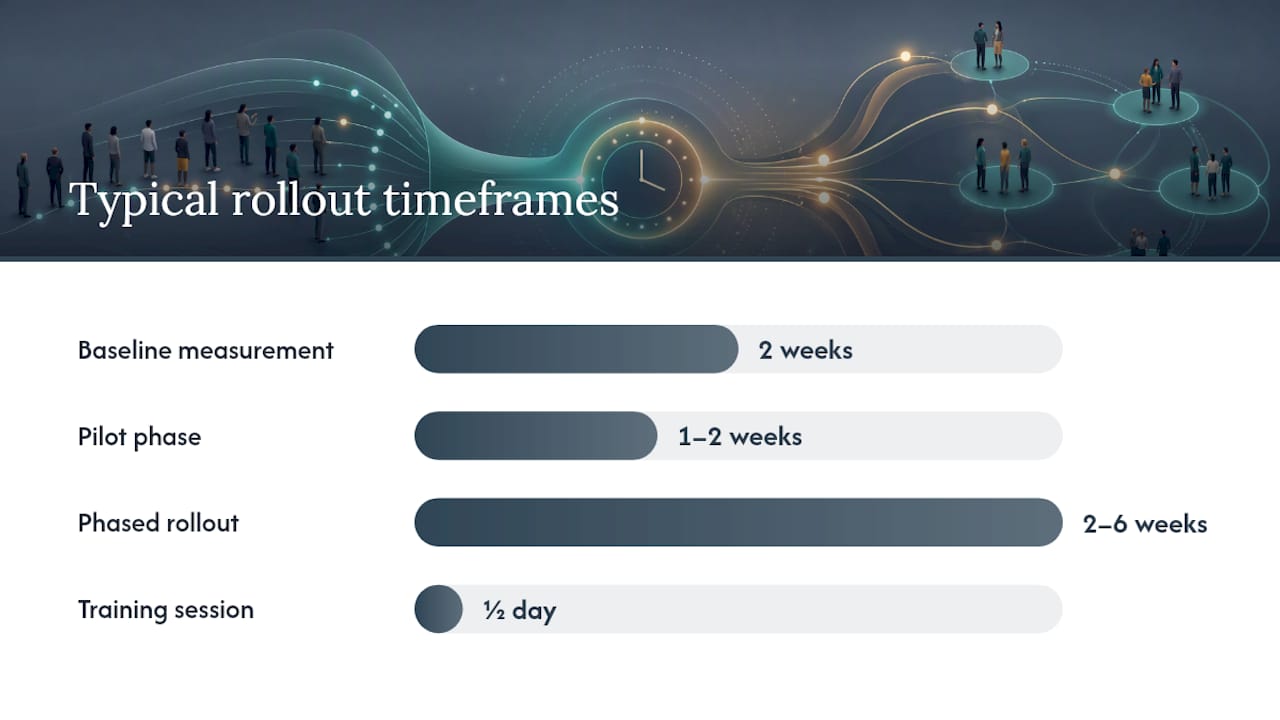
Measure your baseline first. Pull two weeks of call data: total inbound volume, peak concurrent calls, and any voicemail or missed-call counts. This tells you whether you have a ring group problem or a queue need.
-
Stage queues for overflow and peak windows. Keep your existing ring group as the primary destination. Add a queue as the overflow target when all ring group members are busy. This gives you queue features where they matter without disrupting the team's existing workflow.
-
Cut over fully when the metrics justify it. Once your queue pilot shows lower abandonment and measurable SLA data, move the primary routing into the queue and retire the ring group as the main path. Keep it as a backup or for specific departments that genuinely don't need queue features.
A common hybrid pattern for Ontario SMBs: reception desk on a simultaneous ring group (two to three phones), with overflow into a queue during busy windows. Sales uses a round-robin ring group. Support runs a full queue with position announcements and callbacks. Businessvoip's phone system design process maps exactly this kind of topology to a business's staffing and site layout before a single cable gets run.
Timeline for a typical rollout:
- Pilot phase: 1–2 weeks with a small agent group and wallboard monitoring active from day one.
- Phased rollout: 2–6 weeks to extend queue coverage department by department.
- Training: plan for a half-day session per team; queue login/logout behavior is the main adjustment for agents used to ring groups.
Pro Tip: During the pilot, set alerts on queue depth and oldest-call age rather than waiting for weekly reports. A queue that looks fine in aggregate can hide a 10-minute backlog on Tuesday mornings — and you won't see it until a client complains.
How Businessvoip configures queues and ring groups for Ontario businesses
A typical Ontario client comes to Businessvoip with a mix of needs: a front desk that needs immediate coverage, a support team that's losing callers during peak hours, and a remote office that needs to share the same routing logic. The architecture that fits most of those briefs combines a simultaneous ring group for reception with a queue for the support team and a hunt group for after-hours escalation.
Businessvoip's local Ontario team handles every step of that build:
- System design and routing architecture mapped to the client's staffing and site topology.
- Programming of ring groups, hunt sequences, queue rules, overflow destinations, and after-hours routing.
- Physical cabling and on-site phone installation so every handset works from day one.
- Number porting from the existing carrier with no service gap.
- Staff training on queue login/logout, call handling, and voicemail-to-email.
- Reporting setup: wallboard configuration, SLA thresholds, and supervisor panel access.
Fixed pricing means no annual increases, and rented phones carry a lifetime warranty. For multi-site deployments, Businessvoip extends the same queue and ring group architecture across locations, including remote offices outside Ontario.
The result most clients notice first: callers stop hitting voicemail during busy windows, and the support team can finally see — in real time — how many people are waiting and how long the oldest call has been in queue.
The trade-off most businesses underestimate
The conversation about queues vs ring groups almost always focuses on features. What it should focus on is monitoring.
A ring group that nobody watches is fine — it either rings or it doesn't. A queue that nobody watches is a liability. Queue depth can grow silently while agents assume the system is handling it. Abandon rates climb. Callers leave frustrated. The queue license paid for visibility, but visibility only works if someone is looking at the wallboard.
The real governance question isn't "which routing method is better?" It's "who owns the queue metrics, and what triggers a routing change?" Set that accountability before you configure anything. Routing changes that happen reactively — after a complaint — are almost always slower and more disruptive than changes driven by a weekly metric review.
Your Ontario phone system, configured right from day one
Getting the routing architecture right before installation saves weeks of rework. Businessvoip designs and installs VoIP phone systems for Ontario businesses with ring groups, call queues, hunt sequences, and after-hours routing all configured to match your staffing and call volume — not a generic template.

Unlike providers that ship phones and leave configuration to you, Businessvoip's local team programs every queue rule, ring group, and overflow destination on-site. Fixed monthly pricing, no annual increases, and a lifetime warranty on rented phones. Whether you run a single office near Ancaster or multiple sites across Ontario, the system works from the moment it's installed.
Ready to find out which routing setup fits your call volume and team size? Start with a phone system design consultation and get a configuration mapped to your business before you commit to any licensing.
Sources
- Hunt Groups, Ring Groups & Call Queues UK 2026 | CT
- What is an Automatic Call distribution algorithm? | Mida Solutions
- When to Use Message Queues for System Reliability
- Automatic Call Distribution (ACD) To Boost Call Center
- Call Queues vs Ring Groups in 3CX : Voice and Data