For multi-property managers, the essential phone features are auto-attendant and IVR routing, tenant-facing texting with voicemail-to-email, shared queues with per-property ring groups, structured after-hours emergency triage, and integrations that turn calls into tickets automatically. Get those five categories right and you get faster repair turnaround, fewer repeat calls, and a call record you can actually audit when a tenant disputes what happened.
TL;DR:
- Implementing multi-level IVR menus with role-based queues and spillover routing prevents call delays and ensures tenants reach the correct department quickly.
- Using dedicated tenant lines with property-specific greetings and automated updates significantly reduces repeat calls and tenant confusion.
- Early planning of number assignments and time-zone-aware routing helps maintain consistent service levels across multiple sites during growth.
- Integrating call logs, voicemails, and transcripts with property management platforms enables automatic ticket creation and improves dispute resolution.
- Proper network readiness checks, on-site system design, and staff training are essential to prevent installation failures and ensure a smooth multi-property phone system rollout.
Table of Contents
- What core telephony features do property managers actually need?
- Which tenant-facing features actually reduce repeat calls?
- How should routing scale across a growing property portfolio?
- Why do call logs need to feed your workflow tools?
- What's the right way to route emergency and after-hours calls?
- What should a phone system rollout checklist include?
- Why on-site design still beats a box of phones and a manual
- BusinessVoip: on-site design built for multi-property operations
- Sources
What core telephony features do property managers actually need?
A phone system for a single office and a phone system for a 40 door portfolio are not the same tool wearing different labels. The portfolio version has to sort calls by property, role, and urgency before a human ever picks up, and it has to leave a paper trail behind every one of those decisions.
Start with routing. An auto-attendant with multi-level IVR menus lets a caller punch in a property code or press 1 for leasing, 2 for maintenance, 3 for billing, without tying up staff. Behind that menu, call queues, hunt groups, and ring groups organized by property or role decide who actually gets the call and in what order.
From there, the baseline feature list looks like this:
- Auto-attendant and multi-level IVR for self-routing by property or department
- Call queues, ring groups, and hunt groups organized by role, not just by person
- Voicemail-to-email and a unified inbox that merges calls, texts, and email into one view
- Call recording, logging, and searchable transcripts for dispute resolution and staff training
- Mobile softphone apps so leasing agents and contractors can answer or forward calls from a job site
- Documented uptime commitments and failover routing so a single circuit outage doesn't take down tenant access
That last point gets skipped more often than it should. A property manager fielding calls across six sites cannot afford a system where one office's internet outage silences every incoming tenant call. Failover routing, whether to mobile extensions or a backup carrier path, needs to be part of the spec sheet, not an afterthought you discover during the first outage.
Which tenant-facing features actually reduce repeat calls?
Tenants call back because their first attempt went nowhere. Give them a dedicated service line per property with a greeting that names the building, and half the confusion disappears before the call even routes.
The features that move the needle most:
- Two-way texting and MMS so tenants can send a photo of the leak instead of describing it three times
- Voicemail transcription paired with voicemail-to-email, so a missed call becomes a searchable message, not a mystery
- Automated status updates through IVR ("your work order is scheduled for Thursday") that cut down "just checking in" calls
- Auto-reply texts for missed or after-hours calls that set expectations immediately
Text-based photo intake and transcription together shorten the back-and-forth on maintenance approvals, since the LeadSimple integrated phone and inbox model shows how much friction disappears once a tenant can just send a picture instead of a voicemail description.
Pro Tip: If you're recording calls or texting tenants, put your consent language in the lease and the greeting, not just in a policy binder nobody reads. It matters if a dispute ever lands in front of a mediator.
How should routing scale across a growing property portfolio?
Routing logic that works for three buildings breaks at fifteen unless you plan the structure early. The fix isn't more phones. It's smarter grouping.
- Build ring groups around role and function first (maintenance, leasing, billing), then layer property-specific numbers on top, rather than assigning a totally separate phone tree to every address.
- Use shared queues with spillover rules so a call unanswered at property A after 30 seconds rolls to a backup group instead of ringing out.
- Assign DIDs (direct inward dial numbers) deliberately, matched to property or function, since planning number assignment early simplifies both tenant expectations and internal reporting later.
- Set time-zone and business-hours aware routing so a property on a different schedule doesn't get lumped into the wrong after-hours rules.
- Pull reporting by property and by agent, tracking answer rate and speed-to-answer, so you can see which site is actually understaffed instead of guessing.
Bidrento's research on multi-property patterns confirms this is standard practice, not a luxury: shared queues and dedicated tenant lines are the baseline for portfolios managing emergency prioritization across sites.
Why do call logs need to feed your workflow tools?
A call that ends when the receiver goes down is a wasted call. The point of integrating your phone system with your property management platform is that the conversation becomes a record, not a memory.
That means API and webhook connections that log calls and texts directly to the tenant's contact record, and a shared timeline where calls, texts, and emails on a single unit all live in one thread. Voicemails and transcripts can trigger maintenance ticket creation automatically, cutting out the manual re-entry step where details get lost.
- Native connectors between your phone system and your PM platform's ticketing
- A shared conversation timeline attached to each tenant or property record
- Automatic ticket creation from voicemail transcripts or structured intake forms
- Call metrics exported to BI dashboards for portfolio-wide reporting
Platforms like Buildium build their integrations around this exact expectation: calls and messages need to land in the same system where work orders and reporting already live, not in a separate silo your staff has to check manually.
What's the right way to route emergency and after-hours calls?
The failure mode almost every property manager has lived through is forwarding the emergency line straight to a manager's cell phone. It works until that manager is asleep, driving, or already on another call, and the tenant gets no filtering, no context, and no record.
A better structure uses on-call schedules with clear escalation tiers, plus structured intake, either IVR prompts or AI-assisted triage, that captures the unit number, access details, and whether there's an actual threat to life or property before anyone gets paged. AI-assisted intake can triage and route these calls so the on-call staffer only gets woken up for calls that meet real emergency criteria.
- On-call rotation with escalation rules that spill to a second contact if the first doesn't answer
- Structured intake capturing unit, access, and urgency before routing to a human
- Recordings and transcripts attached automatically to the incident ticket
Pro Tip: Route "maybe emergencies" to voicemail-to-ticket instead of the live on-call queue. It keeps your after-hours staff rested for the calls that genuinely can't wait.
What should a phone system rollout checklist include?
Most VoIP rollout failures trace back to network prep that never happened, not the phones themselves.
- Run a network readiness check for bandwidth, QoS, PoE capacity, and VLAN segmentation before a single handset ships.
- Plan number porting and DID assignments weeks ahead, then test them in a pilot group before the full switch.
- Decide on-site installation needs, including cabling and PoE switches, and schedule staff training around it, not after it.
- Write your call recording and retention policy, and notify tenants where local rules require it.
- Pilot your queues and after-hours scenarios with real staff, collect answer-time data, and adjust before full rollout.
| Checklist item | Why it matters |
|---|---|
| Network audit (PoE, QoS, VLANs) | Prevents dropped calls and one-way audio on day one |
| Number porting and DID plan | Avoids service gaps during the switch |
| Staff training scheduled with install | Keeps adoption from stalling after go-live |
| Pilot test of queues and after-hours flow | Catches routing mistakes before tenants notice |
Why on-site design still beats a box of phones and a manual
Most rollout failures I've seen trace back to network assumptions nobody checked. Guest Wi-Fi masquerading as the office network. Switches with no PoE budget for the handset count. Phones provisioned generically instead of mapped to the actual ring group structure a property needs. None of that shows up on a spec sheet until the first Monday morning call storm.
That's the case for on-site design and installation over a ship-and-hope model: someone tests the network before the handsets arrive, not after. Fixed pricing and a handset warranty also shift the financial risk of a bad rollout off the property manager's shoulders and onto the provider's.
— James
BusinessVoip: on-site design built for multi-property operations
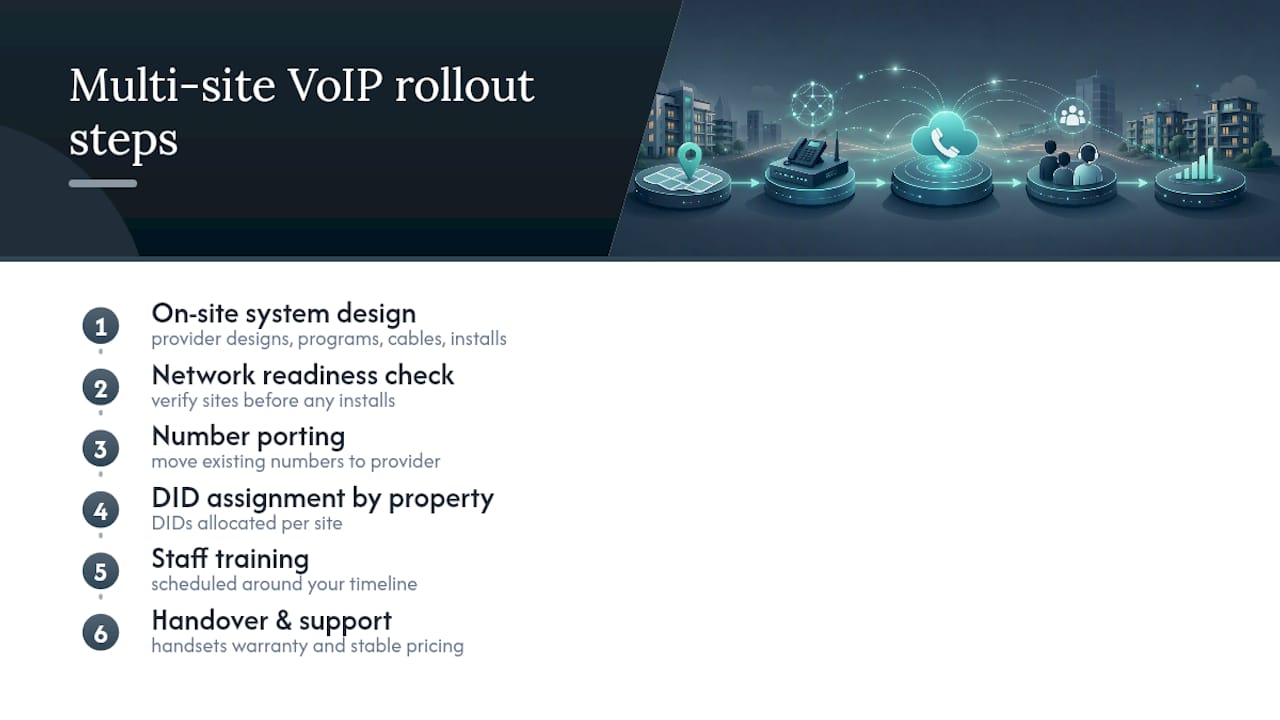
Running phones across several buildings means your provider needs to understand ring groups, DIDs, and after-hours routing before they ever touch a cable. The provider designs, programs, cables, and installs the system on-site, so every phone works from day one instead of becoming a weeks-long troubleshooting project.

A rollout starts with a network readiness check, then number porting, DID assignment by property, and staff training scheduled around your timeline, not squeezed in after. Handsets come with warranty coverage, and pricing remains stable. For portfolios spread across several sites, multi-site and remote office VoIP solutions are built specifically for the routing complexity a growing portfolio creates, and the property management phone systems page walks through how the pieces fit together for your sector specifically. If workflow automation and reporting are part of your evaluation, a partner like Quick To Impress's revenue operations work is worth a look for connecting call data to your broader systems.
Request a quote and a network check to see exactly what your portfolio needs before you commit to anything.